
Hi
I tried searching for this but couldn't find satisfactory information. Maybe I am using the wrong search terms.
I want to change the "Mouse-Hover-over-a-Menu" Color.
This is really tough on eyes & I wouldn't mind a dark blue color.
Can someone please point me in a specific direction, like
if Visual Styles are needed which one should I use because I am
pretty OK with other GUI elements.
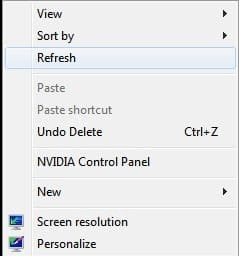
I have attached the image. In this image, I am Right-clicking on the
Desktop & am hovering the mouse over the Refresh menu-title.
Thank you.
I tried searching for this but couldn't find satisfactory information. Maybe I am using the wrong search terms.
I want to change the "Mouse-Hover-over-a-Menu" Color.
This is really tough on eyes & I wouldn't mind a dark blue color.
Can someone please point me in a specific direction, like
if Visual Styles are needed which one should I use because I am
pretty OK with other GUI elements.
I have attached the image. In this image, I am Right-clicking on the
Desktop & am hovering the mouse over the Refresh menu-title.
Thank you.
Attachments
My Computer
At a glance
Windows 7 Ultimate x64
- OS
- Windows 7 Ultimate x64


