Solved Change order that buttons appear in the Start Menu??

Amaterasu

Member
Member
Local time
9:07 PM
Messages
74
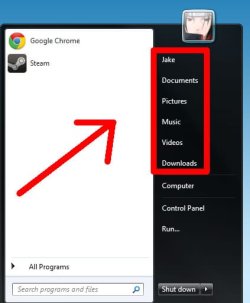
hi is there a way to change the order that it appears in the menu as you can see in the picture its "user, documents, pictures, music, videos, downloads" i want it to be in this order "downloads, documents, pictures, videos, music, user" and is there a way to get rid of the separator that are between "downloads, computer, control panel" thanks
 

Attachments
  • 2.jpg
    2.jpg
    19.5 KB · Views: 5

My Computer My Computer

At a glance

Windows 7 Ultimate 64-bit SP1Intel i7-3930K 3.20GHz 6-Core ProcessorG Skill Ripjaws Z 32GB DDR3 1866MHzEVGA Nvidia GeForce GTX 980 4GB
Computer type
PC/Desktop
Computer Manufacturer/Model Number
Custom Build
OS
Windows 7 Ultimate 64-bit SP1
CPU
Intel i7-3930K 3.20GHz 6-Core Processor
Motherboard
Asus Sabertooth X79
Memory
G Skill Ripjaws Z 32GB DDR3 1866MHz
Graphics Card(s)
EVGA Nvidia GeForce GTX 980 4GB
Monitor(s) Displays
29" LG Curved Ultrawide IPS Monitor
Screen Resolution
2560 x 1080
Hard Drives
Samsung 850 Pro 128GB
PSU
Corsair AX760
Case
Aerocool DS200
Cooling
Cooler Master Nepton 240M
Keyboard
Wireless Keyboard
Mouse
Wireless Mouse
Internet Speed
32MB
Antivirus
Bitdefender
Browser
Google Chrome
Other Info
TP-LINK Archer T9E Network adapter
I do not know if you can change the order in which the buttons are, but that separator is image #810 in the aero.msstyles.
Jerry
 

My Computer My Computer

At a glance

Win 7 Pro x64 / Win 10 ProIntel(R) Core(TM) i7-3630QM CPU @ 2.40GHz12 GB(1) Intel(R) HD Graphics 4000 (2) NVIDIA GeFo...
Computer type
Laptop
Computer Manufacturer/Model Number
Sager NP9170
OS
Win 7 Pro x64 / Win 10 Pro
CPU
Intel(R) Core(TM) i7-3630QM CPU @ 2.40GHz
Motherboard
CLEVO P170EM
Memory
12 GB
Graphics Card(s)
(1) Intel(R) HD Graphics 4000 (2) NVIDIA GeForce GTX 675M
Sound Card
(1) Realtek High Definition Audio (2) Intel(R) Display Aud
Monitor(s) Displays
17.3
Screen Resolution
1920x1080
Hard Drives
(1) Samsung 860 EVO 500GB(OS) (1) Samsung 860 EVO 500GB(Data)
Keyboard
Backlite
Antivirus
MSE, Malwarebytes Pro
Browser
Firefox
Other Info
DESKTOP: Custom-built.
OS: Win 10 Pro x64.
CASE: Rosewill R5.
CPU: Intel I5 4670K CPU @ 3.40GHz.
CPU COOLER: Cool Master Hyper 212 EVO.
MOTHERBOARD: Asus Z87-A.
MEMORY: Kingston HyperX 2x4 GB.
GPU: Nvidia Geforce 650 TI.
PSU: Corsair TX750.
DRIVES: (1) Samsung 840 120 GB SSD (2) Western Digital blue 500 GB 7200 RPM.
I do not know if you can change the order in which the buttons are, but that separator is image #810 in the aero.msstyles.
Jerry

ok i find the file but it will not let me delete it is there a way to remove / disable it
 

My Computer My Computer

At a glance

Windows 7 Ultimate 64-bit SP1Intel i7-3930K 3.20GHz 6-Core ProcessorG Skill Ripjaws Z 32GB DDR3 1866MHzEVGA Nvidia GeForce GTX 980 4GB
Computer type
PC/Desktop
Computer Manufacturer/Model Number
Custom Build
OS
Windows 7 Ultimate 64-bit SP1
CPU
Intel i7-3930K 3.20GHz 6-Core Processor
Motherboard
Asus Sabertooth X79
Memory
G Skill Ripjaws Z 32GB DDR3 1866MHz
Graphics Card(s)
EVGA Nvidia GeForce GTX 980 4GB
Monitor(s) Displays
29" LG Curved Ultrawide IPS Monitor
Screen Resolution
2560 x 1080
Hard Drives
Samsung 850 Pro 128GB
PSU
Corsair AX760
Case
Aerocool DS200
Cooling
Cooler Master Nepton 240M
Keyboard
Wireless Keyboard
Mouse
Wireless Mouse
Internet Speed
32MB
Antivirus
Bitdefender
Browser
Google Chrome
Other Info
TP-LINK Archer T9E Network adapter
The best way you could do that is to create a new custom theme, look at Post #38 of this thread will show you how to do that http://www.sevenforums.com/customization/135985-start-menu-color-change-4.html#post1358071 then you can use a resource hacker of some kind extract that image and with a image editor like Gimp make the image transparent (all you have to do is hit the delete key while the image is in the editor) then the import the image back in with a resource hacker and save it.
You will need to do 1 of these 2 ways of Enabling custom themes for it to work.
http://www.sevenforums.com/tutorials/34579-enabling-custom-themes-windows-7-a.html
Or
http://www.sevenforums.com/tutorials/28377-theme-how-apply-custom-themes.html?filter

If this is too complicated for you I could do it and posted here in a zip folder for you.

Let me know
Jerry
 

My Computer My Computer

At a glance

Win 7 Pro x64 / Win 10 ProIntel(R) Core(TM) i7-3630QM CPU @ 2.40GHz12 GB(1) Intel(R) HD Graphics 4000 (2) NVIDIA GeFo...
Computer type
Laptop
Computer Manufacturer/Model Number
Sager NP9170
OS
Win 7 Pro x64 / Win 10 Pro
CPU
Intel(R) Core(TM) i7-3630QM CPU @ 2.40GHz
Motherboard
CLEVO P170EM
Memory
12 GB
Graphics Card(s)
(1) Intel(R) HD Graphics 4000 (2) NVIDIA GeForce GTX 675M
Sound Card
(1) Realtek High Definition Audio (2) Intel(R) Display Aud
Monitor(s) Displays
17.3
Screen Resolution
1920x1080
Hard Drives
(1) Samsung 860 EVO 500GB(OS) (1) Samsung 860 EVO 500GB(Data)
Keyboard
Backlite
Antivirus
MSE, Malwarebytes Pro
Browser
Firefox
Other Info
DESKTOP: Custom-built.
OS: Win 10 Pro x64.
CASE: Rosewill R5.
CPU: Intel I5 4670K CPU @ 3.40GHz.
CPU COOLER: Cool Master Hyper 212 EVO.
MOTHERBOARD: Asus Z87-A.
MEMORY: Kingston HyperX 2x4 GB.
GPU: Nvidia Geforce 650 TI.
PSU: Corsair TX750.
DRIVES: (1) Samsung 840 120 GB SSD (2) Western Digital blue 500 GB 7200 RPM.
The best way you could do that is to create a new custom theme, look at Post #38 of this thread will show you how to do that http://www.sevenforums.com/customization/135985-start-menu-color-change-4.html#post1358071 then you can use a resource hacker of some kind extract that image and with a image editor like Gimp make the image transparent (all you have to do is hit the delete key while the image is in the editor) then the import the image back in with a resource hacker and save it.
You will need to do 1 of these 2 ways of Enabling custom themes for it to work.
http://www.sevenforums.com/tutorials/34579-enabling-custom-themes-windows-7-a.html
Or
http://www.sevenforums.com/tutorials/28377-theme-how-apply-custom-themes.html?filter

If this is too complicated for you I could do it and posted here in a zip folder for you.

Let me know
Jerry

i mite be able to do it but i dont want to mess anything up so it would be a great help if you could do it for me thanks
 

My Computer My Computer

At a glance

Windows 7 Ultimate 64-bit SP1Intel i7-3930K 3.20GHz 6-Core ProcessorG Skill Ripjaws Z 32GB DDR3 1866MHzEVGA Nvidia GeForce GTX 980 4GB
Computer type
PC/Desktop
Computer Manufacturer/Model Number
Custom Build
OS
Windows 7 Ultimate 64-bit SP1
CPU
Intel i7-3930K 3.20GHz 6-Core Processor
Motherboard
Asus Sabertooth X79
Memory
G Skill Ripjaws Z 32GB DDR3 1866MHz
Graphics Card(s)
EVGA Nvidia GeForce GTX 980 4GB
Monitor(s) Displays
29" LG Curved Ultrawide IPS Monitor
Screen Resolution
2560 x 1080
Hard Drives
Samsung 850 Pro 128GB
PSU
Corsair AX760
Case
Aerocool DS200
Cooling
Cooler Master Nepton 240M
Keyboard
Wireless Keyboard
Mouse
Wireless Mouse
Internet Speed
32MB
Antivirus
Bitdefender
Browser
Google Chrome
Other Info
TP-LINK Archer T9E Network adapter
OK give me a little time and I will get it done and posted here, meanwhile do 1 of the 2 tutorials I posted above.

Jerry
 

My Computer My Computer

At a glance

Win 7 Pro x64 / Win 10 ProIntel(R) Core(TM) i7-3630QM CPU @ 2.40GHz12 GB(1) Intel(R) HD Graphics 4000 (2) NVIDIA GeFo...
Computer type
Laptop
Computer Manufacturer/Model Number
Sager NP9170
OS
Win 7 Pro x64 / Win 10 Pro
CPU
Intel(R) Core(TM) i7-3630QM CPU @ 2.40GHz
Motherboard
CLEVO P170EM
Memory
12 GB
Graphics Card(s)
(1) Intel(R) HD Graphics 4000 (2) NVIDIA GeForce GTX 675M
Sound Card
(1) Realtek High Definition Audio (2) Intel(R) Display Aud
Monitor(s) Displays
17.3
Screen Resolution
1920x1080
Hard Drives
(1) Samsung 860 EVO 500GB(OS) (1) Samsung 860 EVO 500GB(Data)
Keyboard
Backlite
Antivirus
MSE, Malwarebytes Pro
Browser
Firefox
Other Info
DESKTOP: Custom-built.
OS: Win 10 Pro x64.
CASE: Rosewill R5.
CPU: Intel I5 4670K CPU @ 3.40GHz.
CPU COOLER: Cool Master Hyper 212 EVO.
MOTHERBOARD: Asus Z87-A.
MEMORY: Kingston HyperX 2x4 GB.
GPU: Nvidia Geforce 650 TI.
PSU: Corsair TX750.
DRIVES: (1) Samsung 840 120 GB SSD (2) Western Digital blue 500 GB 7200 RPM.
ok there no rush u can do it went u next get some free time if u want
 

My Computer My Computer

At a glance

Windows 7 Ultimate 64-bit SP1Intel i7-3930K 3.20GHz 6-Core ProcessorG Skill Ripjaws Z 32GB DDR3 1866MHzEVGA Nvidia GeForce GTX 980 4GB
Computer type
PC/Desktop
Computer Manufacturer/Model Number
Custom Build
OS
Windows 7 Ultimate 64-bit SP1
CPU
Intel i7-3930K 3.20GHz 6-Core Processor
Motherboard
Asus Sabertooth X79
Memory
G Skill Ripjaws Z 32GB DDR3 1866MHz
Graphics Card(s)
EVGA Nvidia GeForce GTX 980 4GB
Monitor(s) Displays
29" LG Curved Ultrawide IPS Monitor
Screen Resolution
2560 x 1080
Hard Drives
Samsung 850 Pro 128GB
PSU
Corsair AX760
Case
Aerocool DS200
Cooling
Cooler Master Nepton 240M
Keyboard
Wireless Keyboard
Mouse
Wireless Mouse
Internet Speed
32MB
Antivirus
Bitdefender
Browser
Google Chrome
Other Info
TP-LINK Archer T9E Network adapter
Here you go download it and extract the Zipped folder at the bottom of this post to your desktop.
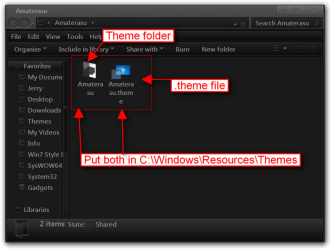
Put both 1 Amaterasu theme folder and 1 Amaterasu.theme file in C:\Windows\Resources\Themes
Amaterasu.pngThemes.png

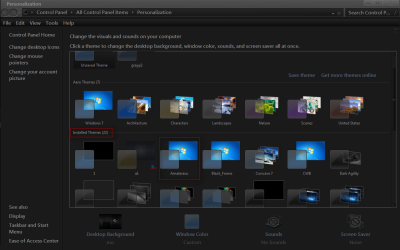
It should show up in Personalization as Amaterasu under Installed Themes.
Personalization.png

Jerry
 

Attachments

My Computer My Computer

At a glance

Win 7 Pro x64 / Win 10 ProIntel(R) Core(TM) i7-3630QM CPU @ 2.40GHz12 GB(1) Intel(R) HD Graphics 4000 (2) NVIDIA GeFo...
Computer type
Laptop
Computer Manufacturer/Model Number
Sager NP9170
OS
Win 7 Pro x64 / Win 10 Pro
CPU
Intel(R) Core(TM) i7-3630QM CPU @ 2.40GHz
Motherboard
CLEVO P170EM
Memory
12 GB
Graphics Card(s)
(1) Intel(R) HD Graphics 4000 (2) NVIDIA GeForce GTX 675M
Sound Card
(1) Realtek High Definition Audio (2) Intel(R) Display Aud
Monitor(s) Displays
17.3
Screen Resolution
1920x1080
Hard Drives
(1) Samsung 860 EVO 500GB(OS) (1) Samsung 860 EVO 500GB(Data)
Keyboard
Backlite
Antivirus
MSE, Malwarebytes Pro
Browser
Firefox
Other Info
DESKTOP: Custom-built.
OS: Win 10 Pro x64.
CASE: Rosewill R5.
CPU: Intel I5 4670K CPU @ 3.40GHz.
CPU COOLER: Cool Master Hyper 212 EVO.
MOTHERBOARD: Asus Z87-A.
MEMORY: Kingston HyperX 2x4 GB.
GPU: Nvidia Geforce 650 TI.
PSU: Corsair TX750.
DRIVES: (1) Samsung 840 120 GB SSD (2) Western Digital blue 500 GB 7200 RPM.
thanks a lot :D
 

My Computer My Computer

At a glance

Windows 7 Ultimate 64-bit SP1Intel i7-3930K 3.20GHz 6-Core ProcessorG Skill Ripjaws Z 32GB DDR3 1866MHzEVGA Nvidia GeForce GTX 980 4GB
Computer type
PC/Desktop
Computer Manufacturer/Model Number
Custom Build
OS
Windows 7 Ultimate 64-bit SP1
CPU
Intel i7-3930K 3.20GHz 6-Core Processor
Motherboard
Asus Sabertooth X79
Memory
G Skill Ripjaws Z 32GB DDR3 1866MHz
Graphics Card(s)
EVGA Nvidia GeForce GTX 980 4GB
Monitor(s) Displays
29" LG Curved Ultrawide IPS Monitor
Screen Resolution
2560 x 1080
Hard Drives
Samsung 850 Pro 128GB
PSU
Corsair AX760
Case
Aerocool DS200
Cooling
Cooler Master Nepton 240M
Keyboard
Wireless Keyboard
Mouse
Wireless Mouse
Internet Speed
32MB
Antivirus
Bitdefender
Browser
Google Chrome
Other Info
TP-LINK Archer T9E Network adapter
You're Welcome
 

My Computer My Computer

At a glance

Win 7 Pro x64 / Win 10 ProIntel(R) Core(TM) i7-3630QM CPU @ 2.40GHz12 GB(1) Intel(R) HD Graphics 4000 (2) NVIDIA GeFo...
Computer type
Laptop
Computer Manufacturer/Model Number
Sager NP9170
OS
Win 7 Pro x64 / Win 10 Pro
CPU
Intel(R) Core(TM) i7-3630QM CPU @ 2.40GHz
Motherboard
CLEVO P170EM
Memory
12 GB
Graphics Card(s)
(1) Intel(R) HD Graphics 4000 (2) NVIDIA GeForce GTX 675M
Sound Card
(1) Realtek High Definition Audio (2) Intel(R) Display Aud
Monitor(s) Displays
17.3
Screen Resolution
1920x1080
Hard Drives
(1) Samsung 860 EVO 500GB(OS) (1) Samsung 860 EVO 500GB(Data)
Keyboard
Backlite
Antivirus
MSE, Malwarebytes Pro
Browser
Firefox
Other Info
DESKTOP: Custom-built.
OS: Win 10 Pro x64.
CASE: Rosewill R5.
CPU: Intel I5 4670K CPU @ 3.40GHz.
CPU COOLER: Cool Master Hyper 212 EVO.
MOTHERBOARD: Asus Z87-A.
MEMORY: Kingston HyperX 2x4 GB.
GPU: Nvidia Geforce 650 TI.
PSU: Corsair TX750.
DRIVES: (1) Samsung 840 120 GB SSD (2) Western Digital blue 500 GB 7200 RPM.
Back
Top