Solved Change Power Setting of Wireless Radios

Alan613733

New member
Local time
2:29 PM
Messages
9
Fn + F5 brings up a small menu to turn on and off wi-fi, Bluetooth etc. Anyone know where that file is?
 

My Computer My Computer

At a glance

Windows 7 x644 Gb
Computer type
Laptop
Computer Manufacturer/Model Number
Lenovo T500
OS
Windows 7 x64
Memory
4 Gb
Hard Drives
256 SSD
Antivirus
Windows Defender
Browser
Firefox
It's not clear what your asking as the title says power settings for radios? The function key may be a BIOS settings not knowing what the pc is
 

My Computer My Computer

At a glance

win 8 32 bit
Computer type
PC/Desktop
OS
win 8 32 bit
I've managed to find the file I'm looking for its in the HOTKEY folder, but thanks for the reply.
 

My Computer My Computer

At a glance

Windows 7 x644 Gb
Computer type
Laptop
Computer Manufacturer/Model Number
Lenovo T500
OS
Windows 7 x64
Memory
4 Gb
Hard Drives
256 SSD
Antivirus
Windows Defender
Browser
Firefox
You can adjust the transmission power of your computer's WiFI adaptor in the Properties window of Device Manager. Do this:


Open Device Manager, open the Network adaptors node, right-mouse click on your WiFi adaptor and select Properties. Once in Properties Window, select the Advanced Tab and under the Property heading of the left-pane, select Transmit Power. Then, in the right-pane, under value, select the power value that you wish to use. When done select OK.

That is it.
 

My Computer My Computer

At a glance

Windows 7 x64, Vista x64, 8.1 smartphoneIntel E8400 65W 64-bitDDR2 2 x 2GB, 1GB x 2XFX Radeon HD5750
Computer type
PC/Desktop
OS
Windows 7 x64, Vista x64, 8.1 smartphone
CPU
Intel E8400 65W 64-bit
Motherboard
Gigabyte EP45-UD3LR
Memory
DDR2 2 x 2GB, 1GB x 2
Graphics Card(s)
XFX Radeon HD5750
Sound Card
AMD High Definition Audio; Realtek High Definition Audio
Monitor(s) Displays
iiyama prolite X2377HDS
Screen Resolution
1920 x 1080
Hard Drives
500GB 7200 rpm Seagate ST3500413AS 16MB, 500GB 5400 rpm Toshiba MQ02ABF050H 32MB, 200GB 7200 rpm Seagate ST3200820AS 8MB, 2TB 7200 rpm Western Digital WD20EZRX 64MB
PSU
Enermax Liberty Modular
Case
Antec P193 Midi Tower
Keyboard
Mionix ZIBAL 60
Mouse
Razer USB 2.0 Diamondback Mouse or Huion Graphics Tablet
Browser
Internet Explorer, Lunascape, Firefox, Opera, Avast Safezone
I'm not sure what you think I'm looking for iko22, but its not that. Its a file called tpfnf5.exe and as my last post suggests I have now sorted it. Thanks
 

My Computer My Computer

At a glance

Windows 7 x644 Gb
Computer type
Laptop
Computer Manufacturer/Model Number
Lenovo T500
OS
Windows 7 x64
Memory
4 Gb
Hard Drives
256 SSD
Antivirus
Windows Defender
Browser
Firefox
Okay. I just included it for the benefit of anyone passing by and reading this post, and wanted a more fuller answer.

I'm glad that you found the answer to your question, and thanks for returning to tell us what you found out.
 

My Computer My Computer

At a glance

Windows 7 x64, Vista x64, 8.1 smartphoneIntel E8400 65W 64-bitDDR2 2 x 2GB, 1GB x 2XFX Radeon HD5750
Computer type
PC/Desktop
OS
Windows 7 x64, Vista x64, 8.1 smartphone
CPU
Intel E8400 65W 64-bit
Motherboard
Gigabyte EP45-UD3LR
Memory
DDR2 2 x 2GB, 1GB x 2
Graphics Card(s)
XFX Radeon HD5750
Sound Card
AMD High Definition Audio; Realtek High Definition Audio
Monitor(s) Displays
iiyama prolite X2377HDS
Screen Resolution
1920 x 1080
Hard Drives
500GB 7200 rpm Seagate ST3500413AS 16MB, 500GB 5400 rpm Toshiba MQ02ABF050H 32MB, 200GB 7200 rpm Seagate ST3200820AS 8MB, 2TB 7200 rpm Western Digital WD20EZRX 64MB
PSU
Enermax Liberty Modular
Case
Antec P193 Midi Tower
Keyboard
Mionix ZIBAL 60
Mouse
Razer USB 2.0 Diamondback Mouse or Huion Graphics Tablet
Browser
Internet Explorer, Lunascape, Firefox, Opera, Avast Safezone
You can adjust the transmission power of your computer's WiFI adaptor in the Properties window of Device Manager. Do this:


Open Device Manager, open the Network adaptors node, right-mouse click on your WiFi adaptor and select Properties. Once in Properties Window, select the Advanced Tab and under the Property heading of the left-pane, select Transmit Power. Then, in the right-pane, under value, select the power value that you wish to use. When done select OK.

That is it.

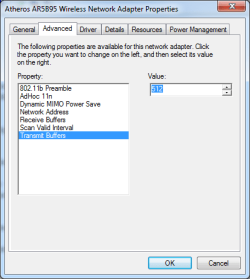
I don't see "Transmit Power", but I see "Transmit Buffers". Would that be the same thing?
 

Attachments

  • WNAPAdv.png
    WNAPAdv.png
    11 KB · Views: 4

My Computer My Computer

At a glance

Microsoft Windows 7 Home Premium 64-bit 7601 ...Intel(R) Core(TM) i3-N3054.00 GBStandard VGA Graphics Adapter
Computer type
Laptop
Computer Manufacturer/Model Number
LENOVO IdeaPad Slim 3 15IAN8
OS
Microsoft Windows 7 Home Premium 64-bit 7601 Multiprocessor Free Service Pack 1
CPU
Intel(R) Core(TM) i3-N305
Motherboard
Oracle Corporation VirtualBox
Memory
4.00 GB
Graphics Card(s)
Standard VGA Graphics Adapter
Sound Card
High Definition Audio Device
Hard Drives
VBOX HARDDISK ATA Device

My Computer My Computer

At a glance

Windows 7 x64, Vista x64, 8.1 smartphoneIntel E8400 65W 64-bitDDR2 2 x 2GB, 1GB x 2XFX Radeon HD5750
Computer type
PC/Desktop
OS
Windows 7 x64, Vista x64, 8.1 smartphone
CPU
Intel E8400 65W 64-bit
Motherboard
Gigabyte EP45-UD3LR
Memory
DDR2 2 x 2GB, 1GB x 2
Graphics Card(s)
XFX Radeon HD5750
Sound Card
AMD High Definition Audio; Realtek High Definition Audio
Monitor(s) Displays
iiyama prolite X2377HDS
Screen Resolution
1920 x 1080
Hard Drives
500GB 7200 rpm Seagate ST3500413AS 16MB, 500GB 5400 rpm Toshiba MQ02ABF050H 32MB, 200GB 7200 rpm Seagate ST3200820AS 8MB, 2TB 7200 rpm Western Digital WD20EZRX 64MB
PSU
Enermax Liberty Modular
Case
Antec P193 Midi Tower
Keyboard
Mionix ZIBAL 60
Mouse
Razer USB 2.0 Diamondback Mouse or Huion Graphics Tablet
Browser
Internet Explorer, Lunascape, Firefox, Opera, Avast Safezone
Back
Top