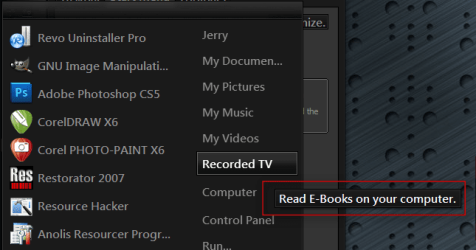
Solved Change start menu infotips

khodges747

New member
Local time
5:46 AM
Messages
20
Hi everyone, and Merry Christmas.

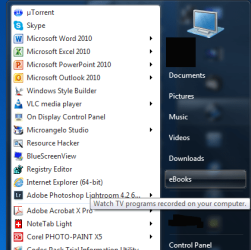
I have a small question. In my start menu, I have changed the Recorded TV library to point to my ebooks. This works fine, but if I choose the option to "display as link" and then hover my mouse pointer over it, it shows me an infotip that still refers to the original destination about recorded TV shows. If I choose "display as menu", this doesn't happen because there is no infotip.

So my question is where can I edit the text shown in the infotip. I want it to say that I can read my ebooks, not watch TV. I have searched the registry, and the text is not there. It must be somewhere else, but I can't find it. Does anywone know where this infotip text is found?

Here's a screenshot.
Start Menu 2.png

Thanks in advance for your help.
Khodges747
 

My Computer

Computer type
PC/Desktop
Computer Manufacturer/Model Number
Dell Inspiron 870
OS
Windows 7 Ultimate x64
CPU
Intel i7 4790 @ 3.60 GHz
Motherboard
Dell
Memory
16 GB
Graphics Card(s)
NVIDIA GeForce GTX 750 Ti
Sound Card
Onboard, Realtek HD Audio
Monitor(s) Displays
ASUS ProArt
Screen Resolution
1920*1200
Hard Drives
Samsung 840 EVO 250 GB SSD
Various HDDs
Keyboard
Logitech K800 Wireless
Mouse
Logitech MX Master
Browser
Firefox 42.0
Let me put together how I did then I will post it. It may be tomorrow before I get to it. You can add your own text.

Jerry
untitled.PNG
 

My Computer

Computer type
Laptop
Computer Manufacturer/Model Number
Sager NP9170
OS
Win 7 Pro x64 / Win 10 Pro
CPU
Intel(R) Core(TM) i7-3630QM CPU @ 2.40GHz
Motherboard
CLEVO P170EM
Memory
12 GB
Graphics Card(s)
(1) Intel(R) HD Graphics 4000 (2) NVIDIA GeForce GTX 675M
Sound Card
(1) Realtek High Definition Audio (2) Intel(R) Display Aud
Monitor(s) Displays
17.3
Screen Resolution
1920x1080
Hard Drives
(1) Samsung 860 EVO 500GB(OS) (1) Samsung 860 EVO 500GB(Data)
Keyboard
Backlite
Antivirus
MSE, Malwarebytes Pro
Browser
Firefox
Other Info
DESKTOP: Custom-built.
OS: Win 10 Pro x64.
CASE: Rosewill R5.
CPU: Intel I5 4670K CPU @ 3.40GHz.
CPU COOLER: Cool Master Hyper 212 EVO.
MOTHERBOARD: Asus Z87-A.
MEMORY: Kingston HyperX 2x4 GB.
GPU: Nvidia Geforce 650 TI.
PSU: Corsair TX750.
DRIVES: (1) Samsung 840 120 GB SSD (2) Western Digital blue 500 GB 7200 RPM.
Yup, that's what I want.

Take your time Jerry. It's not like my box is unuseable. Just a minor annoyance.

Keith
 

My Computer

Computer type
PC/Desktop
Computer Manufacturer/Model Number
Dell Inspiron 870
OS
Windows 7 Ultimate x64
CPU
Intel i7 4790 @ 3.60 GHz
Motherboard
Dell
Memory
16 GB
Graphics Card(s)
NVIDIA GeForce GTX 750 Ti
Sound Card
Onboard, Realtek HD Audio
Monitor(s) Displays
ASUS ProArt
Screen Resolution
1920*1200
Hard Drives
Samsung 840 EVO 250 GB SSD
Various HDDs
Keyboard
Logitech K800 Wireless
Mouse
Logitech MX Master
Browser
Firefox 42.0

My Computer

Computer type
Laptop
Computer Manufacturer/Model Number
Sager NP9170
OS
Win 7 Pro x64 / Win 10 Pro
CPU
Intel(R) Core(TM) i7-3630QM CPU @ 2.40GHz
Motherboard
CLEVO P170EM
Memory
12 GB
Graphics Card(s)
(1) Intel(R) HD Graphics 4000 (2) NVIDIA GeForce GTX 675M
Sound Card
(1) Realtek High Definition Audio (2) Intel(R) Display Aud
Monitor(s) Displays
17.3
Screen Resolution
1920x1080
Hard Drives
(1) Samsung 860 EVO 500GB(OS) (1) Samsung 860 EVO 500GB(Data)
Keyboard
Backlite
Antivirus
MSE, Malwarebytes Pro
Browser
Firefox
Other Info
DESKTOP: Custom-built.
OS: Win 10 Pro x64.
CASE: Rosewill R5.
CPU: Intel I5 4670K CPU @ 3.40GHz.
CPU COOLER: Cool Master Hyper 212 EVO.
MOTHERBOARD: Asus Z87-A.
MEMORY: Kingston HyperX 2x4 GB.
GPU: Nvidia Geforce 650 TI.
PSU: Corsair TX750.
DRIVES: (1) Samsung 840 120 GB SSD (2) Western Digital blue 500 GB 7200 RPM.
Thanks Jerry.
I figured it was an easy mod to a dll or mui. I have a 64 bit system (like you) so I have explorer.exe.mui in C:\Windows\SysWOW64\En-US as well. I modified both files with Resource Hacker, and guess what - no change in the text in the infotip on the start menu. I rechecked both files, and they are indeed modified. But on mouse hover I still have the "Watch TV..." text. I rebooted once, then again, then shut it down and waited a minute before rebooting. Somehow my system is finding that text somewhere else. I did a search of the whole Windows directory and only those 2 occurrences of explorer.exe.mui exist.

Any ideas?
Keith
 

My Computer

Computer type
PC/Desktop
Computer Manufacturer/Model Number
Dell Inspiron 870
OS
Windows 7 Ultimate x64
CPU
Intel i7 4790 @ 3.60 GHz
Motherboard
Dell
Memory
16 GB
Graphics Card(s)
NVIDIA GeForce GTX 750 Ti
Sound Card
Onboard, Realtek HD Audio
Monitor(s) Displays
ASUS ProArt
Screen Resolution
1920*1200
Hard Drives
Samsung 840 EVO 250 GB SSD
Various HDDs
Keyboard
Logitech K800 Wireless
Mouse
Logitech MX Master
Browser
Firefox 42.0
Hah! I got it!

I needed to run mcbuilder from an elevated command prompt after making the mods. Now all is perfect. You may want to add that to your tutorial Jerry.

Thanks a bunch. Now I'm going to mod the icon.
 

My Computer

Computer type
PC/Desktop
Computer Manufacturer/Model Number
Dell Inspiron 870
OS
Windows 7 Ultimate x64
CPU
Intel i7 4790 @ 3.60 GHz
Motherboard
Dell
Memory
16 GB
Graphics Card(s)
NVIDIA GeForce GTX 750 Ti
Sound Card
Onboard, Realtek HD Audio
Monitor(s) Displays
ASUS ProArt
Screen Resolution
1920*1200
Hard Drives
Samsung 840 EVO 250 GB SSD
Various HDDs
Keyboard
Logitech K800 Wireless
Mouse
Logitech MX Master
Browser
Firefox 42.0
You're welcome
I'm glad you got it, I have never ran mcbuilder before or heard of it.
And you did not need to do so one in C:\Windows\SysWOW64\En-US just in C:\Windows\En-US.

Jerry
 

My Computer

Computer type
Laptop
Computer Manufacturer/Model Number
Sager NP9170
OS
Win 7 Pro x64 / Win 10 Pro
CPU
Intel(R) Core(TM) i7-3630QM CPU @ 2.40GHz
Motherboard
CLEVO P170EM
Memory
12 GB
Graphics Card(s)
(1) Intel(R) HD Graphics 4000 (2) NVIDIA GeForce GTX 675M
Sound Card
(1) Realtek High Definition Audio (2) Intel(R) Display Aud
Monitor(s) Displays
17.3
Screen Resolution
1920x1080
Hard Drives
(1) Samsung 860 EVO 500GB(OS) (1) Samsung 860 EVO 500GB(Data)
Keyboard
Backlite
Antivirus
MSE, Malwarebytes Pro
Browser
Firefox
Other Info
DESKTOP: Custom-built.
OS: Win 10 Pro x64.
CASE: Rosewill R5.
CPU: Intel I5 4670K CPU @ 3.40GHz.
CPU COOLER: Cool Master Hyper 212 EVO.
MOTHERBOARD: Asus Z87-A.
MEMORY: Kingston HyperX 2x4 GB.
GPU: Nvidia Geforce 650 TI.
PSU: Corsair TX750.
DRIVES: (1) Samsung 840 120 GB SSD (2) Western Digital blue 500 GB 7200 RPM.
Couldn't have done it without you Jerry.

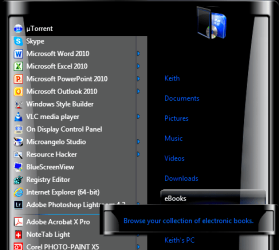
Here's the final result, with the theme I normally use and the icon changed in shell32.dll.

Start Menu 3.png

Keith
 

My Computer

Computer type
PC/Desktop
Computer Manufacturer/Model Number
Dell Inspiron 870
OS
Windows 7 Ultimate x64
CPU
Intel i7 4790 @ 3.60 GHz
Motherboard
Dell
Memory
16 GB
Graphics Card(s)
NVIDIA GeForce GTX 750 Ti
Sound Card
Onboard, Realtek HD Audio
Monitor(s) Displays
ASUS ProArt
Screen Resolution
1920*1200
Hard Drives
Samsung 840 EVO 250 GB SSD
Various HDDs
Keyboard
Logitech K800 Wireless
Mouse
Logitech MX Master
Browser
Firefox 42.0
Back
Top