
change system hard drive

zuth

New member
Local time
4:25 PM
Messages
18
hello all!
i encountered a problem after installing a new hard drive
i have 3 HDs (including the one i just installed) C: wich is where windows is installed and E: and F: for data
after installing the new HD ( F: )and formatting it, my system stopped booting, it just hangs, so i changed the boot order and it boots fine, but not through C: but through E:
i also found new BOOT folder in E:, wich wasnt there before
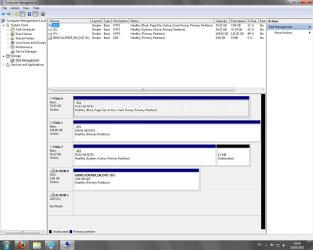
i believe that the HD the system boots from should be the one Windows is installed on ( C: ) so if im not mistaken (very likely i am) i should have C: marked as BOOT and SYSTEM in the Disk Management window
i searched a bit but cannot find a way to fix this, help would be greatly apreciated!

this is a screenshot of my Disk Management window
Dmanagement.jpg
 

My Computer

OS
Windows 7 Ultimate x64
Welcome to the forum, I don't know enough to help but I did notice from your screenshot that you have 2 Active partitions so perhaps that is the problem. Wait until one of the experts comes along to help I just wanted to welcome you and point out my observation.:)
 

My Computer

Computer type
PC/Desktop
Computer Manufacturer/Model Number
Acer Aspire XC-704 x64 bit/ Asus K55A Notebook PC/HP Envy x360 Convertible 15-bq0xx
OS
Windows 10 64bit/Windows 10 64bit/Windows 10 64bit
CPU
Intel Pentium J3710 @ 60GHz/Intel B820,1.7GHz/AMD A9 Radeon
Motherboard
Acer Aspire XC-704 (SOCKET 0)/Asus/HP 8312 (Socket FP4)
Memory
8.00GB DDR3 @ 1599MHz/8GB 2 x 4GB DDR3/8.00GB Dual-Channel
Graphics Card(s)
Intel HD Graphics/Intel/512MB ATI AMD Radeon R5 Graphics (HP
Sound Card
Realtek High Definition Audio/Onboard/AMD High Definition Au
Monitor(s) Displays
Acer LCD K222HQL /Asus 15.6/Generic PnP Monitor (1920x1080@6
Screen Resolution
1920x1080@59Hz/1366 x 768/1920x1080@60Hz
Hard Drives
1863GBWesternn Digital WDC/Asus/119GB SanDisk SD8SN8U-128G-1006 (SSD)
931GB Hitachi HGST HTS721010A9E630 (SATA)
Keyboard
Microsoft Natural Ergonomic Keyboard 4000 (UK)/Inbuilt/Inbui
Mouse
Microsoft Optical Wheel Mouse/Same plus Touchpad/Same + Pad
Internet Speed
Infinity 2 up to 76 Mbps
Antivirus
MSE/MSE/MSE and all 3 have MalwareBytes Premium
Browser
Edge, Firefox/Edge, Firefox/Edge, Firefox, Chrome
Other Info
Seagate Expansion 500GB External Desktop Drive
Seagate Expansion Portable Drives 500GB and 1TB
Epson XP-332 Wireless Printer
thank you for the warm welcome, its helpful in a way to :)

also, i should have mentioned that initially just E: drive was active
both of them being active is a result of my attempts to fix this
didnt think it can have an effect but ill try having only C: active and report back
 

My Computer

OS
Windows 7 Ultimate x64
Hello zuth, welcome to Seven Forums!


My friend Joan is on the right track. ;)


Since the Hard Disk Drive that shows as Disk 0 is marked as Active, set the Windows 7 (Disk 0) as the first boot device in the main BIOS again and boot the Windows 7 installation DVD or a created repair disk and do the 3 separate startup repairs with the separate restarts to recreate the "System" boot files to the Windows 7 partition, have a look at this tutorial at the link below.

Startup Repair - Run 3 Separate Times


Then have a look at Option Two #2 of the same tutorial to see how to mark the Disk 2 as Inactive so this can't happen again and be sure to post back with any further questions you may have and to keep us informed.
 

My Computer

Computer Manufacturer/Model Number
* BFK Customs *
OS
W 7 64-bit Ultimate
CPU
Intel Q9550 Yorkfield
Motherboard
ASUS P5Q Pro
Memory
8GB Dominator 8500C5D
Graphics Card(s)
ATI : XFX 5870
Sound Card
Realtek HD Audio 7-1
Monitor(s) Displays
1x 47" LCD HDMI & 3x 26" LCD HDMI
Screen Resolution
1920x1080P & 1920x1200
Hard Drives
1x 80GB Intel X25-M G2 SSD : 1x 500GB & 1x 640GB WD Caviar Black(s)
PSU
Corsair 620HX
Case
Cooler Master RC-690
Cooling
Tuniq Tower 120, 2x 140mm and 3x 120mm case fans
Keyboard
Microsoft 500
Mouse
Razer Diamondback 3G
Internet Speed
14 Mb/s
Other Info
1x Koutech 3Gb/s SATA HDD Hot Swap Rack

My Computer

Computer Manufacturer/Model Number
HP, Dell, Gateway, Toshiba - 4 laptops and 2 desktops
OS
Vista, Windows7, Mint Mate, Zorin, Windows 8
CPU
from 1.6GHz Duo to i7
Monitor(s) Displays
2x HP w2207
Hard Drives
5x HDD, 7x SSD, 12x Externals
Keyboard
with trackball - no mices
Mouse
Trackball mice
Internet Speed
DSL 6000
The method posted by BFK will do the job
 

My Computers

System One System Two

  • Computer type
    PC/Desktop
    OS
    7 X64
    CPU
    i5 8400
    Motherboard
    gigabyte b365m ds3h
    Memory
    2x8gb 3200mhz
    Hard Drives
    various
    PSU
    pure power 11 400w cm
    Case
    Coolermaster
    Cooling
    cryorig m9i
  • Computer type
    PC/Desktop
    OS
    7x64
    CPU
    g5400
    Motherboard
    ga b365m ds3h
    Memory
    8gb ddr4 2400
    PSU
    xfx pro 450w
@Bare Foot Kid

hi, and thanks for the quick reply
i tried your suggestion, changed boot order to C: ( disk 0 )
but when attempting "startup repair" it cannot detect any problems
also tried making disk 2 ( E: ) inactive and than running "startup repair" while disk 0 is first boot device
no good, it just hangs whenever i try to boot from C:
had to make disk 2 active again so i can boot my system

maybe im missing somthing in the "startup repair" phase?
 

My Computer

OS
Windows 7 Ultimate x64
Power down the PC and disconnect the HDD data cables from the motherboard, leaving only the Windows 7 HDD connected, make sure it's set as the first boot device in the BIOS and try the 3 startup repairs again.


You are doing at least 3 separate startup repairs with system restarts between each repair?
 

My Computer

Computer Manufacturer/Model Number
* BFK Customs *
OS
W 7 64-bit Ultimate
CPU
Intel Q9550 Yorkfield
Motherboard
ASUS P5Q Pro
Memory
8GB Dominator 8500C5D
Graphics Card(s)
ATI : XFX 5870
Sound Card
Realtek HD Audio 7-1
Monitor(s) Displays
1x 47" LCD HDMI & 3x 26" LCD HDMI
Screen Resolution
1920x1080P & 1920x1200
Hard Drives
1x 80GB Intel X25-M G2 SSD : 1x 500GB & 1x 640GB WD Caviar Black(s)
PSU
Corsair 620HX
Case
Cooler Master RC-690
Cooling
Tuniq Tower 120, 2x 140mm and 3x 120mm case fans
Keyboard
Microsoft 500
Mouse
Razer Diamondback 3G
Internet Speed
14 Mb/s
Other Info
1x Koutech 3Gb/s SATA HDD Hot Swap Rack
gonna try this in a minute.
just to make sure im not doing it all wrong.
im starting the system with windows CD in and clicking repair, then "startup repair"
then it tells me that are no problems, restarting and repeating, i should then still do it twice more? and again get no problems?
 

My Computer

OS
Windows 7 Ultimate x64
With only the Windows 7 HDD data cable connected to the mobo and set as the first boot device in the PC main BIOS, boot the Windows DVD and do this 3 separate times with a PC/system restart between each startup repair.


How to Run a Startup Repair in Windows 7
 

My Computer

Computer Manufacturer/Model Number
* BFK Customs *
OS
W 7 64-bit Ultimate
CPU
Intel Q9550 Yorkfield
Motherboard
ASUS P5Q Pro
Memory
8GB Dominator 8500C5D
Graphics Card(s)
ATI : XFX 5870
Sound Card
Realtek HD Audio 7-1
Monitor(s) Displays
1x 47" LCD HDMI & 3x 26" LCD HDMI
Screen Resolution
1920x1080P & 1920x1200
Hard Drives
1x 80GB Intel X25-M G2 SSD : 1x 500GB & 1x 640GB WD Caviar Black(s)
PSU
Corsair 620HX
Case
Cooler Master RC-690
Cooling
Tuniq Tower 120, 2x 140mm and 3x 120mm case fans
Keyboard
Microsoft 500
Mouse
Razer Diamondback 3G
Internet Speed
14 Mb/s
Other Info
1x Koutech 3Gb/s SATA HDD Hot Swap Rack
no luck :(
disconnected everything except the system HD
made 3 separate Startup repairs
no problems detected by them
and afterwards tried booting with the HD (the others still disconnected)
and it hangs just like before
getting frustrating around here :(
any advice?
 

My Computer

OS
Windows 7 Ultimate x64
Are you certain the correct HDD is connected and set as the first boot device for the repairs?
 

My Computer

Computer Manufacturer/Model Number
* BFK Customs *
OS
W 7 64-bit Ultimate
CPU
Intel Q9550 Yorkfield
Motherboard
ASUS P5Q Pro
Memory
8GB Dominator 8500C5D
Graphics Card(s)
ATI : XFX 5870
Sound Card
Realtek HD Audio 7-1
Monitor(s) Displays
1x 47" LCD HDMI & 3x 26" LCD HDMI
Screen Resolution
1920x1080P & 1920x1200
Hard Drives
1x 80GB Intel X25-M G2 SSD : 1x 500GB & 1x 640GB WD Caviar Black(s)
PSU
Corsair 620HX
Case
Cooler Master RC-690
Cooling
Tuniq Tower 120, 2x 140mm and 3x 120mm case fans
Keyboard
Microsoft 500
Mouse
Razer Diamondback 3G
Internet Speed
14 Mb/s
Other Info
1x Koutech 3Gb/s SATA HDD Hot Swap Rack
Can we see another screenshot of Disk Mgmt with all HD's plugged in?

It is safer to plug/unplug the cables at the HD's rather than touching the mobo. Be sure to discharge static by touching the case each time.
 
@Bare Foot Kid
i am sure its the only HDD connected, as for first boot device, its the only one in the list after disconnecting the rest, only its really second to the cd drive for the Windows CD

@gregrocker
i did disconnect from HD's and not mobo to be on the safe side :)
and here's another screenshot, nothing different except different order of HD's
Dmanagement2.jpg
 

My Computer

OS
Windows 7 Ultimate x64
Boot into BIOS setup to set Win7 HD as first to boot, before the CD/DVD drive.

Download and burn to CD free Partition Wizard bootable CD, boot CD, rightclick E to Modify>Set to Inactive, click OK. Partition Wizard will autostart on its own.

Next click on DISK0 so that it is highlighted, then from the Disk tab select Rebuild MBR, OK, Apply both steps. Close PW, remove CD, restart computer.

If Win7 doesn't start, repeat the above with all other HD"s unplugged besides Win7.

If Win7 doesn't start, use the one-time BIOS Boot Menu key to boot into Win7 DVD Repair console to run Startup Repair 3 separate times with reboots until Win7 starts.
 
it just hangs whenever i try to boot from C:
had to make disk 2 active again so i can boot my system

At what point does it hang?

Any messages?
 

My Computers

System One System Two

  • Computer type
    PC/Desktop
    OS
    7 X64
    CPU
    i5 8400
    Motherboard
    gigabyte b365m ds3h
    Memory
    2x8gb 3200mhz
    Hard Drives
    various
    PSU
    pure power 11 400w cm
    Case
    Coolermaster
    Cooling
    cryorig m9i
  • Computer type
    PC/Desktop
    OS
    7x64
    CPU
    g5400
    Motherboard
    ga b365m ds3h
    Memory
    8gb ddr4 2400
    PSU
    xfx pro 450w
@SIW2
it hangs where the boot device is supposed to be activated i believe, for instance, if i choose to boot from CD, it prompts me to click a button to boot from CD, if i dont and the second boot device is my system HD it hangs, no massages

@gregrocker
im gonna give it a try, only thing im confused about is that you said to "set Win7 HD as first to boot, before the CD/DVD drive" but as i mentioned before, it wont boot this way, i have to choose my second HD for it to boot.
so i suppose you meant just to boot my system so i can download partition wizard, if so you may disregard that last comment, otherwise, if it has any significance to the process please let me know
 

My Computer

OS
Windows 7 Ultimate x64
As stated use the one-time BIOS Boot Menu key which every computer has (look on first boot screen) to boot the DVD.
Asus - F8
HP/Compaq - Esc
Sony - F2
Acer - F12
Gateway - F10
eMachnes - F10
Toshiba - F12
Dell - F12
IBM/Lenovo - the blue Thinkvantage button


PW CD will autostart, meaning it will boot itself.

Unplug all peripherals, remove any cards from slots.
 
@SIW2
it hangs where the boot device is supposed to be activated i believe, for instance, if i choose to boot from CD, it prompts me to click a button to boot from CD, if i dont and the second boot device is my system HD it hangs, no massages

Do you get just a blinking cursor at top left of black screen?
 

My Computers

System One System Two

  • Computer type
    PC/Desktop
    OS
    7 X64
    CPU
    i5 8400
    Motherboard
    gigabyte b365m ds3h
    Memory
    2x8gb 3200mhz
    Hard Drives
    various
    PSU
    pure power 11 400w cm
    Case
    Coolermaster
    Cooling
    cryorig m9i
  • Computer type
    PC/Desktop
    OS
    7x64
    CPU
    g5400
    Motherboard
    ga b365m ds3h
    Memory
    8gb ddr4 2400
    PSU
    xfx pro 450w
gregrocker!!! your a life saver :)
I used Partition Wizard, as you suggested and the problem is solved, very quickly and easily to :)
many thanks to all who helped out
 

My Computer

OS
Windows 7 Ultimate x64
Back
Top