Change the message on start up.How do you change it?

Denv12

New member
Local time
10:41 PM
Messages
22
Location
Adelaide Australia
Hi. When I start up my computer,it says "protected by Avast".Its possible that this was there after I first instaled avast a few days after buying and using my computer.This computer had nortons internet security 2012 ipre installed when I bought it in June 2012.

I added these after I bought it:
1))avg free standalone linkscanner
2)avast free anti virus.

I let nortons run out then installed zonealarm free firewall antivirus.
I also had to uninstall avast back then too.

I decided that I wanted to go back to Nortons/avg linkscanner/avast so I uninstalled zonealarm (even though it was quite good-just preferred nortons)then installed nortons then avg linkscanner and tried to reinstall avast.I just left it with nortons and avast.

Can someone give me step by step instructions to remove "protected by avast"?

Thanks.

Have a Merry Christmas!
 

My Computer My Computer

At a glance

windows 7 home premium x 64
OS
windows 7 home premium x 64
Welcome to Seven Forums Danv12. You should run only one AV program at a time, either Avast or Norton. Use the removal tool for whichever you do not use:

Norton Removal Tool

Avast! Uninstall Utility

To disable the Avast message at boot:

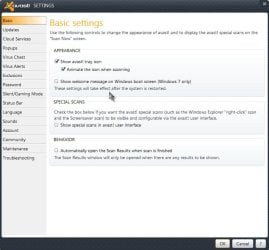
Open Avast> Click on Settings at top right> Basic tab> Appearance> Uncheck Show welcome message on Windows boot screen (Windows 7 only)> OK

Avast.jpg

That should do it ;)

A Guy
 

My Computer My Computer

At a glance

Windows 10 Home x64INTEL Core i5-750 Quad-Core 3.37GHzHyperX Fury Black Series 8GB (2 x 4GB) 1866MhzEVGA GeForce GTX 750 Superclocked 1GB 128-Bit...
Computer type
PC/Desktop
OS
Windows 10 Home x64
CPU
INTEL Core i5-750 Quad-Core 3.37GHz
Motherboard
ASUS P7P55D
Memory
HyperX Fury Black Series 8GB (2 x 4GB) 1866Mhz
Graphics Card(s)
EVGA GeForce GTX 750 Superclocked 1GB 128-Bit GDDR5
Monitor(s) Displays
LG 32MA68HY 32" IPS
Screen Resolution
1920 x 1080
Hard Drives
Samsung 840 Evo 120GB, SEAGATE 500GB Barracuda® 7200.12, SATA 3 Gb/s, 7200 RPM, 16MB cache
PSU
ANTEC TruePower New TP-550, 80 PLUS, 550W
Case
ANTEC Three Hundred Illusion
Cooling
COOLER MASTER Hyper 212 Plus, 4 x 120mm 1 x 140mm Noctua's
Internet Speed
85 + Mbps
Antivirus
Avast
Browser
Vivaldi
Reply...

Hi Thanks for your reply.

I currently dont have avast installed on my pc.I uninstalled it about August this year.It still shows that its protected by avast even though its not even on there.
 

My Computer My Computer

At a glance

windows 7 home premium x 64
OS
windows 7 home premium x 64
I was editing my post, check it again ;)

A Guy
 

My Computer My Computer

At a glance

Windows 10 Home x64INTEL Core i5-750 Quad-Core 3.37GHzHyperX Fury Black Series 8GB (2 x 4GB) 1866MhzEVGA GeForce GTX 750 Superclocked 1GB 128-Bit...
Computer type
PC/Desktop
OS
Windows 10 Home x64
CPU
INTEL Core i5-750 Quad-Core 3.37GHz
Motherboard
ASUS P7P55D
Memory
HyperX Fury Black Series 8GB (2 x 4GB) 1866Mhz
Graphics Card(s)
EVGA GeForce GTX 750 Superclocked 1GB 128-Bit GDDR5
Monitor(s) Displays
LG 32MA68HY 32" IPS
Screen Resolution
1920 x 1080
Hard Drives
Samsung 840 Evo 120GB, SEAGATE 500GB Barracuda® 7200.12, SATA 3 Gb/s, 7200 RPM, 16MB cache
PSU
ANTEC TruePower New TP-550, 80 PLUS, 550W
Case
ANTEC Three Hundred Illusion
Cooling
COOLER MASTER Hyper 212 Plus, 4 x 120mm 1 x 140mm Noctua's
Internet Speed
85 + Mbps
Antivirus
Avast
Browser
Vivaldi
As I said before Avast isnt listed there at all.Its not showing anywhere.

I'll keep nortons.
 

My Computer My Computer

At a glance

windows 7 home premium x 64
OS
windows 7 home premium x 64
But Avast no doubt still has some leftovers on your system, hence the welcome screen. Try running the Avast uninstaller. You might also see if the free Revo Uninstaller will find the Avast leftovers if the uninstaller does not. A Guy
 

My Computer My Computer

At a glance

Windows 10 Home x64INTEL Core i5-750 Quad-Core 3.37GHzHyperX Fury Black Series 8GB (2 x 4GB) 1866MhzEVGA GeForce GTX 750 Superclocked 1GB 128-Bit...
Computer type
PC/Desktop
OS
Windows 10 Home x64
CPU
INTEL Core i5-750 Quad-Core 3.37GHz
Motherboard
ASUS P7P55D
Memory
HyperX Fury Black Series 8GB (2 x 4GB) 1866Mhz
Graphics Card(s)
EVGA GeForce GTX 750 Superclocked 1GB 128-Bit GDDR5
Monitor(s) Displays
LG 32MA68HY 32" IPS
Screen Resolution
1920 x 1080
Hard Drives
Samsung 840 Evo 120GB, SEAGATE 500GB Barracuda® 7200.12, SATA 3 Gb/s, 7200 RPM, 16MB cache
PSU
ANTEC TruePower New TP-550, 80 PLUS, 550W
Case
ANTEC Three Hundred Illusion
Cooling
COOLER MASTER Hyper 212 Plus, 4 x 120mm 1 x 140mm Noctua's
Internet Speed
85 + Mbps
Antivirus
Avast
Browser
Vivaldi
you can change the start up message by using regedit in start menu type regedit.exe and open it.
navgate to this key

"HKEY_LOCAL_MACHINE\Software\Microsoft\Windows\Current Version\Policies\System"
click on system and you will see right hand panel a set of keys.
double click "legalnoticecaption" and in the data value put your desired cation if avast is using this you may see avast's data.
after that double click "legalnoticetext"
put the text you desire their.
If avast message is present delete it and type yours and if you want no message delete the data value of both and leave it blank and save t ,restart to check it.
Hope this works for you.
 

My Computer My Computer

At a glance

Windows 7 Ultimate x64core i5 460m4 GB ddr3Ati radeon mobility 4650hd 1GB
Computer Manufacturer/Model Number
Dell inpiron n5010
OS
Windows 7 Ultimate x64
CPU
core i5 460m
Motherboard
intel hm57
Memory
4 GB ddr3
Graphics Card(s)
Ati radeon mobility 4650hd 1GB
Sound Card
IDT high definition codec
Monitor(s) Displays
1 HD LED 1366x786
Hard Drives
Segate momentus 500GB 5400rpm
Also check this if it doesn't fix it
"http://www.sevenforums.com/tutorials/126315-welcome-log-text-message-change.html"
 

My Computer My Computer

At a glance

Windows 7 Ultimate x64core i5 460m4 GB ddr3Ati radeon mobility 4650hd 1GB
Computer Manufacturer/Model Number
Dell inpiron n5010
OS
Windows 7 Ultimate x64
CPU
core i5 460m
Motherboard
intel hm57
Memory
4 GB ddr3
Graphics Card(s)
Ati radeon mobility 4650hd 1GB
Sound Card
IDT high definition codec
Monitor(s) Displays
1 HD LED 1366x786
Hard Drives
Segate momentus 500GB 5400rpm
Re:how do you change it....

I installed revo.It wasnt listed on there and I also have iobit uninstaller and its not in there either.
I followed your other instruction and most of the suggestions you made werent in there.

As I dont have avast anywhere on my computer I do just want to edit it where it says "protected by avast" or just so I can leave either make it it blank,maybe disable it altogether.

Thanks for your help.
 

My Computer My Computer

At a glance

windows 7 home premium x 64
OS
windows 7 home premium x 64
can you post a screen shot , photo by camera is just fine i just want see where it appears.
 

My Computer My Computer

At a glance

Windows 7 Ultimate x64core i5 460m4 GB ddr3Ati radeon mobility 4650hd 1GB
Computer Manufacturer/Model Number
Dell inpiron n5010
OS
Windows 7 Ultimate x64
CPU
core i5 460m
Motherboard
intel hm57
Memory
4 GB ddr3
Graphics Card(s)
Ati radeon mobility 4650hd 1GB
Sound Card
IDT high definition codec
Monitor(s) Displays
1 HD LED 1366x786
Hard Drives
Segate momentus 500GB 5400rpm
If the Avast unisnstaller does not remove it, I'm afraid I am at a loss. It will be difficult to determine where the message is located. Short of uninstalling Norton with their removal tool, reinstalling Avast, and making sure the welcome is disabled, uninstalling avast with their removal tool, and finally reinstalling Norton. I'm assuming rajdeepak singh's suggestion did not help as well...I was unfamiliar with that. A Guy
 

My Computer My Computer

At a glance

Windows 10 Home x64INTEL Core i5-750 Quad-Core 3.37GHzHyperX Fury Black Series 8GB (2 x 4GB) 1866MhzEVGA GeForce GTX 750 Superclocked 1GB 128-Bit...
Computer type
PC/Desktop
OS
Windows 10 Home x64
CPU
INTEL Core i5-750 Quad-Core 3.37GHz
Motherboard
ASUS P7P55D
Memory
HyperX Fury Black Series 8GB (2 x 4GB) 1866Mhz
Graphics Card(s)
EVGA GeForce GTX 750 Superclocked 1GB 128-Bit GDDR5
Monitor(s) Displays
LG 32MA68HY 32" IPS
Screen Resolution
1920 x 1080
Hard Drives
Samsung 840 Evo 120GB, SEAGATE 500GB Barracuda® 7200.12, SATA 3 Gb/s, 7200 RPM, 16MB cache
PSU
ANTEC TruePower New TP-550, 80 PLUS, 550W
Case
ANTEC Three Hundred Illusion
Cooling
COOLER MASTER Hyper 212 Plus, 4 x 120mm 1 x 140mm Noctua's
Internet Speed
85 + Mbps
Antivirus
Avast
Browser
Vivaldi
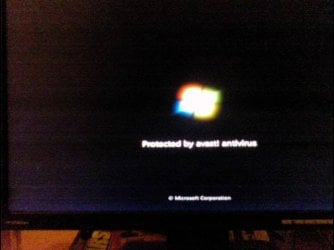
Photo as requested in one of your replies......

This is taken with a mobile phone(cell phone):

As windows 7 boots up you will see it.

All I want to do is either delete it,edit it to say something else or just disable it.I dont need to install avast as I'm running nortons.

Thank you.

This topic is now closed.
 

Attachments

  • DSC00013.JPG
    DSC00013.JPG
    26.8 KB · Views: 7

My Computer My Computer

At a glance

windows 7 home premium x 64
OS
windows 7 home premium x 64
I understand you want to use Norton. Your choice if you want to close the topic, but someone may have another suggestion for you. I wasn't suggesting you keep Avast, only install it again to make sure you completely uninstall it this time. Good luck. A Guy
 

My Computer My Computer

At a glance

Windows 10 Home x64INTEL Core i5-750 Quad-Core 3.37GHzHyperX Fury Black Series 8GB (2 x 4GB) 1866MhzEVGA GeForce GTX 750 Superclocked 1GB 128-Bit...
Computer type
PC/Desktop
OS
Windows 10 Home x64
CPU
INTEL Core i5-750 Quad-Core 3.37GHz
Motherboard
ASUS P7P55D
Memory
HyperX Fury Black Series 8GB (2 x 4GB) 1866Mhz
Graphics Card(s)
EVGA GeForce GTX 750 Superclocked 1GB 128-Bit GDDR5
Monitor(s) Displays
LG 32MA68HY 32" IPS
Screen Resolution
1920 x 1080
Hard Drives
Samsung 840 Evo 120GB, SEAGATE 500GB Barracuda® 7200.12, SATA 3 Gb/s, 7200 RPM, 16MB cache
PSU
ANTEC TruePower New TP-550, 80 PLUS, 550W
Case
ANTEC Three Hundred Illusion
Cooling
COOLER MASTER Hyper 212 Plus, 4 x 120mm 1 x 140mm Noctua's
Internet Speed
85 + Mbps
Antivirus
Avast
Browser
Vivaldi
Avast message still on screen during boot up.

Thanks for your help.I understand what you mean.

As this problem is just a matter of words on the boot up screen it would be easier to delete,edit or disable it.Avast has been uninstalled despite then I not only tried to reinstall it but also tried the avast removal tool too.and,that didnt install either.For what its worth its just not going to change.I wont devote anymore time to avast.Even though I wanted Nortons with it, it would have been nice if avast could have been installed.Not now.If thats the effort to get nowhere its not worth it.

I tried various anti virus programs over the last 6 months and I ended up going back to nortons.It came already installed on the computer.In hindsight I should have left it that way.

If anyone knows how to go into the settings for the boot up screen please post your instructions here just in case there are others experiencing the same problems.

Thank you for all your help.
 

My Computer My Computer

At a glance

windows 7 home premium x 64
OS
windows 7 home premium x 64
If you feel comfortable editing the registry:

1. In the start menu search box type regedit and click Enter
2. The "Registry Editor" dialog box opens
3. Click on Computer to highlight it
4. Click Ctrl+F to open a "Find" dialog box
5. Type in avast and make sure the three boxes are checked (Keys, Values, Data)
6. Click the Find Next button

The registry will be searched for avast. If found, the scan will stop and you can determine if the found item can be safely deleted by clicking the Del or Delete button on keyboard, and answering Yes to the prompt. Once deleted, click F3 top row of keyboard and search will resume. Continue deleting all references to avast. When scan is finished you could run it a second time just in case something was missed or close it out. This may get rid of the unwelcome message.

   Warning
Use caution. The search could also find similar entries such as "a vast ocean" (just as an example.)
 

My Computer My Computer

At a glance

Win 7 Pro 64-bitIntel i5 2.4 Ghz8GB DDR3Intel HD 3000
Computer type
Laptop
Computer Manufacturer/Model Number
Sony Vaio VPCEB47GM Laptop
OS
Win 7 Pro 64-bit
CPU
Intel i5 2.4 Ghz
Memory
8GB DDR3
Graphics Card(s)
Intel HD 3000
Sound Card
IDT High Definition
Monitor(s) Displays
15.6 WGXA Anti-Glare LED
Screen Resolution
1280x800
Hard Drives
640Gb 7200rpm
Antivirus
MSE
Browser
Opera (primary) with IE9 backup
This is taken with a mobile phone(cell phone):

As windows 7 boots up you will see it.

All I want to do is either delete it,edit it to say something else or just disable it.I dont need to install avast as I'm running nortons.

Thank you.

This topic is now closed.
Hey i think i have found a method to change it,use
Windows 7 Boot Updater


goto link

"http://www.askvg.com/change-windows-7-boot-screen-using-windows-7-boot-updater/"


download from here
"http://www.coderforlife.com/projects/win7boot/#Download"
I have personally not tried it and recommend you read the instructions carefully and create system backup just in case.
Also before using the software try running "sfc /scannow" in a administrative command prompt.
Tell me if it works.:D
 

My Computer My Computer

At a glance

Windows 7 Ultimate x64core i5 460m4 GB ddr3Ati radeon mobility 4650hd 1GB
Computer Manufacturer/Model Number
Dell inpiron n5010
OS
Windows 7 Ultimate x64
CPU
core i5 460m
Motherboard
intel hm57
Memory
4 GB ddr3
Graphics Card(s)
Ati radeon mobility 4650hd 1GB
Sound Card
IDT high definition codec
Monitor(s) Displays
1 HD LED 1366x786
Hard Drives
Segate momentus 500GB 5400rpm
I had used the Boot Updater to change my boot screen, and chose no text, so this is a good suggestion rajdeepak singh :thumbsup:

Make sure to print out the instructions under HOW TO RESTORE just in case. I also made complete system images before I did it. Good luck. A Guy
 

My Computer My Computer

At a glance

Windows 10 Home x64INTEL Core i5-750 Quad-Core 3.37GHzHyperX Fury Black Series 8GB (2 x 4GB) 1866MhzEVGA GeForce GTX 750 Superclocked 1GB 128-Bit...
Computer type
PC/Desktop
OS
Windows 10 Home x64
CPU
INTEL Core i5-750 Quad-Core 3.37GHz
Motherboard
ASUS P7P55D
Memory
HyperX Fury Black Series 8GB (2 x 4GB) 1866Mhz
Graphics Card(s)
EVGA GeForce GTX 750 Superclocked 1GB 128-Bit GDDR5
Monitor(s) Displays
LG 32MA68HY 32" IPS
Screen Resolution
1920 x 1080
Hard Drives
Samsung 840 Evo 120GB, SEAGATE 500GB Barracuda® 7200.12, SATA 3 Gb/s, 7200 RPM, 16MB cache
PSU
ANTEC TruePower New TP-550, 80 PLUS, 550W
Case
ANTEC Three Hundred Illusion
Cooling
COOLER MASTER Hyper 212 Plus, 4 x 120mm 1 x 140mm Noctua's
Internet Speed
85 + Mbps
Antivirus
Avast
Browser
Vivaldi
Back
Top