When I got my laptop I immediatly changed my desktop background by saving a picture to my desktop, right clicking it, then clicking 'set as desktop background'. Now I'm ready to change it, but can't seem to accomplish this simple task. I've tried every different way of changing it that I know of, but my old picture stays. I have even deleted the picture completely off my computer. If I right click on the desktop, hit 'Personalize', and click one of the defaut background slideshows, it will act like it has changed, telling me that what I clicked is now my background and it even changes the color scheme and sound, but my old picture remains. Any help before I completely erase my hard drive and start all over?
One other Desktop (tester) and spare Toshba laptop both with SSD's
Running Kaspersky 2016 ISS on all machines config'd identically
Logitec audio stereo systems on each machine (x3)
Canon MG5250MFC
Router/modem TP-Link running WPA2SK
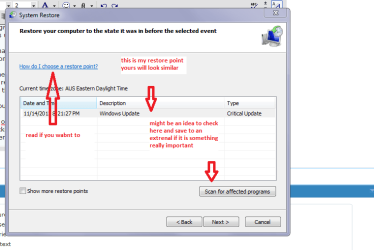
No mate it will just take you back to a point before the problem began.
It will or should give you a list of dates to restore to so pick one when you know the machine was up and running well and set it going but don't stop it once going!
Now that date maybe the same as when you changed the background but there should also be some times along with it.
For example if the date is 1/10/2012 then it should have restore points at different times if you can remember roughly the time you did that change set the restore to the point before that time even the day before if you like.
It might mean you may have to download an update or two but I doubt it.
Now if this goes ok what I suggest you do is save that picture or any that you might like as backgrounds to My Pics or some sort of folder/s and then do the change from where you stored it.
If you are still unsure get back to us or let us know how it went.
Sorry meant to add if there is only one restore point check the little box on the lower left
Attachments
RST.PNG
16.5 KB
· Views: 8
My Computer
At a glance
Desk1 7 Home Prem / Desk2 10 Pro / Main lap A...Desk1 i5 3750K / Laptop i7 GTX 860M / Desk2 i...Desk1 8GB (1866) / Desk2 16GB (1333) / Laptop...Desk 1& 2NVidia GTX 650 & Laptops on board Intel
Computer type
PC/Desktop
Computer Manufacturer/Model Number
Own build (new) Desk1 / Asus ROG Win 7 / Desk2 1st build
OS
Desk1 7 Home Prem / Desk2 10 Pro / Main lap Asus ROG 10 Pro 2 laptop Toshiba 7 Pro Asus P2520 7 & 10
One other Desktop (tester) and spare Toshba laptop both with SSD's
Running Kaspersky 2016 ISS on all machines config'd identically
Logitec audio stereo systems on each machine (x3)
Canon MG5250MFC
Router/modem TP-Link running WPA2SK
Well Jeremy mate I think you had better back up / image the install you have now and re install and then put back the programs and stuff you saved.
Sorry my friend but apart from messing around in the registry (not recommended unless you have a lot of experience) I think you would be saving yourself a lot of grief going a round the houses like this.
So when it is u and running again mate just save pics to a folder first.
One other Desktop (tester) and spare Toshba laptop both with SSD's
Running Kaspersky 2016 ISS on all machines config'd identically
Logitec audio stereo systems on each machine (x3)
Canon MG5250MFC
Router/modem TP-Link running WPA2SK
Try going to C:\Users\YOUR USER NAME\AppData\Roaming\Microsoft\Windows\Themes folder and delete the TranscodedWallpaper.jpg and then see if you can change your background. AppData is hidden use step 3 of this tutorial to unhide it http://www.sevenforums.com/tutorials/56005-file-folder-hide-unhide.html
Jerry
My Computer
At a glance
Win 7 Pro x64 / Win 10 ProIntel(R) Core(TM) i7-3630QM CPU @ 2.40GHz12 GB(1) Intel(R) HD Graphics 4000 (2) NVIDIA GeFo...
Computer type
Laptop
Computer Manufacturer/Model Number
Sager NP9170
OS
Win 7 Pro x64 / Win 10 Pro
CPU
Intel(R) Core(TM) i7-3630QM CPU @ 2.40GHz
Motherboard
CLEVO P170EM
Memory
12 GB
Graphics Card(s)
(1) Intel(R) HD Graphics 4000 (2) NVIDIA GeForce GTX 675M
Sound Card
(1) Realtek High Definition Audio (2) Intel(R) Display Aud
Monitor(s) Displays
17.3
Screen Resolution
1920x1080
Hard Drives
(1) Samsung 860 EVO 500GB(OS) (1) Samsung 860 EVO 500GB(Data)
Keyboard
Backlite
Antivirus
MSE, Malwarebytes Pro
Browser
Firefox
Other Info
DESKTOP: Custom-built.
OS: Win 10 Pro x64.
CASE: Rosewill R5.
CPU: Intel I5 4670K CPU @ 3.40GHz.
CPU COOLER: Cool Master Hyper 212 EVO.
MOTHERBOARD: Asus Z87-A.
MEMORY: Kingston HyperX 2x4 GB.
GPU: Nvidia Geforce 650 TI.
PSU: Corsair TX750.
DRIVES: (1) Samsung 840 120 GB SSD (2) Western Digital blue 500 GB 7200 RPM.
Try going to C:\Users\YOUR USER NAME\AppData\Roaming\Microsoft\Windows\Themes folder and delete the TranscodedWallpaper.jpg and then see if you can change your background. AppData is hidden use step 3 of this tutorial to unhide it http://www.sevenforums.com/tutorials/56005-file-folder-hide-unhide.html





 The most common fix is what Jerry suggested


