Solved Changed my motherboard and im wondering if i can avoid format

Ok now this really start pissing me off i installed my mb chipset driver and windows installed 3 updates and asked me to restart.Guess what still the same ****ing problem stucked at starting windows screen even with usb legacy disabled
 

My Computer My Computer

At a glance

windows 7Intel(R) Core(TM)2 Duo CPU E8200 @ 2.66GHzsymmetric 2048mbytes DDR2Nvidia geforce9600gt
OS
windows 7
CPU
Intel(R) Core(TM)2 Duo CPU E8200 @ 2.66GHz
Motherboard
gigabyte technology EX38-DS4
Memory
symmetric 2048mbytes DDR2
Graphics Card(s)
Nvidia geforce9600gt
Screen Resolution
1920x1080
Hard Drives
WDC caviar blue 1tb
WD 500BEV External usb device
Internet Speed
24mbs
Were those chipset drivers missing after install? Remember that Win7 is the authority on its own drivers so if installer issued drivers for the chipset they should take precedence unless there are performance problems pointing to them.

Boot into System Recovery Options to System Restore to before you installed the MB drivers, then reboot a few times to see what happens. Then install only the drivers from optional Windows Update which is how Win7 delivers newer drivers, as the first driver-complete OS.

If System Restore doesn't work, clean reinstall but this time follow the steps here based on thousands of successful reinstalls here of Win7, not XP: Reinstalling Windows 7.
 
Boot into System Recovery Options to System Restore to before you installed the MB drivers, then reboot a few times to see what happens. Then install only the drivers from optional Windows Update which is how Win7 delivers newer drivers, as the first driver-complete OS.

If System Restore doesn't work, clean reinstall but this time follow the steps here based on thousands of successful reinstalls here of Win7, not XP: Reinstalling Windows 7.
how can i boot into system recovery options when it stuck at starting windows after loading files?Also both windows 7 dvd and usb sticks wont boot so i cant clean reinstall :mad:
 

My Computer My Computer

At a glance

windows 7Intel(R) Core(TM)2 Duo CPU E8200 @ 2.66GHzsymmetric 2048mbytes DDR2Nvidia geforce9600gt
OS
windows 7
CPU
Intel(R) Core(TM)2 Duo CPU E8200 @ 2.66GHz
Motherboard
gigabyte technology EX38-DS4
Memory
symmetric 2048mbytes DDR2
Graphics Card(s)
Nvidia geforce9600gt
Screen Resolution
1920x1080
Hard Drives
WDC caviar blue 1tb
WD 500BEV External usb device
Internet Speed
24mbs
Access System Recovery Options from the Installation DVD, if necessary Disabling USB Legacy Support in BIOS which worked yesterday.

It's becoming quite clear you have a problem with your mobo install or drivers, as we've done everything with Windows install that can be done unless it will repair to tell you what is hanging at start screen.

You also didn't answer if MB drivers were provided by Win7 installer, or completely missing. As it says in the steps I gave you for reinstall: do not change drivers provided by Win7 installer.
 
Last edited:
Access System Recovery Options from the Installation DVD, if necessary Disabling USB Legacy Support in BIOS which worked yesterday.

It's becoming quite clear you have as problem with your mobo install or drivers, as we've done everything with Windows install that can be done unless it will repair to tell you what is hanging at start screen.

You also didn't answer if MB drivers were provided by Win7 installer, or completely missing. As it says in the steps I gave you for reinstall: do not change drivers provided by Win7 installer.
Nope installed the drivers from maunfacter website
 

My Computer My Computer

At a glance

windows 7Intel(R) Core(TM)2 Duo CPU E8200 @ 2.66GHzsymmetric 2048mbytes DDR2Nvidia geforce9600gt
OS
windows 7
CPU
Intel(R) Core(TM)2 Duo CPU E8200 @ 2.66GHz
Motherboard
gigabyte technology EX38-DS4
Memory
symmetric 2048mbytes DDR2
Graphics Card(s)
Nvidia geforce9600gt
Screen Resolution
1920x1080
Hard Drives
WDC caviar blue 1tb
WD 500BEV External usb device
Internet Speed
24mbs
If you replaced mobo drivers given by the Win7 installer, then reinstall Win7 following the steps I gave you to get a perfect reinstall based on thousands which we've helped with here: Reinstalling Windows 7

One of the problems we see here frequently is users applying old XPired methods to Win7. MS spent a fortune making Win7 the authority on its own drivers, getting them into the installer or quickly updated via Optional Updates. Yet users will blindly change them like this is XP and then complain about problems.

The drivers you provided may indeed be the best, but how do you know if you dumped the drivers Win7 might have thought were best for your mobo?
 
So after 5 days i managed to fix my pc by booting my windows 7 dvd using boot logging by pressing f8 and i managed to use it just fine without installing my own drivers but installing the windows updates without a single problem.However today that i tried to open the same problem appeared AGAIN when i try to boot windows 7 with safe mode it will stuck at classpnp.sys and when i try to boot windows 7 dvd to run system startup repair it will stuck at disk.sys!tried again to boot using boot logging but it wont fix my problem any idea greg?
 

My Computer My Computer

At a glance

windows 7Intel(R) Core(TM)2 Duo CPU E8200 @ 2.66GHzsymmetric 2048mbytes DDR2Nvidia geforce9600gt
OS
windows 7
CPU
Intel(R) Core(TM)2 Duo CPU E8200 @ 2.66GHz
Motherboard
gigabyte technology EX38-DS4
Memory
symmetric 2048mbytes DDR2
Graphics Card(s)
Nvidia geforce9600gt
Screen Resolution
1920x1080
Hard Drives
WDC caviar blue 1tb
WD 500BEV External usb device
Internet Speed
24mbs
Are you saying you reinstalled and are using only WIn7 installer and optional Updates drivers now?

Can you disable USB Legacy to get it to boot again?

Try Startup Repair several times to give it a chance.

Then try System Restore from System Recovery Options, working backwards through Restore points. You'll want to see if any drivers were rolled back by scanning for Updates once it starts to see what comes up again. Post them up here.
 
Are you saying you reinstalled and are using only WIn7 installer and optional Updates drivers now?

Can you disable USB Legacy to get it to boot again?

Try Startup Repair several times to give it a chance.

Then try System Restore from System Recovery Options, working backwards through Restore points. You'll want to see if any drivers were rolled back by scanning for Updates once it starts to see what comes up again. Post them up here.
i reinstalled windows 7 successfuly and installed every single updates with no problem,restarted and i was able to use my pc without a single problem until 3 hours ago that i opened it again.I disabled usb legacy still aint working.how can i startup repair since i cant boot to windows 7 dvd ?Pressing f8 to repair my computer and launch startup repair options will give me windows is loading files screen then a blank one and then nothing.Cant boot system recovery option since it will stuck at disk.sys when i try to boot win7 installation disc.
 

My Computer My Computer

At a glance

windows 7Intel(R) Core(TM)2 Duo CPU E8200 @ 2.66GHzsymmetric 2048mbytes DDR2Nvidia geforce9600gt
OS
windows 7
CPU
Intel(R) Core(TM)2 Duo CPU E8200 @ 2.66GHz
Motherboard
gigabyte technology EX38-DS4
Memory
symmetric 2048mbytes DDR2
Graphics Card(s)
Nvidia geforce9600gt
Screen Resolution
1920x1080
Hard Drives
WDC caviar blue 1tb
WD 500BEV External usb device
Internet Speed
24mbs
Often we find the DVD is not being booted correctly, since we assume it's good after just reinstalling.

Try setting it first to boot in BIOS - do you get a prompt to "Press any key?" What happens exactly?

Next try setting HD first to boot, then using one-time BIOS Boot Menu key to trigger DVD drive. What happens?

Next reset BIOS to defaults so we know the BIOS hasn't somehow slipped: Clear CMOS - 3 Ways to Clear the CMOS - Reset BIOS. Set SATA controller to AHCI to try install, then IDE mode if necessary.

Next we need to clear the hardware: Run maker's HD Diagnostic extended CD scan to test HD, then afterwards use it's option to wipe the HD, or boot free Partition Wizard bootable CD to wipe the HD. Both these disks will autostart on their own.

Next test RAM - Test with Memtest86+

If you can get it installed monitor very closely the logs and System Resources to check for clues before problem reoccurs: troubleshooting steps. I'd also run for awhile without updates and then install them singly to isolate which might be causing the fatal problem.

 
Often we find the DVD is not being booted correctly, since we assume it's good after just reinstalling.

Try setting it first to boot in BIOS - do you get a prompt to "Press any key?" What happens exactly? Did this lot of times i get press any key but that wont change anything

Next try setting HD first to boot, then using one-time BIOS Boot Menu key to trigger DVD drive. What happens?
Did this as wel wont change anything
Next reset BIOS to defaults so we know the BIOS hasn't somehow slipped: Clear CMOS - 3 Ways to Clear the CMOS - Reset BIOS. Set SATA controller to AHCI to try install, then IDE mode if necessary.
i reinstalled the bios battery dozen of times wont change anything about the sata controller to ahci as i told you about 2-3 pages before with screens my bios dont have any option like that.
Next we need to clear the hardware: Run maker's HD Diagnostic extended CD scan to test HD, then afterwards use it's option to wipe the HD, or boot free Partition Wizard bootable CD to wipe the HD. Both these disks will autostart on their own.
i scanned it already but it wouldnt find any problem also wiping the disc again for fourth time?:S

Next test RAM - Test with Memtest86+
will try this next

If you can get it installed monitor very closely the logs and System Resources to check for clues before problem reoccurs: troubleshooting steps. I'd also run for awhile without updates and then install them singly to isolate which might be causing the fatal problem.
here you are

By the way do you know any command that i can use when i boot windows 7 to disable my acpi since my bios doesnt have one?Maybe this will fix my problem
 

My Computer My Computer

At a glance

windows 7Intel(R) Core(TM)2 Duo CPU E8200 @ 2.66GHzsymmetric 2048mbytes DDR2Nvidia geforce9600gt
OS
windows 7
CPU
Intel(R) Core(TM)2 Duo CPU E8200 @ 2.66GHz
Motherboard
gigabyte technology EX38-DS4
Memory
symmetric 2048mbytes DDR2
Graphics Card(s)
Nvidia geforce9600gt
Screen Resolution
1920x1080
Hard Drives
WDC caviar blue 1tb
WD 500BEV External usb device
Internet Speed
24mbs
If you get Press Any Key then the problem is not in your BIOS but the disk. Can you write ISO to flash stick to cross-check using Universal USB Installer with Win7 in dropdown menu? Boot under USB, Removable or HD's using one-time BIOS Boot Menu key.

Then do the RAM test for both chips and slots.
 
If you get Press Any Key then the problem is not in your BIOS but the disk. Can you write ISO to flash stick to cross-check using Universal USB Installer with Win7 in dropdown menu? Boot under USB, Removable or HD's using one-time BIOS Boot Menu key.

Then do the RAM test for both chips and slots.
well that is weird because yesterday i managed to install windows 7 from my disk and today i cant.I also tried to install ubuntu from a flash stick(with usb legacy disabled)but it would stuck at acpi.That why im asking you if there is any command that i can use to boot without ACPI

im running the memory test right now i will update this post with the results
 

My Computer My Computer

At a glance

windows 7Intel(R) Core(TM)2 Duo CPU E8200 @ 2.66GHzsymmetric 2048mbytes DDR2Nvidia geforce9600gt
OS
windows 7
CPU
Intel(R) Core(TM)2 Duo CPU E8200 @ 2.66GHz
Motherboard
gigabyte technology EX38-DS4
Memory
symmetric 2048mbytes DDR2
Graphics Card(s)
Nvidia geforce9600gt
Screen Resolution
1920x1080
Hard Drives
WDC caviar blue 1tb
WD 500BEV External usb device
Internet Speed
24mbs
More information needed.
Does it start to load?
What error message do you get?
I have changed the Motherboard in 3 systems so far and they all started without loading Drivers
I dont get any error message,but it always come up with the following message : windows failed to start a recent hardware change might be the cause and when i press the option start windows normally and it gets me to starting windows screen that when it stucks.


Hi there
I've changed MOBOS loads of times -- Windows usually starts (in bog standard VGA mode !!) until some drivers are loaded

HOWEVER :

Check the BIOS -- if your previous Windows had ACPI enabled and this NEW Bios has it turned off you won't be able to boot Windows.

(Otherway round as well).

So just turn it OFF if it's on or turn it ON if it's off and try re-booting. Do this in the BIOS SETUP MENU at boot time -- probably something like hit DEL key or ESC key at boot time.

Usually unless your hardware is totally bonkers you'll get a base system up and running -- and installing the MOBO drivers will fix the other problems -- e.g chipset / video / audio / lan etc.

You might not even have to re-activate --although if it's a major CPU change as well you probably will have to.

Cheers
jimbo
 

My Computer My Computer

At a glance

Linux CENTOS 7 / various Windows OS'es and se...Intel i7 Intel i58GB, 16GBOn Motherboard
Computer type
PC/Desktop
Computer Manufacturer/Model Number
Custom built, several laptops HP/ASUS
OS
Linux CENTOS 7 / various Windows OS'es and servers
CPU
Intel i7 Intel i5
Memory
8GB, 16GB
Graphics Card(s)
On Motherboard
Sound Card
Realtek HD audio
Monitor(s) Displays
Apple Cinema display, Samsung LCD
Screen Resolution
1920 X 1080
Hard Drives
4 X 1TB SATA
Mouse
Toshiba wireless laser
Internet Speed
> 20MB up
So today my pc decided to finally load startup repair and when i tried to fix my windows 7 it failed.At the log i saw that my memory and hard disk are working fine the 2 only errors were :

root cause found:
a patch is preventing the system from starting

repair action : system restore result: failed error code = 0x1f

repair action : system files integrity check and repair : result : failed error code 0xa

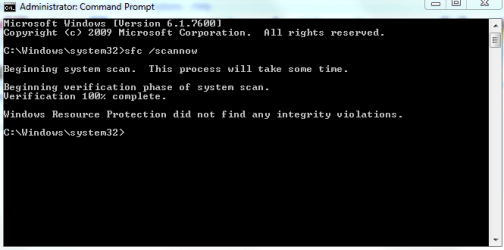
then i launched system restore point and even if it said that it failed my windows 7 booted successfully i havent changed a single thing from yesterday and it booted :S.
Also i did the memory check with no errors.
 

My Computer My Computer

At a glance

windows 7Intel(R) Core(TM)2 Duo CPU E8200 @ 2.66GHzsymmetric 2048mbytes DDR2Nvidia geforce9600gt
OS
windows 7
CPU
Intel(R) Core(TM)2 Duo CPU E8200 @ 2.66GHz
Motherboard
gigabyte technology EX38-DS4
Memory
symmetric 2048mbytes DDR2
Graphics Card(s)
Nvidia geforce9600gt
Screen Resolution
1920x1080
Hard Drives
WDC caviar blue 1tb
WD 500BEV External usb device
Internet Speed
24mbs

Attachments

  • Capture.PNG
    Capture.PNG
    9.1 KB · Views: 7

My Computer My Computer

At a glance

windows 7Intel(R) Core(TM)2 Duo CPU E8200 @ 2.66GHzsymmetric 2048mbytes DDR2Nvidia geforce9600gt
OS
windows 7
CPU
Intel(R) Core(TM)2 Duo CPU E8200 @ 2.66GHz
Motherboard
gigabyte technology EX38-DS4
Memory
symmetric 2048mbytes DDR2
Graphics Card(s)
Nvidia geforce9600gt
Screen Resolution
1920x1080
Hard Drives
WDC caviar blue 1tb
WD 500BEV External usb device
Internet Speed
24mbs

My Computer My Computer

At a glance

windows 7Intel(R) Core(TM)2 Duo CPU E8200 @ 2.66GHzsymmetric 2048mbytes DDR2Nvidia geforce9600gt
OS
windows 7
CPU
Intel(R) Core(TM)2 Duo CPU E8200 @ 2.66GHz
Motherboard
gigabyte technology EX38-DS4
Memory
symmetric 2048mbytes DDR2
Graphics Card(s)
Nvidia geforce9600gt
Screen Resolution
1920x1080
Hard Drives
WDC caviar blue 1tb
WD 500BEV External usb device
Internet Speed
24mbs
Back
Top