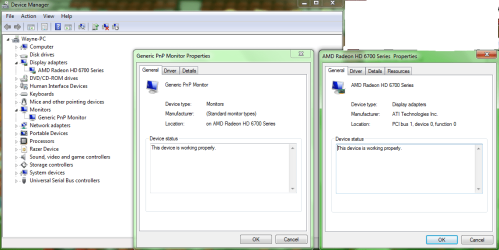
Hello! I've been around here for a sometimes but never registered as a users because I find all the solution I needed, but I have one follow problems that I can't solve and I need sevenforum's help!
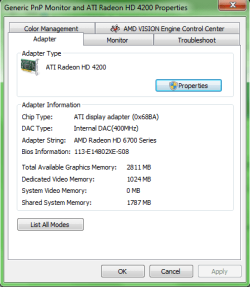
I recently bought Sapphire Radeon HD 6770 and comparing game performance with my old graphic card Nvidia 9800 GT, I don't see much of a difference. According to my friend who builds computer, he said it's suppose to be superior differences between those 2 graphic cards. I also tried to sign up for BETA profile for Blizzard game series and apparently it kept detecting the Radeon HD 4200, which is my integrated card. Anyways, my question is, how can I change my Adapter Type? I posted a picture of it so you guys can see what's my problem is. I have the latest Catalyst Control Panel from the sites sticky thread .
.
I don't know how to check my computer stuff, so here's my computer on website: HP - Pavilion Desktop / AMD Athlon™ II Processor / 4GB Memory / 750GB Hard Drive - p6654y
My english is my second language so if you can't understand what I said I'll be glad to explain again lol. Rough draft xD.
I've already tried Driver Sweeper, failed on me .
.
I don't know what BIOS means either lol.
If my integrated graphic card is disabled for good, I think I might get to see my 6770's full performance. Also tried overclocking, didn't helped at all :[. I still think it's my integrated card's problem, but hey I could be wrong. I'm terrible at computers .
.
Thanks.
-youki412
I recently bought Sapphire Radeon HD 6770 and comparing game performance with my old graphic card Nvidia 9800 GT, I don't see much of a difference. According to my friend who builds computer, he said it's suppose to be superior differences between those 2 graphic cards. I also tried to sign up for BETA profile for Blizzard game series and apparently it kept detecting the Radeon HD 4200, which is my integrated card. Anyways, my question is, how can I change my Adapter Type? I posted a picture of it so you guys can see what's my problem is. I have the latest Catalyst Control Panel from the sites sticky thread
.I don't know how to check my computer stuff, so here's my computer on website: HP - Pavilion Desktop / AMD Athlon™ II Processor / 4GB Memory / 750GB Hard Drive - p6654y
My english is my second language so if you can't understand what I said I'll be glad to explain again lol. Rough draft xD.
I've already tried Driver Sweeper, failed on me
.I don't know what BIOS means either lol.
If my integrated graphic card is disabled for good, I think I might get to see my 6770's full performance. Also tried overclocking, didn't helped at all :[. I still think it's my integrated card's problem, but hey I could be wrong. I'm terrible at computers
.Thanks.
-youki412
Attachments
My Computer
At a glance
Windows 7 Ultimate x64
- OS
- Windows 7 Ultimate x64