
Literature
New member
- Local time
- 9:35 AM
- Messages
- 2
[FONT="]Hi all, [/FONT]
[FONT="]I had a quick question about altering fonts in Windows 7 I was hoping someone could give me a hand with. I have a touch of OCD when it comes to consistency and am having trouble changing the system fonts globally on my machine. I have changed 80% or so of them through the registry entry (found here):
[/FONT]
[FONT="]
The only issue I’m having is that the font is not adjusted in a few other places. For example, if I right-click on a file and look at the properties window, the font is still the default system font.
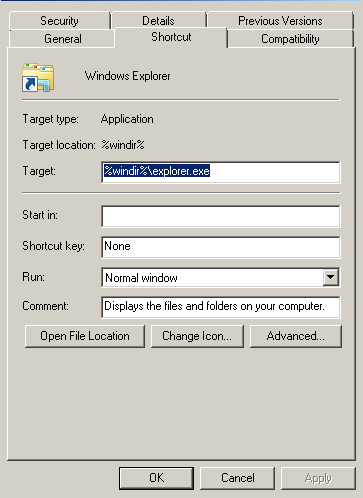
I’ve changed both the registry entry and the window fonts under “Personalization” to what I want but can’t seem to figure out how to change this font. [/FONT][FONT="]I’d be eternally (or close to it) grateful to anyone who knows how to alter this font.[/FONT]
[FONT="]- [/FONT][FONT="]Greg[/FONT]
[FONT="]I had a quick question about altering fonts in Windows 7 I was hoping someone could give me a hand with. I have a touch of OCD when it comes to consistency and am having trouble changing the system fonts globally on my machine. I have changed 80% or so of them through the registry entry (found here):
[/FONT]
Code:
Windows Registry Editor Version 5.00
  ; Created by: Shawn Brink
  ; [URL]http://www.sevenforums.com[/URL]
  ; Tutorial: [URL]http://www.sevenforums.com/tutorials/1175-fonts-change.html[/URL]

  [HKEY_LOCAL_MACHINE\SOFTWARE\Microsoft\Windows NT\CurrentVersion\Fonts]
  "Segoe UI (TrueType)"=""
  "Segoe UI Bold (TrueType)"=""
  "Segoe UI Italic (TrueType)"=""
  "Segoe UI Bold Italic (TrueType)"=""
  "Segoe UI Semibold (TrueType)"=""
  "Segoe UI Light (TrueType)"=""
  "Segoe UI Symbol (TrueType)"=""

  [HKEY_LOCAL_MACHINE\SOFTWARE\Microsoft\Windows NT\CurrentVersion\FontSubstitutes]
"Segoe UI"="CUSTOM_FONT_NAME"The only issue I’m having is that the font is not adjusted in a few other places. For example, if I right-click on a file and look at the properties window, the font is still the default system font.
I’ve changed both the registry entry and the window fonts under “Personalization” to what I want but can’t seem to figure out how to change this font. [/FONT][FONT="]I’d be eternally (or close to it) grateful to anyone who knows how to alter this font.[/FONT]
[FONT="]- [/FONT][FONT="]Greg[/FONT]
My Computer
At a glance
Windows 7 - 64bitIntel i2500kRadeon HD 6900
- Computer type
- PC/Desktop
- Computer Manufacturer/Model Number
- Custom Built
- OS
- Windows 7 - 64bit
- CPU
- Intel i2500k
- Graphics Card(s)
- Radeon HD 6900
- Hard Drives
- Sandisk 240 GB SSD
- Antivirus
- MSE
- Browser
- Firefox


