Changing an .rtf test document to a .jpg.

DickH

New member
Local time
5:16 PM
Messages
21
I need to change 27 text documents to .jpg so I can view them as a photo.
Is there an easy way to do it?
Yes, I can take a screen shot and paste it into an image program, but that's not very efficient.
 

My Computer My Computer

At a glance

Windows 7 64 bit
Computer type
PC/Desktop
Computer Manufacturer/Model Number
e-machines
OS
Windows 7 64 bit
Browser
Firefox
If you can open the document in an application that can "print" the document, then you can turn that document into any of these file formats:
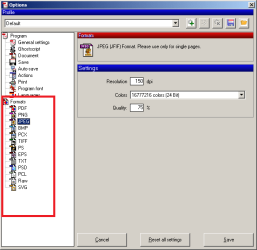
P1.png


However, I hesitate to suggest PDFCreator...
...because it is a pain to prevent extra junk/features from installing.
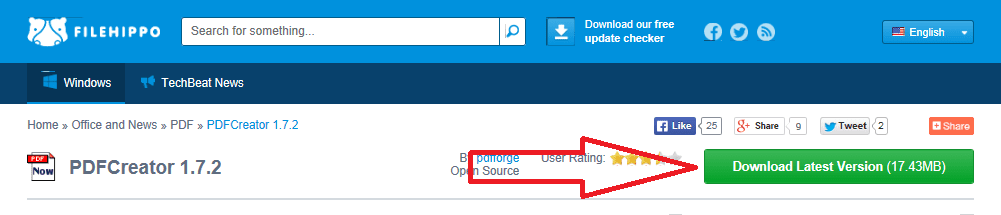
Download PDFCreator 1.7.2 - FileHippo.com

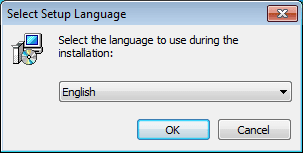
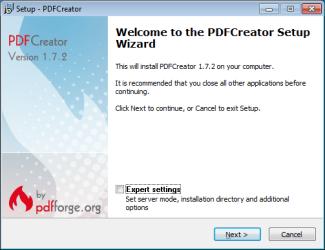
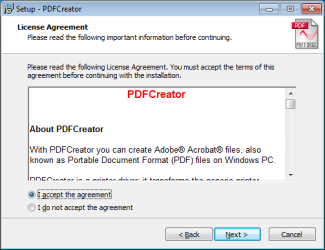
If you will follow these screenshots, then you should be safe on the installation:
P2.png


Select Run or Save or Save as...

P3.png


Deal with the User Account Control and OS security windows - if need be.
(not shown via screenshots)
P4.png

P5.png

P6.png


Remove every check - except the ones shown in the next two screenshots:
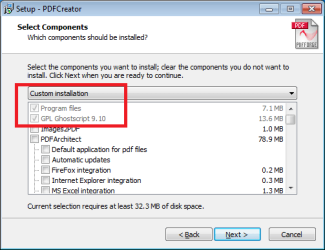
P7.png

P8.png


P9.png

After you click on Install (as shown above)...
...you may be offered junk (as shown below):

P10.png
I have moved the window to show you that this offer of junk is via a separate installer with its own window. Just click on Cancel to decline the junk. The other installer should continue.


Uncheck the option to Show help after setup.
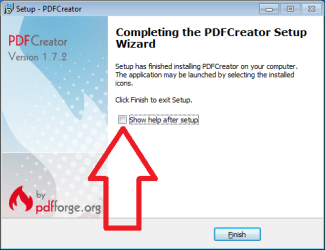
P11.png


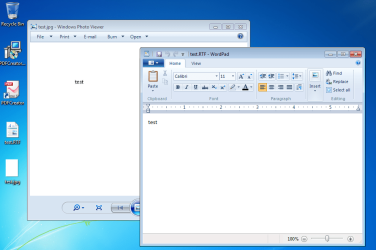
Now you are ready to "print" to jpg.

Open the RTF document in any app that can print.

You do not have to use WordPad like I do in these screenshots.

P12.png


You only need to do this step one time:

P13.png


You only need to do this step one time:

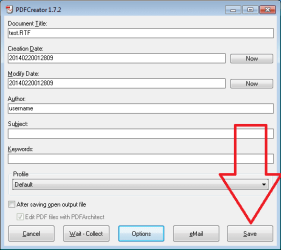
P14.png

P15.png

P16.png

P17.png


Edit:
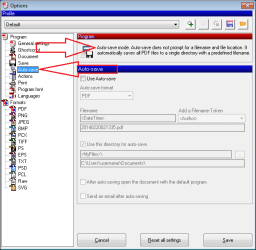
If you are going to print lots of documents, then it is worth your time to learn how to use the auto-save (batch-print) feature:

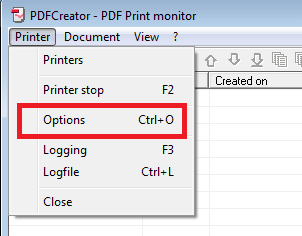
P18.png

P19.png

P20.png
 

My Computer My Computer

At a glance

W7 Pro SP1 64biti78GBIntel HD Graphics
Computer type
Laptop
Computer Manufacturer/Model Number
Employer provided Dell Latitude
OS
W7 Pro SP1 64bit
CPU
i7
Memory
8GB
Graphics Card(s)
Intel HD Graphics
Hard Drives
crappy SSD
Antivirus
Employer mandated Symantec Endpoint Protection
Browser
Pale Moon 64bit, IE11 64bit & Chrome 64bit
Thanks.
How do you get to that "OPTIONS" page?
I don't want to try the .pdf solution.
 

My Computer My Computer

At a glance

Windows 7 64 bit
Computer type
PC/Desktop
Computer Manufacturer/Model Number
e-machines
OS
Windows 7 64 bit
Browser
Firefox
In the string of screenshots, you should see where I said, "You only need to do this step one time:". That will take you to options.

Also, these two steps should get you there:

307289d1392884174t-changing-rtf-test-document-jpg-p18.png


307290d1392884174-changing-rtf-test-document-jpg-p19.png
 

My Computer My Computer

At a glance

W7 Pro SP1 64biti78GBIntel HD Graphics
Computer type
Laptop
Computer Manufacturer/Model Number
Employer provided Dell Latitude
OS
W7 Pro SP1 64bit
CPU
i7
Memory
8GB
Graphics Card(s)
Intel HD Graphics
Hard Drives
crappy SSD
Antivirus
Employer mandated Symantec Endpoint Protection
Browser
Pale Moon 64bit, IE11 64bit & Chrome 64bit
You said you hesitate to recommend PDF Creator, yet you just pointed me there.
Is there no other way>
 

My Computer My Computer

At a glance

Windows 7 64 bit
Computer type
PC/Desktop
Computer Manufacturer/Model Number
e-machines
OS
Windows 7 64 bit
Browser
Firefox
You said you hesitate to recommend PDF Creator, yet you just pointed me there.
Is there no other way>
I gave the reason why I was hesitant:
"...because it is a pain to prevent extra junk/features from installing."

Then I said:
"If you will follow these screenshots, then you should be safe on the installation:"

Even if you mess up during the installation, nothing that gets installed is malware. It is just junk that you do not need.


There are probably plenty of other ways to do what you want, but I don't know about them. I've used PDFCreator for many years now - so I've not had to ferret out any other ways to print to a file format.
 

My Computer My Computer

At a glance

W7 Pro SP1 64biti78GBIntel HD Graphics
Computer type
Laptop
Computer Manufacturer/Model Number
Employer provided Dell Latitude
OS
W7 Pro SP1 64bit
CPU
i7
Memory
8GB
Graphics Card(s)
Intel HD Graphics
Hard Drives
crappy SSD
Antivirus
Employer mandated Symantec Endpoint Protection
Browser
Pale Moon 64bit, IE11 64bit & Chrome 64bit
Back
Top