Solved Changing C Drive back to primary partition from logical

NICK21

New member
Local time
1:11 PM
Messages
4
Hi All,

I had intended to create a new partition by shrinking my C drive, to dual boot with the Windows 10 technical preview.

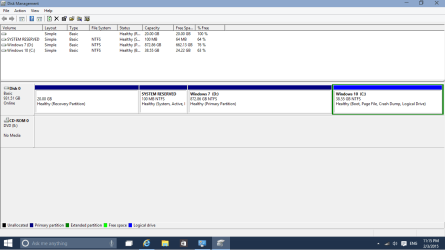
I appear to have changed my C drive from a primary to a logical partition. It still works perfectly and have no issues.

I did not install Windows 10 in case the partition created includes files necessary for Windows 7 to run.

Is it possible to delete the windows 10 partition I created then change the C drive back to primary without any data loss? From there could I also create a new logical partition or use the recovery partition to install Windows 10? Please see the attached picture for a preview of disk management which should clarify things further.

Thanks for all your help in advance!
 

Attachments

  • Untitled-1.jpg
    Untitled-1.jpg
    58 KB · Views: 0

My Computer My Computer

Computer type
PC/Desktop
Computer Manufacturer/Model Number
Packard Bell TS11HR
OS
Window 7 Home Premium 64 Bit
Memory
4GB
Hard Drives
1TB
Antivirus
Kaspersky
Browser
Chrome
Hi Nick21 and welcome to Seven Forums,

I believe you can just right-click on your Windows 10 partition and select delete volume. That will make it into unallocated space which you can then extend your C drive to.

Then, when you want to install Windows 10, follow this tutorial. Windows 10 - Dual Boot with Windows 7 or Windows 8 - Windows 10 Forums

-Chuck
 

My Computer My Computer

Computer type
PC/Desktop
Computer Manufacturer/Model Number
Self/ Custom Built
OS
Windows 10 Pro 64-bit
CPU
AMD FX-6300
Motherboard
MSI 970A-G43
Memory
Crucial Ballistix Sport 8 GB
Graphics Card(s)
Asus GTX 750ti
Monitor(s) Displays
HP w220
Screen Resolution
1650x1080
Hard Drives
Seagate 3.5" 7200 RPM Hybrid Drive
Crucial M500 240GB 2.5-inch Internal SSD
PSU
EVGA 500 Watt 80+ Certified ATX Power Supply
Case
Fractral Design Define R4
Cooling
Corsair Hydro Series H55 Quiet Edition Liquid CPU Cooler
Keyboard
CM Storm Devastator - Red
Mouse
Logitech Wireless Performance Mouse MX
Internet Speed
Really fast.
Antivirus
AVG
Browser
Firefox
Other Info
Logitech G230 Headset
You may have four total Primary partitions on an MBR drive, or 3 Primary and unlimited contiguous Logicals. So you could even change C back to Primary and keep everything else the way it is now.

There's nothing wrong with C being Logical since only the System partition must be Primary. I'd also not change the Recovery partition just to be safe.

If you'd like to change it around so the 10 partition is Logical you can do that with How to set partition as Primary or Logical with Partition Wizard.
 
Thanks for replying guys.

I'll try to change the windows 10 drive to logical tonight after work and make the c drive primary again using partition wizard.

I had tried with other software yesterday but the option was greyed out, hopefully it will be available in partition wizard.

If not I will delete the windows 10 drive and start from there.

I'll post the results later this evening to help others in similar situations.

Thanks!
 

My Computer My Computer

Computer type
PC/Desktop
Computer Manufacturer/Model Number
Packard Bell TS11HR
OS
Window 7 Home Premium 64 Bit
Memory
4GB
Hard Drives
1TB
Antivirus
Kaspersky
Browser
Chrome
Here's the results,

I have installed windows 10 on the logical drive fine and both os' are running great.

As you can see in the screenshot my windows 7 have now moved from the C drive to D drive and is no longer boot.

Is this a problem?

Thanks.
 

Attachments

  • Untitled.png
    Untitled.png
    18.2 KB · Views: 1

My Computer My Computer

Computer type
PC/Desktop
Computer Manufacturer/Model Number
Packard Bell TS11HR
OS
Window 7 Home Premium 64 Bit
Memory
4GB
Hard Drives
1TB
Antivirus
Kaspersky
Browser
Chrome
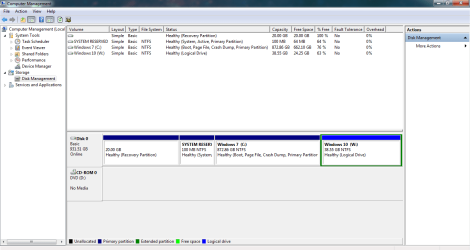
Ignore the last post, when logging back into windows 7 it is in fact still the C drive.

Here's a screenshot for full clarity should anyone need help on this in the future.

Thanks for the help guys!
 

Attachments

  • Untitled2.png
    Untitled2.png
    30.1 KB · Views: 0

My Computer My Computer

Computer type
PC/Desktop
Computer Manufacturer/Model Number
Packard Bell TS11HR
OS
Window 7 Home Premium 64 Bit
Memory
4GB
Hard Drives
1TB
Antivirus
Kaspersky
Browser
Chrome
All is well. :geek:

Enjoy the new OS, soon to be the worthy and logical successor to Windows 7! I've been using 10 for four months and never gone back.

When ready you can delete all the other partitions and do the vastly superior Clean Reinstall Windows 7 so you can enjoy native Win7 performance on that PC for the first time before you say goodbye to it some day soon. ;)
 
:ditto: :thumbsup:
 

My Computer My Computer

Computer type
PC/Desktop
Computer Manufacturer/Model Number
Self/ Custom Built
OS
Windows 10 Pro 64-bit
CPU
AMD FX-6300
Motherboard
MSI 970A-G43
Memory
Crucial Ballistix Sport 8 GB
Graphics Card(s)
Asus GTX 750ti
Monitor(s) Displays
HP w220
Screen Resolution
1650x1080
Hard Drives
Seagate 3.5" 7200 RPM Hybrid Drive
Crucial M500 240GB 2.5-inch Internal SSD
PSU
EVGA 500 Watt 80+ Certified ATX Power Supply
Case
Fractral Design Define R4
Cooling
Corsair Hydro Series H55 Quiet Edition Liquid CPU Cooler
Keyboard
CM Storm Devastator - Red
Mouse
Logitech Wireless Performance Mouse MX
Internet Speed
Really fast.
Antivirus
AVG
Browser
Firefox
Other Info
Logitech G230 Headset
Back
Top