
Changing Desktop Icons Font Color, Ultimate

yupp8

New member
Member
Local time
7:30 AM
Messages
40
Hey there,
I recently got the new windows 7 Ultimate
I'm Using DreamScene to change my Desktop Background Picture into a video,
it's a video in snow that repeats itself....
It's in snow so it is white, but now I can't see what is written under my desktop icons,
they are white....
So I tried the solution given here:
http://www.sevenforums.com/customization/8916-changing-font-icon-text.html
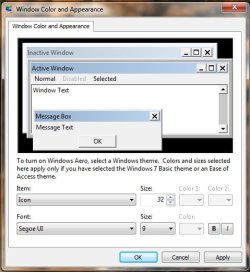
I used the tutorial, and got in here
but what do I do now? I cant change the font color....
help me please...
thanks in advance
 

Attachments
  • 28txqgy.jpg
    28txqgy.jpg
    37.2 KB · Views: 512

My Computer My Computer

At a glance

Windows 7
OS
Windows 7
Hey there,
I recently got the new windows 7 Ultimate
I'm Using DreamScene to change my Desktop Background Picture into a video,
it's a video in snow that repeats itself....
It's in snow so it is white, but now I can't see what is written under my desktop icons,
they are white....
So I tried the solution given here:
http://www.sevenforums.com/customization/8916-changing-font-icon-text.html
I used the tutorial, and got in here
but what do I do now? I cant change the font color....
help me please...
thanks in advance

Open the same window there but pick Desktop in items choose white in color 1 it should give you black text you will have to set your background again.
Hope it helps you.
 

My Computer My Computer

At a glance

Win 7 Pro x64 / Win 10 ProIntel(R) Core(TM) i7-3630QM CPU @ 2.40GHz12 GB(1) Intel(R) HD Graphics 4000 (2) NVIDIA GeFo...
Computer type
Laptop
Computer Manufacturer/Model Number
Sager NP9170
OS
Win 7 Pro x64 / Win 10 Pro
CPU
Intel(R) Core(TM) i7-3630QM CPU @ 2.40GHz
Motherboard
CLEVO P170EM
Memory
12 GB
Graphics Card(s)
(1) Intel(R) HD Graphics 4000 (2) NVIDIA GeForce GTX 675M
Sound Card
(1) Realtek High Definition Audio (2) Intel(R) Display Aud
Monitor(s) Displays
17.3
Screen Resolution
1920x1080
Hard Drives
(1) Samsung 860 EVO 500GB(OS) (1) Samsung 860 EVO 500GB(Data)
Keyboard
Backlite
Antivirus
MSE, Malwarebytes Pro
Browser
Firefox
Other Info
DESKTOP: Custom-built.
OS: Win 10 Pro x64.
CASE: Rosewill R5.
CPU: Intel I5 4670K CPU @ 3.40GHz.
CPU COOLER: Cool Master Hyper 212 EVO.
MOTHERBOARD: Asus Z87-A.
MEMORY: Kingston HyperX 2x4 GB.
GPU: Nvidia Geforce 650 TI.
PSU: Corsair TX750.
DRIVES: (1) Samsung 840 120 GB SSD (2) Western Digital blue 500 GB 7200 RPM.
Black or White or Drop Shadows

Yes, it seems windows automatically uses a text color that contrasts the desktop color, even if the desktop color is covered with wallpaper.

And, the only colors it uses are Black or White.

Another option might be to turn on the drop shadows, sometimes this shows better on light-colored fancy wallpaper than the black, even if it is enlarged and set to bold (which you might want to do, regardless of what color you choose).

You can turn on/off drop shadows at: System Properties/Advanced/Performance Options/Use drop shadows for icon labels on the desktop.
 

My Computer My Computer

At a glance

Windows 7
OS
Windows 7
Just wanted to thank you immensely for this information. I have issues with my eyesight that make it difficult to see the icon font with the shadow enabled. I looked everywhere (I thought...) to fix this and couldn't find anything that helped. This did it!!
THANK YOU!!!
 

My Computer My Computer

At a glance

Windows 7 ProIntel Pen D 2.80GHz/Dual CoreRAM 2 GINVIDIA GE FORCE 8400 GS
Computer Manufacturer/Model Number
Dell XPS 410
OS
Windows 7 Pro
CPU
Intel Pen D 2.80GHz/Dual Core
Motherboard
Dell Inc. 0WG855
Memory
RAM 2 G
Graphics Card(s)
INVIDIA GE FORCE 8400 GS
Monitor(s) Displays
Dell 17"
Hard Drives
2 RAID 500 G hard drives
Keyboard
Saitek
Mouse
Wacom Intuos3 Tablet with Pen
Internet Speed
DSL - I don't know
Back
Top