JavaScript is disabled. For a better experience, please enable JavaScript in your browser before proceeding.
You are using an out of date browser. It may not display this or other websites correctly.
You should upgrade or use an
alternative browser .
Changing taskbar font color / icons?
Currently my taskbar's font is uniform with the rest of my theme, however, I'd like to change it to a dark grey so that it doesn't stand out as much.
example
what i currently have
Any idea on how to do so? Also there is a way of renaming the tabs on the taskbar that'd be sweet as well.
I'd also like to make the icon transparent which appears to be harder than just changing the application icon to a transparent one because the icon still shows up for apps like winterfox.
Thanks.
~IE
Microsoft Windows 7 Ultimate 64-bit 7601 Mult... Intel(R) Core(TM) i7-3770K CPU @ 3.50GHz 32.00 GB NVIDIA GeForce GTX 680 PC/Desktop Microsoft Windows 7 Ultimate 64-bit 7601 Multiprocessor Free Service Pack 1 Intel(R) Core(TM) i7-3770K CPU @ 3.50GHz ASUSTeK COMPUTER INC. P8Z77-V 32.00 GB NVIDIA GeForce GTX 680 (1) NVIDIA High Definition Audio (2) High Definition Audio 1920 x 1080 x 32 bits (4294967296 colors) @ 60 Hz (1) Samsung SSD 840 Series ATA Device (2) ST2000DM001-9YN164 ATA Device
Confusion Therapist
Guru
Gold Member
VIP
TASKBAR.PNG
41 KB
· Views: 0
Desk1 7 Home Prem / Desk2 10 Pro / Main lap A... Desk1 i5 3750K / Laptop i7 GTX 860M / Desk2 i... Desk1 8GB (1866) / Desk2 16GB (1333) / Laptop... Desk 1& 2NVidia GTX 650 & Laptops on board Intel PC/Desktop Own build (new) Desk1 / Asus ROG Win 7 / Desk2 1st build Desk1 7 Home Prem / Desk2 10 Pro / Main lap Asus ROG 10 Pro 2 laptop Toshiba 7 Pro Asus P2520 7 & 10 Desk1 i5 3750K / Laptop i7 GTX 860M / Desk2 i5 2500 Desk1 Asus P877-V / Desk2 Gigabyte H67 UD3H / Laptop ? Desk1 8GB (1866) / Desk2 16GB (1333) / Laptop 8Gb DDR3 Desk 1& 2NVidia GTX 650 & Laptops on board Intel Desk 1 & 2 -XONAR DG Realtek High Def audio Laptop Desk 1 Benq HD 2450 / Desk2 Philips 24" / Laptop 17.5" 1920x1080 D1 & D2 & Laptop 1 Desk1 Samsung 120GB 830 SSD Desk 1 Corsair HX 1050/ Laptop ? / Desk 2 Corsair HX 650 Desk 1 Cooler HAF XM ? Toshiba laptop / Desk2 Coolermaster Fans on all Desk1 -2 Desk2 - all Coolermasters 5 Laptop ? Desk 1 MS Sidewinder X6 Desk 2 MS Sidewinder X 4 Desk 1&2 - Gigabyte MS 900 gamer - laptop - Logitec wireless ADSL2+ One other Desktop (tester) and spare Toshba laptop both with SSD's
New member
Thread Starter
Microsoft Windows 7 Ultimate 64-bit 7601 Mult... Intel(R) Core(TM) i7-3770K CPU @ 3.50GHz 32.00 GB NVIDIA GeForce GTX 680 PC/Desktop Microsoft Windows 7 Ultimate 64-bit 7601 Multiprocessor Free Service Pack 1 Intel(R) Core(TM) i7-3770K CPU @ 3.50GHz ASUSTeK COMPUTER INC. P8Z77-V 32.00 GB NVIDIA GeForce GTX 680 (1) NVIDIA High Definition Audio (2) High Definition Audio 1920 x 1080 x 32 bits (4294967296 colors) @ 60 Hz (1) Samsung SSD 840 Series ATA Device (2) ST2000DM001-9YN164 ATA Device
Confusion Therapist
Guru
Gold Member
VIP
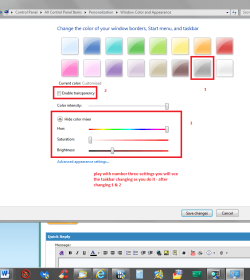
IC see my pic you can change the taskbar colour to just about everything and untick transparency. The icons I am not sure about
PS I meant to add could not see your pics so use this for sending pics
http://www.sevenforums.com/tutorials/9733-screenshots-files-upload-post-seven-forums.html
and / or this
How to Use the Snipping Tool in Vista
Hey thanks for the reply - the images are just links o-o, anyone should be able to click them.
Also I'm looking to change the font color of the taskbar, not the taskbar color itself; i'm fine with the current color. Thanks though.
Ok well I seem to have hit on your post with the wrong idea and just out of interest in the pic is a snip of what one of the links you sent look like.
IMG.PNG
15.1 KB
· Views: 2
Desk1 7 Home Prem / Desk2 10 Pro / Main lap A... Desk1 i5 3750K / Laptop i7 GTX 860M / Desk2 i... Desk1 8GB (1866) / Desk2 16GB (1333) / Laptop... Desk 1& 2NVidia GTX 650 & Laptops on board Intel PC/Desktop Own build (new) Desk1 / Asus ROG Win 7 / Desk2 1st build Desk1 7 Home Prem / Desk2 10 Pro / Main lap Asus ROG 10 Pro 2 laptop Toshiba 7 Pro Asus P2520 7 & 10 Desk1 i5 3750K / Laptop i7 GTX 860M / Desk2 i5 2500 Desk1 Asus P877-V / Desk2 Gigabyte H67 UD3H / Laptop ? Desk1 8GB (1866) / Desk2 16GB (1333) / Laptop 8Gb DDR3 Desk 1& 2NVidia GTX 650 & Laptops on board Intel Desk 1 & 2 -XONAR DG Realtek High Def audio Laptop Desk 1 Benq HD 2450 / Desk2 Philips 24" / Laptop 17.5" 1920x1080 D1 & D2 & Laptop 1 Desk1 Samsung 120GB 830 SSD Desk 1 Corsair HX 1050/ Laptop ? / Desk 2 Corsair HX 650 Desk 1 Cooler HAF XM ? Toshiba laptop / Desk2 Coolermaster Fans on all Desk1 -2 Desk2 - all Coolermasters 5 Laptop ? Desk 1 MS Sidewinder X6 Desk 2 MS Sidewinder X 4 Desk 1&2 - Gigabyte MS 900 gamer - laptop - Logitec wireless ADSL2+ One other Desktop (tester) and spare Toshba laptop both with SSD's