Gregrocker, now I got test confirmation about what you've been telling me all the time.
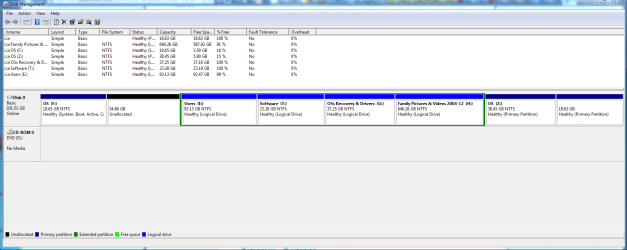
Today, 23 Dec. 2012 (@10 am), I've done the Clean Installation *again* but from within the booted Win7OEM version (which sits in partition Z in the screenshot). The Win7OEM saw its own system partition as C, and the left-most partition as F, so all was ok. I've then put in the 4GB USB Flash Drive (UFD) with the Win7 Clean Installation and started the setup.exe file, which sits in the UFD root directory. The Clean Installation went well and the new Win7 Clean Installation (Win7CI) was put in partition F (in the screenshot). After I booted into Win7CI, Win7CI saw its own system partition as F and the Win7OEM partition as drive C, so it was back to the old situation prior to 21 Dec. 2012. This confirms what you've been telling me.
Today, 23 Dec. 2012 (@5 pm), I did the whole Clean Installation all over *again* but this time after having booted form the Clean Installation (CI) UFD, so no booting from the internal system drive. I assume the running OS must be some kind of WinPE version. Result, when booting into Win7CI, Win7CI sees its own system partition with drive letter C, and the Win7OEM partition has the drive letter D, so all is ok again.
The "missing link" in this whole discussion is the following explanation: When booting from the CI UFD, a RAM disk is probably created which WinPE uses as system drive, and probably that RAM disk has drive letter X, so very different from C. I noticed there must be a RAM disk because the CI UFD also contains a "repair disk" and in that repair disk I went into the Command Prompt under the System Recovery Options. That Command Prompt window showed me X:\Sources> and that was the moment when I realized the Clean Installer sees its own (RAM) disk with drive letter X.
It is only now, after several reinstalls, trials, tests and of the discovery of the RAM disk's drive letter X, that my fuzzy mind fully comprehends (I hope) what you've been telling me all the time: by design the local system drive letter in the newly installed Win7 cannot be the same local system drive letter of the Win7 Installer's boot partition/drive. That is how it is by design (I think). Gregrocker, thanks for all the time you've put in clearing up my mind.
Still got second thoughts, though, about why the Win7(-Installer) designers took that decision about drive letter association. As the drive letter association is very much contextual, that is, done locally within the registry of the booted OS, any booted OS could in principle associate any drive letter to any visible partition (including its own system partition/volume) with the only and single condition that all visible partitions must have a different drive letter. Actually, I think it would've been a whole lot easier if the designers simple dropped any drive letter association in Win7.
Regards, j



 .
.


