Changing Fonts in Windows 7

steveluppino

New member
Local time
10:17 AM
Messages
22
Hi,

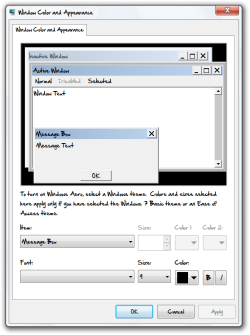
I am trying to change my fonts. I have changed all of them except for one (shown outlined in image).
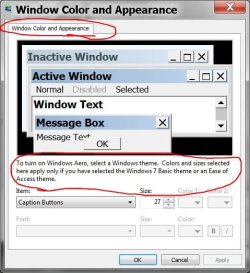
Metrics.jpg

It does not seem to be listed in the item list drop down panel. Does anyone know what its name is or where to find it? And does anyone know how to change the fonts in Windows Live Mail?

Thanks.
 

My Computer My Computer

Computer type
PC/Desktop
OS
windows 7

My Computer My Computer

Computer type
PC/Desktop
Computer Manufacturer/Model Number
n/a
OS
W7 Ultimate SP1, LM19.2 MATE, W10 Home 1703, W10 Pro 1703 VM, #All 64 bit
CPU
AMD Phenom II x6 1100T, 3.3 GHz
Motherboard
ASUS M4A88T-M/USB3 (AM3)
Memory
12GB DDR3 1333 G-Skill (4GB x 2), G-Skill (2GB x 2)
Graphics Card(s)
NVIDIA GeForce GTX 660
Sound Card
Realtek?
Monitor(s) Displays
Samsung S23B350
Screen Resolution
1920x1080
Hard Drives
WD Green 2TB (SATA), WD Green 3TB (SATA), WD Blue 4TB (SATA), WD Blue 6TB (SATA)
PSU
Cooler Master
Case
Antec GX300 Tower
Cooling
3x Antec TRICOOL 120mm Fans
Mouse
Wired Optical
Internet Speed
DSL
Antivirus
Avast
Browser
Pale Moon (64 bit)
Other Info
2018-12-27 Upgraded HDDs
2015-12-10 Upgraded case, graphics card, storage
2015-08-15 Upgraded motherboard & RAM
2015-07-15 Upgraded LM17.1 to LM17.2
Thanksfor your reply.

I looked at the tutorial but as it seems others have the smae problem with Windows 7. It doesn't fix all of them.
 

My Computer My Computer

Computer type
PC/Desktop
OS
windows 7
Sorry.
I had a similar issue with fonts, which couldn't be solved. :(
 

My Computer My Computer

Computer type
PC/Desktop
Computer Manufacturer/Model Number
n/a
OS
W7 Ultimate SP1, LM19.2 MATE, W10 Home 1703, W10 Pro 1703 VM, #All 64 bit
CPU
AMD Phenom II x6 1100T, 3.3 GHz
Motherboard
ASUS M4A88T-M/USB3 (AM3)
Memory
12GB DDR3 1333 G-Skill (4GB x 2), G-Skill (2GB x 2)
Graphics Card(s)
NVIDIA GeForce GTX 660
Sound Card
Realtek?
Monitor(s) Displays
Samsung S23B350
Screen Resolution
1920x1080
Hard Drives
WD Green 2TB (SATA), WD Green 3TB (SATA), WD Blue 4TB (SATA), WD Blue 6TB (SATA)
PSU
Cooler Master
Case
Antec GX300 Tower
Cooling
3x Antec TRICOOL 120mm Fans
Mouse
Wired Optical
Internet Speed
DSL
Antivirus
Avast
Browser
Pale Moon (64 bit)
Other Info
2018-12-27 Upgraded HDDs
2015-12-10 Upgraded case, graphics card, storage
2015-08-15 Upgraded motherboard & RAM
2015-07-15 Upgraded LM17.1 to LM17.2
Welcome to the Seven Forums

It can be done.
Window Color and Appearance.png

Backup the Registry 1st http://www.sevenforums.com/tutorials/4230-registry-backup-restore.html

Download the 2 .reg files below 1 to change the fonts the other is for restoring the fonts to default.

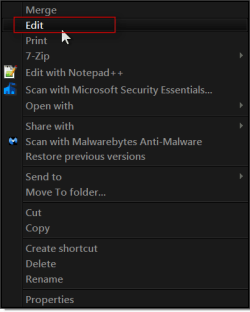
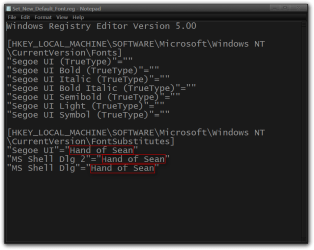
Right click on Set_New_Default_Font.reg and click on Edit, on the Open file box click Run, Notepad will open.
Edit the 3 Hand of Sean between the quotes marks highlighted in the screenshot to your font(make sure you have the font installed) and save it.
Program Manager.pngOpen File - Security Warning.png
Set_New_Default_Font.reg - Notepad.png

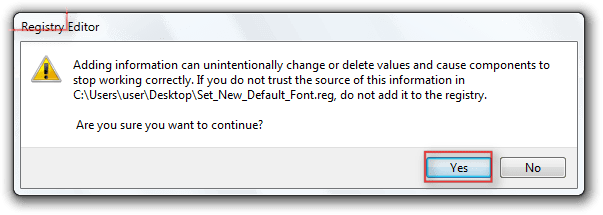
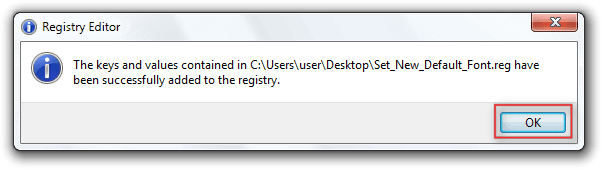
Double click on Set_New_Default_Font.reg if you get the UAC click on Continue, you will get the Registry Editor warning click Yes on the next windows click OK.
Registry Editor.pngRegistry Editor2.png

Reboot the PC

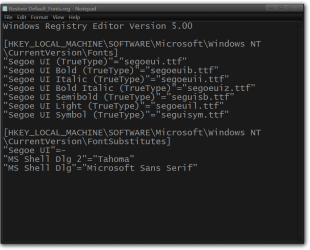
These screenshots show what changes are made to the Registry.

Default
Restore Default_Fonts.reg - Notepad.png

Changes
Set_New_Default_Font.reg - Notepad2.png


Jerry
 

Attachments

My Computer My Computer

Computer type
Laptop
Computer Manufacturer/Model Number
Sager NP9170
OS
Win 7 Pro x64 / Win 10 Pro
CPU
Intel(R) Core(TM) i7-3630QM CPU @ 2.40GHz
Motherboard
CLEVO P170EM
Memory
12 GB
Graphics Card(s)
(1) Intel(R) HD Graphics 4000 (2) NVIDIA GeForce GTX 675M
Sound Card
(1) Realtek High Definition Audio (2) Intel(R) Display Aud
Monitor(s) Displays
17.3
Screen Resolution
1920x1080
Hard Drives
(1) Samsung 860 EVO 500GB(OS) (1) Samsung 860 EVO 500GB(Data)
Keyboard
Backlite
Antivirus
MSE, Malwarebytes Pro
Browser
Firefox
Other Info
DESKTOP: Custom-built.
OS: Win 10 Pro x64.
CASE: Rosewill R5.
CPU: Intel I5 4670K CPU @ 3.40GHz.
CPU COOLER: Cool Master Hyper 212 EVO.
MOTHERBOARD: Asus Z87-A.
MEMORY: Kingston HyperX 2x4 GB.
GPU: Nvidia Geforce 650 TI.
PSU: Corsair TX750.
DRIVES: (1) Samsung 840 120 GB SSD (2) Western Digital blue 500 GB 7200 RPM.
Back
Top