Changing From Firefox To Cyberfox Help Request

huckflynn

New member
Local time
2:37 AM
Messages
8
The majority of my downloaded programs are for firefox. I changed over to "Cyberfox". How do i (import/export?) my programs, emails, icons etc. to the new cyberfox browser?
 

My Computer

Computer type
PC/Desktop
Computer Manufacturer/Model Number
Lenovo
OS
Windows 7 Home Premium
Firefox to Cyberfox

Well I use Cyberfox but ditched Firefox around two years ago so it's a long time since I transferred my FF profile to Cyberfox. What you do is run Profile Buddy:

https://8pecxstudios.com/Forums/viewtopic.php?f=5&t=350&sid=c6b23944694fdb9d1b8c6782a200852a

Watch the video!

What do you mean by import/ export emails? It's not an email client.

What do you mean by programs? If you mean add ons - Profile Buddy will take care of it.

If you want to manually install an add on from your old FF profile:

Launch Cyberfox then right click a blank area in the bar at the top of the screen and tick "Menu Bar"

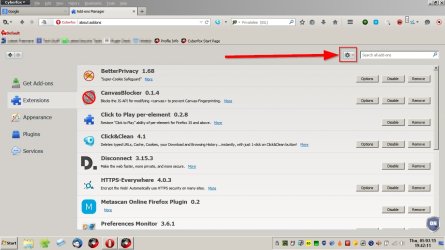
In the Menu Bar click Tools > Add Ons and click the "Gear" icon

Install Add On.jpg

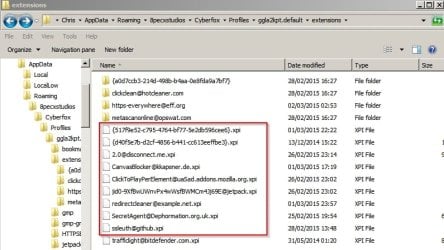
Select "Install Add On From File" and browse to your Firefox Profile and locate the .xpi file for your desired add on and click it to install in Cyberfox.

Extensions.jpg
 

My Computer

Computer type
Laptop
Computer Manufacturer/Model Number
ASUS
OS
Microsoft Windows 7 Home Premium 64-bit 7601 Multiprocessor Free Service Pack 1
CPU
AMD C-60 APU with Radeon(tm) HD Graphics
Motherboard
ASUSTeK COMPUTER INC. X501U
Memory
4.00 GB
Graphics Card(s)
AMD Radeon HD 6290 Graphics
Sound Card
(1) AMD High Definition Audio Device (2) Realtek High Defi
Screen Resolution
1366 x 768 x 32 bits (4294967296 colors) @ 60 Hz
Hard Drives
Hitachi HTS545050A7E380 SATA Disk Device
Antivirus
Comodo CIS & FW, SecureAplus App Whitelisting, Threatfire
Browser
Cyberfox 64bit, Opera 64bit, Airfox
Other Info
Spy-The-Spy, HitmanPro.Alert, Norton Connect Safe, MJRegWatcher, BitDefender TrafficLight, Voodoo Shield, Zemana AntiMalware
Back
Top