changing one drive letter all 3 partitions change to that drive letter

himansh

New member
Local time
3:31 PM
Messages
6
sir,

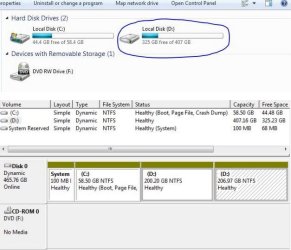
i have windows 7 desktop. there are some partition on it.but there is problem with these partition. All the three partition have the same drive letter.i attach a link showing the picture. all three partitions are dynamic , simple. if i open these drives only the contents of one drive are appeared. another two drive data are not shown in any manner.

i don't want to lose any data from any drive ......
please help me sir...
my windows is installed in c:\ drive which is also dynamic and there are no recent changes.only one change i did which is i shrink dynamic volume 50 GB from 206 GB and again mixed with 206 GB without allocating free space.

and only the c drive is on and d drive is off.but in my other desktop same configuration exist.
please help me...and please don't say change and remove drive letter...........waiting for response
 

Attachments
  • Capture.JPG
    Capture.JPG
    48.8 KB · Views: 34

My Computer My Computer

At a glance

windows 7 32 bit
Computer type
PC/Desktop
OS
windows 7 32 bit
First thing you're going to do is fill in the specs of the desktop whose snips you are showing us.

Then you're going to do the same with the second pc opening a second post with snips. Give it a different title like "Second pc with drive letters the same". Don't forget the snips.

You should not have dynamic disks in either machine. What did you do to accomplish this?

There exists a bevy of spectacular experts on this site that will be happy to help you. But give us ALL the info please.
 

My Computer My Computer

At a glance

W7 Home Premium 32bit
Computer Manufacturer/Model Number
8 home-builds from the 80's into 2004
OS
W7 Home Premium 32bit
What you have created is a "Spanned Volume" of those partitions, a feature of the Dynamic Disk System.

Pscowboy is right: you do not want to have your Windows machine set up with Dynamic Disks. They should be Basic Disks.

The subject is covered well here:
What is the Dynamic disk? Data recovery, backup and manage dynamic disk easily.

To correct this you first must work to back up your data. If you do not have a backup drive or external drive get one. While there are conversion options that can try and retain your data they can go wrong for several reasons.

Then you can do the conversion as explained here:
http://www.sevenforums.com/tutorials/26829-convert-dynamic-disk-basic-disk.html
 

My Computer My Computer

At a glance

Windows 7 64 Bit Home Premium SP1i7-3820GSkill F3-14900CL9Q - 16GBEVGA GeForce GTX660 - Driver 352.86
Computer type
PC/Desktop
Computer Manufacturer/Model Number
Home Built - Jan 2013
OS
Windows 7 64 Bit Home Premium SP1
CPU
i7-3820
Motherboard
Asus P9X79-PRO - Bios 4608
Memory
GSkill F3-14900CL9Q - 16GB
Graphics Card(s)
EVGA GeForce GTX660 - Driver 352.86
Sound Card
On board Realtek ALC898
Monitor(s) Displays
Acer S271HL
Screen Resolution
1920 x 1080
Hard Drives
#1- Samsung 840 Pro Series
#2- Western Digital WD1002FAEX Sata3 Black
#3- Western Digital WD1002FAEX Sata3 Black
PSU
Corsair CMPSU-850TX-V2 - 850 watt (by Seasonic)
Case
Corsair Obsidian 550D
Cooling
Standard 3 120mm case fans, Cooler Master Hyper 212 EVO
Keyboard
MS KC-0405
Mouse
Intellimouse 5-button
Internet Speed
56 Mbits/Sec (on a good day)
Antivirus
Avast & Malwarebytes
Browser
Firefox
Other Info
Asus DVD - DRW-24B1ST 24X
thanks sir ....i know that there should be basic disk. but the snips are real.....please tell me what kind of information you want.....the partition tool which showed in the link are not working.... partition tool says a error massage " partition wizard cannot convert the specific dynamic disk to basic disk.Because partition wizard cannot convert any dynamic volume type expect the simple and mirror volume."
 

My Computer My Computer

At a glance

windows 7 32 bit
Computer type
PC/Desktop
OS
windows 7 32 bit
I'm not sure. I've never seen that message before. It is because of the spanned volume. You need to Break the spanned volume (without losing data) before you can convert.

If you right click on the spanned volume, is there an option to "Break" it?

I've asked for more help.
 

My Computer My Computer

At a glance

Windows 7 64 Bit Home Premium SP1i7-3820GSkill F3-14900CL9Q - 16GBEVGA GeForce GTX660 - Driver 352.86
Computer type
PC/Desktop
Computer Manufacturer/Model Number
Home Built - Jan 2013
OS
Windows 7 64 Bit Home Premium SP1
CPU
i7-3820
Motherboard
Asus P9X79-PRO - Bios 4608
Memory
GSkill F3-14900CL9Q - 16GB
Graphics Card(s)
EVGA GeForce GTX660 - Driver 352.86
Sound Card
On board Realtek ALC898
Monitor(s) Displays
Acer S271HL
Screen Resolution
1920 x 1080
Hard Drives
#1- Samsung 840 Pro Series
#2- Western Digital WD1002FAEX Sata3 Black
#3- Western Digital WD1002FAEX Sata3 Black
PSU
Corsair CMPSU-850TX-V2 - 850 watt (by Seasonic)
Case
Corsair Obsidian 550D
Cooling
Standard 3 120mm case fans, Cooler Master Hyper 212 EVO
Keyboard
MS KC-0405
Mouse
Intellimouse 5-button
Internet Speed
56 Mbits/Sec (on a good day)
Antivirus
Avast & Malwarebytes
Browser
Firefox
Other Info
Asus DVD - DRW-24B1ST 24X
no sir there is no option to break ...
 

My Computer My Computer

At a glance

windows 7 32 bit
Computer type
PC/Desktop
OS
windows 7 32 bit
I have not been able to find anything that will allow you to break a spanned volume without losing your data.

It seems (to me) that this is your best (only?) option:

  • Backup your data from spanned volume(s) D: to another drive (external or another physical hard disk)
  • Once you have secured your data, then REMOVE (not Delete!) the spanned volume (this will delete all data in the volume!)
  • Once the spanned volume is removed then you should be able to convert with Partition Wizard without losing the OS on C:
EDIT: If you have PROGRAMS installed on D: then you may still be able to restore these installations from the backup on the new basic disk labeled D: as long as you make the conversion, create the basic volume D:, and copy everything back into D: before starting Windows.
If Windows starts and finds the programs missing then you would probably need to reinstall them all.
 

My Computer My Computer

At a glance

Windows 7 64 Bit Home Premium SP1i7-3820GSkill F3-14900CL9Q - 16GBEVGA GeForce GTX660 - Driver 352.86
Computer type
PC/Desktop
Computer Manufacturer/Model Number
Home Built - Jan 2013
OS
Windows 7 64 Bit Home Premium SP1
CPU
i7-3820
Motherboard
Asus P9X79-PRO - Bios 4608
Memory
GSkill F3-14900CL9Q - 16GB
Graphics Card(s)
EVGA GeForce GTX660 - Driver 352.86
Sound Card
On board Realtek ALC898
Monitor(s) Displays
Acer S271HL
Screen Resolution
1920 x 1080
Hard Drives
#1- Samsung 840 Pro Series
#2- Western Digital WD1002FAEX Sata3 Black
#3- Western Digital WD1002FAEX Sata3 Black
PSU
Corsair CMPSU-850TX-V2 - 850 watt (by Seasonic)
Case
Corsair Obsidian 550D
Cooling
Standard 3 120mm case fans, Cooler Master Hyper 212 EVO
Keyboard
MS KC-0405
Mouse
Intellimouse 5-button
Internet Speed
56 Mbits/Sec (on a good day)
Antivirus
Avast & Malwarebytes
Browser
Firefox
Other Info
Asus DVD - DRW-24B1ST 24X
i think after my so much try this is my last and final option.but there is a query how you know that it is spanned volume...how ever it shows it is simple volume.....
 

My Computer My Computer

At a glance

windows 7 32 bit
Computer type
PC/Desktop
OS
windows 7 32 bit
Look at your screenshot in the first post. In the lower portion of Disk Management it graphically shows the Volume setup. The first D: volume is 200.20 GB. The second is 206.97 GB. That totals 407.17 GB.

Now look at the top section of DM. It shows one D: volume of 407.17 GB. This proves that the two volumes are combined and treated as one spanned volume by the OS.
 

My Computer My Computer

At a glance

Windows 7 64 Bit Home Premium SP1i7-3820GSkill F3-14900CL9Q - 16GBEVGA GeForce GTX660 - Driver 352.86
Computer type
PC/Desktop
Computer Manufacturer/Model Number
Home Built - Jan 2013
OS
Windows 7 64 Bit Home Premium SP1
CPU
i7-3820
Motherboard
Asus P9X79-PRO - Bios 4608
Memory
GSkill F3-14900CL9Q - 16GB
Graphics Card(s)
EVGA GeForce GTX660 - Driver 352.86
Sound Card
On board Realtek ALC898
Monitor(s) Displays
Acer S271HL
Screen Resolution
1920 x 1080
Hard Drives
#1- Samsung 840 Pro Series
#2- Western Digital WD1002FAEX Sata3 Black
#3- Western Digital WD1002FAEX Sata3 Black
PSU
Corsair CMPSU-850TX-V2 - 850 watt (by Seasonic)
Case
Corsair Obsidian 550D
Cooling
Standard 3 120mm case fans, Cooler Master Hyper 212 EVO
Keyboard
MS KC-0405
Mouse
Intellimouse 5-button
Internet Speed
56 Mbits/Sec (on a good day)
Antivirus
Avast & Malwarebytes
Browser
Firefox
Other Info
Asus DVD - DRW-24B1ST 24X
thank you sir...............
 

My Computer My Computer

At a glance

windows 7 32 bit
Computer type
PC/Desktop
OS
windows 7 32 bit
The problem is that you converted your HD to Dynamic which is only meant to be used to span a partition across multiple HD's. Apparently you didn't see the warning message.

The solution to solve this non-destructively is to boot free Partition Wizard CD version 4.2 which is the last one which offers this as a free feature: pw422.zip ISO - Windows Live.

Download the ISO, rightclick to burn it to CD using Windows Image Burner, or use ImgBurn.

Boot CD. You will need to delete the extra partition(s) you created which tipped it to convert to Dynamic before it will convert back to Basic.

Then follow these video steps: How to convert dynamic disk to basic disk with Partition Wizard?

If Win7 will not start and you confirm it's been converted successfully, then confirm that the 100mb System Reserved partition (preferred if you have it) or C is Set Active partition -Partition Wizard Video Help, then run Startup Repair - Run up to 3 Separate Times.

After conversion if you want help adding a partition post back a screenshot of your maximized Disk Mgmt drive map with listings, using the Snipping Tool in Start Menu, attached using paper clip in Reply Box.
 
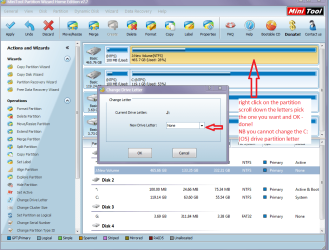
himansh and TV if all is needed is to change the partition label / letter that is easily done with Partition Wizard
Best Free Partition Manager Freeware and free partition magic for Windows 7, Windows 8, Windows Vista and Windows XP 32 bit & 64 bit. MiniTool Free Partition Manager Software Home Edition.

Open the wizard right click on the partition you want to rename go to change letter and scroll down the letter list and pick one hit OK and it changes automatically.

One thing you cannot do is change the C: drive partition letter see pic
 

Attachments

  • PPWW.PNG
    PPWW.PNG
    80.1 KB · Views: 1

My Computer My Computer

At a glance

Desk1 7 Home Prem / Desk2 10 Pro / Main lap A...Desk1 i5 3750K / Laptop i7 GTX 860M / Desk2 i...Desk1 8GB (1866) / Desk2 16GB (1333) / Laptop...Desk 1& 2NVidia GTX 650 & Laptops on board Intel
Computer type
PC/Desktop
Computer Manufacturer/Model Number
Own build (new) Desk1 / Asus ROG Win 7 / Desk2 1st build
OS
Desk1 7 Home Prem / Desk2 10 Pro / Main lap Asus ROG 10 Pro 2 laptop Toshiba 7 Pro Asus P2520 7 & 10
CPU
Desk1 i5 3750K / Laptop i7 GTX 860M / Desk2 i5 2500
Motherboard
Desk1 Asus P877-V / Desk2 Gigabyte H67 UD3H / Laptop ?
Memory
Desk1 8GB (1866) / Desk2 16GB (1333) / Laptop 8Gb DDR3
Graphics Card(s)
Desk 1& 2NVidia GTX 650 & Laptops on board Intel
Sound Card
Desk 1 & 2 -XONAR DG Realtek High Def audio Laptop
Monitor(s) Displays
Desk 1 Benq HD 2450 / Desk2 Philips 24" / Laptop 17.5"
Screen Resolution
1920x1080 D1 & D2 & Laptop 1
Hard Drives
Desk1 Samsung 120GB 830 SSD
Asus ROG 256GB 850 Pro SSD
Desk2 Samsung 840 256 SSD
Toshiba 120GB EVO
PSU
Desk 1 Corsair HX 1050/ Laptop ? / Desk 2 Corsair HX 650
Case
Desk 1 Cooler HAF XM ? Toshiba laptop / Desk2 Coolermaster
Cooling
Fans on all Desk1 -2 Desk2 - all Coolermasters 5 Laptop ?
Keyboard
Desk 1 MS Sidewinder X6 Desk 2 MS Sidewinder X 4
Mouse
Desk 1&2 - Gigabyte MS 900 gamer - laptop - Logitec wireless
Internet Speed
ADSL2+
Other Info
One other Desktop (tester) and spare Toshba laptop both with SSD's
Running Kaspersky 2016 ISS on all machines config'd identically
Logitec audio stereo systems on each machine (x3)
Canon MG5250MFC
Router/modem TP-Link running WPA2SK
himansh, Would you go into your bios and tell me what your sata controller is set to, Please. It should be set to either, IDE, AHCI or raid. If it is set to raid, that will be your problem. I may be able to help you break the raid volume if it is set to that. Please let us know, before making any changes.
 

My Computers My Computers

  • At a glance

    Windows 11 ProRyzen 9 5900X32GB G Skill DDR4-3600EVGA RTX 3080 FTW 3 Ultra
    Computer type
    PC/Desktop
    Computer Manufacturer/Model Number
    ALWAYS UNDER CONSTRUCTION
    OS
    Windows 11 Pro
    CPU
    Ryzen 9 5900X
    Motherboard
    Asus X570 Crosshair Viii Hero
    Memory
    32GB G Skill DDR4-3600
    Graphics Card(s)
    EVGA RTX 3080 FTW 3 Ultra
    Sound Card
    On Board/Sennheiser PC37X Headset
    Monitor(s) Displays
    3 X Asus 27"
    Screen Resolution
    2560x1440
    Hard Drives
    2 X 1 TB NVME drives
    PSU
    EVGA 850
    Case
    Phanteks Eclipse P400A
    Cooling
    EVGA 280 AIO
    Keyboard
    Logitech G510s/ Logitech G13
    Mouse
    Logitech G502
    Internet Speed
    24/1
    Antivirus
    ESET/MBAM Pro/SAS Pro
    Browser
    Chrome/ Firefox/ Edge
  • At a glance

    Windows 11 ProIntel Ultra 9 288V32 GB LPDDR5X 8533
    Computer type
    Laptop
    System Manufacturer/Model Number
    Dell 16 Plus
    OS
    Windows 11 Pro
    CPU
    Intel Ultra 9 288V
    Memory
    32 GB LPDDR5X 8533
    Monitor(s) Displays
    16" Mini-LED HDR600 Touch 90 Hz
    Screen Resolution
    2560X1600
    Hard Drives
    1 TB NVME
Back
Top