Solved Changing out of windows 7 basic colour scheme

Sorry bongo, its a desktop
-.- can i still find it on the PC itself?
Again, apologies of my amateur knowledge
 

My Computer My Computer

OS
Windows 7 Home premium 64bit
No need to be sorry will get there.
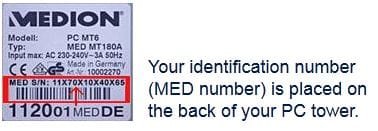
Okay now look on the tower for this sticker and see if you can give me the number highlighted in red.
Jerry
m.JPG
 

My Computer My Computer

Computer type
Laptop
Computer Manufacturer/Model Number
Sager NP9170
OS
Win 7 Pro x64 / Win 10 Pro
CPU
Intel(R) Core(TM) i7-3630QM CPU @ 2.40GHz
Motherboard
CLEVO P170EM
Memory
12 GB
Graphics Card(s)
(1) Intel(R) HD Graphics 4000 (2) NVIDIA GeForce GTX 675M
Sound Card
(1) Realtek High Definition Audio (2) Intel(R) Display Aud
Monitor(s) Displays
17.3
Screen Resolution
1920x1080
Hard Drives
(1) Samsung 860 EVO 500GB(OS) (1) Samsung 860 EVO 500GB(Data)
Keyboard
Backlite
Antivirus
MSE, Malwarebytes Pro
Browser
Firefox
Other Info
DESKTOP: Custom-built.
OS: Win 10 Pro x64.
CASE: Rosewill R5.
CPU: Intel I5 4670K CPU @ 3.40GHz.
CPU COOLER: Cool Master Hyper 212 EVO.
MOTHERBOARD: Asus Z87-A.
MEMORY: Kingston HyperX 2x4 GB.
GPU: Nvidia Geforce 650 TI.
PSU: Corsair TX750.
DRIVES: (1) Samsung 840 120 GB SSD (2) Western Digital blue 500 GB 7200 RPM.
14852010060115
 

My Computer My Computer

OS
Windows 7 Home premium 64bit
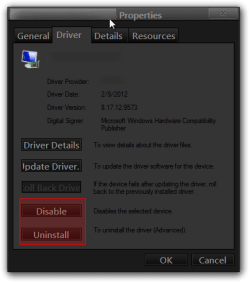
The Mirage Driver did not come with this PC. You may want to wait for your Dad, but I think I would make a http://www.sevenforums.com/tutorials/697-system-restore-point-create.html then Disable or uninstall the Mirage Driver from Device Manager and see if it works then, if not then you can use system restore if need.
_Properties.png


If you can list what is installed on this PC I can look if anything uses Mirage Drivers, go to Control Panel Programs and Features and make screenshots or a list.
Jerry
 

My Computer My Computer

Computer type
Laptop
Computer Manufacturer/Model Number
Sager NP9170
OS
Win 7 Pro x64 / Win 10 Pro
CPU
Intel(R) Core(TM) i7-3630QM CPU @ 2.40GHz
Motherboard
CLEVO P170EM
Memory
12 GB
Graphics Card(s)
(1) Intel(R) HD Graphics 4000 (2) NVIDIA GeForce GTX 675M
Sound Card
(1) Realtek High Definition Audio (2) Intel(R) Display Aud
Monitor(s) Displays
17.3
Screen Resolution
1920x1080
Hard Drives
(1) Samsung 860 EVO 500GB(OS) (1) Samsung 860 EVO 500GB(Data)
Keyboard
Backlite
Antivirus
MSE, Malwarebytes Pro
Browser
Firefox
Other Info
DESKTOP: Custom-built.
OS: Win 10 Pro x64.
CASE: Rosewill R5.
CPU: Intel I5 4670K CPU @ 3.40GHz.
CPU COOLER: Cool Master Hyper 212 EVO.
MOTHERBOARD: Asus Z87-A.
MEMORY: Kingston HyperX 2x4 GB.
GPU: Nvidia Geforce 650 TI.
PSU: Corsair TX750.
DRIVES: (1) Samsung 840 120 GB SSD (2) Western Digital blue 500 GB 7200 RPM.
OK, dad came home today, and i un installed mirage. Rebooted PC and working (except login screen which is still different colour) but apart from that, thanks very much :D.
 

My Computer My Computer

OS
Windows 7 Home premium 64bit
You're Welcome
 

My Computer My Computer

Computer type
Laptop
Computer Manufacturer/Model Number
Sager NP9170
OS
Win 7 Pro x64 / Win 10 Pro
CPU
Intel(R) Core(TM) i7-3630QM CPU @ 2.40GHz
Motherboard
CLEVO P170EM
Memory
12 GB
Graphics Card(s)
(1) Intel(R) HD Graphics 4000 (2) NVIDIA GeForce GTX 675M
Sound Card
(1) Realtek High Definition Audio (2) Intel(R) Display Aud
Monitor(s) Displays
17.3
Screen Resolution
1920x1080
Hard Drives
(1) Samsung 860 EVO 500GB(OS) (1) Samsung 860 EVO 500GB(Data)
Keyboard
Backlite
Antivirus
MSE, Malwarebytes Pro
Browser
Firefox
Other Info
DESKTOP: Custom-built.
OS: Win 10 Pro x64.
CASE: Rosewill R5.
CPU: Intel I5 4670K CPU @ 3.40GHz.
CPU COOLER: Cool Master Hyper 212 EVO.
MOTHERBOARD: Asus Z87-A.
MEMORY: Kingston HyperX 2x4 GB.
GPU: Nvidia Geforce 650 TI.
PSU: Corsair TX750.
DRIVES: (1) Samsung 840 120 GB SSD (2) Western Digital blue 500 GB 7200 RPM.
I know this thread is 453 days old, but I had the issue too, and my fix was simple:

- Control Panel\All Control Panel Items\Personalization
- Select a preexisting Aero Theme. This restored my Aero settings
- I reselected my previous theme. I stayed Aero. No longer under Basic Color settings.

So this might help some poor soul like me who faced that issue!

 

My Computer My Computer

Computer type
PC/Desktop
OS
WIn 7 64 Bits Professionnal
I know this thread is 453 days old, but I had the issue too, and my fix was simple:

- Control Panel\All Control Panel Items\Personalization
- Select a preexisting Aero Theme. This restored my Aero settings
- I reselected my previous theme. I stayed Aero. No longer under Basic Color settings.

So this might help some poor soul like me who faced that issue!

This worked for me. I have a game that I play that switches to Basic Color Scheme and doesn't like to switch back to Aero for some odd reason.

This is what I do:

  1. Right-click somewhere on the desktop
  2. Select Personalize
  3. Choose any Aero theme and let it do its thing
  4. Then select the theme I normally use

Kicks Aero back on and all is good. Thanks to Vaixe for the tip!
 

My Computer My Computer

OS
Windows 7 Ultimate x64
CPU
Dual Core 2.6ghz
Memory
4gb
Graphics Card(s)
Nvidia GeForce 9800gt
Monitor(s) Displays
2x19" 1x40"
Hard Drives
2x1tb, 2x500gb
Back
Top