- Local time
- 7:10 AM
- Messages
- 35,002
Hi !
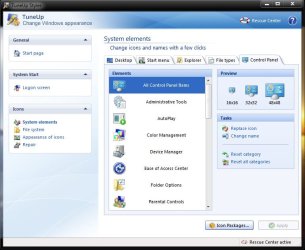
I want to change all my system icons to token icon ( Token by ~brsev on deviantART ). I dont want to use iconpackager, because I have some bitter experience with it in windows 7. Generally I use TuneUp utilities to change icons, but for all the system icons , it will consume a huge time. Is there any shortcut to do that ?
I want to change all my system icons to token icon ( Token by ~brsev on deviantART ). I dont want to use iconpackager, because I have some bitter experience with it in windows 7. Generally I use TuneUp utilities to change icons, but for all the system icons , it will consume a huge time. Is there any shortcut to do that ?
My Computer
- Computer type
- PC/Desktop
- Computer Manufacturer/Model Number
- Self Assembled
- OS
- Microsoft Windows 10 Pro Insider Preview 64-bit
- CPU
- Intel(R) Core(TM) i3-4130 CPU @ 3.40GHz
- Motherboard
- Gigabyte Technology Co., Ltd. B85M-D3H
- Memory
- Corsair Vengence 4GB x2 (8.00GB Dual-Channel DDR3 @ 798MHz)
- Graphics Card(s)
- 2047MB GeForce GTS 450 (ZOTAC International)
- Sound Card
- Onboard (Realtek High Definition Audio)
- Monitor(s) Displays
- LG Flatron E2040T
- Screen Resolution
- 1600x900
- Hard Drives
- Western Digital 1 TB
Seagate 500 GB
- PSU
- Corsair VS550
- Case
- Cooler Master K380
- Cooling
- Cooler Master Seidon 120V Plus
- Keyboard
- Logitech MK260r
- Mouse
- Logitech MK260r
- Internet Speed
- PMPL Broadband
- Antivirus
- Windows Defender + MBAM
- Browser
- Firefox
- Other Info
- Dell Studio 15" Laptop

 The only way to change a system icon is by creating a program shortcut 1st on your desktop. Then right click on it, navigate to properties. Under the "Shortcut" tab, click on "change icon". Look for the icon you wish to replace with. Click apply then Ok.