Solved Changing System Reserved information in Disk Management

mysterygurgle

New member
Local time
2:17 AM
Messages
5
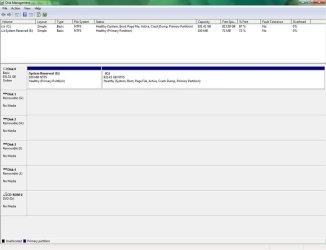
Hello all. I have recently done a repair install to fix an issue with Windows Media Player. But before that, I had changed the C drive or partition to active, and have read just now that the system reserved part should be marked active.
Untitled.jpg

Can I switch it back to active without anything bad happening to the computer? Does anything else need to be in the parentheses besides "Primary Partition" and "Active"?
 

My Computer My Computer

Computer type
PC/Desktop
Computer Manufacturer/Model Number
Dell XPS 8300
OS
Windows 7 Home Premium 64 bit
CPU
Intel Core i7-2600 CPU @ 3.40 GHz
Memory
8GB
Graphics Card(s)
Nvidia GeForce GT 530
Monitor(s) Displays
Dell 17" LCD
Screen Resolution
1280 x 1024
Hard Drives
1TB Western Digital
Antivirus
McAfee & Malwarebytes
Browser
Chrome
Does this computer boot and run as it should? If so I wouldn't change anything. Your repair and install might of moved your MBR Master Boot Record to your C drive.
 

My Computer My Computer

Computer type
PC/Desktop
Computer Manufacturer/Model Number
Home made Desktop
OS
Windows 10 Pro. 64/ version 1709 Windows 7 Pro/64
CPU
Intel i7-6800K @ 4.3
Motherboard
ASUS X-99 Deluxe II
Memory
Corsair Platinum 16 gig @2400
Graphics Card(s)
EVGA GTX 1070 OC
Monitor(s) Displays
Asus 27" LED LCD/VE278Q
Screen Resolution
1920-1080 or 1280-720 HDMI
Hard Drives
INTEL SSD 730-240 Gb Sata 3.0/
PSU
EVGA Platium 1200W
Case
Phanteks Luxe Tempered Glass 8 fans/ one radiator
Cooling
XSPC/ Water Cooled CPU
Keyboard
Das 4 Professional
Mouse
Logitech M705/MX Anywhere 2-S
Internet Speed
100 mbits
Antivirus
Microsoft Security Essentials/ Malwarebytes Premium 3.0/ SAS
Browser
I.E. 11 default/Firefox/ ISP Time Warner Cable/Spectrum
Other Info
LG BluRay Burner/
Sound system-KLipsch-THX/
Icy Dock ssd Hot Swap bays.
Hi,

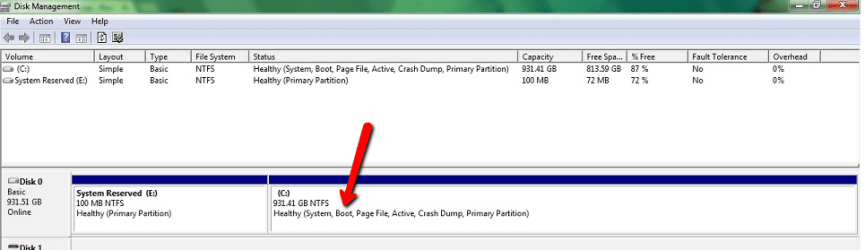
You don't need to do anything since the boot files are already on the C: (note the partition shows the word BOOT).

cap.png

If you have no need for OEM recovery tools or Bitlocker, you can remove the System Reserved partition, and then resize C: into the un-allocated space.

Regards,
Golden
 
Last edited:

My Computer My Computer

Computer type
PC/Desktop
Computer Manufacturer/Model Number
Golden Mk. I.4
OS
Windows 10 Pro x64 ; Xubuntu x64
CPU
Intel i7 860 @ 2.80 GHz O/C'ed to 4.0GHz
Motherboard
Gigabyte P55A-UD3R Rev.1. Award BIOS F13
Memory
16GB Corsair Vengance DDR3 @ 661 MHz Dual Channel (9-9-9-24)
Graphics Card(s)
EVGA NVidia GTX 560 1024MB
Sound Card
Realtek Integrated
Monitor(s) Displays
Dual Samsung SyncMaster 2494HS
Screen Resolution
1920*1080 and 1920*1080
Hard Drives
1*Samsung 840 EVO 120GB SSD;
1*OCZ Vertex 2 60GB SSD;
2*Samsung F3 SpinPoint 1TB in RAID0;
1*Samsung F1 SpinPoint 1TB;
2*Western Digital 1TB External USB 3.0
1*Western Digital 500GB External USB 3.0
1*Seagate 500GB External USB 2.0
PSU
Thermaltake ToughPower QFan 750W
Case
Thermaltake Element S VK60001W2Z
Cooling
Corsair H60 Water Cooling, 2*230mm and 2*80mm case fans
Keyboard
Logitech G110
Mouse
Logitech MX518
You don't need to do anything since the boot files are already on the C: (note the partition shows the word BOOT).

Microsoft likes confusion :) "Boot" means that here lies Windows. The actual startup/boot files are on the "system" partition - which happens to be the same volume in this case.
 

My Computer My Computer

OS
Windows
Why would you mark C Active? Were you playing?

System Reserved should boot if you switch the Active flag back to it since it already contains the boot files you unnecessarily also wrote to C during the Repairs.
 
Sorry I forgot to say, if you don't already know, that I am not very computer-literate. I try to fix my computer from what I read online since sometimes my computer's manufacturer does not give much help.

Layback Bear, yes the computer boots and runs as it should. I just would like to have the computer back to how it was before or how it should be.

Golden, can I still use system restore if I didn't have the OEM recovery tools?

gregrocker, I guess I was playing, in order to soon fix WMP, which did not work until I did the repair install after that then solved my problem.

Would anyone recommend me marking System Reserved Active, removing System Reserved partition and resizing C:, or leaving it as is? Or anything I didn't mention?

Thank you all for the replies.
 

My Computer My Computer

Computer type
PC/Desktop
Computer Manufacturer/Model Number
Dell XPS 8300
OS
Windows 7 Home Premium 64 bit
CPU
Intel Core i7-2600 CPU @ 3.40 GHz
Memory
8GB
Graphics Card(s)
Nvidia GeForce GT 530
Monitor(s) Displays
Dell 17" LCD
Screen Resolution
1280 x 1024
Hard Drives
1TB Western Digital
Antivirus
McAfee & Malwarebytes
Browser
Chrome
If you want it back to the way it was, then mark System Reserved Active in Disk Mgmt, but first have your Win7 DVD or http://www.sevenforums.com/performance-maintenance/51100-repair-cd-system-repair-disk.html standing by so if it doesn't boot you can run http://www.sevenforums.com/tutorials/105541-startup-repair-run-3-separate-times.html, and if that fails you can move the Active flag back to C using Option Two in http://www.sevenforums.com/tutorials/71432-partition-mark-active.html and run Repairs there also if necessary.

If you decide you want to leave it as it is, that's fine too.

I hope this is a lesson that you can't expect Win7 to endure random reckless acts. Now that you know we are here and can help, always ask us first for whatever you'd like to do. For example, you can practice and gain more knowledge about your PC working through these simple http://www.sevenforums.com/tutorials/220165-troubleshooting-steps-windows-7-a.html to check everything over.
 
mysterygurgle you say you are not computer literate. That is okay. I'm not the sharpest knife in the kitchen either. The good people here can work most people through these kinds of things if they can follow instruction. We like helping people. If you feel comfortable doing as greg has posted in # 7 it will work but it can be some what complicated to some. Read through the suggestions and methods.
Please let us know what you decide and always feel free to ask for help and information.
 

My Computer My Computer

Computer type
PC/Desktop
Computer Manufacturer/Model Number
Home made Desktop
OS
Windows 10 Pro. 64/ version 1709 Windows 7 Pro/64
CPU
Intel i7-6800K @ 4.3
Motherboard
ASUS X-99 Deluxe II
Memory
Corsair Platinum 16 gig @2400
Graphics Card(s)
EVGA GTX 1070 OC
Monitor(s) Displays
Asus 27" LED LCD/VE278Q
Screen Resolution
1920-1080 or 1280-720 HDMI
Hard Drives
INTEL SSD 730-240 Gb Sata 3.0/
PSU
EVGA Platium 1200W
Case
Phanteks Luxe Tempered Glass 8 fans/ one radiator
Cooling
XSPC/ Water Cooled CPU
Keyboard
Das 4 Professional
Mouse
Logitech M705/MX Anywhere 2-S
Internet Speed
100 mbits
Antivirus
Microsoft Security Essentials/ Malwarebytes Premium 3.0/ SAS
Browser
I.E. 11 default/Firefox/ ISP Time Warner Cable/Spectrum
Other Info
LG BluRay Burner/
Sound system-KLipsch-THX/
Icy Dock ssd Hot Swap bays.
Thank you gregrocker, Layback Bear, and everyone else. I decided to mark System Reserved back to Active with system repair disk standing by and it turned out to boot up fine without having to use the disk. I ran startup repair 3 separate times anyway(maybe not a good idea) and still, everything was fine. I will be more careful next time. :o
 

My Computer My Computer

Computer type
PC/Desktop
Computer Manufacturer/Model Number
Dell XPS 8300
OS
Windows 7 Home Premium 64 bit
CPU
Intel Core i7-2600 CPU @ 3.40 GHz
Memory
8GB
Graphics Card(s)
Nvidia GeForce GT 530
Monitor(s) Displays
Dell 17" LCD
Screen Resolution
1280 x 1024
Hard Drives
1TB Western Digital
Antivirus
McAfee & Malwarebytes
Browser
Chrome
mysterygurgle I'm glad you got things the way you want them. Good job.
Remember you don't have to have a problem to come back to Forum. Just reading through other peoples post and our Tutorials can be a learning experience.
Happy computing.
 

My Computer My Computer

Computer type
PC/Desktop
Computer Manufacturer/Model Number
Home made Desktop
OS
Windows 10 Pro. 64/ version 1709 Windows 7 Pro/64
CPU
Intel i7-6800K @ 4.3
Motherboard
ASUS X-99 Deluxe II
Memory
Corsair Platinum 16 gig @2400
Graphics Card(s)
EVGA GTX 1070 OC
Monitor(s) Displays
Asus 27" LED LCD/VE278Q
Screen Resolution
1920-1080 or 1280-720 HDMI
Hard Drives
INTEL SSD 730-240 Gb Sata 3.0/
PSU
EVGA Platium 1200W
Case
Phanteks Luxe Tempered Glass 8 fans/ one radiator
Cooling
XSPC/ Water Cooled CPU
Keyboard
Das 4 Professional
Mouse
Logitech M705/MX Anywhere 2-S
Internet Speed
100 mbits
Antivirus
Microsoft Security Essentials/ Malwarebytes Premium 3.0/ SAS
Browser
I.E. 11 default/Firefox/ ISP Time Warner Cable/Spectrum
Other Info
LG BluRay Burner/
Sound system-KLipsch-THX/
Icy Dock ssd Hot Swap bays.
Back
Top