Changing the cursor colour in Windows Live Mail

olddog1

New member
Local time
10:06 AM
Messages
2
When using WLM on our Dell, Windows 7, 64 bit system the cursor and all border line colours are displayed in a very pale blue colour. In particular, it is hard to see the cursor at times. Is there an easy way to alter this cursor from a pale blue to a black colour in Windows live mail? Can you also change the border line colours? Thank you.
 

My Computer My Computer

OS
windows 7 64 bit
Options/Compose Tab/Compose Font/"Font Settings"-Button. One of the font settings is the color.
 

My Computer My Computer

Computer type
PC/Desktop
Computer Manufacturer/Model Number
OQO 2+
OS
Windows 8 Pro w/MC 32-bit
CPU
Intel Atom 1.86 GHz
Motherboard
OQO 2+
Memory
2 GB
Graphics Card(s)
Intel GMA 500
Sound Card
IDT
Monitor(s) Displays
LCD
Screen Resolution
800 x 480 (portable) 1280 x 1024 (docked)
Hard Drives
64 GB SSD
PSU
9 Ah Battery (portable) or OQO Brick (docked)
Case
Shirt Pocket Sized
Cooling
Tiny Fan
Keyboard
Slide out (portable) DiNovo Edge (docked)
Mouse
Eraser head (portable) Logitech Bluetooth (docked)
Internet Speed
WWAN or 802.11G (portable) T1 (docked)
Browser
IE 10
Other Info
DVD-RW OQO Docking Station
Thank you for the reply. I checked that through but it seems the font settings there apply to mail or news with the ability to alter only the Font / Style / Size that are in use. It is the actual cursor colour that we would like to be able to adjust if thats at all possible. I note too that it is on the address bar area where the cursor appears in the light blue colour but that it changes to black when you come down to the text area..
 
Last edited:

My Computer My Computer

OS
windows 7 64 bit
...Is there an easy way to alter this cursor from a pale blue to a black colour in Windows live mail? Can you also change the border line colours?...
In my version of WLM the cursor is black (and I agree that the color is the same no matter what the font color is). Not sure what you mean by "boarder line". I did notice that the vertical lines separating different sections of the main WLM window and the column headers are very faint until you scroll over them when they glow brighter in the same color as the chosen color theme for WLM.

What color is the cursor in Notepad, Wordpad, or your browser when filling in a form?

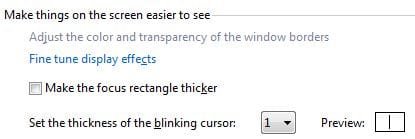
You might try Control Panel/Ease of Access Center:
 

Attachments

  • Cursor Adjust.JPG
    Cursor Adjust.JPG
    15.5 KB · Views: 5

My Computer My Computer

Computer type
PC/Desktop
Computer Manufacturer/Model Number
OQO 2+
OS
Windows 8 Pro w/MC 32-bit
CPU
Intel Atom 1.86 GHz
Motherboard
OQO 2+
Memory
2 GB
Graphics Card(s)
Intel GMA 500
Sound Card
IDT
Monitor(s) Displays
LCD
Screen Resolution
800 x 480 (portable) 1280 x 1024 (docked)
Hard Drives
64 GB SSD
PSU
9 Ah Battery (portable) or OQO Brick (docked)
Case
Shirt Pocket Sized
Cooling
Tiny Fan
Keyboard
Slide out (portable) DiNovo Edge (docked)
Mouse
Eraser head (portable) Logitech Bluetooth (docked)
Internet Speed
WWAN or 802.11G (portable) T1 (docked)
Browser
IE 10
Other Info
DVD-RW OQO Docking Station
Back
Top