Changing the Recycle Bin Delete Confirmation Message.

Golbez

New member
Local time
7:14 AM
Messages
12
The standard message is,

"Are you sure you want to permanently delete this (folder/file)?"

I'd like to change it to something else, like "Delete this junk?" etc. Can this happen? I've got a good theme going and you'd make me very happy! :)
 

My Computer My Computer

OS
Windows 7 Home Premium
That is in the shell32.dll.mui in C:\Windows\System32\en-US and if you are using 64 bit it's in both C:\Windows\System32\en-US and C:\Windows\SysWOW64\en-US

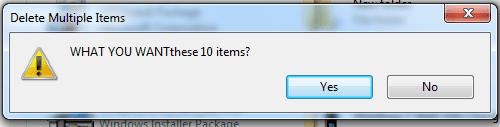
I searched for Are you sure you want to permanently delete (found it 9 times)and replaced it with WHAT YOU WANT and got this (I forgot a space). You will still get a items count.

Capture2.PNG

Use this http://www.sevenforums.com/tutorial...ange-descriptive-text-pop-up-information.html to change it.

Jerry
 

My Computer My Computer

Computer type
Laptop
Computer Manufacturer/Model Number
Sager NP9170
OS
Win 7 Pro x64 / Win 10 Pro
CPU
Intel(R) Core(TM) i7-3630QM CPU @ 2.40GHz
Motherboard
CLEVO P170EM
Memory
12 GB
Graphics Card(s)
(1) Intel(R) HD Graphics 4000 (2) NVIDIA GeForce GTX 675M
Sound Card
(1) Realtek High Definition Audio (2) Intel(R) Display Aud
Monitor(s) Displays
17.3
Screen Resolution
1920x1080
Hard Drives
(1) Samsung 860 EVO 500GB(OS) (1) Samsung 860 EVO 500GB(Data)
Keyboard
Backlite
Antivirus
MSE, Malwarebytes Pro
Browser
Firefox
Other Info
DESKTOP: Custom-built.
OS: Win 10 Pro x64.
CASE: Rosewill R5.
CPU: Intel I5 4670K CPU @ 3.40GHz.
CPU COOLER: Cool Master Hyper 212 EVO.
MOTHERBOARD: Asus Z87-A.
MEMORY: Kingston HyperX 2x4 GB.
GPU: Nvidia Geforce 650 TI.
PSU: Corsair TX750.
DRIVES: (1) Samsung 840 120 GB SSD (2) Western Digital blue 500 GB 7200 RPM.
Excellent. Thanks! Follow-up question re:item count. Can I change the text "items" in, for example "...permanently delete these 9 items?"
 

My Computer My Computer

OS
Windows 7 Home Premium
I will have a look and see later.

Jerry
 

My Computer My Computer

Computer type
Laptop
Computer Manufacturer/Model Number
Sager NP9170
OS
Win 7 Pro x64 / Win 10 Pro
CPU
Intel(R) Core(TM) i7-3630QM CPU @ 2.40GHz
Motherboard
CLEVO P170EM
Memory
12 GB
Graphics Card(s)
(1) Intel(R) HD Graphics 4000 (2) NVIDIA GeForce GTX 675M
Sound Card
(1) Realtek High Definition Audio (2) Intel(R) Display Aud
Monitor(s) Displays
17.3
Screen Resolution
1920x1080
Hard Drives
(1) Samsung 860 EVO 500GB(OS) (1) Samsung 860 EVO 500GB(Data)
Keyboard
Backlite
Antivirus
MSE, Malwarebytes Pro
Browser
Firefox
Other Info
DESKTOP: Custom-built.
OS: Win 10 Pro x64.
CASE: Rosewill R5.
CPU: Intel I5 4670K CPU @ 3.40GHz.
CPU COOLER: Cool Master Hyper 212 EVO.
MOTHERBOARD: Asus Z87-A.
MEMORY: Kingston HyperX 2x4 GB.
GPU: Nvidia Geforce 650 TI.
PSU: Corsair TX750.
DRIVES: (1) Samsung 840 120 GB SSD (2) Western Digital blue 500 GB 7200 RPM.
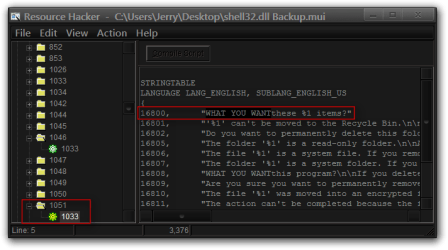
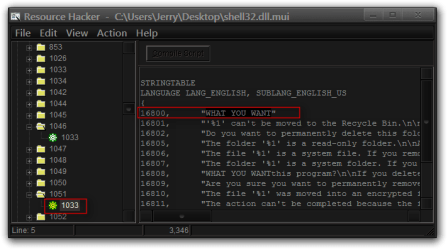
Look at screenshots for location, change anything between the " " I removed these %1 items and when I tested all the was shown was WHAT YOU WANT if you want the count # leave %1

Jerry
Resource Hacker  -  CUsersJerryDesktopshell32.dll Backup.mui.png

Resource Hacker  -  CUsersJerryDesktopshell32.dll.mui.png
 

My Computer My Computer

Computer type
Laptop
Computer Manufacturer/Model Number
Sager NP9170
OS
Win 7 Pro x64 / Win 10 Pro
CPU
Intel(R) Core(TM) i7-3630QM CPU @ 2.40GHz
Motherboard
CLEVO P170EM
Memory
12 GB
Graphics Card(s)
(1) Intel(R) HD Graphics 4000 (2) NVIDIA GeForce GTX 675M
Sound Card
(1) Realtek High Definition Audio (2) Intel(R) Display Aud
Monitor(s) Displays
17.3
Screen Resolution
1920x1080
Hard Drives
(1) Samsung 860 EVO 500GB(OS) (1) Samsung 860 EVO 500GB(Data)
Keyboard
Backlite
Antivirus
MSE, Malwarebytes Pro
Browser
Firefox
Other Info
DESKTOP: Custom-built.
OS: Win 10 Pro x64.
CASE: Rosewill R5.
CPU: Intel I5 4670K CPU @ 3.40GHz.
CPU COOLER: Cool Master Hyper 212 EVO.
MOTHERBOARD: Asus Z87-A.
MEMORY: Kingston HyperX 2x4 GB.
GPU: Nvidia Geforce 650 TI.
PSU: Corsair TX750.
DRIVES: (1) Samsung 840 120 GB SSD (2) Western Digital blue 500 GB 7200 RPM.
Fantastic! You rock, Jerry. Thanks again.
 

My Computer My Computer

OS
Windows 7 Home Premium
D'oh, so my preliminary attempt at this process got me everything except for accepting the new file. I copied shell32.dll.mui to my C drive (easier location to find for taking ownership), successfully took ownership and granted F or whatever that was about. But when I dropped it back into SysWOW64/en-US, it kept saying I needed permission, even after it asked for permission and I granted it. I'm definitely administrator and opened up the Administrator command prompt to take ownership. Any thoughts on what I'm doing wrong?
 

My Computer My Computer

OS
Windows 7 Home Premium

My Computer My Computer

Computer type
Laptop
Computer Manufacturer/Model Number
Sager NP9170
OS
Win 7 Pro x64 / Win 10 Pro
CPU
Intel(R) Core(TM) i7-3630QM CPU @ 2.40GHz
Motherboard
CLEVO P170EM
Memory
12 GB
Graphics Card(s)
(1) Intel(R) HD Graphics 4000 (2) NVIDIA GeForce GTX 675M
Sound Card
(1) Realtek High Definition Audio (2) Intel(R) Display Aud
Monitor(s) Displays
17.3
Screen Resolution
1920x1080
Hard Drives
(1) Samsung 860 EVO 500GB(OS) (1) Samsung 860 EVO 500GB(Data)
Keyboard
Backlite
Antivirus
MSE, Malwarebytes Pro
Browser
Firefox
Other Info
DESKTOP: Custom-built.
OS: Win 10 Pro x64.
CASE: Rosewill R5.
CPU: Intel I5 4670K CPU @ 3.40GHz.
CPU COOLER: Cool Master Hyper 212 EVO.
MOTHERBOARD: Asus Z87-A.
MEMORY: Kingston HyperX 2x4 GB.
GPU: Nvidia Geforce 650 TI.
PSU: Corsair TX750.
DRIVES: (1) Samsung 840 120 GB SSD (2) Western Digital blue 500 GB 7200 RPM.
Read this post and thought i would have a go too. I have x64 version so changed the Recycle Bin text to Trash in both shell32.dll.mui locations with Resource Hacker. Took ownership of the originals and renamed them to .bak then copied the modified versions into there respective folders and restarted Windows. Nothing has changed, so i opened the modified files and searched for Recycle Bin and found no instances so it did change the text. Any thoughts as to why it's not working?
 

My Computer My Computer

Computer Manufacturer/Model Number
Custom Built
OS
Windows 7 Ultimate x64
Read this post and thought i would have a go too. I have x64 version so changed the Recycle Bin text to Trash in both shell32.dll.mui locations with Resource Hacker. Took ownership of the originals and renamed them to .bak then copied the modified versions into there respective folders and restarted Windows. Nothing has changed, so i opened the modified files and searched for Recycle Bin and found no instances so it did change the text. Any thoughts as to why it's not working?

Post a screenshot of what you are trying change.
Use these tutorials for posting screenshots.
http://www.sevenforums.com/tutorials/9717-screenshot-paint.html
How to Use the Snipping Tool in Vista - Vista Forums
http://www.sevenforums.com/tutorials/9733-screenshots-files-upload-post-seven-forums.html

Jerry
 

My Computer My Computer

Computer type
Laptop
Computer Manufacturer/Model Number
Sager NP9170
OS
Win 7 Pro x64 / Win 10 Pro
CPU
Intel(R) Core(TM) i7-3630QM CPU @ 2.40GHz
Motherboard
CLEVO P170EM
Memory
12 GB
Graphics Card(s)
(1) Intel(R) HD Graphics 4000 (2) NVIDIA GeForce GTX 675M
Sound Card
(1) Realtek High Definition Audio (2) Intel(R) Display Aud
Monitor(s) Displays
17.3
Screen Resolution
1920x1080
Hard Drives
(1) Samsung 860 EVO 500GB(OS) (1) Samsung 860 EVO 500GB(Data)
Keyboard
Backlite
Antivirus
MSE, Malwarebytes Pro
Browser
Firefox
Other Info
DESKTOP: Custom-built.
OS: Win 10 Pro x64.
CASE: Rosewill R5.
CPU: Intel I5 4670K CPU @ 3.40GHz.
CPU COOLER: Cool Master Hyper 212 EVO.
MOTHERBOARD: Asus Z87-A.
MEMORY: Kingston HyperX 2x4 GB.
GPU: Nvidia Geforce 650 TI.
PSU: Corsair TX750.
DRIVES: (1) Samsung 840 120 GB SSD (2) Western Digital blue 500 GB 7200 RPM.
Back
Top