Changing the Start menu to Windows 2000 style

aln688

New member
Local time
10:44 PM
Messages
95
Location
Norway
In Windows 7 Ultimate, how do you change the Start menu to look like it does in Windows 2000? I.e. no icon, user name, list of recently run programs, etc. I prefer it when I click the Start button I see the familiar menus, such as Programs, Settings, Search, etc.

Thanks.
 

My Computer My Computer

OS
Windows 7 Ultimate x64
CPU
Intel Core i7 920 D0 @ 4.0 GHz
Motherboard
Asus Rampage II Gene
Memory
Corsair XMS3 1600 MHz 6 x 2GB (12GB)
Graphics Card(s)
VisionTek ATI Radeon HD 4870 X2
Sound Card
Creative X-Fi XtremeGamer
Monitor(s) Displays
Eizo Nanao S2100 21"
Screen Resolution
1600 x 1200
Hard Drives
Western Digital VelociRaptor 150GB
Western Digital Cavier 500GB
PSU
Seasonic M12D 850 watt
Case
Antec Mini P180
Cooling
2 x Sanyo Denki 9G1212H101, 1 x Sanyo Denki 9G1212
Keyboard
Logitech Illuminated Keyboard
Mouse
Logitech MX-610
Not possible, in short.
 

My Computer My Computer

Computer Manufacturer/Model Number
Asus EEE PC 900HD
OS
Windows XP
CPU
Intel Celeron ULV (max 900 mhz; set to 630 mhz)
Memory
1 GB DDR2
Graphics Card(s)
Intel GMA 900 64 MB
Sound Card
Realtek HD Audio
Monitor(s) Displays
8.9 inch LED backlight display
Screen Resolution
1024 by 600
Hard Drives
160 GB
PSU
35 watt
Keyboard
just fine
Mouse
multi-touch touchpad
Internet Speed
slow
Other Info
Using a netbook currently for travel. Also own a Dell 755 and a T500 and a Toshiba P105.
In Windows 7 Ultimate, how do you change the Start menu to look like it does in Windows 2000? I.e. no icon, user name, list of recently run programs, etc. I prefer it when I click the Start button I see the familiar menus, such as Programs, Settings, Search, etc.

Thanks.
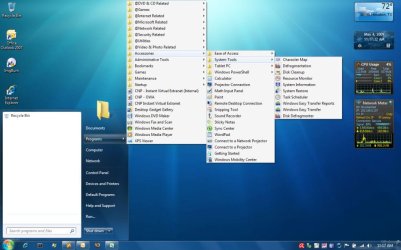
It is possible to get something similiar to what you want. The below is my example. This is done using registry edits. Please see the attached registry tweaks file.
 

Attachments

My Computer My Computer

Computer Manufacturer/Model Number
Dell Inspiron 1525 Notebook
OS
Windows 7
CPU
rocessor Intel(R) Pentium(R) Dual CPU T2390 @ 1.86GHz, 1867
Motherboard
Intel(R) ICH8 Family Chipset
Memory
Installed Physical Memory (RAM) 4 GB
Graphics Card(s)
Mobile Intel(R) 965 Express Chipset Family (Sux)
Sound Card
Intel(R) High Definition Audio HDMI
Ah ha! Other than the white blank space on the left where the programs used to be, it looks great. I'll give it a try, thanks!
 

My Computer My Computer

OS
Windows 7 Ultimate x64
CPU
Intel Core i7 920 D0 @ 4.0 GHz
Motherboard
Asus Rampage II Gene
Memory
Corsair XMS3 1600 MHz 6 x 2GB (12GB)
Graphics Card(s)
VisionTek ATI Radeon HD 4870 X2
Sound Card
Creative X-Fi XtremeGamer
Monitor(s) Displays
Eizo Nanao S2100 21"
Screen Resolution
1600 x 1200
Hard Drives
Western Digital VelociRaptor 150GB
Western Digital Cavier 500GB
PSU
Seasonic M12D 850 watt
Case
Antec Mini P180
Cooling
2 x Sanyo Denki 9G1212H101, 1 x Sanyo Denki 9G1212
Keyboard
Logitech Illuminated Keyboard
Mouse
Logitech MX-610
Yep, there is a way to get rid of the white space, I just haven't looked hard enough yet. :) The reg tweak in that file are many, so you may have to edit it and remove the ones you don't want. Also, you will need to customize your start menu to show favorites checked off. Then rename favorites to Programs or whatever you want it to show.
 

My Computer My Computer

Computer Manufacturer/Model Number
Dell Inspiron 1525 Notebook
OS
Windows 7
CPU
rocessor Intel(R) Pentium(R) Dual CPU T2390 @ 1.86GHz, 1867
Motherboard
Intel(R) ICH8 Family Chipset
Memory
Installed Physical Memory (RAM) 4 GB
Graphics Card(s)
Mobile Intel(R) 965 Express Chipset Family (Sux)
Sound Card
Intel(R) High Definition Audio HDMI
It is possible to get something similiar to what you want. The below is my example.


But in your example are missing some menus entries which are included in original menu. Compare submenu Accessories. Missing:
  • Command Prompt
  • Notepad
  • Run
  • Windows Explorer
That's because you only include the menu path
C:\ProgramData\Microsoft\Windows\Startmenü\Programme
And this is the path to start menu entries of all users.

But your example ignores the menu path:
C:\Users\[user name]\AppData\Roaming\Microsoft\Windows\Startmenü\Programme
This path contains the start menu entries for the individual user.
 

My Computer My Computer

OS
Windows XP and 7
look in the Customize section, i posted a start menu alternative the other day. it's a little app that you can pin to your taskbar to get a classic-looking programs menu.
 

My Computer My Computer

OS
7600 x86
CPU
Core 2 Duo e7200, 2.53 ghz
Motherboard
Micro-Star MS-7529
Memory
2x DDR2 PC5300 1gb, 667 mhz
Graphics Card(s)
GeForce 9500gt, 512mb
Monitor(s) Displays
22" LG Flatron w2234s
Screen Resolution
1680x1050
Hard Drives
Excelstor SATA-II 250gb 7200rpm, 8mb cache
PSU
CoolerMaster M520
Internet Speed
30/20 mbits
What exactly would be the advantage of the classic menu?

The new menu puts everything in close range. Classic menu gives you menus all over your screen, blegh.

I get kind of tired of people that are so scared of good change. The new menu rocks, no doubt.
 

My Computer My Computer

Computer Manufacturer/Model Number
Dell Vostro 1510
OS
Windows 7 Build 7100 32-bit, Windows Vista 32-bit
CPU
Intel Core Duo T8100 2,1GHz
Memory
3GB
Graphics Card(s)
NVIDIA GeForce 8400M GS
Screen Resolution
1440x900
Hard Drives
250GB
Once you take 5 minutes to organized it the advantage of the classic menu would be less clutter, lean & fast.
 

My Computer My Computer

OS
Windows 7 64bit Home
CPU
Q9650
Motherboard
Asus P5Q E
Memory
Kingston Hyper X 4x2048
Graphics Card(s)
His 4870
Sound Card
Onboard
Monitor(s) Displays
Dell 2008WFP
Screen Resolution
1920x1200
Hard Drives
Velociraptor
PSU
Enermax Modu+ 625w
Case
Antec 300
New OS? Lets make it look like the old!
 

My Computer My Computer

OS
7264x64/7260x86
Not all changes are welcome. I like the extra leg room a bench seat in a car gives. Try finding that. Just because it's new doesn't mean it is welcome, let alone better. It is personal taste. You like the new-good for you. I like the old-MY choice.
 
So stay on whatever again OS you're using.
 

My Computer My Computer

OS
7264x64/7260x86
Back
Top