
Changing the tab order in the taskbar

agbenny

New member
Local time
6:27 PM
Messages
9
Hi,

This could be a silly question, But I couldn't find a way to change the order of tabs which are grouped in Win 7. I like to have the recently opened Tab on top and the rest according to their history.

I've attached the screen to explain if my terminology is confusing. In this, you see the Outlook Emails grouped. I wish to have Outlook at the bottom and Emails on top of it, the top most will be the one opened recently. (Last in on top)


(I like other groups too have the same Eg. Chrome Tabs stacked).

I remember I had this settings before, But I miss that now.

Thanks in advance.
 

Attachments
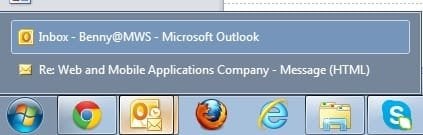
  • order-change.jpg
    order-change.jpg
    11.5 KB · Views: 2

My Computer

OS
Win 7 64 bit
Hi,

This could be a silly question, But I couldn't find a way to change the order of tabs which are grouped in Win 7. I like to have the recently opened Tab on top and the rest according to their history.

I've attached the screen to explain if my terminology is confusing. In this, you see the Outlook Emails grouped. I wish to have Outlook at the bottom and Emails on top of it, the top most will be the one opened recently. (Last in on top)


(I like other groups too have the same Eg. Chrome Tabs stacked).

I remember I had this settings before, But I miss that now.

Thanks in advance.

Hi agbenny,

I understand you wish to group the application first and then with the recently opened files. Please check a similar post below which might be useful:

http://www.sevenforums.com/general-discussion/110382-change-order-grouped-buttons-taskbar.html

Let us know if you have further queries.
 

My Computer

Computer type
PC/Desktop
OS
Winndows 7 32 bit
Hi,

This could be a silly question, But I couldn't find a way to change the order of tabs which are grouped in Win 7. I like to have the recently opened Tab on top and the rest according to their history.

I've attached the screen to explain if my terminology is confusing. In this, you see the Outlook Emails grouped. I wish to have Outlook at the bottom and Emails on top of it, the top most will be the one opened recently. (Last in on top)


(I like other groups too have the same Eg. Chrome Tabs stacked).

I remember I had this settings before, But I miss that now.

Thanks in advance.

Hi agbenny,

I understand you wish to group the application first and then with the recently opened files. Please check a similar post below which might be useful:

http://www.sevenforums.com/general-discussion/110382-change-order-grouped-buttons-taskbar.html

Let us know if you have further queries.

Thanks for letting me know this thread. They recommend some third party tool Maxmonkey. I am not sure how it would work, But I will give a try. Anyhow its a surprise to know that there is no way easily we could change the order in the group. :(
 

My Computer

OS
Win 7 64 bit
Hi agbenny,

Please try the same at your convenience and let us know if it helps. I tried to check if there are any options within Windows to change the order but unfortunately can't find it.

Hope it helps.
 

My Computer

Computer type
PC/Desktop
OS
Winndows 7 32 bit
Back
Top