Character Problem

IMAyNeed

New member
Power User
Local time
10:46 PM
Messages
501
Hello,

I am doing video editing and I am using more than one computer.
Mostly Ultimate and Home Premium.

When I arrange the video on Ultimate, sometimes I am sending it to Home Premium to encode but then if I am using non-English (usually French) characters (for example é), it is changing to Asian characters in Home Premium.

How can I solve this problem?
 

My Computer

Computer Manufacturer/Model Number
ASUS G72 Notebook
OS
Windows 7 Ultimate 64-bit
CPU
Intel® Core™2 Duo mobile processor P8700 2.53 GHz
Memory
6GB DDRII
Graphics Card(s)
NVIDIA GeForce GTX 260M
Sound Card
EAX Advanced HD 4.0 + Logitech Wireless Headset G930
Monitor(s) Displays
17.3" LED-backlit LCD high-definition plus widescreen
Screen Resolution
1600 x 900
Hard Drives
2 x Seagate Momentus 500 GB 5400.6 SATA 3Gb/s
Cooling
Targus
Mouse
Logitech Wireless Trackball M570
Internet Speed
3 to 6 Mbps Download / .5 to 1 Mbps Upload
Other Info
Clear Modem with Wi-fi*
Comodo Internet Security Premium
Didn't like this post just sitting there without a response, so will attempt to help. First off have you got the same video editing program installed on both machines? When you say you use French characters, do you mean you are setting in English with the occasional French charaters or are you setting in French? If you are using individual French characters how to you generate them, for instance, do you use Windows character map for this?
 

My Computer

Computer type
PC/Desktop
OS
Microsoft Windows 7 Home Premium 64-bit 7601 Multiprocessor Free Service Pack 1
CPU
Intel(R) Core(TM) i7-3770 CPU @ 3.40GHz
Motherboard
ASUSTeK COMPUTER INC. P8H77-M
Memory
8.00 GB
Graphics Card(s)
Intel(R) HD Graphics 4000
Sound Card
On Board
Monitor(s) Displays
Dell 24"
Screen Resolution
1920 x 1080
Hard Drives
(1) INTEL SSDSC2CT180A3 ATA Device (2) ST500DM002-1BD142 ATA Device (3) WDC WD3200AAKS-75L9A0 ATA Device (4) Generic- Compact Flash USB Device (5) Generic- MS/MS-Pro USB Device (6) Generic- SD/MMC USB Device (7) Generic- SM/xD-Picture USB
PSU
500w Corsair
Case
Cooler Master
Cooling
3 Fans
Keyboard
Logitech MK300
Mouse
Logitech WOM
Internet Speed
75Mb
Antivirus
Norton 360
Browser
Firefox, Opera, IE
Same video editing program installed on both machines.

I am setting in English with occasional French characters. Usually, I have already the French text to copy from, so usually I am just directly copying it. If I need to type it myself, I am using Alt+0233 for example for an é.
So, sometimes I am copying it directly from the French text, sometimes I am typing it myself using Alt+whatever number (All Machines has English Windows, no French language Windows installed).

Maybe, this information will help a bit too. On Ultimate, when I type Alt+0233, I see an é. On Home Premium, when I type Alt+0233, I see a black heart (♥).

Ultimate specifics is under my Specs. Home Premium Computer is a Toshiba Satellite L505D.

Last time, when I had this problem and wrote the post, my Alt+0233 character on Ultimate, the "é" turned into some Asian characters in Home Premium.

Thanks.
 

My Computer

Computer Manufacturer/Model Number
ASUS G72 Notebook
OS
Windows 7 Ultimate 64-bit
CPU
Intel® Core™2 Duo mobile processor P8700 2.53 GHz
Memory
6GB DDRII
Graphics Card(s)
NVIDIA GeForce GTX 260M
Sound Card
EAX Advanced HD 4.0 + Logitech Wireless Headset G930
Monitor(s) Displays
17.3" LED-backlit LCD high-definition plus widescreen
Screen Resolution
1600 x 900
Hard Drives
2 x Seagate Momentus 500 GB 5400.6 SATA 3Gb/s
Cooling
Targus
Mouse
Logitech Wireless Trackball M570
Internet Speed
3 to 6 Mbps Download / .5 to 1 Mbps Upload
Other Info
Clear Modem with Wi-fi*
Comodo Internet Security Premium
OK Then can you check the fonts on the two machines. If you highlight the character on the Ultimate machine and check the font name, then take that file to the Home premium machine and check the font there . See if it exactly the same font. Another way to test this is to use Ariel on both machines and see what result that has. What you are getting is a classic example of Windows finding the nearest available font to the one in an imported file, when the same font is not installed on the second machine. What font are you using BTW?
 

My Computer

Computer type
PC/Desktop
OS
Microsoft Windows 7 Home Premium 64-bit 7601 Multiprocessor Free Service Pack 1
CPU
Intel(R) Core(TM) i7-3770 CPU @ 3.40GHz
Motherboard
ASUSTeK COMPUTER INC. P8H77-M
Memory
8.00 GB
Graphics Card(s)
Intel(R) HD Graphics 4000
Sound Card
On Board
Monitor(s) Displays
Dell 24"
Screen Resolution
1920 x 1080
Hard Drives
(1) INTEL SSDSC2CT180A3 ATA Device (2) ST500DM002-1BD142 ATA Device (3) WDC WD3200AAKS-75L9A0 ATA Device (4) Generic- Compact Flash USB Device (5) Generic- MS/MS-Pro USB Device (6) Generic- SD/MMC USB Device (7) Generic- SM/xD-Picture USB
PSU
500w Corsair
Case
Cooler Master
Cooling
3 Fans
Keyboard
Logitech MK300
Mouse
Logitech WOM
Internet Speed
75Mb
Antivirus
Norton 360
Browser
Firefox, Opera, IE
On the video editing program, I am using Tahoma.
But, when I am editing the text, I am editing it with Word, and when I am using word, sometimes I am having to open the text in a different coding mode, such as Windows Default, Unicode, Other, Japanese. That depends on the original text I received.

BUT;

I still don't understand. for example in Mozilla Firefox Address Area;
When I type Alt+0233;

why I am getting an "e with an accent" ( é ) on Ultimate on ASUS G72;
and why I am getting a "black heart" ( ) on Home Premium on Toshiba Satellite L505D


How can I know the font the Windows uses to type in Mozilla Firefox Web Address Area - just as an example - or any other place on Asus, and on Toshiba?

Thanks.
 

My Computer

Computer Manufacturer/Model Number
ASUS G72 Notebook
OS
Windows 7 Ultimate 64-bit
CPU
Intel® Core™2 Duo mobile processor P8700 2.53 GHz
Memory
6GB DDRII
Graphics Card(s)
NVIDIA GeForce GTX 260M
Sound Card
EAX Advanced HD 4.0 + Logitech Wireless Headset G930
Monitor(s) Displays
17.3" LED-backlit LCD high-definition plus widescreen
Screen Resolution
1600 x 900
Hard Drives
2 x Seagate Momentus 500 GB 5400.6 SATA 3Gb/s
Cooling
Targus
Mouse
Logitech Wireless Trackball M570
Internet Speed
3 to 6 Mbps Download / .5 to 1 Mbps Upload
Other Info
Clear Modem with Wi-fi*
Comodo Internet Security Premium
Your Firefox question has the same reply as the earlier post when I said:
OK Then can you check the fonts on the two machines. If you highlight the character on the Ultimate machine and check the font name, then take that file to the Home premium machine and check the font there . See if it exactly the same font.
You seem to be under the misapprehension that it matters what make of PC you are using. The fonts that you use on any machine in any program including Firefox is determined by what you have in your fonts folder. It is located here:
C:/Windows/Fonts
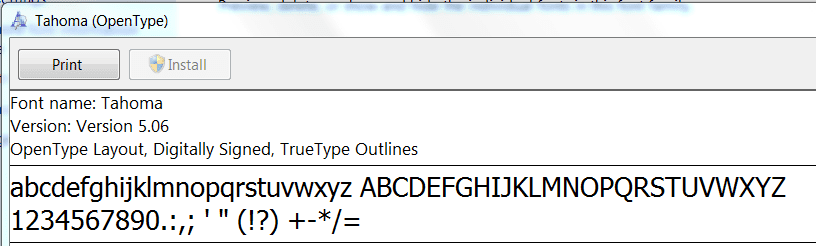
Go to this folder double click on the Tahoma font and you will see two fonts Tahoma Bold and Regular. Double click the Regular and you should open the entire font with this at the top:

Capture91.PNG

Check the version details and then do exactly the same on your other machine. Are the versions of Tahoma the same on both machines?
Don't fully understand what you mean by:

sometimes I am having to open the text in a different coding mode, such as Windows Default, Unicode, Other, Japanese. That depends on the original text I received.

Are you getting text sent you in different languages? What file extensions are these text files?
I see that you are setting type in MS Word and then "Putting" that text into your Video Editor.This is mistake as when you type just one word in MS Word if you copy that word and paste it into another program then you take with it all the Word formatting of the style you typed the original in. It will carry al the format details like letter and line spacing,wrapping etc etc. The then causes a conflict with the formatting that you choose in your Video Editor. I presume you are using the titling facility although I could assist you better if you told me the Video Editor you are using! I did ask for this info before!
t is always best to type your text straight into the Video Editor but if you must set it outside then use Windows Notepad, not Wordpad. Notepad will produce pure text with no formatting so it will not conflict. This taking formatting forward is often shown in a website where the setting has been done (wrongly) in a Word Processor and copied and pasted into a web page. When it gets parsed by the browser all the settings look odd and don't fit where they should!
 

My Computer

Computer type
PC/Desktop
OS
Microsoft Windows 7 Home Premium 64-bit 7601 Multiprocessor Free Service Pack 1
CPU
Intel(R) Core(TM) i7-3770 CPU @ 3.40GHz
Motherboard
ASUSTeK COMPUTER INC. P8H77-M
Memory
8.00 GB
Graphics Card(s)
Intel(R) HD Graphics 4000
Sound Card
On Board
Monitor(s) Displays
Dell 24"
Screen Resolution
1920 x 1080
Hard Drives
(1) INTEL SSDSC2CT180A3 ATA Device (2) ST500DM002-1BD142 ATA Device (3) WDC WD3200AAKS-75L9A0 ATA Device (4) Generic- Compact Flash USB Device (5) Generic- MS/MS-Pro USB Device (6) Generic- SD/MMC USB Device (7) Generic- SM/xD-Picture USB
PSU
500w Corsair
Case
Cooler Master
Cooling
3 Fans
Keyboard
Logitech MK300
Mouse
Logitech WOM
Internet Speed
75Mb
Antivirus
Norton 360
Browser
Firefox, Opera, IE
Are the versions of Tahoma the same on both machines?
Yes, they are same.

(The difference is when I select all (ctrl+a) in Home Premiums's Windows\Fonts, I get 240 items selected; in Ultimate, I get 445 item selected.)

Don't fully understand what you mean by:

sometimes I am having to open the text in a different coding mode, such as Windows Default, Unicode, Other, Japanese. That depends on the original text I received.
I meant when I was trying to open the files in Word.

Are you getting text sent you in different languages?
Texts are in English and French. Sometimes German, but I am mostly working in English and French.

What file extensions are these text files?
TXT

I see that you are setting type in MS Word and then "Putting" that text into your Video Editor.This is mistake as when you type just one word in MS Word if you copy that word and paste it into another program then you take with it all the Word formatting of the style you typed the original in. It will carry al the format details like letter and line spacing,wrapping etc etc. The then causes a conflict with the formatting that you choose in your Video Editor.
I used to edit it with Notepad, just lately, I needed to do spell checks, that is why I started to use Word. I never used to work with this amount of text before, especially not in 2-3 languages with different characters.

I presume you are using the titling facility although I could assist you better if you told me the Video Editor you are using! I did ask for this info before!
No, you didn't. Check the posts please.
For creating and editing the video, I use Adobe Creative programs. For editing and encoding, I am using TMPGenc. This problem has only happened with TMPGenc.
Before coming to the last encoding stage, the videos usually have the text in them, but if there are lots of text, I use the TMPGenc to add the text.

It is always best to type your text straight into the Video Editor but if you must set it outside then use Windows Notepad, not Wordpad. Notepad will produce pure text with no formatting so it will not conflict.
As I said, I was using Notepad, but I had to stop because, the new videos I was editing, required much more text, which required spell checks.

This taking formatting forward is often shown in a website where the setting has been done (wrongly) in a Word Processor and copied and pasted into a web page. When it gets parsed by the browser all the settings look odd and don't fit where they should!
I know about that cause I used to do that (not the mistake per se, the webpages/blogs)!

So, can copying the 445 fonts in Ultimate to Home Premium solve the problem?
If yes, how can I do that?
If no, how can I make Home Premium to show the same font with the same Alt+(number) as in Ultimate?
And what makes Home Premium to show a black heart with alt+0233?
I find that strange. I am opening Word or Notepad in Home Premium, and typing alt+0233, and it shows an accented e é, but when I type in Mozilla (again in Home Premium), it shows a black heart, the other alt+(number) is not working in Home Premium either. It is just showing some types of symbols.
Look at the characters that Home Premium types with alt+(different numbers) in the picture.

The alt+(number) function is not working correctly in Home Premium for some reason, and I don't know why.

Thanks.
 

Attachments

  • capture2wm.jpg
    capture2wm.jpg
    10.4 KB · Views: 7
Last edited:

My Computer

Computer Manufacturer/Model Number
ASUS G72 Notebook
OS
Windows 7 Ultimate 64-bit
CPU
Intel® Core™2 Duo mobile processor P8700 2.53 GHz
Memory
6GB DDRII
Graphics Card(s)
NVIDIA GeForce GTX 260M
Sound Card
EAX Advanced HD 4.0 + Logitech Wireless Headset G930
Monitor(s) Displays
17.3" LED-backlit LCD high-definition plus widescreen
Screen Resolution
1600 x 900
Hard Drives
2 x Seagate Momentus 500 GB 5400.6 SATA 3Gb/s
Cooling
Targus
Mouse
Logitech Wireless Trackball M570
Internet Speed
3 to 6 Mbps Download / .5 to 1 Mbps Upload
Other Info
Clear Modem with Wi-fi*
Comodo Internet Security Premium
I'm afraid you have lost me on your video editing. Normally a video editor will create a generic project file that contains just the editing parts in a text format. No actual video clips are included, just links to where they are on your system. I have never heard of a program that will create a project file that will open in another third party program so I can't understand how you do some editing in one program then transfer that file to another program to continue editing. The only way to do that, that I know of is to render a new a video file each time you transfer from one prog to the other! Also how do you work in two and sometimes three different languages at the same time?
As far as the Alt + numbers problem. When you say:
Look at the characters that Home Premium types with alt+(different numbers) in the picture.
If this is in Mozilla address bar then this is a Mozilla probelm but if it is in a Windows program, when you type and hit the Alt +0233 and it shows a symbol, highlight the symbols so created and look in the Font box to see which font it is using.
You could still use Notepad and install a third party spell checker, there are many to choose from, here's just one:
TinySpell : Spell Checker For Windows Notepad
 

My Computer

Computer type
PC/Desktop
OS
Microsoft Windows 7 Home Premium 64-bit 7601 Multiprocessor Free Service Pack 1
CPU
Intel(R) Core(TM) i7-3770 CPU @ 3.40GHz
Motherboard
ASUSTeK COMPUTER INC. P8H77-M
Memory
8.00 GB
Graphics Card(s)
Intel(R) HD Graphics 4000
Sound Card
On Board
Monitor(s) Displays
Dell 24"
Screen Resolution
1920 x 1080
Hard Drives
(1) INTEL SSDSC2CT180A3 ATA Device (2) ST500DM002-1BD142 ATA Device (3) WDC WD3200AAKS-75L9A0 ATA Device (4) Generic- Compact Flash USB Device (5) Generic- MS/MS-Pro USB Device (6) Generic- SD/MMC USB Device (7) Generic- SM/xD-Picture USB
PSU
500w Corsair
Case
Cooler Master
Cooling
3 Fans
Keyboard
Logitech MK300
Mouse
Logitech WOM
Internet Speed
75Mb
Antivirus
Norton 360
Browser
Firefox, Opera, IE
Just had another thought! Are both your keyboards set to the same language?
 

My Computer

Computer type
PC/Desktop
OS
Microsoft Windows 7 Home Premium 64-bit 7601 Multiprocessor Free Service Pack 1
CPU
Intel(R) Core(TM) i7-3770 CPU @ 3.40GHz
Motherboard
ASUSTeK COMPUTER INC. P8H77-M
Memory
8.00 GB
Graphics Card(s)
Intel(R) HD Graphics 4000
Sound Card
On Board
Monitor(s) Displays
Dell 24"
Screen Resolution
1920 x 1080
Hard Drives
(1) INTEL SSDSC2CT180A3 ATA Device (2) ST500DM002-1BD142 ATA Device (3) WDC WD3200AAKS-75L9A0 ATA Device (4) Generic- Compact Flash USB Device (5) Generic- MS/MS-Pro USB Device (6) Generic- SD/MMC USB Device (7) Generic- SM/xD-Picture USB
PSU
500w Corsair
Case
Cooler Master
Cooling
3 Fans
Keyboard
Logitech MK300
Mouse
Logitech WOM
Internet Speed
75Mb
Antivirus
Norton 360
Browser
Firefox, Opera, IE
Just had another thought! Are both your keyboards set to the same language?

English (United States)
No other language installed in both computers.
 

My Computer

Computer Manufacturer/Model Number
ASUS G72 Notebook
OS
Windows 7 Ultimate 64-bit
CPU
Intel® Core™2 Duo mobile processor P8700 2.53 GHz
Memory
6GB DDRII
Graphics Card(s)
NVIDIA GeForce GTX 260M
Sound Card
EAX Advanced HD 4.0 + Logitech Wireless Headset G930
Monitor(s) Displays
17.3" LED-backlit LCD high-definition plus widescreen
Screen Resolution
1600 x 900
Hard Drives
2 x Seagate Momentus 500 GB 5400.6 SATA 3Gb/s
Cooling
Targus
Mouse
Logitech Wireless Trackball M570
Internet Speed
3 to 6 Mbps Download / .5 to 1 Mbps Upload
Other Info
Clear Modem with Wi-fi*
Comodo Internet Security Premium
I'm afraid you have lost me on your video editing. Normally a video editor will create a generic project file that contains just the editing parts in a text format. No actual video clips are included, just links to where they are on your system. I have never heard of a program that will create a project file that will open in another third party program so I can't understand how you do some editing in one program then transfer that file to another program to continue editing. The only way to do that, that I know of is to render a new a video file each time you transfer from one prog to the other!

yes, before the video is ready, it is being encoded a few times.
(Usually videos are added together in each encode)

Also how do you work in two and sometimes three different languages at the same time?
I am usually working in English and French.
Some videos are both instructed in English and French.
German is specific for German videos.

You could still use Notepad and install a third party spell checker, there are many to choose from, here's just one:
TinySpell : Spell Checker For Windows Notepad
Thanks for the advice and the link.
 

My Computer

Computer Manufacturer/Model Number
ASUS G72 Notebook
OS
Windows 7 Ultimate 64-bit
CPU
Intel® Core™2 Duo mobile processor P8700 2.53 GHz
Memory
6GB DDRII
Graphics Card(s)
NVIDIA GeForce GTX 260M
Sound Card
EAX Advanced HD 4.0 + Logitech Wireless Headset G930
Monitor(s) Displays
17.3" LED-backlit LCD high-definition plus widescreen
Screen Resolution
1600 x 900
Hard Drives
2 x Seagate Momentus 500 GB 5400.6 SATA 3Gb/s
Cooling
Targus
Mouse
Logitech Wireless Trackball M570
Internet Speed
3 to 6 Mbps Download / .5 to 1 Mbps Upload
Other Info
Clear Modem with Wi-fi*
Comodo Internet Security Premium
Sorry for the delay in coming back to you but I have been busy on things "domestic".
Have given more thought to your problem and am trying to get my head round it. To simplify matters can you confirm the following please.
In one PC the characters show as expected in all programs?
In the other PC they show OK in Adobe but not in TMPGenc or Firefox?
In the PC where it shows wrongly can you try entering the character you want by using the character map and copy and paste?
Also have you tried highlighting the "heart" character and seeing what Font comes up?
If it works OK in one program namely Adobe then there is nothing wrong with the Font. It would seem to be a problem with the programs. Just to be sure run through your word processor/s and text programs just to see if they are all OK. That way we can isolate the problem to two programs! (Hopefully)
 

My Computer

Computer type
PC/Desktop
OS
Microsoft Windows 7 Home Premium 64-bit 7601 Multiprocessor Free Service Pack 1
CPU
Intel(R) Core(TM) i7-3770 CPU @ 3.40GHz
Motherboard
ASUSTeK COMPUTER INC. P8H77-M
Memory
8.00 GB
Graphics Card(s)
Intel(R) HD Graphics 4000
Sound Card
On Board
Monitor(s) Displays
Dell 24"
Screen Resolution
1920 x 1080
Hard Drives
(1) INTEL SSDSC2CT180A3 ATA Device (2) ST500DM002-1BD142 ATA Device (3) WDC WD3200AAKS-75L9A0 ATA Device (4) Generic- Compact Flash USB Device (5) Generic- MS/MS-Pro USB Device (6) Generic- SD/MMC USB Device (7) Generic- SM/xD-Picture USB
PSU
500w Corsair
Case
Cooler Master
Cooling
3 Fans
Keyboard
Logitech MK300
Mouse
Logitech WOM
Internet Speed
75Mb
Antivirus
Norton 360
Browser
Firefox, Opera, IE
Have made a couple of what are think significant discoveries. The system font for Firefox is Tahoma and the default font in TMPGenc is also Tahoma! I have just downloaded the trial version of TMPGenc just to try to replicate your problem. I can't on my Win 7 Home Premium PC.
So I think I was wrong when I said there is nothing wrong with the Tahoma Font on your Home premium PC.
Lets try this:
On the Ultimate PC copy the Tahoma Font file from the Fonts folder onto a USB stick, memory card or CD.
Go to the Premium PC and open the Fonts folder. Rename the Tahoma file to a different name, no need to delete it. Then go to the device with the Tahoma file from the Ultimate machine, and drag the Tahoma font file to the Fonts folder on the Premium PC. Give that a try!
EDIT:
Need to have another rethink, forgot you can't rename font files!


OK Panic over. This should work or it does on my PC. On the Premium PC open C:/WINDOWS/ to show the Fonts folder. Dont open the fonts folder. Then open the Drive where you saved the Tahoma font file from the Ultimate PC and drag to the Fonts folder. It should say Tahoma already installed, Do you want to overwrite it" Say YES. Do this for the Regular and Bold Tahoma fonts.
 
Last edited:

My Computer

Computer type
PC/Desktop
OS
Microsoft Windows 7 Home Premium 64-bit 7601 Multiprocessor Free Service Pack 1
CPU
Intel(R) Core(TM) i7-3770 CPU @ 3.40GHz
Motherboard
ASUSTeK COMPUTER INC. P8H77-M
Memory
8.00 GB
Graphics Card(s)
Intel(R) HD Graphics 4000
Sound Card
On Board
Monitor(s) Displays
Dell 24"
Screen Resolution
1920 x 1080
Hard Drives
(1) INTEL SSDSC2CT180A3 ATA Device (2) ST500DM002-1BD142 ATA Device (3) WDC WD3200AAKS-75L9A0 ATA Device (4) Generic- Compact Flash USB Device (5) Generic- MS/MS-Pro USB Device (6) Generic- SD/MMC USB Device (7) Generic- SM/xD-Picture USB
PSU
500w Corsair
Case
Cooler Master
Cooling
3 Fans
Keyboard
Logitech MK300
Mouse
Logitech WOM
Internet Speed
75Mb
Antivirus
Norton 360
Browser
Firefox, Opera, IE
In one PC the characters show as expected in all programs?
In the other PC they show OK in Adobe but not in TMPGenc or Firefox?
Exactly. In Home Premium, it doesn't work correctly in TMPGenc and Firefox.
(In Ultimate, it does work)

In the PC where it shows wrongly can you try entering the character you want by using the character map and copy and paste?
Yes, I can. I can even use "replace all", but I can do that on notepad, not on TMPGenc. On TMPGenc, I can only change the characters one by one by copying it from the character map, not able to use "Replace All". The characters are already working correctly on Notepad. They are not working correctly on TMPGenc, as well as not working on Firefox.

I tried a similar method also:

- Sent the file to Home Premium (And everything below in this list is done in Home Premium)
- Open it in TMPGenc
- See the mistakes
- Open it in Notepad
- Even though the characters are working correctly in Notepad, type them again in Notepad
- Send it to TMPGenc, mistakes are still there
- Open the file again in Notepad, this time put the characters copied from character map
- Open it TMPGEnc, mistakes are still there.

(Example:

98446972.jpg turns into eo2.jpg)

And in addition to that;
Firstly; it means, I will need to do another extra editing session, most likely sessions, on Home Premium, for each video. That also defeats the whole purpose of using another computer for encoding.

When I finish editing the video for the last encode on Ultimate, I am sending it to Home Premium for encode. If I need to check the last video on Home Premium, which is already completely edited on Ultimate; it means I need to make another extra "editing session" on Home Premium, which is I am trying to avoid. It is a really annoying thing when you arrange everything on one computer, and on the other, start editing it again.

Secondly; these computers are not in the same place. I am reaching Home Premium by Remote Control and I have read/write control of a specific folder. I am sending the files through internet, putting them in the encode program by remote control and again receiving them by internet when they are done. So, making an edit on the other computer does not work as well as the machine I am working on, even though I am able to use full screen remote control with a stable connection. Well, to be honest, I can edit the text on Home Premium easily even with the remote control, do not need to edit the video, but as I said before, I can't use the "replace all" function in TMPGenc, so it doesn't matter anyway.

Also have you tried highlighting the "heart" character and seeing what Font comes up?
How will I do that?
The "heart" character just comes up in Firefox and TMPGenc, and I don't know how to get the font info.

If it works OK in one program namely Adobe then there is nothing wrong with the Font. It would seem to be a problem with the programs. Just to be sure run through your word processor/s and text programs just to see if they are all OK. That way we can isolate the problem to two programs! (Hopefully)
It works ok in Notepad, Wordpad, Word. Even works in Windows Explorer when I type a file name.
It doesn't work in TMPGenc, Firefox, IE, Opera and most likely any other browser on Home Premium.
(This means, on Windows Programs, it is working correctly, even on Windows Explorer, but when it comes to internet browsers including Internet Explorer, and when it comes to TMPGenc, it doesn't work. - I didn't know before that it was not working on Internet Explorer because I wasn't using it. I just checked it while writing this post.)

On the Premium PC open C:/WINDOWS/ to show the Fonts folder. Dont open the fonts folder. Then open the Drive where you saved the Tahoma font file from the Ultimate PC and drag to the Fonts folder. It should say Tahoma already installed, Do you want to overwrite it" Say YES. Do this for the Regular and Bold Tahoma fonts.
Nope, no change.
Just there is something strange now, which I couldn't figure out. By the way, I am so tired, maybe I will figure it out later.
Even though it says, "Tahoma is installed, do you want to overwrite?", Tahoma does not show in the fonts anymore, before it had 240 items, and now, it has 239 items. I tried installing by right click and install, the same thing, it is saying that Tahoma is installed, but does not show in fonts anymore.
This is strange.

As I wrote in my previous post, Home Premium Fonts folder has 240 items(After the Tahoma incident 239 now), Ultimate Fonts folder has 445 items.
(Does every Ultimate have 445 items? Does every Home Premium has 240 items? Do you know about that?)

All for this time.
Thanks for all of your answers, and do not ever worry about any delays.
Thanks for your help again.
 

My Computer

Computer Manufacturer/Model Number
ASUS G72 Notebook
OS
Windows 7 Ultimate 64-bit
CPU
Intel® Core™2 Duo mobile processor P8700 2.53 GHz
Memory
6GB DDRII
Graphics Card(s)
NVIDIA GeForce GTX 260M
Sound Card
EAX Advanced HD 4.0 + Logitech Wireless Headset G930
Monitor(s) Displays
17.3" LED-backlit LCD high-definition plus widescreen
Screen Resolution
1600 x 900
Hard Drives
2 x Seagate Momentus 500 GB 5400.6 SATA 3Gb/s
Cooling
Targus
Mouse
Logitech Wireless Trackball M570
Internet Speed
3 to 6 Mbps Download / .5 to 1 Mbps Upload
Other Info
Clear Modem with Wi-fi*
Comodo Internet Security Premium
A
(Does every Ultimate have 445 items? Does every Home Premium has 240 items? Do you know about that?)
To answer this part: Answer No! Windows 7 comes with a certain number of fonts many are "System fonts" Tahoma is one of them and if you try to delete Tahoma, you should get the message "Tahoma is a system font and cannot be deleted". Why it is no longer showing in the Fonts folder I don't know!
Every Program that you install on the PC that has any text facility at all will come with extra fonts, these are automatically installed into the Fonts folder and then become available to all Windows programs. The Ultimate PC clearly has a lot more programs installed than the Ultimate PC!
Here's a list of all the fonts shipped with Windows 7:
Aharoni Bold
Andalus Regular
Angsana New, Angsana New Bold, Angsana New Italic & Angsana New Bold Italic
AngsanaUPC, AngsanaUPC Bold, AngsanaUPC Italic & AngsanaUPC Bold Italic
Aparajita, Aparajita Bold, Aparajita Italic & Aparajita Bold Italic
Arabic Typesetting Regular
Arial, Arial Bold, Arial Black, Arial Italic & Arial Bold Italic
Arial Unicode MS Regular
Batang
BatangChe
Browallia New, Browallia New Bold, Browallia New Italic & Browallia New Bold Italic
BrowalliaUPC, BrowalliaUPC Bold, BrowalliaUPC Italic & BrowalliaUPC Bold Italic
Calibri, Calibri Bold, Calibri Italic & Calibri Bold Italic
Cambria, Cambria Bold, Cambria Italic & Cambria Bold Italic
Cambria Math
Candara, Candara Bold, Candara Italic & Candara Bold Italic
Comic Sans MS & Comic Sans MS Bold
Consolas, Consolas Bold, Consolas Italic & Consolas Bold Italic
Constantia, Constantia Bold, Constantia Italic & Constantia Bold Italic
Corbel, Corbel Bold, Corbel Italic, Corbel Bold Italic
Cordia New, Cordia New Bold, Cordia New Italic & Cordia New Bold Italic
CordiaUPC, CordiaUPC Bold, CordiaUPC Italic & CordiaUPC Bold Italic
Courier New, Courier New Bold, Courier New Italic & Courier New Bold Italic
DaunPenh
David & David Bold
DFKai-SB
DilleniaUPC, DilleniaUPC Bold, DilleniaUPC Italic & DilleniaUPC Bold Italic
DokChampa
Dotum
DotumChe
Ebrima & Ebrima Bold
Estrangelo Edessa
EucrosiaUPC, EucrosiaUPC Bold, EucrosiaUPC Italic & EucrosiaUPC Bold Italic
Euphemia
FangSong
Franklin Gothic Medium & Franklin Gothic Medium Italic
FrankRuehl
FreesiaUPC, FreesiaUPC Bold, FreesiaUPC Italic & FreesiaUPC Bold Italic
Gabriola
Gautami & Gautami Bold
Georgia, Georgia Bold, Georgia Italic, & Georgia Bold Italic
Gisha & Gisha Bold
Gulim
GulimChe
Gungsuh
GungsuhChe
Impact
IrisUPC, IrisUPC Bold, IrisUPC Italic & IrisUPC Bold Italic
Iskoola Pota & IskoolaPota Bold
JasmineUPC, JasmineUPC Bold, JasmineUPC Italic & JasmineUPC Bold Italic
KaiTi
Kalinga & Kalinga Bold
Kartika & Kartika Bold
Khmer UI & Khmer UI Bold
KodchiangUPC, KodchiangUPC Bold, KodchiangUPC Italic & KodchiangUPC Bold Italic
Kokila, Kokila Bold, Kokila Italic & Kokila Bold Italic
Lao UI & Lao UI Bold
Latha & Latha Bold
Leelawadee & Leelawadee Bold
Levenim MT & Levenim MT Bold
LilyUPC, LilyUPC Bold, LilyUPC Italic & LilyUPC Bold Italic
Lucida Console
Lucida Sans Unicode
Malgun Gothic & Malgun Gothic Bold
Mangal & Mangal Bold
Meiryo, Meiryo Bold, Meiryo Italic & Meiryo Bold Italic
Meiryo UI, Meiryo UI Bold, Meiryo UI Italic & Meiryo UI Bold Italic
Microsoft Himalaya
Microsoft JhengHei & Microsoft JhengHei Bold
Microsoft New Tai Lue & Microsoft New Tai Lue Bold
Microsoft PhagsPa & Microsoft PhagsPa Bold
Microsoft Sans Serif
Microsoft Tai Le & Microsoft Tai Le Bold
Microsoft Uighur
Microsoft YaHei & Microsoft YaHei Bold
Microsoft Yi Baiti
MingLiU
MingLiU_HKSCS
MingLiU_HKSCS-ExtB
MingLiU-ExtB
Miriam
Miriam Fixed
Mongolian Baiti
MoolBoran
MS Gothic
MS Mincho
MS PGothic
MS PMincho
MS UI Gothic
MV Boli
Narkisim
NSimSun
Nyala
Palatino Linotype, Palatino Linotype Bold, Palatino Linotype Italic & Palatino Linotype Bold Italic
Plantagenet Cherokee
PMingLiU
PMingLiU-ExtB
Raavi & Raavi Bold
Rod
Sakkal Majalla & Sakkal Majalla Bold
Segoe Print & Segoe Print Bold
Segoe Script & Segoe Script Bold
Segoe UI, Segoe UI Bold, Segoe UI Italic, Segoe UI Bold Italic, Segoe UI Light & Segoe UI Semibold
Segoe UI Symbol
Shonar Bangla & Shonar Bangla Bold
Shruti & Shruti Bold
SimHei
Simplified Arabic & Simplified Arabic Bold
Simplified Arabic Fixed
SimSun
SimSun-ExtB
Sylfaen
Symbol
Tahoma, Tahoma Bold
Times New Roman, Times New Roman Bold, Times New Roman Italic & Times New Roman Bold Italic
Traditional Arabic & Traditional Arabic Bold
Trebuchet MS, Trebuchet MS Bold, Trebuchet MS Italic & Trebuchet MS Bold Italic
Tunga & Tunga Bold
Utsaah, Utsaah Bold,Utsaah Italic & Utsaah Bold Italic
Vani & Vani Bold
Verdana,Verdana Bold, Verdana Italic & Verdana Bold Italic
Vijaya & Vijaya Bold
Vrinda & Vrinda Bold
Webdings
Wingdings

Any that you have that are not on that list must have come shipped with programs that have been installed!

 

My Computer

Computer type
PC/Desktop
OS
Microsoft Windows 7 Home Premium 64-bit 7601 Multiprocessor Free Service Pack 1
CPU
Intel(R) Core(TM) i7-3770 CPU @ 3.40GHz
Motherboard
ASUSTeK COMPUTER INC. P8H77-M
Memory
8.00 GB
Graphics Card(s)
Intel(R) HD Graphics 4000
Sound Card
On Board
Monitor(s) Displays
Dell 24"
Screen Resolution
1920 x 1080
Hard Drives
(1) INTEL SSDSC2CT180A3 ATA Device (2) ST500DM002-1BD142 ATA Device (3) WDC WD3200AAKS-75L9A0 ATA Device (4) Generic- Compact Flash USB Device (5) Generic- MS/MS-Pro USB Device (6) Generic- SD/MMC USB Device (7) Generic- SM/xD-Picture USB
PSU
500w Corsair
Case
Cooler Master
Cooling
3 Fans
Keyboard
Logitech MK300
Mouse
Logitech WOM
Internet Speed
75Mb
Antivirus
Norton 360
Browser
Firefox, Opera, IE
Just had one more thought. Can you get physical access to the Premium machine so that you can use it's installed keyboard and not use it remotely. Just to eliminate that possibility.
I think then we can discount anything to do with actual Video Editing and concentrate on the fact the on a Windows 7 Machine with the Premium version installed on of the system fonts does not function properly. With physical access can you run sfc /scannow to see if that fixes it. If not short of a system repair I cannot think of anything else. Lets see what the above idea comes up with and take it from there!
 

My Computer

Computer type
PC/Desktop
OS
Microsoft Windows 7 Home Premium 64-bit 7601 Multiprocessor Free Service Pack 1
CPU
Intel(R) Core(TM) i7-3770 CPU @ 3.40GHz
Motherboard
ASUSTeK COMPUTER INC. P8H77-M
Memory
8.00 GB
Graphics Card(s)
Intel(R) HD Graphics 4000
Sound Card
On Board
Monitor(s) Displays
Dell 24"
Screen Resolution
1920 x 1080
Hard Drives
(1) INTEL SSDSC2CT180A3 ATA Device (2) ST500DM002-1BD142 ATA Device (3) WDC WD3200AAKS-75L9A0 ATA Device (4) Generic- Compact Flash USB Device (5) Generic- MS/MS-Pro USB Device (6) Generic- SD/MMC USB Device (7) Generic- SM/xD-Picture USB
PSU
500w Corsair
Case
Cooler Master
Cooling
3 Fans
Keyboard
Logitech MK300
Mouse
Logitech WOM
Internet Speed
75Mb
Antivirus
Norton 360
Browser
Firefox, Opera, IE
It is 240 items now. Probably needed a restart.
I will inform about the sfc /scannow result when done.
Why do I need physical access for that, I didn't understand though.

UPDATE: Without physical access, nothing was found.
As I remember "no integrity violations found" something like that.
I didn't expect any either.
The OS installed is the same one when it was bought.
The Original one that came with it.
Maybe did a couple of system restores on it, but not anything else.

STRANGE: Yes, it is strange, and nothing comes to my mind either. I have used Toshiba before, and several other brands, but I have not seen this problem. And yes, I can't think of anything either. All I know is it is something with that computer and the symbols coming up when you press Alt+(number)

THANKS: Thank you for your help a lot. I will post here, if I come up with an answer or something new.
 
Last edited:

My Computer

Computer Manufacturer/Model Number
ASUS G72 Notebook
OS
Windows 7 Ultimate 64-bit
CPU
Intel® Core™2 Duo mobile processor P8700 2.53 GHz
Memory
6GB DDRII
Graphics Card(s)
NVIDIA GeForce GTX 260M
Sound Card
EAX Advanced HD 4.0 + Logitech Wireless Headset G930
Monitor(s) Displays
17.3" LED-backlit LCD high-definition plus widescreen
Screen Resolution
1600 x 900
Hard Drives
2 x Seagate Momentus 500 GB 5400.6 SATA 3Gb/s
Cooling
Targus
Mouse
Logitech Wireless Trackball M570
Internet Speed
3 to 6 Mbps Download / .5 to 1 Mbps Upload
Other Info
Clear Modem with Wi-fi*
Comodo Internet Security Premium
Why do I need physical access for that, I didn't understand though.

My idea was to actually be at the Premium machine and use the keyboard that is installed, this would eliminate the slight possibility that it was the remote access to the Premium PC that was causing the problem. Can you not get access to that machine?
 

My Computer

Computer type
PC/Desktop
OS
Microsoft Windows 7 Home Premium 64-bit 7601 Multiprocessor Free Service Pack 1
CPU
Intel(R) Core(TM) i7-3770 CPU @ 3.40GHz
Motherboard
ASUSTeK COMPUTER INC. P8H77-M
Memory
8.00 GB
Graphics Card(s)
Intel(R) HD Graphics 4000
Sound Card
On Board
Monitor(s) Displays
Dell 24"
Screen Resolution
1920 x 1080
Hard Drives
(1) INTEL SSDSC2CT180A3 ATA Device (2) ST500DM002-1BD142 ATA Device (3) WDC WD3200AAKS-75L9A0 ATA Device (4) Generic- Compact Flash USB Device (5) Generic- MS/MS-Pro USB Device (6) Generic- SD/MMC USB Device (7) Generic- SM/xD-Picture USB
PSU
500w Corsair
Case
Cooler Master
Cooling
3 Fans
Keyboard
Logitech MK300
Mouse
Logitech WOM
Internet Speed
75Mb
Antivirus
Norton 360
Browser
Firefox, Opera, IE
Why do I need physical access for that, I didn't understand though.

My idea was to actually be at the Premium machine and use the keyboard that is installed, this would eliminate the slight possibility that it was the remote access to the Premium PC that was causing the problem. Can you not get access to that machine?

No change.
Same thing.
Same problem with the Alt, and no errors on sfc /scannow.
I don't understand how can a machine type a black heart when you press alt+0233.
It must be the way it is designed by Toshiba or something. (Though I couldn't find anything on Google.)
Just remember if somebody says their keyboard showing a black heart or other symbols when alt+(number) is pressed.
 

My Computer

Computer Manufacturer/Model Number
ASUS G72 Notebook
OS
Windows 7 Ultimate 64-bit
CPU
Intel® Core™2 Duo mobile processor P8700 2.53 GHz
Memory
6GB DDRII
Graphics Card(s)
NVIDIA GeForce GTX 260M
Sound Card
EAX Advanced HD 4.0 + Logitech Wireless Headset G930
Monitor(s) Displays
17.3" LED-backlit LCD high-definition plus widescreen
Screen Resolution
1600 x 900
Hard Drives
2 x Seagate Momentus 500 GB 5400.6 SATA 3Gb/s
Cooling
Targus
Mouse
Logitech Wireless Trackball M570
Internet Speed
3 to 6 Mbps Download / .5 to 1 Mbps Upload
Other Info
Clear Modem with Wi-fi*
Comodo Internet Security Premium
I don't understand how can a machine type a black heart when you press alt+0233.
It must be the way it is designed by Toshiba or something. (Though I couldn't find anything on Google.)
Just remember if somebody says their keyboard showing a black heart or other symbols when alt+(number) is pressed.
Well I would stick my neck out and say that it cannot be anything to do with the way your PC is designed. It must be either a glitch I your OS or the actual font file. Have just gone back over this thread and cannot see if you say that you have tried a different Font? Does this happen with other fonts, say Ariel or is it just Tahoma? I ask this as it seems from here to happen in programs that use Tahoma for their system font!
 

My Computer

Computer type
PC/Desktop
OS
Microsoft Windows 7 Home Premium 64-bit 7601 Multiprocessor Free Service Pack 1
CPU
Intel(R) Core(TM) i7-3770 CPU @ 3.40GHz
Motherboard
ASUSTeK COMPUTER INC. P8H77-M
Memory
8.00 GB
Graphics Card(s)
Intel(R) HD Graphics 4000
Sound Card
On Board
Monitor(s) Displays
Dell 24"
Screen Resolution
1920 x 1080
Hard Drives
(1) INTEL SSDSC2CT180A3 ATA Device (2) ST500DM002-1BD142 ATA Device (3) WDC WD3200AAKS-75L9A0 ATA Device (4) Generic- Compact Flash USB Device (5) Generic- MS/MS-Pro USB Device (6) Generic- SD/MMC USB Device (7) Generic- SM/xD-Picture USB
PSU
500w Corsair
Case
Cooler Master
Cooling
3 Fans
Keyboard
Logitech MK300
Mouse
Logitech WOM
Internet Speed
75Mb
Antivirus
Norton 360
Browser
Firefox, Opera, IE
Back
Top