Character to ASCII Converter [Beta]

x BlueRobot

Closed by request
Local time
4:47 AM
Messages
6,784
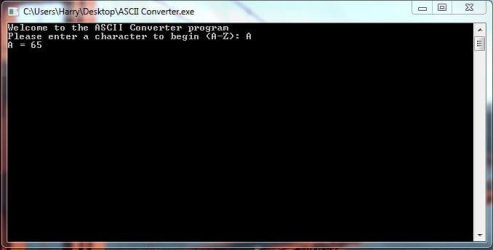
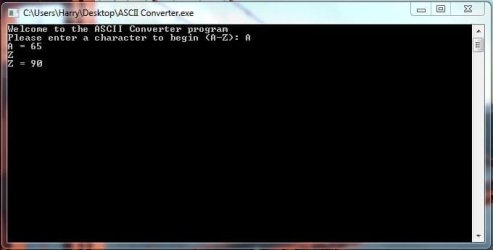
The program converts any uppercase character into it's decimal representation, I need to add all the lowercase characters and other symbols available on the keyboard. Here's a couple examples of the program:

Pic1.JPG

Pic2.JPG

Pic3.JPG
 

Attachments

My Computer My Computer

Computer type
Laptop

My Computer My Computer

At a glance

W7 Pro SP1 64biti78GBIntel HD Graphics
Computer type
Laptop
Computer Manufacturer/Model Number
Employer provided Dell Latitude
OS
W7 Pro SP1 64bit
CPU
i7
Memory
8GB
Graphics Card(s)
Intel HD Graphics
Hard Drives
crappy SSD
Antivirus
Employer mandated Symantec Endpoint Protection
Browser
Pale Moon 64bit, IE11 64bit & Chrome 64bit
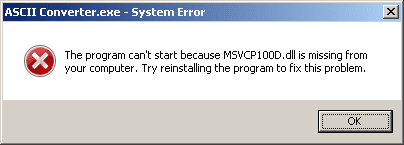
Sorry, I uploaded the Debug version of the program, and not the Release version. The correct version should be uploaded now.

I was thinking of writing the program up as a Windows program instead of a DOS program eventually.

I've got another program published in this sub section too.
 

Attachments

My Computer My Computer

Computer type
Laptop
Yep - that version works. Writing it in .NET might be best and auto-select the answer so that it is ready to copy/paste like the tool below.

Since I don't know how to program, I would have to script it via AutoIt:
Code:
Opt ("TrayIconDebug", 1)

While 1
    $var = InputBox("Converter", "Type one character. Click on OK to convert." & _
        @CR & @CR & "(Or just press Enter to convert.)")
    If @error = 1 Then Exit
    If $var = "" Then ContinueLoop
    InputBox("Converter", $var & " as DEC ASCIIcode." & _
        @CR & @CR & "(Ready to copy or cut and paste.)" & _
        @CR & @CR & "Press Enter to continue.", Asc($var))
    If @error = 1 Then Exit
WEnd
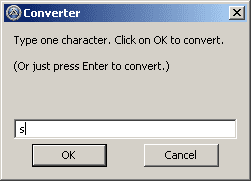
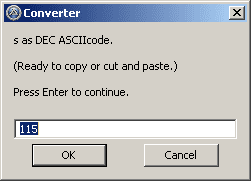
It took me much longer to decide on the text of the prompts than to knock out the code.

If you compile that script - some antivirus apps might complain:
https://www.virustotal.com/en/file/...30798300201ea7b32690ab73/analysis/1375540873/
Ya just can't make some AV companies understand :-(
I usually don't compile my scripts - I just run them as text files.

1.png

2.png

None printable characters won't look so nice in the second window - but I did not want to deal with that since I've no particular need to use or distribute this script.


Your file compare app seems helpful, but I use WinMerge.
 

My Computer My Computer

At a glance

W7 Pro SP1 64biti78GBIntel HD Graphics
Computer type
Laptop
Computer Manufacturer/Model Number
Employer provided Dell Latitude
OS
W7 Pro SP1 64bit
CPU
i7
Memory
8GB
Graphics Card(s)
Intel HD Graphics
Hard Drives
crappy SSD
Antivirus
Employer mandated Symantec Endpoint Protection
Browser
Pale Moon 64bit, IE11 64bit & Chrome 64bit
I usually write it .NET, I'll finish writing the DOS version and then start looking into the GUI version of the program.
 

My Computer My Computer

Computer type
Laptop
UI ASCII Converter.JPG

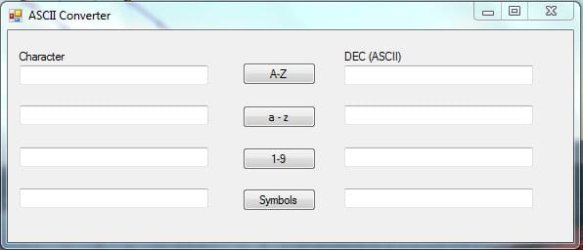
I've created and designed the UI for the ASCII Converter program, just need to add all the logic for the buttons, and test all the code to see if it works correctly.
 

My Computer My Computer

Computer type
Laptop
Looks good. Enjoy your coding :-)
 

My Computer My Computer

At a glance

W7 Pro SP1 64biti78GBIntel HD Graphics
Computer type
Laptop
Computer Manufacturer/Model Number
Employer provided Dell Latitude
OS
W7 Pro SP1 64bit
CPU
i7
Memory
8GB
Graphics Card(s)
Intel HD Graphics
Hard Drives
crappy SSD
Antivirus
Employer mandated Symantec Endpoint Protection
Browser
Pale Moon 64bit, IE11 64bit & Chrome 64bit
Thanks, I'll post it back here when it's completed. It'll probably be done today :)
 

My Computer My Computer

Computer type
Laptop
Download is below:

ASCII Converter V2 - Added Features:

  • Added UI
  • Added support for a-z, 0-9 and special characters such ? etc.
  • Note: \ is added as a label on the UI, since the compiler gives an error that the \ is a newline character.
 

Attachments

My Computer My Computer

Computer type
Laptop
Works as advertized :-)

Was this an assignment from some class or did you write it because you need a tool to do this?
 

My Computer My Computer

At a glance

W7 Pro SP1 64biti78GBIntel HD Graphics
Computer type
Laptop
Computer Manufacturer/Model Number
Employer provided Dell Latitude
OS
W7 Pro SP1 64bit
CPU
i7
Memory
8GB
Graphics Card(s)
Intel HD Graphics
Hard Drives
crappy SSD
Antivirus
Employer mandated Symantec Endpoint Protection
Browser
Pale Moon 64bit, IE11 64bit & Chrome 64bit
I wrote it because I saw a thread asking about ASCII values not appearing properly or something like that, so I thought people might find it useful to be able to convert between the two :)

Also, I've self-taught myself everything I know about programming, so I kinda wrote it as an exercise for my myself.

I was thinking of creating a percentage calculator soon, we would be a useful tool for myself ;)
 

My Computer My Computer

Computer type
Laptop
I see - thanks for the answers. Have fun coding :-)
 

My Computer My Computer

At a glance

W7 Pro SP1 64biti78GBIntel HD Graphics
Computer type
Laptop
Computer Manufacturer/Model Number
Employer provided Dell Latitude
OS
W7 Pro SP1 64bit
CPU
i7
Memory
8GB
Graphics Card(s)
Intel HD Graphics
Hard Drives
crappy SSD
Antivirus
Employer mandated Symantec Endpoint Protection
Browser
Pale Moon 64bit, IE11 64bit & Chrome 64bit
Back
Top