Chassis Fan Control

Hi Un4GiVeN78 :)

To make Speedfan work you need to put a tick in Automatic Fan Speed honey

Untitled-1.png

That's quite easy.
Who knew!!
Thanks
 

My Computer

Computer type
PC/Desktop
Computer Manufacturer/Model Number
Custom Build
OS
Windows 7 Home Premium 64 bit
CPU
Intel Core i7-4790
Motherboard
GA-Z87X-D3H
Memory
G.SKILL 8GB (2 x 4GB) DDR3 F3-10666CL9D-8GBNT
Graphics Card(s)
AMD Radeon R7 250
Sound Card
Realtek ALC892
Monitor(s) Displays
Samsung UN32EH5000, Dell 1703FPT
Screen Resolution
1920 x 1080, 1280 x 1024
Hard Drives
WD5003AZEX
WD10EZEX
Samsung HD103SJ
Samsung 128 GB 840 PRO
PSU
SeaSonic M12II SS-500GM
Case
Fractal Design Define R4
Cooling
Zalman CNPS9900ALED
Keyboard
Logitech K800
Mouse
Logitech M705
Internet Speed
16 Mbps
Antivirus
Avast
Browser
Firefox
Other Info
Bose Companion 2 Multimedia Speakers
se fan and 1 120mm CPU fan in my system. 2 of them connect to 3 pin headers. The other one connects to the secondary 4 pin header, CPU fan to the CPU header. All of them, including the CPU fan which is 4 pin, are controlled by the BIOS settings and set to Silent which makes them run at around 800RPM, including the CPU fan. If the system starts to get hot the BIOS raises there speed accordingly. CPU first as that is what gets the hottest.

The BIOS lowers or raises the voltage supplied to the fans to increase or decrease there speed.

Yours might but if I'm reading the manual for Un4GiVeN78's motherboard, it will only control fans connected to the 4 pin headers,

fancontrol.PNG

which would leave any fans connected to either of the 3 pin headers running at full speed.

whereas yours (and mine for that matter) has Asus' Q-Fan option which does allow for. Also not to say it isn't possible, but do you really think that the PWR_FAN header would have any kind of fan control on it? Not sure that it would be a good idea to let anything other than the power supply itself regulate its fan. Then again when was the last time you saw a power supply that had its fan connected to the motherboard?
 

My Computer

Computer type
PC/Desktop
Computer Manufacturer/Model Number
Me
OS
Win 7 Ultimate x64
CPU
FX-8350 @ 4.6 GHz so far
Motherboard
Asus M5A97 EVO
Memory
ADATA XPG V1 Series Black 8GB DDR3 1600
Graphics Card(s)
Sapphire R9 270x Dual-X
Sound Card
Xonar DGX w/ Corsair Vengence 1300
Monitor(s) Displays
Acer S232HL Abid
Screen Resolution
1920x1080
Hard Drives
120 GB OCZ Vertex 3
500 GB Seagate 7200.12
PSU
Antec Earthwatts 650W Green
Case
Antec Three Hundred
Cooling
Cooler Master 212 EVO
Keyboard
Logitech G510
Mouse
Logitech G500s
Internet Speed
35000/3000
Hi Un4GiVeN78 :)

To make Speedfan work you need to put a tick in Automatic Fan Speed honey

Untitled-1.png

Hi Un4GiVeN78 :)

To make Speedfan work you need to put a tick in Automatic Fan Speed honey

Untitled-1.png

That's quite easy.
Who knew!!
Thanks


I tried to put a tick in Automatic Fan Speed and almost everything possible to control it, I guess it's hardware issue.

I must do something in the hardware before using that program to allow me controlling it.

Thank you guys <33
 

My Computer

OS
MS Windows 7 Ultimate 64-bit
CPU
AMD Phenom II X4 Black Edition 955
Motherboard
Gigabyte GA-MA770T-UD3P
Memory
KingSton 8GB BUS1333 DDR3
Graphics Card(s)
SAPPHIRE HD 5850 1GB GDDR5 PCIE (Game Edition)
Sound Card
Realtek High Definition Audio
Monitor(s) Displays
DELL M993s Flat screen 19inch
Screen Resolution
1280x1024
Hard Drives
WD Caviar Green 1 TB, 5400 RPM, 64 MB Cache
PSU
Gamma-HEC 500 Watt
Case
Gamma
Cooling
Cooler Master hyper 212 plus
Keyboard
A4TECH
Mouse
A4TECH
Internet Speed
ADSL 2048 Kbps
Well I'm really not sure what that PWR_FAN header if for. IMHO it certainly isn't for the power supply fan. They are all internal to the PSU with there own internal speed control and temp sensor.

Honestly I haven't seen a PSU with a external wire for fan control or power in a long time, if ever.
 

My Computer

Computer Manufacturer/Model Number
Built be Me
OS
Windows 7 Pro x64
CPU
i5 760
Motherboard
Asus P7P55D-E Pro
Memory
16GB
Graphics Card(s)
Nvidia GTS450
Sound Card
On board
Monitor(s) Displays
Dell 2007WFP Dell 1800FP
Screen Resolution
1680x1050 1280x1024
Hard Drives
Seagate 250GB & 750GB
WD 1TB
PSU
Antec 750
Case
In Win
Cooling
Cooler Master Hyper 212+
Keyboard
IBM
Mouse
MS
A 3 pin to 4 pin adapter won't allow for fan speed control for one very simple reason, there is no 4th wire from the fan itself which is what is needed for that to happen.

A 3 pin to 4 pin adapter won't allow for fan speed control for one very simple reason, there is no 4th wire from the fan itself which is what is needed for that to happen.

Not really. I have 3 120mm 3 pin case fan and 1 120mm CPU fan in my system. 2 of them connect to 3 pin headers. The other one connects to the secondary 4 pin header, CPU fan to the CPU header. All of them, including the CPU fan which is 4 pin, are controlled by the BIOS settings and set to Silent which makes them run at around 800RPM, including the CPU fan. If the system starts to get hot the BIOS raises there speed accordingly. CPU first as that is what gets the hottest.

The BIOS lowers or raises the voltage supplied to the fans to increase or decrease there speed.

se fan and 1 120mm CPU fan in my system. 2 of them connect to 3 pin headers. The other one connects to the secondary 4 pin header, CPU fan to the CPU header. All of them, including the CPU fan which is 4 pin, are controlled by the BIOS settings and set to Silent which makes them run at around 800RPM, including the CPU fan. If the system starts to get hot the BIOS raises there speed accordingly. CPU first as that is what gets the hottest.

The BIOS lowers or raises the voltage supplied to the fans to increase or decrease there speed.

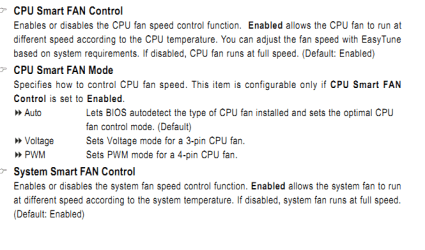
Yours might but if I'm reading the manual for Un4GiVeN78's motherboard, it will only control fans connected to the 4 pin headers,

View attachment 148920

which would leave any fans connected to either of the 3 pin headers running at full speed.

whereas yours (and mine for that matter) has Asus' Q-Fan option which does allow for. Also not to say it isn't possible, but do you really think that the PWR_FAN header would have any kind of fan control on it? Not sure that it would be a good idea to let anything other than the power supply itself regulate its fan. Then again when was the last time you saw a power supply that had its fan connected to the motherboard?


Hmm.. you're killing me guys :huh:

I can see from the M.B. manual that when Enabled allow system to run the FAN according system temp. It's already Enabled and running @ maximum speed which means my system temp. may be too hot so that the system run it @ full speed. Here's a screen shot of PC temp.
 

Attachments

  • Untitled.png
    Untitled.png
    37.2 KB · Views: 71

My Computer

OS
MS Windows 7 Ultimate 64-bit
CPU
AMD Phenom II X4 Black Edition 955
Motherboard
Gigabyte GA-MA770T-UD3P
Memory
KingSton 8GB BUS1333 DDR3
Graphics Card(s)
SAPPHIRE HD 5850 1GB GDDR5 PCIE (Game Edition)
Sound Card
Realtek High Definition Audio
Monitor(s) Displays
DELL M993s Flat screen 19inch
Screen Resolution
1280x1024
Hard Drives
WD Caviar Green 1 TB, 5400 RPM, 64 MB Cache
PSU
Gamma-HEC 500 Watt
Case
Gamma
Cooling
Cooler Master hyper 212 plus
Keyboard
A4TECH
Mouse
A4TECH
Internet Speed
ADSL 2048 Kbps
Or

maybe Enabled working like Disabled they both work @ max speed and it's all pretending
 

My Computer

OS
MS Windows 7 Ultimate 64-bit
CPU
AMD Phenom II X4 Black Edition 955
Motherboard
Gigabyte GA-MA770T-UD3P
Memory
KingSton 8GB BUS1333 DDR3
Graphics Card(s)
SAPPHIRE HD 5850 1GB GDDR5 PCIE (Game Edition)
Sound Card
Realtek High Definition Audio
Monitor(s) Displays
DELL M993s Flat screen 19inch
Screen Resolution
1280x1024
Hard Drives
WD Caviar Green 1 TB, 5400 RPM, 64 MB Cache
PSU
Gamma-HEC 500 Watt
Case
Gamma
Cooling
Cooler Master hyper 212 plus
Keyboard
A4TECH
Mouse
A4TECH
Internet Speed
ADSL 2048 Kbps
Well I'm really not sure what that PWR_FAN header if for. IMHO it certainly isn't for the power supply fan. They are all internal to the PSU with there own internal speed control and temp sensor.

Honestly I haven't seen a PSU with a external wire for fan control or power in a long time, if ever.

Bytheway, I think my PSU (OCZ 600 WATT) is frying because i tried to replace its fan because of noise coming from it, but the store guy told me that the stock fan is the best fan already and there's no any silent replacement and he gave me " AKAI BLUE " something like spray and when i used it on the PSU fan it made the sound much much louder.
Moreover SpeedFan showing i have 79 degree temp(look at the screen shot i sent earlier) on a piece of my PC and i think that's the PSU.

So, maybe the system fan is running @ max speed coz of it. idk

Thanks guys for your help i appreciate it all
 

My Computer

OS
MS Windows 7 Ultimate 64-bit
CPU
AMD Phenom II X4 Black Edition 955
Motherboard
Gigabyte GA-MA770T-UD3P
Memory
KingSton 8GB BUS1333 DDR3
Graphics Card(s)
SAPPHIRE HD 5850 1GB GDDR5 PCIE (Game Edition)
Sound Card
Realtek High Definition Audio
Monitor(s) Displays
DELL M993s Flat screen 19inch
Screen Resolution
1280x1024
Hard Drives
WD Caviar Green 1 TB, 5400 RPM, 64 MB Cache
PSU
Gamma-HEC 500 Watt
Case
Gamma
Cooling
Cooler Master hyper 212 plus
Keyboard
A4TECH
Mouse
A4TECH
Internet Speed
ADSL 2048 Kbps
Well I'm really not sure what that PWR_FAN header if for. IMHO it certainly isn't for the power supply fan. They are all internal to the PSU with there own internal speed control and temp sensor.

Honestly I haven't seen a PSU with a external wire for fan control or power in a long time, if ever.

Some PSU's have a fan header wire that connects to the motherboard so that you can monitor the PSU fan. It doesn't control the fan, just allows you to monitor it.

I bought a silverstone fan controller for my machine and my fathers machine to control the fans.
Newegg.com - SILVERSTONE FP33-B Controller, Panel

Amazon.com: SilverStone FP33B Aluminum 3.5-Inch Drive Bay/Expansion Slot with Independent Fan Controllers (Black): Electronics
 

My Computer

Computer Manufacturer/Model Number
HAL-9000
OS
Windows 7 Ultimate 64bit
CPU
Intel i7 3770K
Motherboard
Asus Sabertooth Z77
Memory
16GB DDR3 1333 Corsair XMS3
Graphics Card(s)
XFX HD6950 2GB EyeFinity
Sound Card
Logitech G35 & Sennheiser PC135 & VIA HD
Monitor(s) Displays
23" HP 2310e, 23" Samsung B2230, 21.5" Viewsonic
Screen Resolution
5760x1080
Hard Drives
16TB of Storage
128GB & 256GB Crucial M4 SSD's, 2X 1TB WD Black, 3x 2TB WD, 3x 2TB Samsung F4, 1.5TB Seagate, WD 500GB,
PSU
Antec True Power New 650watt
Case
Cooler Master HAF-932
Cooling
Corsair H60 Hydro Cooler, 3x 230mm Fans, 2x120mm Fan
Keyboard
Logitech G15 and G13
Mouse
Logitech G700 Gaming Mouse
Internet Speed
50/10 Mbit
Other Info
Speakers : Alesis M1 Active Mk2 Studio Monitors , APC RS 1200 UPS, HP 4500DN Color Laser, HP P1006 mono Laser, Kodak 8500 Dye-Sub, Epson 1280 inkjet, Epson Worforce 610 MFC
Hi ... :)
If you have knowledge of electronics - or know someone who has - you can make use of a resistor. Otherwise, you can use SpeedFan, but since the fan is connected to the motherboard. Remember to use 3 to 4 pin adapter and plug it in where shown below.
Hope it helps! ;)


Good luck with that.

Plug it directly into the motherboard... and if you've got the same BIOS version as me, you should have some full-on AI fan control settings. check out the photos attached for how I have my baby set up. (the fans are dead silent... two of them are 120mm's, one is 80mm)

Take note of the bottom settings, they affect ALL of my fans for some odd reason

My MoBo is also GigaByte
 

Attachments

  • IMG_0051[1].JPG
    IMG_0051[1].JPG
    287.6 KB · Views: 107

My Computer

Computer Manufacturer/Model Number
HomeBuild (CodeNamed "Suzanne")
OS
Micro$oft Windows 7 Ultimate x64
CPU
Intel Core2Duo (2.66GHz autoclocked to 3.00GHz)
Motherboard
Gigabyte GA-X38-DS5
Memory
4gb DDR2 (2+2gb)
Graphics Card(s)
NVidia 8800gt + Generic Radeon
Sound Card
OnBoard (see Motherboard), Azalia codec enabled
Monitor(s) Displays
LG Flatron L197WH, Dell UltraSHARP 17", ACER V193W
Screen Resolution
1440x900x32 1440x900x32 1024x768x32
Hard Drives
500GB Sata (3.5")
500GB Sata (3.5")
160GB Sata (2.5")
PSU
NeoPower 550
Case
iCute
Cooling
Air (through Larger-than-needed heatsyncs)
Keyboard
Apple Aluminium Keyboard
Mouse
Standard Microsoft 3 button mouse with scroll wheel
Internet Speed
50mb/s Virgin Media
Other Info
got 4 PC's... need more space to list them.

My Computer

Computer type
PC/Desktop
Computer Manufacturer/Model Number
Custom Build
OS
Windows 7 Home Premium 64 bit
CPU
Intel Core i7-4790
Motherboard
GA-Z87X-D3H
Memory
G.SKILL 8GB (2 x 4GB) DDR3 F3-10666CL9D-8GBNT
Graphics Card(s)
AMD Radeon R7 250
Sound Card
Realtek ALC892
Monitor(s) Displays
Samsung UN32EH5000, Dell 1703FPT
Screen Resolution
1920 x 1080, 1280 x 1024
Hard Drives
WD5003AZEX
WD10EZEX
Samsung HD103SJ
Samsung 128 GB 840 PRO
PSU
SeaSonic M12II SS-500GM
Case
Fractal Design Define R4
Cooling
Zalman CNPS9900ALED
Keyboard
Logitech K800
Mouse
Logitech M705
Internet Speed
16 Mbps
Antivirus
Avast
Browser
Firefox
Other Info
Bose Companion 2 Multimedia Speakers
Hi ... :)
If you have knowledge of electronics - or know someone who has - you can make use of a resistor. Otherwise, you can use SpeedFan, but since the fan is connected to the motherboard. Remember to use 3 to 4 pin adapter and plug it in where shown below.
Hope it helps! ;)


Good luck with that.

Plug it directly into the motherboard... and if you've got the same BIOS version as me, you should have some full-on AI fan control settings. check out the photos attached for how I have my baby set up. (the fans are dead silent... two of them are 120mm's, one is 80mm)

Take note of the bottom settings, they affect ALL of my fans for some odd reason

My MoBo is also GigaByte

Your BIOS is different, However my BIOS setting is like yours except I have "System Smart Fan Control" which i don't see in your photo.
I must have a FAN with 4 wires to be able to control the FAN by BIOS or whatever..

Thank you for your help.


If you couldn't get Speedfan to work earlier, this may help....
http://www.sevenforums.com/software/137450-speed-fan-question.html
Thank you it's good tutorial. Nice work.
 

My Computer

OS
MS Windows 7 Ultimate 64-bit
CPU
AMD Phenom II X4 Black Edition 955
Motherboard
Gigabyte GA-MA770T-UD3P
Memory
KingSton 8GB BUS1333 DDR3
Graphics Card(s)
SAPPHIRE HD 5850 1GB GDDR5 PCIE (Game Edition)
Sound Card
Realtek High Definition Audio
Monitor(s) Displays
DELL M993s Flat screen 19inch
Screen Resolution
1280x1024
Hard Drives
WD Caviar Green 1 TB, 5400 RPM, 64 MB Cache
PSU
Gamma-HEC 500 Watt
Case
Gamma
Cooling
Cooler Master hyper 212 plus
Keyboard
A4TECH
Mouse
A4TECH
Internet Speed
ADSL 2048 Kbps
I got it.
I can not control my 3 wires FAN until I buy a separate speed controller.
Or i can replace my fan with PWM FAN which allow speed controlling.

Thank you guys.luv ya all
 

My Computer

OS
MS Windows 7 Ultimate 64-bit
CPU
AMD Phenom II X4 Black Edition 955
Motherboard
Gigabyte GA-MA770T-UD3P
Memory
KingSton 8GB BUS1333 DDR3
Graphics Card(s)
SAPPHIRE HD 5850 1GB GDDR5 PCIE (Game Edition)
Sound Card
Realtek High Definition Audio
Monitor(s) Displays
DELL M993s Flat screen 19inch
Screen Resolution
1280x1024
Hard Drives
WD Caviar Green 1 TB, 5400 RPM, 64 MB Cache
PSU
Gamma-HEC 500 Watt
Case
Gamma
Cooling
Cooler Master hyper 212 plus
Keyboard
A4TECH
Mouse
A4TECH
Internet Speed
ADSL 2048 Kbps
any intake on my fan speed ect as i dont understand what it should be or anythink thanx
 

Attachments

  • Capture.PNG
    Capture.PNG
    22.7 KB · Views: 18

My Computer

Computer Manufacturer/Model Number
custom
OS
windows 7 ultimate x64
CPU
AMD Athlon II X3 445 Rana 45nm Technology
Motherboard
BIOSTAR Group N68S3B
Memory
8gbram
Graphics Card(s)
32MB GeForce 7025 / nForce 630a (Biostar Microtech Int'l)
Screen Resolution
1280x1024
Hard Drives
488GB Seagate ST350041 3AS SCSI Disk Device (ATA)
PSU
400w ?
Keyboard
usb
Mouse
usb
I got it.
I can not control my 3 wires FAN until I buy a separate speed controller.
Or i can replace my fan with PWM FAN which allow speed controlling.

Thank you guys.luv ya all

<3 pwm control


for my 140mm fan (at the front of my PC), I performed a hackjob. instead of the wires defaulting to 12v and neutral, I hooked them up to 5v and neutral. shaving 7v off is the best thing I've ever done. the turbine "frill" of the case looks nicer now its slower, and it doesn't sound like a wind-tunnel.
 

My Computer

Computer Manufacturer/Model Number
HomeBuild (CodeNamed "Suzanne")
OS
Micro$oft Windows 7 Ultimate x64
CPU
Intel Core2Duo (2.66GHz autoclocked to 3.00GHz)
Motherboard
Gigabyte GA-X38-DS5
Memory
4gb DDR2 (2+2gb)
Graphics Card(s)
NVidia 8800gt + Generic Radeon
Sound Card
OnBoard (see Motherboard), Azalia codec enabled
Monitor(s) Displays
LG Flatron L197WH, Dell UltraSHARP 17", ACER V193W
Screen Resolution
1440x900x32 1440x900x32 1024x768x32
Hard Drives
500GB Sata (3.5")
500GB Sata (3.5")
160GB Sata (2.5")
PSU
NeoPower 550
Case
iCute
Cooling
Air (through Larger-than-needed heatsyncs)
Keyboard
Apple Aluminium Keyboard
Mouse
Standard Microsoft 3 button mouse with scroll wheel
Internet Speed
50mb/s Virgin Media
Other Info
got 4 PC's... need more space to list them.
Hi ... :)
If you have knowledge of electronics - or know someone who has - you can make use of a resistor. Otherwise, you can use SpeedFan, but since the fan is connected to the motherboard. Remember to use 3 to 4 pin adapter and plug it in where shown below.
Hope it helps! ;)


I tried to lower the percentage to 50% but it is not working and lower fan speed from the config. and still not working(look at the pic).


Did you configure Speedfan to work with your fans? Because you can't control them right off the bat.
 

My Computer

Computer Manufacturer/Model Number
Dell Inc.
OS
Windows 7 Home Premium x64 SP1
CPU
Intel Core 2 Duo E7500 @ 2.94GHz
Motherboard
Dell Motherboard
Memory
8GB
Graphics Card(s)
(XFX) ATI RADEON HD4650 (1GB, PCI-E, DDR2)
Sound Card
Realtek
Monitor(s) Displays
HP 2011x WLED Monitor
Screen Resolution
1600x900
Hard Drives
1TB Hard Drive
PSU
300 Watt PSU
Case
Dell Inspiron 560MT Case
Cooling
Fans.
Keyboard
Dell Standard United States Keyboard
Mouse
Dell Standard 2 Button Mouse
Did you configure Speedfan to work with your fans? Because you can't control them right off the bat.

Either I did it right or wrong it's not gonna work because my fan doesn't support speed controlling.
Thank you
.
.
.
.
.
.
###
 

My Computer

OS
MS Windows 7 Ultimate 64-bit
CPU
AMD Phenom II X4 Black Edition 955
Motherboard
Gigabyte GA-MA770T-UD3P
Memory
KingSton 8GB BUS1333 DDR3
Graphics Card(s)
SAPPHIRE HD 5850 1GB GDDR5 PCIE (Game Edition)
Sound Card
Realtek High Definition Audio
Monitor(s) Displays
DELL M993s Flat screen 19inch
Screen Resolution
1280x1024
Hard Drives
WD Caviar Green 1 TB, 5400 RPM, 64 MB Cache
PSU
Gamma-HEC 500 Watt
Case
Gamma
Cooling
Cooler Master hyper 212 plus
Keyboard
A4TECH
Mouse
A4TECH
Internet Speed
ADSL 2048 Kbps
Did you configure Speedfan to work with your fans? Because you can't control them right off the bat.

Either I did it right or wrong it's not gonna work because my fan doesn't support speed controlling.
Thank you
.
.
.
.
.
.
###

I posted a link to a tutorial that may help, a few posts back.
 

My Computer

Computer type
PC/Desktop
Computer Manufacturer/Model Number
Custom Build
OS
Windows 7 Home Premium 64 bit
CPU
Intel Core i7-4790
Motherboard
GA-Z87X-D3H
Memory
G.SKILL 8GB (2 x 4GB) DDR3 F3-10666CL9D-8GBNT
Graphics Card(s)
AMD Radeon R7 250
Sound Card
Realtek ALC892
Monitor(s) Displays
Samsung UN32EH5000, Dell 1703FPT
Screen Resolution
1920 x 1080, 1280 x 1024
Hard Drives
WD5003AZEX
WD10EZEX
Samsung HD103SJ
Samsung 128 GB 840 PRO
PSU
SeaSonic M12II SS-500GM
Case
Fractal Design Define R4
Cooling
Zalman CNPS9900ALED
Keyboard
Logitech K800
Mouse
Logitech M705
Internet Speed
16 Mbps
Antivirus
Avast
Browser
Firefox
Other Info
Bose Companion 2 Multimedia Speakers
I got it.
I can not control my 3 wires FAN until I buy a separate speed controller.
Or i can replace my fan with PWM FAN which allow speed controlling.

Thank you guys.luv ya all

Some motherboards will give you an option to control the fan through 4 wire Pulse Width Modulation or 3 wire by varying the voltage. On my MB I control several PWM fans through the BIOA and CPU 4 pin header (getting the voltage via PS molex) and several case fans through the BIOS varying the voltage on their 3 pin headers. If your MB/BIOS supports the latter, the fan doesn't have to support variable rate (except that it has to be able to spin up at the lowest voltage). Sounds like you don't have the latter option.
 

My Computer

Computer type
PC/Desktop
Computer Manufacturer/Model Number
Home built (GeneO industries)/Model 4
OS
Windows 10 Pro. EFI boot partition, full EFI boot
CPU
i7 4770k 4.4GHz (44-44-43-43 turbo) @ 1.248V
Motherboard
ASUS Maximus VI Hero
Memory
16GB (8GBx2) @2200 MHz G.skill Sniper 10-11-10-30-1, 1.6V
Graphics Card(s)
MSI GTX 970 Gaming 4G
Sound Card
Onboard SupremeFX Audio
Monitor(s) Displays
NEC Spectraview 2490WUXi-SV
Screen Resolution
1920 x 1200
Hard Drives
Samsung 850 Pro 256GB (OS), Samsung 2x 128GB 840 Pro SSD in RAID0, 3x WD Blue 6Gb/s 1TB RAID0, WD 2TB Black external USB 3.0, 2TB WD20EARS Green external USB 3.0, 2x 500GB Seagate and 1 750 GB external USB, 1x 350GB external USB3
PSU
Seasonic X-850 (2012 KM3 model)
Case
Fractal Design Define R4
Cooling
NH-D14, NF-F12, NF-A15; NF-P14, NF-P12,NF-A14, S12A PWM
Keyboard
Cooler Master Storm Quickfire Rapid - Brown
Mouse
Logitech G602
Internet Speed
126.4 Mb/s down, 24.3 Mb/s up
Other Info
USB 3.0 x8 , SATA III x8, eSATA, USB 2.0 x6. Samsung DVD R/W drive.

WEI: CPU 7.8, Memory 7.9, Graphics 7.9, Disk 7.9
Back
Top