
MoonLightFlyer
New member
- Local time
- 9:54 AM
- Messages
- 2
Check Box -> Show icon in taskbar notification area when connected is
Please see the picture below,
this is on my network adapters properties :
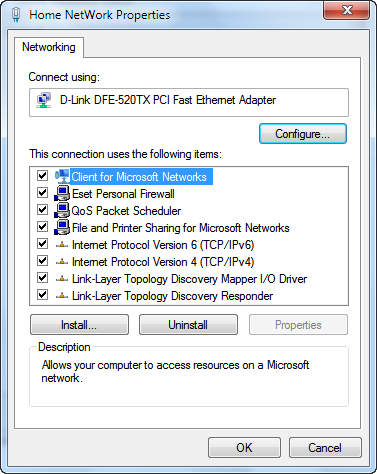
where is the General Tab In this Network adapter ?
Also, I couldn't find that check box for Display Network Icon on the Taskbar?
Where can I find it?
Is something wrong with my new installation of windows 7?
The link below is for windows xp, but I couldn't find anything for windows 7!
How Display Network Icon on the Taskbar in windows xp
=========================================================
i have 3 network adapters and i want to show all of their icons in system tray.
so the below links could n't help :
official page of M$ for Windows 7
How can I show the network icon in the task bar like in windows?
=========================================================
thanks in advance
Please see the picture below,
this is on my network adapters properties :
where is the General Tab In this Network adapter ?
Also, I couldn't find that check box for Display Network Icon on the Taskbar?
Where can I find it?
Is something wrong with my new installation of windows 7?
The link below is for windows xp, but I couldn't find anything for windows 7!
How Display Network Icon on the Taskbar in windows xp
=========================================================
i have 3 network adapters and i want to show all of their icons in system tray.
so the below links could n't help :
official page of M$ for Windows 7
How can I show the network icon in the task bar like in windows?
=========================================================
thanks in advance
My Computer
At a glance
Windows 7 Ultimate x64
- OS
- Windows 7 Ultimate x64


