Solved Check Disk Log

Hopalong X

R.I.P.
Guru
Gold Member
VIP
Local time
4:04 PM
Messages
6,328
Location
Grafton,IL
Windows 7 said I needed to run check disk so I did. I'm not sure why?
Did File and Free Space. Only check disk log listed in Event Viewer.
Here is the log if some of you know what in the world to read from it.
I'm a bit confused unless the Security Descriptors were the problem- what ever they are?
http://technet.microsoft.com/en-us/library/cc783702(WS.10).aspx

I just checked the C partition of the drive since that was the one prompted originally to check.
HD-Western Digital Caviar Black WD7501AALS 750GB 7200 RPM SATA 3.0Gb/s
Mike

Code:
Log Name:      Application
Source:        Microsoft-Windows-Wininit
Date:          5/18/2011 7:45:17 PM
Event ID:      1001
Task Category: None
Level:         Information
Keywords:      Classic
User:          N/A
Computer:      HAL
Description:
 
Checking file system on C:
The type of the file system is NTFS.
Volume label is Win7.
One of your disks needs to be checked for consistency. You
may cancel the disk check, but it is strongly recommended
that you continue.
Windows will now check the disk.                         
CHKDSK is verifying files (stage 1 of 5)...
  200960 file records processed.                                         
File verification completed.
  275 large file records processed.                                   
  0 bad file records processed.                                     
  2 EA records processed.                                           
  92 reparse records processed.                                      
CHKDSK is verifying indexes (stage 2 of 5)...
  251120 index entries processed.                                        
Index verification completed.
  0 unindexed files scanned.                                        
  0 unindexed files recovered.                                      
CHKDSK is verifying security descriptors (stage 3 of 5)...
  200960 file SDs/SIDs processed.                                        
Cleaning up 1231 unused index entries from index $SII of file 0x9.
Cleaning up 1231 unused index entries from index $SDH of file 0x9.
Cleaning up 1231 unused security descriptors.
Security descriptor verification completed.
  25081 data files processed.                                           
CHKDSK is verifying Usn Journal...
  34958880 USN bytes processed.                                            
Usn Journal verification completed.
CHKDSK is verifying file data (stage 4 of 5)...
  200944 files processed.                                                
File data verification completed.
CHKDSK is verifying free space (stage 5 of 5)...
  146213298 free clusters processed.                                        
Free space verification is complete.
Windows has checked the file system and found no problems.
 630068223 KB total disk space.
  44825972 KB in 111171 files.
     67228 KB in 25082 indexes.
         0 KB in bad sectors.
    321827 KB in use by the system.
     65536 KB occupied by the log file.
 584853196 KB available on disk.
      4096 bytes in each allocation unit.
 157517055 total allocation units on disk.
 146213299 allocation units available on disk.
Internal Info:
00 11 03 00 47 14 02 00 40 d0 03 00 00 00 00 00  ....G...@.......
80 04 00 00 5c 00 00 00 00 00 00 00 00 00 00 00  ....\...........
00 00 00 00 00 00 00 00 00 00 00 00 00 00 00 00  ................
Windows has finished checking your disk.
Please wait while your computer restarts.
Event Xml:
<Event xmlns="[URL="http://schemas.microsoft.com/win/2004/08/events/event"]Error[/URL]">
  <System>
    <Provider Name="Microsoft-Windows-Wininit" Guid="{206f6dea-d3c5-4d10-bc72-989f03c8b84b}" EventSourceName="Wininit" />
    <EventID Qualifiers="16384">1001</EventID>
    <Version>0</Version>
    <Level>4</Level>
    <Task>0</Task>
    <Opcode>0</Opcode>
    <Keywords>0x80000000000000</Keywords>
    <TimeCreated SystemTime="2011-05-19T00:45:17.000000000Z" />
    <EventRecordID>41745</EventRecordID>
    <Correlation />
    <Execution ProcessID="0" ThreadID="0" />
    <Channel>Application</Channel>
    <Computer>HAL</Computer>
    <Security />
  </System>
  <EventData>
    <Data>
Checking file system on C:
The type of the file system is NTFS.
Volume label is Win7.
One of your disks needs to be checked for consistency. You
may cancel the disk check, but it is strongly recommended
that you continue.
Windows will now check the disk.                         
CHKDSK is verifying files (stage 1 of 5)...
  200960 file records processed.                                         
File verification completed.
  275 large file records processed.                                   
  0 bad file records processed.                                     
  2 EA records processed.                                           
  92 reparse records processed.                                      
CHKDSK is verifying indexes (stage 2 of 5)...
  251120 index entries processed.                                        
Index verification completed.
  0 unindexed files scanned.                                        
  0 unindexed files recovered.                                      
CHKDSK is verifying security descriptors (stage 3 of 5)...
  200960 file SDs/SIDs processed.                                        
Cleaning up 1231 unused index entries from index $SII of file 0x9.
Cleaning up 1231 unused index entries from index $SDH of file 0x9.
Cleaning up 1231 unused security descriptors.
Security descriptor verification completed.
  25081 data files processed.                                           
CHKDSK is verifying Usn Journal...
  34958880 USN bytes processed.                                            
Usn Journal verification completed.
CHKDSK is verifying file data (stage 4 of 5)...
  200944 files processed.                                                
File data verification completed.
CHKDSK is verifying free space (stage 5 of 5)...
  146213298 free clusters processed.                                        
Free space verification is complete.
Windows has checked the file system and found no problems.
 630068223 KB total disk space.
  44825972 KB in 111171 files.
     67228 KB in 25082 indexes.
         0 KB in bad sectors.
    321827 KB in use by the system.
     65536 KB occupied by the log file.
 584853196 KB available on disk.
      4096 bytes in each allocation unit.
 157517055 total allocation units on disk.
 146213299 allocation units available on disk.
Internal Info:
00 11 03 00 47 14 02 00 40 d0 03 00 00 00 00 00  ....G...@.......
80 04 00 00 5c 00 00 00 00 00 00 00 00 00 00 00  ....\...........
00 00 00 00 00 00 00 00 00 00 00 00 00 00 00 00  ................
Windows has finished checking your disk.
Please wait while your computer restarts.
</Data>
  </EventData>
</Event>
 
Last edited:

My Computer

Computer Manufacturer/Model Number
Hopalong/ Godzilla
OS
Windows7 Pro 64bit SP-1; Windows XP Pro 32bit
CPU
Intel Core i7-870 Lynnfield 2.93GHz LGA 1156 95W Quad-Core
Motherboard
ASUS P7P55D-E PRO
Memory
8GB@1400MHz Crucial Ballistix DDR3-1600 4x2GB
Graphics Card(s)
ASUS ENGTX460 DirectCU/2DI/1GD5 1GB 256-bit GDDR5
Sound Card
VIA Onboard
Monitor(s) Displays
Asus VS248H-P 24"; Samsung SyncMaster 941BW 19"ws
Screen Resolution
1920x1080; 1440x900
Hard Drives
Samsung 830 120GB SSD
Intel 320 120GB SSD
Western Digital Caviar Black WD7501AALS 750GB 7200 RPM SATA 3.0Gb/s
Western Digital Caviar Black WD6401AALS 640GB 7200 RPM SATA 3.0Gb/s
PSU
COOLER MASTER Silent Pro RS850-AMBAJ3-US 850W Modular
Case
COOLER MASTER HAF 932 RC-932-KKN5-GP Black
Cooling
Scythe "Mugen-2 Rev.B" (2 ScytheKaze-Jyuni PWM fans)
Keyboard
Logitech K-320
Mouse
Kensington
Antivirus
Avast Inernet Suite
Browser
IE 9 ; Chrome
Hey Mike, just how did Windows let you know this? It's never happened to me before?
 

My Computer

Computer type
PC/Desktop
Computer Manufacturer/Model Number
Home Built Desktop By DataTech
OS
Windows 7 Ultimate X64 SP1
CPU
Intel i5-2550K, Differing ~4.4-4.8GHz No built in GPU
Motherboard
ASUS P8Z68-V PRO/GEN3
Memory
16GB G.Skill Sniper 1866MHz @ 2133MHz 2x8GB
Graphics Card(s)
ASUS GTX650TIB-DC2OC-2GD5, (650TI Boost)
Sound Card
Onboard Realtek 5-1
Monitor(s) Displays
Samsung P2570HD
Screen Resolution
1920x1080
Hard Drives
Samsung 840 Pro 256GB SSD for OS, 500GB Seagate Constellation (Enterprise drive) for Data
PSU
Corsair HX650W
Case
Inwin Dragon Rider
Cooling
Hyper 212 EVO w/two Noctua fans, push-pull, @1300 RPM
Keyboard
E-Z Eyes, bright yellow keys with large characters
Mouse
steelseries SENSEI Laser Pro Gaming
Internet Speed
48-51Mbs Mbs down, 11 Mbs up Xfinity Cable
Antivirus
Norton Internet Security 2013
Browser
IE 10, Opera, Pale Moon if needed
Other Info
4 case fans, LG BluRay-RE, ASUS DVD-RW, Mr. Fusion power supply, 1.21 gigawatts.
Hi Mike,

Didn't see anything in the log that indicates a problem.

D/L and run Western Digital Lifeguard– Quick Test and Extended Test, on the entire drive, just to be sure the HDD is ok.

I trust you have an image backup already.
 

My Computer

Computer type
PC/Desktop
Computer Manufacturer/Model Number
76~2.0
OS
Windows 7 Ult x64 - SP1/ Windows 8 Pro x64
CPU
Intel Core i5-3570K 4.6GHz
Motherboard
Gigabyte GA-Z77X UD3H, f18
Memory
8GB (2X4GB) DDR3 1600 Corsair Vengeance CL8 1.5v
Graphics Card(s)
Sapphire HD 7770 Vapor-X OC 1GB DDR5
Sound Card
Onboard VIA VT2021
Monitor(s) Displays
22" LCD Dell
Screen Resolution
1680x1050
Hard Drives
Samsung 840Pro 128GB SSD,
Seagate Barracuda 500GB SATA2 7200rpm 32MB cache, Seagate Barracuda 1TB SATA2 7200rpm 32MB cache,
PSU
Corsair HX650W
Case
Cooler Master Storm Scout
Cooling
Corsair H80 2x12cm Noctua NF P12 , 2x14cm case fans
Keyboard
Logitech Wave
Mouse
CM Sentinel
Internet Speed
Dismal
Antivirus
Avast
Browser
Opera Next
Other Info
Haswell laptop: HP Envy 17t-j, i7-4700MQ, GeForce 740M 2GB DDR3, 17.3" Full HD 1920x1080, 16GB RAM, Samsung 840 Pro 128GB, 1TB Hitachi 7200 HDD,
Desktop: eSATA ports,
External eSATA Seagate 500GB SATA2 7200rpm,
External WD USB 500GB
No bad sectors is a good thing.

But run the WD Lifeguard CD extended scan to be sure. It can repair problems if caught early enough to extend a HD's life indefinitely.
 
It's not always a disk problem when a disk gets marked as "dirty". I had this when I first installed IE9 beta. Even running chkdisk was not a permanent solution. It kept coming back until I removed IE9 beta.
 

My Computer

Computer type
Laptop
Computer Manufacturer/Model Number
Hewlett-Packard/G62-107SA Notebook
OS
Microsoft Windows 7 Home Premium 64-bit Service Pack 1
CPU
Intel(R) Core(TM) i3 CPU M 330 @ 2.13GHz
Motherboard
Hewlett-Packard 1425
Memory
8 GB DDR3
Graphics Card(s)
Intel(R) HD Graphics
Sound Card
Realtek High Definition Audio
Monitor(s) Displays
Builtin
Screen Resolution
1366 x 768 x 32 bits (4294967296 colors) @ 60 Hz
Hard Drives
250 GB SATA Hard Disk Drive 7200 rpm
2TB Seagate GoFlex USB 2 Drive
1TB Iomega Prestige USB 2 Drive
1.5TB Iomega Prestige USB 2 Drive (Samsung)
2TB WD MyBook Live NAS.
Mouse
Logitech Anywhere MX
Internet Speed
152 Mbs download 10 Mbs upload
Antivirus
Norton 360
Browser
Chrome
Hey Mike, just how did Windows let you know this? It's never happened to me before?
Action Center. It had a notification under maintenance.

Click the white flag in right side of task bar. Right now it says "No current issues detected".
Stated one issue yesterday evening and when I opened Action Center it was listed it should check the disk under the maintenance tab.

Mike
-----------------------------------------
Greg and Dave

Thanks for the response.
Will run WD checks.
 

My Computer

Computer Manufacturer/Model Number
Hopalong/ Godzilla
OS
Windows7 Pro 64bit SP-1; Windows XP Pro 32bit
CPU
Intel Core i7-870 Lynnfield 2.93GHz LGA 1156 95W Quad-Core
Motherboard
ASUS P7P55D-E PRO
Memory
8GB@1400MHz Crucial Ballistix DDR3-1600 4x2GB
Graphics Card(s)
ASUS ENGTX460 DirectCU/2DI/1GD5 1GB 256-bit GDDR5
Sound Card
VIA Onboard
Monitor(s) Displays
Asus VS248H-P 24"; Samsung SyncMaster 941BW 19"ws
Screen Resolution
1920x1080; 1440x900
Hard Drives
Samsung 830 120GB SSD
Intel 320 120GB SSD
Western Digital Caviar Black WD7501AALS 750GB 7200 RPM SATA 3.0Gb/s
Western Digital Caviar Black WD6401AALS 640GB 7200 RPM SATA 3.0Gb/s
PSU
COOLER MASTER Silent Pro RS850-AMBAJ3-US 850W Modular
Case
COOLER MASTER HAF 932 RC-932-KKN5-GP Black
Cooling
Scythe "Mugen-2 Rev.B" (2 ScytheKaze-Jyuni PWM fans)
Keyboard
Logitech K-320
Mouse
Kensington
Antivirus
Avast Inernet Suite
Browser
IE 9 ; Chrome
It's not always a disk problem when a disk gets marked as "dirty". I had this when I first installed IE9 beta. Even running chkdisk was not a permanent solution. It kept coming back until I removed IE9 beta.
I just double checked.
I uninstalled Beta before installing the final release.

Never hurts to check. ;) :D

Thanks.
Mike
 

My Computer

Computer Manufacturer/Model Number
Hopalong/ Godzilla
OS
Windows7 Pro 64bit SP-1; Windows XP Pro 32bit
CPU
Intel Core i7-870 Lynnfield 2.93GHz LGA 1156 95W Quad-Core
Motherboard
ASUS P7P55D-E PRO
Memory
8GB@1400MHz Crucial Ballistix DDR3-1600 4x2GB
Graphics Card(s)
ASUS ENGTX460 DirectCU/2DI/1GD5 1GB 256-bit GDDR5
Sound Card
VIA Onboard
Monitor(s) Displays
Asus VS248H-P 24"; Samsung SyncMaster 941BW 19"ws
Screen Resolution
1920x1080; 1440x900
Hard Drives
Samsung 830 120GB SSD
Intel 320 120GB SSD
Western Digital Caviar Black WD7501AALS 750GB 7200 RPM SATA 3.0Gb/s
Western Digital Caviar Black WD6401AALS 640GB 7200 RPM SATA 3.0Gb/s
PSU
COOLER MASTER Silent Pro RS850-AMBAJ3-US 850W Modular
Case
COOLER MASTER HAF 932 RC-932-KKN5-GP Black
Cooling
Scythe "Mugen-2 Rev.B" (2 ScytheKaze-Jyuni PWM fans)
Keyboard
Logitech K-320
Mouse
Kensington
Antivirus
Avast Inernet Suite
Browser
IE 9 ; Chrome
Yep. Never hurts to check although my problems occurred within a few days of install.

The only other time I've had a disk marked dirty was after BSODS caused by dodgy memory sticks but this looks different. I never got the warning from Action Centre, just it going into chkdisk on boot.
 

My Computer

Computer type
Laptop
Computer Manufacturer/Model Number
Hewlett-Packard/G62-107SA Notebook
OS
Microsoft Windows 7 Home Premium 64-bit Service Pack 1
CPU
Intel(R) Core(TM) i3 CPU M 330 @ 2.13GHz
Motherboard
Hewlett-Packard 1425
Memory
8 GB DDR3
Graphics Card(s)
Intel(R) HD Graphics
Sound Card
Realtek High Definition Audio
Monitor(s) Displays
Builtin
Screen Resolution
1366 x 768 x 32 bits (4294967296 colors) @ 60 Hz
Hard Drives
250 GB SATA Hard Disk Drive 7200 rpm
2TB Seagate GoFlex USB 2 Drive
1TB Iomega Prestige USB 2 Drive
1.5TB Iomega Prestige USB 2 Drive (Samsung)
2TB WD MyBook Live NAS.
Mouse
Logitech Anywhere MX
Internet Speed
152 Mbs download 10 Mbs upload
Antivirus
Norton 360
Browser
Chrome
Action center showed a yellow flag similar to when you haven't run a MSE scan for a long while.
No red flags or "you have to do this or else" warnings.
--------------------
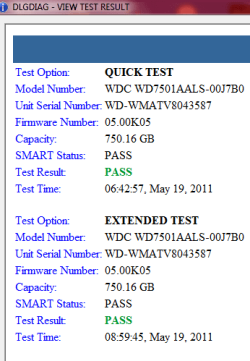
Everything checked fine with WD diagnostics.
 

Attachments

  • DLGDisk extended1.PNG
    DLGDisk extended1.PNG
    11.9 KB · Views: 20

My Computer

Computer Manufacturer/Model Number
Hopalong/ Godzilla
OS
Windows7 Pro 64bit SP-1; Windows XP Pro 32bit
CPU
Intel Core i7-870 Lynnfield 2.93GHz LGA 1156 95W Quad-Core
Motherboard
ASUS P7P55D-E PRO
Memory
8GB@1400MHz Crucial Ballistix DDR3-1600 4x2GB
Graphics Card(s)
ASUS ENGTX460 DirectCU/2DI/1GD5 1GB 256-bit GDDR5
Sound Card
VIA Onboard
Monitor(s) Displays
Asus VS248H-P 24"; Samsung SyncMaster 941BW 19"ws
Screen Resolution
1920x1080; 1440x900
Hard Drives
Samsung 830 120GB SSD
Intel 320 120GB SSD
Western Digital Caviar Black WD7501AALS 750GB 7200 RPM SATA 3.0Gb/s
Western Digital Caviar Black WD6401AALS 640GB 7200 RPM SATA 3.0Gb/s
PSU
COOLER MASTER Silent Pro RS850-AMBAJ3-US 850W Modular
Case
COOLER MASTER HAF 932 RC-932-KKN5-GP Black
Cooling
Scythe "Mugen-2 Rev.B" (2 ScytheKaze-Jyuni PWM fans)
Keyboard
Logitech K-320
Mouse
Kensington
Antivirus
Avast Inernet Suite
Browser
IE 9 ; Chrome
That's good news.

You should be able to rest easier now.
 

My Computer

Computer type
PC/Desktop
Computer Manufacturer/Model Number
76~2.0
OS
Windows 7 Ult x64 - SP1/ Windows 8 Pro x64
CPU
Intel Core i5-3570K 4.6GHz
Motherboard
Gigabyte GA-Z77X UD3H, f18
Memory
8GB (2X4GB) DDR3 1600 Corsair Vengeance CL8 1.5v
Graphics Card(s)
Sapphire HD 7770 Vapor-X OC 1GB DDR5
Sound Card
Onboard VIA VT2021
Monitor(s) Displays
22" LCD Dell
Screen Resolution
1680x1050
Hard Drives
Samsung 840Pro 128GB SSD,
Seagate Barracuda 500GB SATA2 7200rpm 32MB cache, Seagate Barracuda 1TB SATA2 7200rpm 32MB cache,
PSU
Corsair HX650W
Case
Cooler Master Storm Scout
Cooling
Corsair H80 2x12cm Noctua NF P12 , 2x14cm case fans
Keyboard
Logitech Wave
Mouse
CM Sentinel
Internet Speed
Dismal
Antivirus
Avast
Browser
Opera Next
Other Info
Haswell laptop: HP Envy 17t-j, i7-4700MQ, GeForce 740M 2GB DDR3, 17.3" Full HD 1920x1080, 16GB RAM, Samsung 840 Pro 128GB, 1TB Hitachi 7200 HDD,
Desktop: eSATA ports,
External eSATA Seagate 500GB SATA2 7200rpm,
External WD USB 500GB
Better to check than to have it die without warning.

Windows must have had a hiccup. ;)
 

My Computer

Computer Manufacturer/Model Number
Hopalong/ Godzilla
OS
Windows7 Pro 64bit SP-1; Windows XP Pro 32bit
CPU
Intel Core i7-870 Lynnfield 2.93GHz LGA 1156 95W Quad-Core
Motherboard
ASUS P7P55D-E PRO
Memory
8GB@1400MHz Crucial Ballistix DDR3-1600 4x2GB
Graphics Card(s)
ASUS ENGTX460 DirectCU/2DI/1GD5 1GB 256-bit GDDR5
Sound Card
VIA Onboard
Monitor(s) Displays
Asus VS248H-P 24"; Samsung SyncMaster 941BW 19"ws
Screen Resolution
1920x1080; 1440x900
Hard Drives
Samsung 830 120GB SSD
Intel 320 120GB SSD
Western Digital Caviar Black WD7501AALS 750GB 7200 RPM SATA 3.0Gb/s
Western Digital Caviar Black WD6401AALS 640GB 7200 RPM SATA 3.0Gb/s
PSU
COOLER MASTER Silent Pro RS850-AMBAJ3-US 850W Modular
Case
COOLER MASTER HAF 932 RC-932-KKN5-GP Black
Cooling
Scythe "Mugen-2 Rev.B" (2 ScytheKaze-Jyuni PWM fans)
Keyboard
Logitech K-320
Mouse
Kensington
Antivirus
Avast Inernet Suite
Browser
IE 9 ; Chrome
It happens ;)

If it happens again run system file checker.
 

My Computer

Computer type
PC/Desktop
Computer Manufacturer/Model Number
76~2.0
OS
Windows 7 Ult x64 - SP1/ Windows 8 Pro x64
CPU
Intel Core i5-3570K 4.6GHz
Motherboard
Gigabyte GA-Z77X UD3H, f18
Memory
8GB (2X4GB) DDR3 1600 Corsair Vengeance CL8 1.5v
Graphics Card(s)
Sapphire HD 7770 Vapor-X OC 1GB DDR5
Sound Card
Onboard VIA VT2021
Monitor(s) Displays
22" LCD Dell
Screen Resolution
1680x1050
Hard Drives
Samsung 840Pro 128GB SSD,
Seagate Barracuda 500GB SATA2 7200rpm 32MB cache, Seagate Barracuda 1TB SATA2 7200rpm 32MB cache,
PSU
Corsair HX650W
Case
Cooler Master Storm Scout
Cooling
Corsair H80 2x12cm Noctua NF P12 , 2x14cm case fans
Keyboard
Logitech Wave
Mouse
CM Sentinel
Internet Speed
Dismal
Antivirus
Avast
Browser
Opera Next
Other Info
Haswell laptop: HP Envy 17t-j, i7-4700MQ, GeForce 740M 2GB DDR3, 17.3" Full HD 1920x1080, 16GB RAM, Samsung 840 Pro 128GB, 1TB Hitachi 7200 HDD,
Desktop: eSATA ports,
External eSATA Seagate 500GB SATA2 7200rpm,
External WD USB 500GB
Now that you have a clean system does that mean you have extra time to mow my lawn?

I told you not to download any "BETA" programs....You are as stubborn as I am.;)
THW
 

My Computer

Computer Manufacturer/Model Number
HP M9077c
OS
Windows 7 Home Premium 64bit
CPU
Intel(R)Core(TM)2 quad [email protected] 2.39GHz
Motherboard
ASUSeK
Memory
6GB DDR2 6400
Graphics Card(s)
GeForce 8500/512MB
Sound Card
Realtek High Def Audio
Monitor(s) Displays
HP w2408 LCD 24" widescreen
Screen Resolution
1920x1200
Cooling
6 pack of Bud
Keyboard
MS wireless Inteli
Mouse
MS wireless Inteli
Thanks Dave.

Dennis mow the lawn and go play Putt-Putt. :p
 

My Computer

Computer Manufacturer/Model Number
Hopalong/ Godzilla
OS
Windows7 Pro 64bit SP-1; Windows XP Pro 32bit
CPU
Intel Core i7-870 Lynnfield 2.93GHz LGA 1156 95W Quad-Core
Motherboard
ASUS P7P55D-E PRO
Memory
8GB@1400MHz Crucial Ballistix DDR3-1600 4x2GB
Graphics Card(s)
ASUS ENGTX460 DirectCU/2DI/1GD5 1GB 256-bit GDDR5
Sound Card
VIA Onboard
Monitor(s) Displays
Asus VS248H-P 24"; Samsung SyncMaster 941BW 19"ws
Screen Resolution
1920x1080; 1440x900
Hard Drives
Samsung 830 120GB SSD
Intel 320 120GB SSD
Western Digital Caviar Black WD7501AALS 750GB 7200 RPM SATA 3.0Gb/s
Western Digital Caviar Black WD6401AALS 640GB 7200 RPM SATA 3.0Gb/s
PSU
COOLER MASTER Silent Pro RS850-AMBAJ3-US 850W Modular
Case
COOLER MASTER HAF 932 RC-932-KKN5-GP Black
Cooling
Scythe "Mugen-2 Rev.B" (2 ScytheKaze-Jyuni PWM fans)
Keyboard
Logitech K-320
Mouse
Kensington
Antivirus
Avast Inernet Suite
Browser
IE 9 ; Chrome
Back
Top