Chkdsk will not run at reboot, only one partition

mike0921

New member
Local time
2:36 AM
Messages
8
Location
Fairmont, WV
I bought my ProBook from a friend who had obtained it as part of an Online Degree Program with (I believe) Everest University (?) or Everest Online College.... It is set up with only one partition (C:). When I try to run a chkdsk /f or any chkdsk... it says I must reschedule it for reboot, it can not run on the current volume in use. I check the boxes and click restart and chkdsk doesn't run. I have tried: tweaking.com's All-in-One Windows repair tool, tried running it from a cmd prompt as administrator, after booting with my Windows Install disc and using the cmd prompt from the Repair menu and nothing works. After running it from the Windows Install disc I did get the following message:
In the cmd prompt window...

X:\Sources> chkdsk /f
The type of the file system is NTFS.
Cannot lock current drive.
Windows cannot run disk checking on this volume because it is write protected.

X:\Sources>

I found a thread here which led me to a wiki article at:

How do you turn off write protect on your hard drive

and after trying the answers there nothing has been resolved. I used a FixIt tool to reset a registry setting which produced a message that it had been successful but the issue remained. It also referred to a Lock sys: on/off command which I tried at a cmd prompt which produced a message that it was an invalid command. I googled Lock sys: on/off command which produced nothing to help me...

Could that Online University (or college...) have set something to cause this? Every day, I get 4 Internet Explorer windows that open up soliciting her to come back to the program but haven't pursued anything with them. (Probably because I'm a little p***d - er, frustrated)

I do appreciate your help and suggestions,

Mike
 

My Computer My Computer

At a glance

Windows 7 Home Premium 64 bit SP1Intel Celeron B840 @ 1.90GHz4.00GB Single-Channel DDR3 @ 665MHz (9-9-9-24)Generic PnP Monitor (1366x768@60Hz)
Computer type
Laptop
Computer Manufacturer/Model Number
HP ProBook 4440S
OS
Windows 7 Home Premium 64 bit SP1
CPU
Intel Celeron B840 @ 1.90GHz
Motherboard
Hewlett-Packard 17F3 (U3E1)
Memory
4.00GB Single-Channel DDR3 @ 665MHz (9-9-9-24)
Graphics Card(s)
Generic PnP Monitor (1366x768@60Hz)
Sound Card
AnvSoft Virtual Sound Device, High Definition Audio Device,
Monitor(s) Displays
Generic PnP Monitor on Intel HD Graphics
Screen Resolution
1366x768 pixels
Hard Drives
ST320LT007-9ZV142 ATA Device, Manufacturer Seagate,
Form Factor 3.5", Capacity 298 GB, Real size - 320,072,933,376 bytes, SATA type SATA-II 3.0Gb/s,
Keyboard
Standard PS/2 Keyboard
Mouse
Microsoft USB Dual Receiver Wireless Mouse & touch pad
Internet Speed
15 mps
Antivirus
Microsoft Security Esssentials
Browser
IE 11
Do you still need assistance with this issue?
 

My Computer My Computer

At a glance

Microsoft Windows 7 Ultimate 64-bit 7601 Mult...Intel(R) Core(TM) i7 CPU 950 @ 3.07GHz16.0GB Dual-Channel DDR3 @ 534MHz (8-8-8-20)1023MB NVIDIA GeForce GTX 650 (EVGA)
Computer type
PC/Desktop
Computer Manufacturer/Model Number
Custome Built
OS
Microsoft Windows 7 Ultimate 64-bit 7601 Multiprocessor Free Service Pack 1
CPU
Intel(R) Core(TM) i7 CPU 950 @ 3.07GHz
Motherboard
ASUSTeK Computer INC. SABERTOOTH X58 (LGA1366)
Memory
16.0GB Dual-Channel DDR3 @ 534MHz (8-8-8-20)
Graphics Card(s)
1023MB NVIDIA GeForce GTX 650 (EVGA)
Sound Card
(1) NVIDIA High Definition Audio (2) High Definition Audio
Monitor(s) Displays
HP W2072a LED Backlit
Screen Resolution
1920x1080@60Hz
Hard Drives
(1) SAMSUNG MMCRE28G5MXP-0VB SCSI Disk Device
(2) ST1000DM 003-1CH162 SCSI Disk Device
(3) WDC WD10EURX-73FH1Y0 SCSI Disk Device
PSU
XION XON-1000P14F
Cooling
Fans
Antivirus
Windows Security Essentials
Browser
Mozilla Firefox
Other Info
BIOS Version/Date
American Megatrends Inc. 1402, 8/9/2012
SMBIOS Version 2.5
Chkdsk will not run at Boot, only one partition...

Gandalph,

Yes the problem still persists, I still get the Action Message that I need to run Chckdsk. It won't run, because the message states it can't run the command since the disk is active... and it won't run the command when I check the boxes to run at startup, it ust boots right into the Win 7 OS on the C drive. And then I am told that I need to run Chkdsk before repairing the HDD> Which there is no way I have discovered yet to run that routine on my HDD.

Thanks for replying to me, I had put up my laptop to look for a new one so wasn't checking mail as regurlarly as I should have. I am sorry for my delay. I hope you can still help me.

Richard Fielder
 

My Computer My Computer

At a glance

Windows 7 Home Premium 64 bit SP1Intel Celeron B840 @ 1.90GHz4.00GB Single-Channel DDR3 @ 665MHz (9-9-9-24)Generic PnP Monitor (1366x768@60Hz)
Computer type
Laptop
Computer Manufacturer/Model Number
HP ProBook 4440S
OS
Windows 7 Home Premium 64 bit SP1
CPU
Intel Celeron B840 @ 1.90GHz
Motherboard
Hewlett-Packard 17F3 (U3E1)
Memory
4.00GB Single-Channel DDR3 @ 665MHz (9-9-9-24)
Graphics Card(s)
Generic PnP Monitor (1366x768@60Hz)
Sound Card
AnvSoft Virtual Sound Device, High Definition Audio Device,
Monitor(s) Displays
Generic PnP Monitor on Intel HD Graphics
Screen Resolution
1366x768 pixels
Hard Drives
ST320LT007-9ZV142 ATA Device, Manufacturer Seagate,
Form Factor 3.5", Capacity 298 GB, Real size - 320,072,933,376 bytes, SATA type SATA-II 3.0Gb/s,
Keyboard
Standard PS/2 Keyboard
Mouse
Microsoft USB Dual Receiver Wireless Mouse & touch pad
Internet Speed
15 mps
Antivirus
Microsoft Security Esssentials
Browser
IE 11
I'm not sure, if you have done this..

Click on your Computer icon
Right click on the C drive
Select Properties
Click on the Tools tab
Click on the Check Now ... button
Make sure both boxes have a check mark in them.
Click on Start button.
Your PC should request a reboot. Do it.
The second half of the check is run during reboot.

Please report the results of the Error-checking.
 

My Computer My Computer

At a glance

Microsoft Windows 7 Ultimate 64-bit 7601 Mult...Intel(R) Core(TM) i7 CPU 950 @ 3.07GHz16.0GB Dual-Channel DDR3 @ 534MHz (8-8-8-20)1023MB NVIDIA GeForce GTX 650 (EVGA)
Computer type
PC/Desktop
Computer Manufacturer/Model Number
Custome Built
OS
Microsoft Windows 7 Ultimate 64-bit 7601 Multiprocessor Free Service Pack 1
CPU
Intel(R) Core(TM) i7 CPU 950 @ 3.07GHz
Motherboard
ASUSTeK Computer INC. SABERTOOTH X58 (LGA1366)
Memory
16.0GB Dual-Channel DDR3 @ 534MHz (8-8-8-20)
Graphics Card(s)
1023MB NVIDIA GeForce GTX 650 (EVGA)
Sound Card
(1) NVIDIA High Definition Audio (2) High Definition Audio
Monitor(s) Displays
HP W2072a LED Backlit
Screen Resolution
1920x1080@60Hz
Hard Drives
(1) SAMSUNG MMCRE28G5MXP-0VB SCSI Disk Device
(2) ST1000DM 003-1CH162 SCSI Disk Device
(3) WDC WD10EURX-73FH1Y0 SCSI Disk Device
PSU
XION XON-1000P14F
Cooling
Fans
Antivirus
Windows Security Essentials
Browser
Mozilla Firefox
Other Info
BIOS Version/Date
American Megatrends Inc. 1402, 8/9/2012
SMBIOS Version 2.5
I ran the tool in Properties

Thanks for your reply and help. I was pulling my hair out and wondering where I was going to find it in my budget to replace my laptop, so I am in your debt! Thanks...

I did as you instructed, clicking on the Check Now button on the Error Checking Tool in the Properties Box on the C:drive. I received the message, "Windows can't check the disk while it's in use. Do you want to check for hard disk errors the next time you start your computer?" I checked yes and closed everything and powered down. After waiting a minute or so I restarted the laptop and it went through the normal Startup routine. It did not run chkdks.

What do I do now?

MIke
 

My Computer My Computer

At a glance

Windows 7 Home Premium 64 bit SP1Intel Celeron B840 @ 1.90GHz4.00GB Single-Channel DDR3 @ 665MHz (9-9-9-24)Generic PnP Monitor (1366x768@60Hz)
Computer type
Laptop
Computer Manufacturer/Model Number
HP ProBook 4440S
OS
Windows 7 Home Premium 64 bit SP1
CPU
Intel Celeron B840 @ 1.90GHz
Motherboard
Hewlett-Packard 17F3 (U3E1)
Memory
4.00GB Single-Channel DDR3 @ 665MHz (9-9-9-24)
Graphics Card(s)
Generic PnP Monitor (1366x768@60Hz)
Sound Card
AnvSoft Virtual Sound Device, High Definition Audio Device,
Monitor(s) Displays
Generic PnP Monitor on Intel HD Graphics
Screen Resolution
1366x768 pixels
Hard Drives
ST320LT007-9ZV142 ATA Device, Manufacturer Seagate,
Form Factor 3.5", Capacity 298 GB, Real size - 320,072,933,376 bytes, SATA type SATA-II 3.0Gb/s,
Keyboard
Standard PS/2 Keyboard
Mouse
Microsoft USB Dual Receiver Wireless Mouse & touch pad
Internet Speed
15 mps
Antivirus
Microsoft Security Esssentials
Browser
IE 11
Run from System Recovery Options Command Line, using Option Two from Disk Check.

Then run SFC /SCANNOW Run in Command Prompt at Boot.

If there are unfixable System files or problems persist you can also consider a Repair Install
which reinstalls the OS in place while saving all the settings, programs and files. You should still have your files backed up at all times.

You can also run Factory Recovery at any time to return the PC to factory condition and start over. If you do this I would then Clean Up Factory Bloatware.

But to have the best install of all I would strongly consider doing what tech enthusiasts do with preinstalled Win7 and do a Clean Reinstall - Factory OEM Windows 7 to get rid of the bloatware and duplicate utilities which interfere with better versions built into Win7. You'll have the best install of Win7 possible, and it will stay that way if you stick with only the tools and methods given.
 
I bought my ProBook from a friend who had obtained it as part of an Online Degree Program with (I believe) Everest University (?) or Everest Online College....


Could that Online University (or college...) have set something to cause this? Every day, I get 4 Internet Explorer windows that open up soliciting her to come back to the program but haven't pursued anything with them. (Probably because I'm a little p***d - er, frustrated)

I do appreciate your help and suggestions,

Mike

Sounds like your friend didn't finish the program, which is probably the criteria for keeping the laptop.

There are quite a few search results for locked Everest supplied laptops,

https://www.google.com/search?q=how...3.21083j0j4&sourceid=chrome&es_sm=93&ie=UTF-8
 

My Computer My Computer

At a glance

Win 10 Pro x64Intel I5-2500K @3.3GHz16GB G.Skill Ripjaws X (4x4GB)EVGA GeForce 750 Ti SC 2GB
Computer type
PC/Desktop
Computer Manufacturer/Model Number
Self Built
OS
Win 10 Pro x64
CPU
Intel I5-2500K @3.3GHz
Motherboard
Asrock P67 Extreme4
Memory
16GB G.Skill Ripjaws X (4x4GB)
Graphics Card(s)
EVGA GeForce 750 Ti SC 2GB
Sound Card
ASUS Xonar DG 5.1 Channels 24-bit 96KHz PCI Interface Sound
Monitor(s) Displays
auria eq2367
Screen Resolution
1920 x 1080
Hard Drives
250GB Samsung 850 EVO SSD
1TB WD Blue
1TB Hitachi
PSU
SeaSonic X 650W 80 Plus Gold
Case
Corsair Obsidian 750D
Cooling
Corsair H60, Three 140mm case fans
Keyboard
Logitech Wireless Keyboard K520
Mouse
Logitech Wireless Mouse M310
Internet Speed
Wave Broadband ~ 100 dn 5 up
Antivirus
Windows Defender, Malwarebytes Premium
Browser
Edge, IE11, Chrome
Other Info
Laptop specs: HP g7-1365dx /
CPU: AMD A6-3420M APU with Radeon(tm) HD Graphics /
RAM: Crucial 8Gb (2x4Gb) /
SSD: Crucial M4-CT128M4SSD2 ATA Device/ FW 000F /
GFX: AMD Radeon HD 6520G /
OS: Windows 10 Pro x64
In this case I'd determine for sure if this was sold to you legally by contacting the IT Department at Everest. If not you'll want to be sure you have documentation of the sale since the owner could say it was stolen to get off the hook. Perhaps if you don't have a receipt or other documentation you should have someone witness a call to the seller in which you ask about this.

You're also going to want to know for sure you have a legal retail license and the PC is not volume licensed by Everest. If you have a COA sticker with readable Product Key on the PC then you can do what most tech enthusiasts do with preinstalled Win7 and http://www.sevenforums.com/tutorials/219487-clean-reinstall-factory-oem-windows-7-a.html#post1839164.

Everything needed is in the blue link to get and keep a perfect install. In your case I'd also wipe the HD first from the installation media Command Line using Clean command: http://www.sevenforums.com/tutorials/52129-disk-clean-clean-all-diskpart-command.html
 
May I put in my 2 cents worth and suggest running this
Download Kaspersky Rescue Disk 10

OP will need the use of a friends machine to make the boot but worth a try in my tiny mind.
 

My Computer My Computer

At a glance

Desk1 7 Home Prem / Desk2 10 Pro / Main lap A...Desk1 i5 3750K / Laptop i7 GTX 860M / Desk2 i...Desk1 8GB (1866) / Desk2 16GB (1333) / Laptop...Desk 1& 2NVidia GTX 650 & Laptops on board Intel
Computer type
PC/Desktop
Computer Manufacturer/Model Number
Own build (new) Desk1 / Asus ROG Win 7 / Desk2 1st build
OS
Desk1 7 Home Prem / Desk2 10 Pro / Main lap Asus ROG 10 Pro 2 laptop Toshiba 7 Pro Asus P2520 7 & 10
CPU
Desk1 i5 3750K / Laptop i7 GTX 860M / Desk2 i5 2500
Motherboard
Desk1 Asus P877-V / Desk2 Gigabyte H67 UD3H / Laptop ?
Memory
Desk1 8GB (1866) / Desk2 16GB (1333) / Laptop 8Gb DDR3
Graphics Card(s)
Desk 1& 2NVidia GTX 650 & Laptops on board Intel
Sound Card
Desk 1 & 2 -XONAR DG Realtek High Def audio Laptop
Monitor(s) Displays
Desk 1 Benq HD 2450 / Desk2 Philips 24" / Laptop 17.5"
Screen Resolution
1920x1080 D1 & D2 & Laptop 1
Hard Drives
Desk1 Samsung 120GB 830 SSD
Asus ROG 256GB 850 Pro SSD
Desk2 Samsung 840 256 SSD
Toshiba 120GB EVO
PSU
Desk 1 Corsair HX 1050/ Laptop ? / Desk 2 Corsair HX 650
Case
Desk 1 Cooler HAF XM ? Toshiba laptop / Desk2 Coolermaster
Cooling
Fans on all Desk1 -2 Desk2 - all Coolermasters 5 Laptop ?
Keyboard
Desk 1 MS Sidewinder X6 Desk 2 MS Sidewinder X 4
Mouse
Desk 1&2 - Gigabyte MS 900 gamer - laptop - Logitec wireless
Internet Speed
ADSL2+
Other Info
One other Desktop (tester) and spare Toshba laptop both with SSD's
Running Kaspersky 2016 ISS on all machines config'd identically
Logitec audio stereo systems on each machine (x3)
Canon MG5250MFC
Router/modem TP-Link running WPA2SK
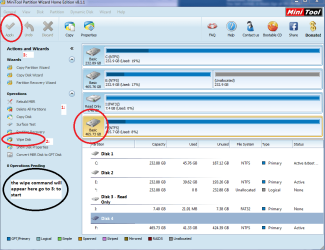
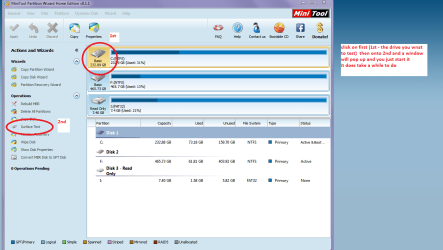
Now I don't see any refs to testingntis drive mayb it has something very wrong with it and I think running this
SeaTools for Windows | Seagate

and a surface test with this
Best Free Partition Manager Freeware and free partition magic for Windows 7, Windows 8, Windows Vista and Windows XP 32 bit & 64 bit. MiniTool Free Partition Manager Software Home Edition. see pic if only to eliminate those possibilities. I also reckon for the time it takes it might as well be worth taking a look at exploring that drive see other pic to see whatis in it.

PS Sorry attached the wrong one for surface test disregard the top pic
 

Attachments

  • MINI TOOL 5.PNG
    MINI TOOL 5.PNG
    48 KB · Views: 0
  • MINI TOOL4.PNG
    MINI TOOL4.PNG
    58.4 KB · Views: 0
  • SURFACE TEST.PNG
    SURFACE TEST.PNG
    47.5 KB · Views: 0

My Computer My Computer

At a glance

Desk1 7 Home Prem / Desk2 10 Pro / Main lap A...Desk1 i5 3750K / Laptop i7 GTX 860M / Desk2 i...Desk1 8GB (1866) / Desk2 16GB (1333) / Laptop...Desk 1& 2NVidia GTX 650 & Laptops on board Intel
Computer type
PC/Desktop
Computer Manufacturer/Model Number
Own build (new) Desk1 / Asus ROG Win 7 / Desk2 1st build
OS
Desk1 7 Home Prem / Desk2 10 Pro / Main lap Asus ROG 10 Pro 2 laptop Toshiba 7 Pro Asus P2520 7 & 10
CPU
Desk1 i5 3750K / Laptop i7 GTX 860M / Desk2 i5 2500
Motherboard
Desk1 Asus P877-V / Desk2 Gigabyte H67 UD3H / Laptop ?
Memory
Desk1 8GB (1866) / Desk2 16GB (1333) / Laptop 8Gb DDR3
Graphics Card(s)
Desk 1& 2NVidia GTX 650 & Laptops on board Intel
Sound Card
Desk 1 & 2 -XONAR DG Realtek High Def audio Laptop
Monitor(s) Displays
Desk 1 Benq HD 2450 / Desk2 Philips 24" / Laptop 17.5"
Screen Resolution
1920x1080 D1 & D2 & Laptop 1
Hard Drives
Desk1 Samsung 120GB 830 SSD
Asus ROG 256GB 850 Pro SSD
Desk2 Samsung 840 256 SSD
Toshiba 120GB EVO
PSU
Desk 1 Corsair HX 1050/ Laptop ? / Desk 2 Corsair HX 650
Case
Desk 1 Cooler HAF XM ? Toshiba laptop / Desk2 Coolermaster
Cooling
Fans on all Desk1 -2 Desk2 - all Coolermasters 5 Laptop ?
Keyboard
Desk 1 MS Sidewinder X6 Desk 2 MS Sidewinder X 4
Mouse
Desk 1&2 - Gigabyte MS 900 gamer - laptop - Logitec wireless
Internet Speed
ADSL2+
Other Info
One other Desktop (tester) and spare Toshba laptop both with SSD's
Running Kaspersky 2016 ISS on all machines config'd identically
Logitec audio stereo systems on each machine (x3)
Canon MG5250MFC
Router/modem TP-Link running WPA2SK
Thanks for your reply and help. I was pulling my hair out and wondering where I was going to find it in my budget to replace my laptop, so I am in your debt! Thanks...

I did as you instructed, clicking on the Check Now button on the Error Checking Tool in the Properties Box on the C:drive. I received the message, "Windows can't check the disk while it's in use. Do you want to check for hard disk errors the next time you start your computer?" I checked yes and closed everything and powered down. After waiting a minute or so I restarted the laptop and it went through the normal Startup routine. It did not run chkdks.

What do I do now?

MIke

Do not Shut Down (power off) the PC after setting up chkdsk to run. Restart instead.
 

My Computer My Computer

At a glance

Windows 7 64 Bit Home Premium SP1i7-3820GSkill F3-14900CL9Q - 16GBEVGA GeForce GTX660 - Driver 352.86
Computer type
PC/Desktop
Computer Manufacturer/Model Number
Home Built - Jan 2013
OS
Windows 7 64 Bit Home Premium SP1
CPU
i7-3820
Motherboard
Asus P9X79-PRO - Bios 4608
Memory
GSkill F3-14900CL9Q - 16GB
Graphics Card(s)
EVGA GeForce GTX660 - Driver 352.86
Sound Card
On board Realtek ALC898
Monitor(s) Displays
Acer S271HL
Screen Resolution
1920 x 1080
Hard Drives
#1- Samsung 840 Pro Series
#2- Western Digital WD1002FAEX Sata3 Black
#3- Western Digital WD1002FAEX Sata3 Black
PSU
Corsair CMPSU-850TX-V2 - 850 watt (by Seasonic)
Case
Corsair Obsidian 550D
Cooling
Standard 3 120mm case fans, Cooler Master Hyper 212 EVO
Keyboard
MS KC-0405
Mouse
Intellimouse 5-button
Internet Speed
56 Mbits/Sec (on a good day)
Antivirus
Avast & Malwarebytes
Browser
Firefox
Other Info
Asus DVD - DRW-24B1ST 24X
Back
Top