Solved Choose default program button (in Right-Click) not working!?

addas

New member
Member
Local time
1:08 AM
Messages
66
Hey Guys!
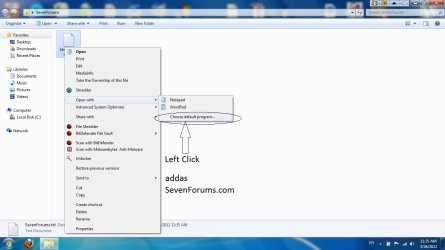
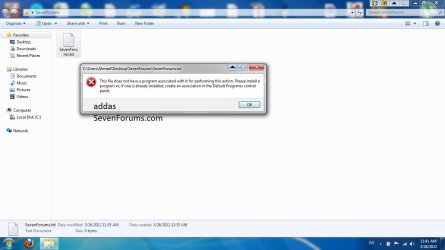
When I right click, open with, choose default program button, it gives me an error says: "This file does not have a program associated with it for performing this action. Please install a program or, if one is already installed, create an association in the Default Programs control panel."
I fixed Windows 7 fix association files, but error still there!

NOTE:
Only Open with and Choose default program button NOT WORKING, but everything like .txt, .exe, .mp3, etc is WORKING, just the BUTTON NOT WORKING!

NOTE 2:
I run a Registry Cleaner before this error, and I don't have BACKUPS! :(

Thanks!
addas
 

My Computer

Computer type
Laptop
Computer Manufacturer/Model Number
Acer Aspire 4935G
OS
Windows 8 Pro with WMC 64-bit
CPU
Intel Core 2 Duo T6400
Motherboard
Acer Aspire 4935 Board
Screen Resolution
1366 X 768
Case
Laptop
Internet Speed
4 mbps
Hi,

Would it be possible to provide some step-by-step screen shots so we can see visually what you are doing and also see the error message on screen?

Regards,
JDobbsy1987
 

My Computer

Computer type
PC/Desktop
Computer Manufacturer/Model Number
Self Built
OS
Windows 8.1 Pro x64
CPU
Intel Core i5-2500K @ 3.30GHz - S1155
Motherboard
Asus P8P67 LE Rev3, Intel P67, S115
Memory
8GB Corsair DDR3 XMS3, PC3-12800
Graphics Card(s)
NVIDIA GeForce GTX 650
Sound Card
On-Board
Monitor(s) Displays
3 x 24" {Extended Display}
Screen Resolution
1920 x 1080
Hard Drives
300GB Seagate Barracuda 7200
PSU
550W Coolermaster GX550
Case
Silverstone Precision PS04B
Cooling
Stock
Keyboard
Logitech K120
Mouse
World of Warcraft Cataclysm MMO Gaming Mouse
Internet Speed
80 MB
Antivirus
MSE / Windows Defender
Browser
Chrome

Attachments

  • SevenForums.jpg
    SevenForums.jpg
    69.1 KB · Views: 110
  • SevenForums2.jpg
    SevenForums2.jpg
    63.1 KB · Views: 106

My Computer

Computer type
Laptop
Computer Manufacturer/Model Number
Acer Aspire 4935G
OS
Windows 8 Pro with WMC 64-bit
CPU
Intel Core 2 Duo T6400
Motherboard
Acer Aspire 4935 Board
Screen Resolution
1366 X 768
Case
Laptop
Internet Speed
4 mbps
Any HELP!!!!!?!?!
 

My Computer

Computer type
Laptop
Computer Manufacturer/Model Number
Acer Aspire 4935G
OS
Windows 8 Pro with WMC 64-bit
CPU
Intel Core 2 Duo T6400
Motherboard
Acer Aspire 4935 Board
Screen Resolution
1366 X 768
Case
Laptop
Internet Speed
4 mbps
Having seen the error message I'm not sure, this isn't something i have seen before sorry.

Maybe someone else around here has seen this error before?
 

My Computer

Computer type
PC/Desktop
Computer Manufacturer/Model Number
Self Built
OS
Windows 8.1 Pro x64
CPU
Intel Core i5-2500K @ 3.30GHz - S1155
Motherboard
Asus P8P67 LE Rev3, Intel P67, S115
Memory
8GB Corsair DDR3 XMS3, PC3-12800
Graphics Card(s)
NVIDIA GeForce GTX 650
Sound Card
On-Board
Monitor(s) Displays
3 x 24" {Extended Display}
Screen Resolution
1920 x 1080
Hard Drives
300GB Seagate Barracuda 7200
PSU
550W Coolermaster GX550
Case
Silverstone Precision PS04B
Cooling
Stock
Keyboard
Logitech K120
Mouse
World of Warcraft Cataclysm MMO Gaming Mouse
Internet Speed
80 MB
Antivirus
MSE / Windows Defender
Browser
Chrome

My Computer

Computer Manufacturer/Model Number
DELL
OS
Windows 8 Pro
CPU
intel i3 2.40 Ghz
Motherboard
DELL inc
Memory
6 GB RAM
Graphics Card(s)
Integrated Intel HD
Sound Card
Realtek high definition SRS surround sound
Screen Resolution
1366*768
Hard Drives
320 GB
Internet Speed
1Mbps
Problem solved!

Hey all! :) :) :)
SFC \SCANNOW command didn't solve... BUT it solved by a member from Vista Forums name yankz23
Thread link: Solved Open with...choose default program error on Vista. - Page 2 - Vista Forums

As he said that some registry entries are deleted

That what he said in Vista Forums:
First I stumbled upon this article on Microsoft's website by changing my google search to fix the problem. I started searching google with the following:

"open with" context menu missing

That brought up the results with the first being a microsoft link:

"Open With" Command Missing from the Context Menu

Now the article didnt tell me exactly how to fix it but it gave me an idea.
It said to examine the following reg key:

HKEY_CLASSES_ROOT\Unknown\shell\openas\command

And it said to look at the following default value:

C:\%windir%\rundll32.exe shell32.dll,OpenAs_RunDLL %1

After looking at this I noticed the value was different but then I noticed the article said this applies to Windows 95 and 98.
I then looked at the same key on my laptop which is also running Vista Ultimate 32bit and I noticed there were subfolders on my laptop that my desktop did not have.
It should look like the following:

HKEY_CLASSES_ROOT\Unknown
\DefaultIcon
\+shell
\+openas
\command
\+opendlg
\command

My desktop only had the DefaultIcon folder.
Well I just copied the key from my laptop and voila...it worked.
I exported the registry keys that are missing, I don't know if uploading it legal or not, I will ask Brink (Shawn)

By the way, Brink helped yankz23 in that thread in Vista Forums!

This is Brink's profile in Seven Forums: Windows 7 Forums - View Profile: Brink
And this is his profile in Vista Forums: Vista Forums

THANKS ALL FOR HELP!

Regards,
addas
 

My Computer

Computer type
Laptop
Computer Manufacturer/Model Number
Acer Aspire 4935G
OS
Windows 8 Pro with WMC 64-bit
CPU
Intel Core 2 Duo T6400
Motherboard
Acer Aspire 4935 Board
Screen Resolution
1366 X 768
Case
Laptop
Internet Speed
4 mbps
Back
Top