- Local time
- 10:09 AM
- Messages
- 28
All my Google Chrome extensions are not clickable.
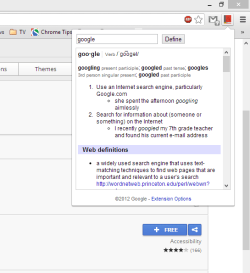
E.g. when I click on the extension "Google Dictionary", it opens the small extension window with a search box and a button "Define". I am able to type a word in the search box, but I am not able to click on the button "Define". The extension does work if I press Enter on my keyboard.
All other extensions have the same problem: not clickable, but keyboard shortcuts do work.
Windows 7 Premium with Service Pack 1. Chrome Version 31.0.1650.63 m. ESET NOD32 Antivirus version 7.0.302.26
Any ideas how to fix this?
E.g. when I click on the extension "Google Dictionary", it opens the small extension window with a search box and a button "Define". I am able to type a word in the search box, but I am not able to click on the button "Define". The extension does work if I press Enter on my keyboard.
All other extensions have the same problem: not clickable, but keyboard shortcuts do work.
Windows 7 Premium with Service Pack 1. Chrome Version 31.0.1650.63 m. ESET NOD32 Antivirus version 7.0.302.26
Any ideas how to fix this?
My Computer
At a glance
Windows 7 Home Premium 64 bit3.40 gigahertz Intel Core i7-2600K2 TB
- Computer Manufacturer/Model Number
- custom
- OS
- Windows 7 Home Premium 64 bit
- CPU
- 3.40 gigahertz Intel Core i7-2600K
- Motherboard
- Gigabyte
- Memory
- 2 TB
- Monitor(s) Displays
- Samsung SyncMaster 275T 27 inch
- Hard Drives
- 2x 120GB AData SSDs
- PSU
- NotSure
- Cooling
- air