
Chrome extensions not clickable

Can you do a quick test?

Type chrome://extensions in the browser address bar. Click the Develope Mode box. Close Chrome, restart it, and test one of the extensions.
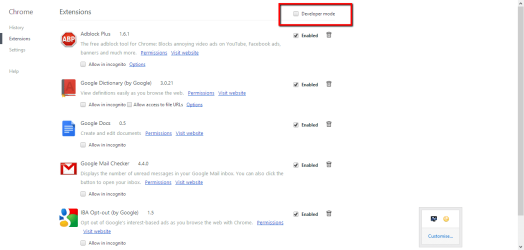
Capture.PNG

Is Chrome your default browser?
 

My Computer

Computer type
PC/Desktop
Computer Manufacturer/Model Number
Golden Mk. I.4
OS
Windows 10 Pro x64 ; Xubuntu x64
CPU
Intel i7 860 @ 2.80 GHz O/C'ed to 4.0GHz
Motherboard
Gigabyte P55A-UD3R Rev.1. Award BIOS F13
Memory
16GB Corsair Vengance DDR3 @ 661 MHz Dual Channel (9-9-9-24)
Graphics Card(s)
EVGA NVidia GTX 560 1024MB
Sound Card
Realtek Integrated
Monitor(s) Displays
Dual Samsung SyncMaster 2494HS
Screen Resolution
1920*1080 and 1920*1080
Hard Drives
1*Samsung 840 EVO 120GB SSD;
1*OCZ Vertex 2 60GB SSD;
2*Samsung F3 SpinPoint 1TB in RAID0;
1*Samsung F1 SpinPoint 1TB;
2*Western Digital 1TB External USB 3.0
1*Western Digital 500GB External USB 3.0
1*Seagate 500GB External USB 2.0
PSU
Thermaltake ToughPower QFan 750W
Case
Thermaltake Element S VK60001W2Z
Cooling
Corsair H60 Water Cooling, 2*230mm and 2*80mm case fans
Keyboard
Logitech G110
Mouse
Logitech MX518
I did try that without luck.

Yes, Chrome is my default browser.
 

My Computer

Computer Manufacturer/Model Number
custom
OS
Windows 7 Home Premium 64 bit
CPU
3.40 gigahertz Intel Core i7-2600K
Motherboard
Gigabyte
Memory
2 TB
Monitor(s) Displays
Samsung SyncMaster 275T 27 inch
Hard Drives
2x 120GB AData SSDs
PSU
NotSure
Cooling
air
Mmm. There has to be something besides the browser/extensions causing this. Is your system otherwise stable/without issue?

Please do the following to check the underlying system:
1. Click Start
orb.png

2. In the search box, type cmd
3. In the list that appears, right-click on cmd.exe and choose Run as administrator
4. In the command window that opens, type sfc /scannow and hit enter.

Report the output from the command window once it finishes.

More detail: http://www.sevenforums.com/tutorials/1538-sfc-scannow-command-system-file-checker.html
 

My Computer

Computer type
PC/Desktop
Computer Manufacturer/Model Number
Golden Mk. I.4
OS
Windows 10 Pro x64 ; Xubuntu x64
CPU
Intel i7 860 @ 2.80 GHz O/C'ed to 4.0GHz
Motherboard
Gigabyte P55A-UD3R Rev.1. Award BIOS F13
Memory
16GB Corsair Vengance DDR3 @ 661 MHz Dual Channel (9-9-9-24)
Graphics Card(s)
EVGA NVidia GTX 560 1024MB
Sound Card
Realtek Integrated
Monitor(s) Displays
Dual Samsung SyncMaster 2494HS
Screen Resolution
1920*1080 and 1920*1080
Hard Drives
1*Samsung 840 EVO 120GB SSD;
1*OCZ Vertex 2 60GB SSD;
2*Samsung F3 SpinPoint 1TB in RAID0;
1*Samsung F1 SpinPoint 1TB;
2*Western Digital 1TB External USB 3.0
1*Western Digital 500GB External USB 3.0
1*Seagate 500GB External USB 2.0
PSU
Thermaltake ToughPower QFan 750W
Case
Thermaltake Element S VK60001W2Z
Cooling
Corsair H60 Water Cooling, 2*230mm and 2*80mm case fans
Keyboard
Logitech G110
Mouse
Logitech MX518
Another question : is the ESET firewall enabled?

Since the browser extension shortcuts work, but the mouse click doesn't, I suspect there is a setting in ESET (probably in the firewall) to prevent that sort of communication.
 

My Computer

Computer type
PC/Desktop
Computer Manufacturer/Model Number
Golden Mk. I.4
OS
Windows 10 Pro x64 ; Xubuntu x64
CPU
Intel i7 860 @ 2.80 GHz O/C'ed to 4.0GHz
Motherboard
Gigabyte P55A-UD3R Rev.1. Award BIOS F13
Memory
16GB Corsair Vengance DDR3 @ 661 MHz Dual Channel (9-9-9-24)
Graphics Card(s)
EVGA NVidia GTX 560 1024MB
Sound Card
Realtek Integrated
Monitor(s) Displays
Dual Samsung SyncMaster 2494HS
Screen Resolution
1920*1080 and 1920*1080
Hard Drives
1*Samsung 840 EVO 120GB SSD;
1*OCZ Vertex 2 60GB SSD;
2*Samsung F3 SpinPoint 1TB in RAID0;
1*Samsung F1 SpinPoint 1TB;
2*Western Digital 1TB External USB 3.0
1*Western Digital 500GB External USB 3.0
1*Seagate 500GB External USB 2.0
PSU
Thermaltake ToughPower QFan 750W
Case
Thermaltake Element S VK60001W2Z
Cooling
Corsair H60 Water Cooling, 2*230mm and 2*80mm case fans
Keyboard
Logitech G110
Mouse
Logitech MX518
Well damn they all look normal to me what version chrome is it? Maybe you should try the Canary channel one and see if changes anything as it used it's own profile and maybe yours is corrupt. https://tools.google.com/dlpage/chromesxs
 

My Computer

Computer type
PC/Desktop
Computer Manufacturer/Model Number
Custom
OS
10 Pro x64
CPU
Ryzen 9 3900X
Motherboard
Asrock x370 Tachi
Memory
64GB(4x16GB) DDR4
Graphics Card(s)
EVGA 1080ti FTW3
Sound Card
ASUS Xonar Essence STX (V4 Bursons), ODAC rev B, NFB-11, O2
Monitor(s) Displays
3xASUS PB278Q/R, Optoma HD142X
Screen Resolution
3x1440p, 1080p
Hard Drives
512GB 850 EVO(OS, Programs)
4TB (Movies)
3TB (Downloads)
3TB (Programs)
1TB HDD (Games)
2x6TB R1 (videos)
PSU
AX760
Case
Fractal Define R5
Cooling
NH-D15S
Keyboard
Massdrop Ctrl with Box Navy's
Mouse
G903, Alioth XXL Mat
Internet Speed
280/40
Antivirus
MBAM, ESET
Browser
Canary 64 Bit
Other Info
I also own a Thinkpad P50 Xeon 4K, X220T, X1C5
All my Google Chrome extensions are not clickable.

E.g. when I click on the extension "Google Dictionary", it opens the small extension window with a search box and a button "Define". I am able to type a word in the search box, but I am not able to click on the button "Define". The extension does work if I press Enter on my keyboard.

All other extensions have the same problem: not clickable, but keyboard shortcuts do work.

Windows 7 Premium with Service Pack 1. Chrome Version 31.0.1650.63 m. ESET NOD32 Antivirus version 7.0.302.26

Any ideas how to fix this?

Well damn they all look normal to me what version chrome is it? Maybe you should try the Canary channel one and see if changes anything as it used it's own profile and maybe yours is corrupt. https://tools.google.com/dlpage/chromesxs

Like I posted. I replicated the OP's setup and found no problems/conflicts. ESET is all that I could not replicate.

Edit: I would still like to see this done. Disabling an AV app is not the same as uninstalling it.
 

My Computer

Computer type
Laptop
Computer Manufacturer/Model Number
Employer provided Dell Latitude
OS
W7 Pro SP1 64bit
CPU
i7
Memory
8GB
Graphics Card(s)
Intel HD Graphics
Hard Drives
crappy SSD
Antivirus
Employer mandated Symantec Endpoint Protection
Browser
Pale Moon 64bit, IE11 64bit & Chrome 64bit
sfc /scannow result is "no integrity violations".

No firewall whatsoever, whether Windows or ESET.

PC is working very well, stable and fast on 2 SSDs. Explorer 9 (which I used until now, because 10 and 11 had blurry fonts and other annoyances) had become increasingly difficult to use, with some sites not working at all on it, so I took the plunge and downloaded Chrome.

Thanks for the advice re

Have you tried a new Windows user/test account/profile?

If links fail in that test account, then...
...uninstall ESET
...restart the computer
...log onto your normal account
...delete that test account (and its files)
...create a fresh test account
...log on to that test account
...install Chrome, one extension and test links.

but that will have to wait until new year (lack of time)...

Before I try these new accounts / uninstalls / reinstalls:

- Do you all have Java or JVM, or is anything similar needed for Chrome to work?

- Is it possible that any settings in IE9 (which I haven't uninstalled) prevent Chrome from working properly?
 

My Computer

Computer Manufacturer/Model Number
custom
OS
Windows 7 Home Premium 64 bit
CPU
3.40 gigahertz Intel Core i7-2600K
Motherboard
Gigabyte
Memory
2 TB
Monitor(s) Displays
Samsung SyncMaster 275T 27 inch
Hard Drives
2x 120GB AData SSDs
PSU
NotSure
Cooling
air
There should be no real interaction between IE9 and Chrome, but I'll test that for you.

No - JAVA's run time environment (JRE) was not installed. It is not needed to make these Chrome Extension links work.
 

My Computer

Computer type
Laptop
Computer Manufacturer/Model Number
Employer provided Dell Latitude
OS
W7 Pro SP1 64bit
CPU
i7
Memory
8GB
Graphics Card(s)
Intel HD Graphics
Hard Drives
crappy SSD
Antivirus
Employer mandated Symantec Endpoint Protection
Browser
Pale Moon 64bit, IE11 64bit & Chrome 64bit
I only tested with one extension installed:


To be clear: when you click on a link like the one shown near the end of the video, nothing happens. Correct?
 

My Computer

Computer type
Laptop
Computer Manufacturer/Model Number
Employer provided Dell Latitude
OS
W7 Pro SP1 64bit
CPU
i7
Memory
8GB
Graphics Card(s)
Intel HD Graphics
Hard Drives
crappy SSD
Antivirus
Employer mandated Symantec Endpoint Protection
Browser
Pale Moon 64bit, IE11 64bit & Chrome 64bit
Yes; correct. These links are not clickable; but if there is a keyboard shortcut, they will work. That makes most extensions unusable.

I notice you have a .NET version which I don't, and also some program by Oracle which I don't have.
 

My Computer

Computer Manufacturer/Model Number
custom
OS
Windows 7 Home Premium 64 bit
CPU
3.40 gigahertz Intel Core i7-2600K
Motherboard
Gigabyte
Memory
2 TB
Monitor(s) Displays
Samsung SyncMaster 275T 27 inch
Hard Drives
2x 120GB AData SSDs
PSU
NotSure
Cooling
air
You can (probably should) update .NET to 4.5, but it probably does not impact this.

The oracle app allows VirtualBox Virtual Machines to interact with the host computer...
...things like mapping drives back to the host hard drive
...change screen resolutions

I tested without those two items installed and the results were the same:
the Chrome extension links were "clickable".
 

My Computer

Computer type
Laptop
Computer Manufacturer/Model Number
Employer provided Dell Latitude
OS
W7 Pro SP1 64bit
CPU
i7
Memory
8GB
Graphics Card(s)
Intel HD Graphics
Hard Drives
crappy SSD
Antivirus
Employer mandated Symantec Endpoint Protection
Browser
Pale Moon 64bit, IE11 64bit & Chrome 64bit

My Computer

Computer type
PC/Desktop
OS
Windows 10 Home x64
CPU
INTEL Core i5-750 Quad-Core 3.37GHz
Motherboard
ASUS P7P55D
Memory
HyperX Fury Black Series 8GB (2 x 4GB) 1866Mhz
Graphics Card(s)
EVGA GeForce GTX 750 Superclocked 1GB 128-Bit GDDR5
Monitor(s) Displays
LG 32MA68HY 32" IPS
Screen Resolution
1920 x 1080
Hard Drives
Samsung 840 Evo 120GB, SEAGATE 500GB Barracuda® 7200.12, SATA 3 Gb/s, 7200 RPM, 16MB cache
PSU
ANTEC TruePower New TP-550, 80 PLUS, 550W
Case
ANTEC Three Hundred Illusion
Cooling
COOLER MASTER Hyper 212 Plus, 4 x 120mm 1 x 140mm Noctua's
Internet Speed
85 + Mbps
Antivirus
Avast
Browser
Vivaldi
Back
Top