Chrome, Firefox and IE render <strong></strong> and <b></b> as normal

fulmodad

New member
Local time
2:26 PM
Messages
1
Chrome, Firefox and IE render <strong></strong> and <b></b> as normal

This is an issue I've been struggling with for several weeks. I have reviewed all fonts and believe all necessary fonts are available. I do not have Lucida Grand, but I have Lucida Sans, Arial and Verdana.

Browsers Chrome, Firefox and IE all render <strong></strong> or <b></b> as normal text - not bold. The same webpage in other Windows 7 machines in my office render correctly. These PCs have nearly identical configurations.

I will be grateful for any suggestions from the forum.

Oh BTW, this is my first post in any of your forums. If I've posted in the wrong forum, please let me know.
 

My Computer My Computer

At a glance

Windows 7 Home PremiumIntel Core i7-3770 CPU @3.40gnz8 GB
Computer type
PC/Desktop
Computer Manufacturer/Model Number
Asus Essentio Series CM6330,CM6630,CM6730,CM6830 Series
OS
Windows 7 Home Premium
CPU
Intel Core i7-3770 CPU @3.40gnz
Motherboard
Asus 64-Bit
Memory
8 GB
Hard Drives
1TB
Antivirus
Trend Micro Titanium
Browser
Chrome, Firefox
Hi and welcome to Sevenforums!

I've never heard of such a problem, but if it's related to fonts you could test in Firefox to set browser.display.use_document_fonts to 0. In about:config. Default is 1. That will make the browser use only a few standard fonts.

Besides that you can check the default font in these browsers. In Firefox:
Code:
about:preferences#content
You could also bring up Web Developer by pressing F12 and inspect your web page to see if any warnings or errors there might be causing this.

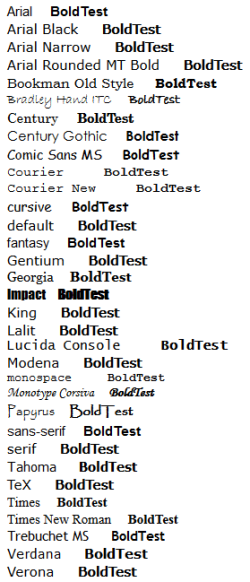
Here's some HTML code you can test with to see fonts and bold in action. Note that when browser.display.use_document_fonts is 0 most fonts will look the same.
HTML:
<font face="Arial">Arial     <B>BoldTest</B></font><br>
<font face="Arial Black">Arial Black     <B>BoldTest</B></font><br>
<font face="Arial Narrow">Arial Narrow     <B>BoldTest</B></font><br>
<font face="Arial Rounded MT Bold">Arial Rounded MT Bold     <B>BoldTest</B></font><br>
<font face="Bookman Old Style">Bookman Old Style     <B>BoldTest</B></font><br>
<font face="Bradley Hand ITC">Bradley Hand ITC     <B>BoldTest</B></font><br>
<font face="Century">Century     <B>BoldTest</B></font><br>
<font face="Century Gothic">Century Gothic     <B>BoldTest</B></font><br>
<font face="Comic Sans MS">Comic Sans MS     <B>BoldTest</B></font><br>
<font face="Courier">Courier     <B>BoldTest</B></font><br>
<font face="Courier New">Courier New     <B>BoldTest</B></font><br>
<font face="cursive">cursive     <B>BoldTest</B></font><br>
<font face="default">default     <B>BoldTest</B></font><br>
<font face="fantasy">fantasy     <B>BoldTest</B></font><br>
<font face="Gentium">Gentium     <B>BoldTest</B></font><br>
<font face="Georgia">Georgia     <B>BoldTest</B></font><br>
<font face="Impact">Impact     <B>BoldTest</B></font><br>
<font face="King">King     <B>BoldTest</B></font><br>
<font face="Lalit">Lalit     <B>BoldTest</B></font><br>
<font face="Lucida Console">Lucida Console     <B>BoldTest</B></font><br>
<font face="Modena">Modena     <B>BoldTest</B></font><br>
<font face="monospace">monospace     <B>BoldTest</B></font><br>
<font face="Monotype Corsiva">Monotype Corsiva     <B>BoldTest</B></font><br>
<font face="Papyrus">Papyrus     <B>BoldTest</B></font><br>
<font face="sans-serif">sans-serif     <B>BoldTest</B></font><br>
<font face="serif">serif     <B>BoldTest</B></font><br>
<font face="Tahoma">Tahoma     <B>BoldTest</B></font><br>
<font face="TeX">TeX     <B>BoldTest</B></font><br>
<font face="Times">Times     <B>BoldTest</B></font><br>
<font face="Times New Roman">Times New Roman     <B>BoldTest</B></font><br>
<font face="Trebuchet MS">Trebuchet MS     <B>BoldTest</B></font><br>
<font face="Verdana">Verdana     <B>BoldTest</B></font><br>
<font face="Verona">Verona     <B>BoldTest</B></font><br>
 

My Computer My Computer

At a glance

Windows 7 Pro 32Intel(R) Core(TM) i5 CPU M 540 @ 2.53GHz4,00 GB (Usable 2,98)NVIDIA NVS 5100M
Computer type
Laptop
Computer Manufacturer/Model Number
HP Elitebook 8540p
OS
Windows 7 Pro 32
CPU
Intel(R) Core(TM) i5 CPU M 540 @ 2.53GHz
Motherboard
Hewlett-Packard 1521
Memory
4,00 GB (Usable 2,98)
Graphics Card(s)
NVIDIA NVS 5100M
Sound Card
NVIDIA High Definition Audio
Screen Resolution
1600x900
Hard Drives
INTEL SSDSA2CW120G3
Antivirus
F-Secure Internet Security
Browser
IE, Firefox, Opera
Other Info
Sandboxie,
SRP (Software Restriction Policy),
EMET (Enhanced Mitigation Experience Toolkit),
WFC (Windows Firewall Control by BiniSoft),
Malwarebytes Premium
Here's what that looks like for me when using default setting for browser.display.use_document_fonts:

fonts.png
 

My Computer My Computer

At a glance

Windows 7 Pro 32Intel(R) Core(TM) i5 CPU M 540 @ 2.53GHz4,00 GB (Usable 2,98)NVIDIA NVS 5100M
Computer type
Laptop
Computer Manufacturer/Model Number
HP Elitebook 8540p
OS
Windows 7 Pro 32
CPU
Intel(R) Core(TM) i5 CPU M 540 @ 2.53GHz
Motherboard
Hewlett-Packard 1521
Memory
4,00 GB (Usable 2,98)
Graphics Card(s)
NVIDIA NVS 5100M
Sound Card
NVIDIA High Definition Audio
Screen Resolution
1600x900
Hard Drives
INTEL SSDSA2CW120G3
Antivirus
F-Secure Internet Security
Browser
IE, Firefox, Opera
Other Info
Sandboxie,
SRP (Software Restriction Policy),
EMET (Enhanced Mitigation Experience Toolkit),
WFC (Windows Firewall Control by BiniSoft),
Malwarebytes Premium
Back
Top