CHROME import/export bookmarks, cant get my HTML saved bookmarks back

rivrbyte17

New member
Local time
11:57 PM
Messages
11
CHROME import/export bookmarks, cant get my HTML saved bookmarks back into Chrome!!!!!


Import/export bookmarks, cant get my HTML saved bookmarks back into Chrome!!!!!

I used to use Internet explorer, then Firefox, and now Chrome as my default browser.

I had to do a updated computer rebuild, and before doing so, i saved my bookmarks as a HTML file, on an external hard drive. After I set up the new computer, and dragged this HTML file of my (over 1200 bookmarks) onto my new desktop.

I went to BOOKMARKS,BOOKMARK MANAGER, THEN "IMPORT FROM ANOTHER BROWSER",abut all the only choices are for, ANOTHER BROWSER, NOT from any file on the computer.

I first tried to import this file into internet Explorer, but that interface seems to also have changed, and it seems whenever I click on the "IE' logo on the task bar, something like YAHOO, or MSN, pops up instead......what happened to the original internet explorer and all of its tools? (YES, I can see the tools or setting, or Internet options on the right of each of these sites, but HOW CAN I GET MY FAV BOOKMARKS HTML FILE BACK INTO CHROME AGAIN???????????? Any Help?

Version 33.0.1750.154 m
 

My Computer My Computer

Computer type
PC/Desktop
OS
64 WIN 7 PRO
Hi I'm kind of confused,
Chrome is much like but not exactly the same as Google toolbar,
Simply signing in would make Google or Chrome bookmarks available,
That is what Google does,
It stores everything on it's servers,
So the basic question is are you signed into Chrome ?
Cheers.
 

My Computer My Computer

Computer type
PC/Desktop
Computer Manufacturer/Model Number
Custom assembled by me :}
OS
Win-7-Pro64bit 7-H-Prem-64bit
CPU
i7-5930K 2nd i9-9940x both water blocked VRM's too
Motherboard
ASUS SABERTOOTH X99 2nd ASUS x299 Apex
Memory
Trident-z 3200C14 2nd Trident-z 3600C16
Graphics Card(s)
EVGA 1080ti ftw3 2nd Titan Xp both water blocked
Sound Card
Built-in Realtek
Monitor(s) Displays
1-AOC G2460PG 24"G-Sync 144Hz/ 2nd 1-ASUS VG248QE 24" 144Hz
Screen Resolution
1920 x 1080 144Hz
Hard Drives
2-Samsung M.2 Evo & Evo Plus
2-Samsung 850 EVO 500GB SSD's/ 3-2.5 W.D. Black 1tb-&3-1tb/3-3.5 WD Black 1tb hdd's
PSU
EVGA SuperNOVA 1000-P2 2nd 1200-P2
Case
2-Corsair Obsidian Series 450D Black ATX Mid Tower
Cooling
Custom water loops
Keyboard
Logitech G710+/ 2nd Logitech G910
Mouse
2-RedDragon M901 Perdition 16400 dpi Gaming mouse = wired
Internet Speed
Comcast Ping 19ms 89.31mbps download speed 6.12mbps upload
Antivirus
Malwarebytes Pro/ Superantispyware Pro
Browser
FireFox & Pale moon
Other Info
2nd ASUS X299 Apex/Intel i9-9940x with Custom water loop/7H-Prem-x64/Corsair 450D case/Ram Trident-z 3600C16 4x8gb / Samsung970Evo plus 500gb SSD/Dual ssd EZ swap evo/PSU EVGA SuperNova 1200w-P2 80+Platinum/GPU Titan Xp /8-ML-140 on push-pull on 2-280GTX rads
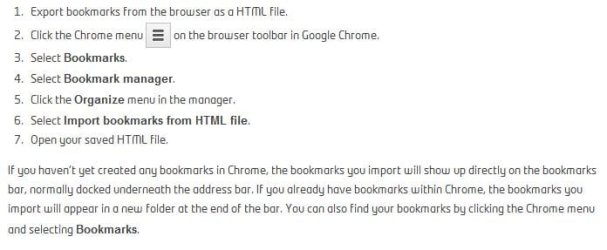
I backup and restore HTML to Chrome no problem. Go into Settings, Bookmark Manager and there is an a selection called Organize. When u select it it will have a drop down with option to import from HTML. The only thing u have to do after that is to move folders/Favorites from Imported folder to appropriate location. IE Other Bookmarks and Toolbar.
 

My Computer My Computer

Computer Manufacturer/Model Number
Home Built
OS
Windows 7 SP1 x64
CPU
AMD 9850 X4
Motherboard
ASUS
Memory
Corsair
Graphics Card(s)
ATI Radeon
Sound Card
Sigmatel
Monitor(s) Displays
Dell
Screen Resolution
1600X900
Hard Drives
(1) WD 1TB
Cooling
Corsair H60
Internet Speed
UVerse 12MB
This step is wrong if you have the bookmarks saved as a file on your desktop: "I went to BOOKMARKS,BOOKMARK MANAGER, THEN "IMPORT FROM ANOTHER BROWSER",abut all the only choices are for, ANOTHER BROWSER, NOT from any file on the computer." Don't import from another browser. Instead import as a file, and then you should be able to locate the HTML file you want.
 

My Computer My Computer

Computer type
Laptop
Computer Manufacturer/Model Number
Dell Inspiron
OS
Windows 7 Ultimate

My Computer My Computer

Computer type
PC/Desktop
OS
Windows 10 Home x64
CPU
INTEL Core i5-750 Quad-Core 3.37GHz
Motherboard
ASUS P7P55D
Memory
HyperX Fury Black Series 8GB (2 x 4GB) 1866Mhz
Graphics Card(s)
EVGA GeForce GTX 750 Superclocked 1GB 128-Bit GDDR5
Monitor(s) Displays
LG 32MA68HY 32" IPS
Screen Resolution
1920 x 1080
Hard Drives
Samsung 840 Evo 120GB, SEAGATE 500GB Barracuda® 7200.12, SATA 3 Gb/s, 7200 RPM, 16MB cache
PSU
ANTEC TruePower New TP-550, 80 PLUS, 550W
Case
ANTEC Three Hundred Illusion
Cooling
COOLER MASTER Hyper 212 Plus, 4 x 120mm 1 x 140mm Noctua's
Internet Speed
85 + Mbps
Antivirus
Avast
Browser
Vivaldi
Back
Top