
circle spinning drives me nuts

ucm

New member
Member
Local time
11:53 AM
Messages
44
Hi there!

I'm new to the forums; i just got Windows 7 this weekend and so far I totaly love it :D

I have changed the cursors both busy and waiting to other cursors that dont use that crazy green circle.

but..

when windows is on the log in screen it plays the circle as well as on the log off screen when installing updates.

How can I change or remove the green spinning circle icons from these places?


p.s.
I remember from back in the day that Internet Explorer would let you change it's icons to a custom icon like aol or compuserve ( wow the memories ); how can we change the spinning circle icon in the IE 8 tabs to something else? ( like the ie6 windows waving flag maybe? )

Many Thanks in advance!
 

My Computer My Computer

Computer Manufacturer/Model Number
Acer || Meeeee
OS
XP Pro SP3 || Windows 7
CPU
Pentium-D || intel Core i5 3.2GHz ( 2 cores w/HT == 4 cpus )
Motherboard
Acer || ASUS
Memory
4GB DDR2-800MHz || 4GB DDR3-1600
Graphics Card(s)
onboard nVidia Geforce something or other
Sound Card
onboard
Monitor(s) Displays
1 21" crt
Screen Resolution
1152 x 864
Hard Drives
500GB sata2 Seagate 7200.12 || 1TB sata2 Seagate 7200.12
PSU
dont know || Ultra
Case
Acer || My old one
Cooling
fans || nicer fans
Keyboard
Acer || Microsoft <-- I LOVE this KB ^^
Mouse
Acer || Microsoft <-- I LOVE this mouse ^^
Internet Speed
Comcast || Comcast
Other Info
Companion PC || Main PC

I use these computers primarily for video game development; when I get my first release ready I'll let you know :-)

O/S Exp:
DOS, Windows 3.11 for workgroups, 95OSR2, 98SE (fav), XP Pro SP3 (fav), Windows 7 Home Premium (fav, ohh wow!!)

I have a copy of vista that came with my Acer but felt more comfortable with XP so I rebuilt it with XP Pro SP3

I don't know p
ucm,

Welcome to SevenForums.

That spinning dodaddy simply indicates that Win 7 is busy.

I really like the "spinner" and always wait for same to disappear before continuing.
 

My Computer My Computer

Computer Manufacturer/Model Number
Toshiba Satellite S875D-S7239 laptop
OS
MS Windows 7 Ultimate SP1 64-bit
CPU
AMD A10-4600M
Motherboard
AMD Pumori (Socket FT1)
Memory
6.00 GB Dual-Channel DDR3 @ 798MHz (11-11-12-28)
Graphics Card(s)
AMD Radeon HD 7660G
Sound Card
High Definition Audio Device
Monitor(s) Displays
Generic PnP Monitor (1600x900@60Hz)
Screen Resolution
1600x900@60Hz
Hard Drives
SSD 119GB Corsair CSSD-V128GB2 ATA Device
Keyboard
Standard PS/2 Keyboard
Mouse
HP Wireless Optical Mobile Mouse Model FHA-3410
Internet Speed
What the local pub, local coffee shop offers.
Other Info
Optical Drive:MATSHITA BD-CMB UJ160B ATA Device


Also have an Asus ha1002xp netbook with Win 7 Ultimate installed.
UCM,
When you get a couple of spare minutes, you can help us better answer you questions by filling out your system specs.

________________________________________

HOW TO FILL OUT YOUR SYSTEM SPECS

In the line at the top of www.SevenForums.com you will see UserCP.
That is an abbreviation for User Control Panel.
Click on UserCP.
In the left-hand column, under Your Profile you will see Edit System Spec.
Click on Edit System Spec
You can copy and paste from the output of Speccy, Speccy - System Information - Free Download to fill out much of the info. Be sure to use the Other Info section of your System Specs for such info as your optical drive, your wireless adapter, your speakers, etc.

________________________________________
 

My Computer My Computer

Computer Manufacturer/Model Number
Toshiba Satellite S875D-S7239 laptop
OS
MS Windows 7 Ultimate SP1 64-bit
CPU
AMD A10-4600M
Motherboard
AMD Pumori (Socket FT1)
Memory
6.00 GB Dual-Channel DDR3 @ 798MHz (11-11-12-28)
Graphics Card(s)
AMD Radeon HD 7660G
Sound Card
High Definition Audio Device
Monitor(s) Displays
Generic PnP Monitor (1600x900@60Hz)
Screen Resolution
1600x900@60Hz
Hard Drives
SSD 119GB Corsair CSSD-V128GB2 ATA Device
Keyboard
Standard PS/2 Keyboard
Mouse
HP Wireless Optical Mobile Mouse Model FHA-3410
Internet Speed
What the local pub, local coffee shop offers.
Other Info
Optical Drive:MATSHITA BD-CMB UJ160B ATA Device


Also have an Asus ha1002xp netbook with Win 7 Ultimate installed.
It does look rather nice and pretty but ( please don't think bad of me ) when it spins it gives me a headache :(

I have no idea why I get a headache but it quickly turns into a migrane. That's the reason why I couldn't use Vista...

I have no idea why i get the headaches from it spinning but if i could even just have it not spin then that would also work too.


Oh sorry about the specs; i'll go update that now :)
 

My Computer My Computer

Computer Manufacturer/Model Number
Acer || Meeeee
OS
XP Pro SP3 || Windows 7
CPU
Pentium-D || intel Core i5 3.2GHz ( 2 cores w/HT == 4 cpus )
Motherboard
Acer || ASUS
Memory
4GB DDR2-800MHz || 4GB DDR3-1600
Graphics Card(s)
onboard nVidia Geforce something or other
Sound Card
onboard
Monitor(s) Displays
1 21" crt
Screen Resolution
1152 x 864
Hard Drives
500GB sata2 Seagate 7200.12 || 1TB sata2 Seagate 7200.12
PSU
dont know || Ultra
Case
Acer || My old one
Cooling
fans || nicer fans
Keyboard
Acer || Microsoft <-- I LOVE this KB ^^
Mouse
Acer || Microsoft <-- I LOVE this mouse ^^
Internet Speed
Comcast || Comcast
Other Info
Companion PC || Main PC

I use these computers primarily for video game development; when I get my first release ready I'll let you know :-)

O/S Exp:
DOS, Windows 3.11 for workgroups, 95OSR2, 98SE (fav), XP Pro SP3 (fav), Windows 7 Home Premium (fav, ohh wow!!)

I have a copy of vista that came with my Acer but felt more comfortable with XP so I rebuilt it with XP Pro SP3

I don't know p
Thanks for spec update. Excellent.

Presently, the only solution I know is to look away when the spinner starts. Wish i had another solution. Let's hope that someone else knows how to replace the spinner, although I'm not optimistic.
 

My Computer My Computer

Computer Manufacturer/Model Number
Toshiba Satellite S875D-S7239 laptop
OS
MS Windows 7 Ultimate SP1 64-bit
CPU
AMD A10-4600M
Motherboard
AMD Pumori (Socket FT1)
Memory
6.00 GB Dual-Channel DDR3 @ 798MHz (11-11-12-28)
Graphics Card(s)
AMD Radeon HD 7660G
Sound Card
High Definition Audio Device
Monitor(s) Displays
Generic PnP Monitor (1600x900@60Hz)
Screen Resolution
1600x900@60Hz
Hard Drives
SSD 119GB Corsair CSSD-V128GB2 ATA Device
Keyboard
Standard PS/2 Keyboard
Mouse
HP Wireless Optical Mobile Mouse Model FHA-3410
Internet Speed
What the local pub, local coffee shop offers.
Other Info
Optical Drive:MATSHITA BD-CMB UJ160B ATA Device


Also have an Asus ha1002xp netbook with Win 7 Ultimate installed.
you can adjust your system for best performance and this will get rid of the spinning-circle...however it won't for IE...

start > control panel > all control panel items > performance information and tools > advanced tools > adjust the appearance and performance of windows > select 'Adjust for best performance'
 

My Computer My Computer

Computer Manufacturer/Model Number
Mac Mini
OS
MAC OS X v10.4.10
CPU
2.4 Ghz
Motherboard
Intel Mini ITX iG45
Memory
2GB
Graphics Card(s)
NVIDIA GeForce 320M 256MB of DDR3 SD
Hard Drives
320GB
UCM,

I don't know about your experience with the draconian action of selecting "best performance", but I still have the spinning circle.
 

My Computer My Computer

Computer Manufacturer/Model Number
Toshiba Satellite S875D-S7239 laptop
OS
MS Windows 7 Ultimate SP1 64-bit
CPU
AMD A10-4600M
Motherboard
AMD Pumori (Socket FT1)
Memory
6.00 GB Dual-Channel DDR3 @ 798MHz (11-11-12-28)
Graphics Card(s)
AMD Radeon HD 7660G
Sound Card
High Definition Audio Device
Monitor(s) Displays
Generic PnP Monitor (1600x900@60Hz)
Screen Resolution
1600x900@60Hz
Hard Drives
SSD 119GB Corsair CSSD-V128GB2 ATA Device
Keyboard
Standard PS/2 Keyboard
Mouse
HP Wireless Optical Mobile Mouse Model FHA-3410
Internet Speed
What the local pub, local coffee shop offers.
Other Info
Optical Drive:MATSHITA BD-CMB UJ160B ATA Device


Also have an Asus ha1002xp netbook with Win 7 Ultimate installed.
Hi there!

I'm new to the forums; i just got Windows 7 this weekend and so far I totaly love it :D

I have changed the cursors both busy and waiting to other cursors that dont use that crazy green circle.

but..

when windows is on the log in screen it plays the circle as well as on the log off screen when installing updates.

How can I change or remove the green spinning circle icons from these places?


p.s.
I remember from back in the day that Internet Explorer would let you change it's icons to a custom icon like aol or compuserve ( wow the memories ); how can we change the spinning circle icon in the IE 8 tabs to something else? ( like the ie6 windows waving flag maybe? )

Many Thanks in advance!

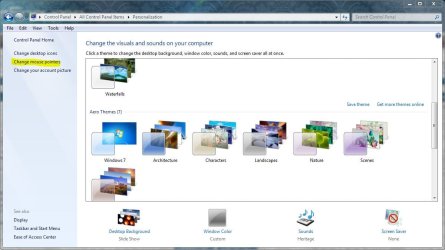
In the personalize window select change mouse pointers,

personalize.JPG

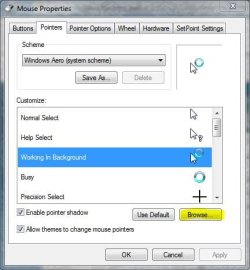
In the next window choose browse,

busy.JPG

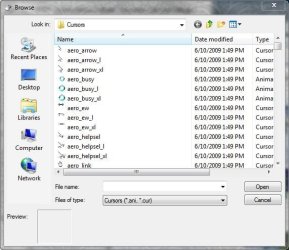
Change to something else,

cursors.JPG
 

My Computer My Computer

Computer type
PC/Desktop
Computer Manufacturer/Model Number
Self Built
OS
Win 10 Pro x64
CPU
Intel I5-2500K @3.3GHz
Motherboard
Asrock P67 Extreme4
Memory
16GB G.Skill Ripjaws X (4x4GB)
Graphics Card(s)
EVGA GeForce 750 Ti SC 2GB
Sound Card
ASUS Xonar DG 5.1 Channels 24-bit 96KHz PCI Interface Sound
Monitor(s) Displays
auria eq2367
Screen Resolution
1920 x 1080
Hard Drives
250GB Samsung 850 EVO SSD
1TB WD Blue
1TB Hitachi
PSU
SeaSonic X 650W 80 Plus Gold
Case
Corsair Obsidian 750D
Cooling
Corsair H60, Three 140mm case fans
Keyboard
Logitech Wireless Keyboard K520
Mouse
Logitech Wireless Mouse M310
Internet Speed
Wave Broadband ~ 100 dn 5 up
Antivirus
Windows Defender, Malwarebytes Premium
Browser
Edge, IE11, Chrome
Other Info
Laptop specs: HP g7-1365dx /
CPU: AMD A6-3420M APU with Radeon(tm) HD Graphics /
RAM: Crucial 8Gb (2x4Gb) /
SSD: Crucial M4-CT128M4SSD2 ATA Device/ FW 000F /
GFX: AMD Radeon HD 6520G /
OS: Windows 10 Pro x64
I thought she was talking about the other times you see the spinner rather than the ones you can control from there.

Could be that this is what she was looking for.

I don't use the standard scheme anyway so for the normal busy I don't have the spinner.

Thanks for pointing out the obvious. As stated, this could be precisely what she means.
 

My Computer My Computer

Computer Manufacturer/Model Number
Toshiba Satellite S875D-S7239 laptop
OS
MS Windows 7 Ultimate SP1 64-bit
CPU
AMD A10-4600M
Motherboard
AMD Pumori (Socket FT1)
Memory
6.00 GB Dual-Channel DDR3 @ 798MHz (11-11-12-28)
Graphics Card(s)
AMD Radeon HD 7660G
Sound Card
High Definition Audio Device
Monitor(s) Displays
Generic PnP Monitor (1600x900@60Hz)
Screen Resolution
1600x900@60Hz
Hard Drives
SSD 119GB Corsair CSSD-V128GB2 ATA Device
Keyboard
Standard PS/2 Keyboard
Mouse
HP Wireless Optical Mobile Mouse Model FHA-3410
Internet Speed
What the local pub, local coffee shop offers.
Other Info
Optical Drive:MATSHITA BD-CMB UJ160B ATA Device


Also have an Asus ha1002xp netbook with Win 7 Ultimate installed.
I thought she was talking about the other times you see the spinner rather than the ones you can control from there.

Could be that this is what she was looking for.

I don't use the standard scheme anyway so for the normal busy I don't have the spinner.

Thanks for pointing out the obvious. As stated, this could be precisely what she means.

Actually after re-reading the post I'm not sure either, I guess we'll see. :huh:
 

My Computer My Computer

Computer type
PC/Desktop
Computer Manufacturer/Model Number
Self Built
OS
Win 10 Pro x64
CPU
Intel I5-2500K @3.3GHz
Motherboard
Asrock P67 Extreme4
Memory
16GB G.Skill Ripjaws X (4x4GB)
Graphics Card(s)
EVGA GeForce 750 Ti SC 2GB
Sound Card
ASUS Xonar DG 5.1 Channels 24-bit 96KHz PCI Interface Sound
Monitor(s) Displays
auria eq2367
Screen Resolution
1920 x 1080
Hard Drives
250GB Samsung 850 EVO SSD
1TB WD Blue
1TB Hitachi
PSU
SeaSonic X 650W 80 Plus Gold
Case
Corsair Obsidian 750D
Cooling
Corsair H60, Three 140mm case fans
Keyboard
Logitech Wireless Keyboard K520
Mouse
Logitech Wireless Mouse M310
Internet Speed
Wave Broadband ~ 100 dn 5 up
Antivirus
Windows Defender, Malwarebytes Premium
Browser
Edge, IE11, Chrome
Other Info
Laptop specs: HP g7-1365dx /
CPU: AMD A6-3420M APU with Radeon(tm) HD Graphics /
RAM: Crucial 8Gb (2x4Gb) /
SSD: Crucial M4-CT128M4SSD2 ATA Device/ FW 000F /
GFX: AMD Radeon HD 6520G /
OS: Windows 10 Pro x64
Couldn't the spinning dodaddy (love that word!) be replaced with a static icon of the same name? Save the .ani files in a zipped folder in the cursor folder just in case?
 

My Computer My Computer

OS
Windows 7 x64
You could have too many processes running which is causing a hang. I never get the busy cursor on my installs, because I don't allow any programs into msconfig>Startup except AV and gadgets.

I also run the lightest weight AV which is still as effective as the bloated paid programs, MS Security Essentials.

The system will tell you if you need to edit Graphics effects as suggested earlier. Look on the Advanced Tools page accessed by clicking your WEI score on Computer>Properties. Issues such as this will be cued at the top.

If so, you don't have to strip all graphics effects out. I just remove sliding, fading and dragging windows intact.

If you still get hangs, google repeat errors in Event Viewer>Admin View and the Performance Diagnostic Log on Advanced tools page, where you can also Generate a System Health Report.

Make sure your drivers are all up to date. Look for newer drivers in Optional Windows Updates and on your computer maker's Support Downloads webpage for you model.

If you resolve repeat errors and hanging persists, test your memory with memtest86 CD for 5-6 passes, and your HD with maker's full diag/repair CD scan.
 
@derekimo: Yep, karlsnooks is right :)

The primary reason why I would like to change the spining circle ( or just have it not spin, or even spin 20x times slower would probably be ok ) is that it gives me a headache. You would not believe the mountain of s*-_t i get from my friends over this, lol

> I don't know about your experience with the draconian action of selecting "best performance", but I still have the spinning circle.

Didn't work on my end either, doh..

@gregrocker: Thanks for your recommendations; and you are right on the money as to why the circle comes up for as long as it does ( lots of software with various processes running and i haven't put on Visual Studio yet ) but it also comes up during the windows update at the shut down screen during install of the updates :(


@Lazy B: That's a great idea! I'm going to go try that now. I made a zip of the cursor files but it made me put the zip on my desktop which is cool but 'different' from my XP Pro understanding ;)

ummm when i try to delete the cursor files i get an error message saying:
"You need permission to perform this action
You need permisson from TrusteedIntaller"
@_# ummm what? Did i upset windows7 already ;)
 

My Computer My Computer

Computer Manufacturer/Model Number
Acer || Meeeee
OS
XP Pro SP3 || Windows 7
CPU
Pentium-D || intel Core i5 3.2GHz ( 2 cores w/HT == 4 cpus )
Motherboard
Acer || ASUS
Memory
4GB DDR2-800MHz || 4GB DDR3-1600
Graphics Card(s)
onboard nVidia Geforce something or other
Sound Card
onboard
Monitor(s) Displays
1 21" crt
Screen Resolution
1152 x 864
Hard Drives
500GB sata2 Seagate 7200.12 || 1TB sata2 Seagate 7200.12
PSU
dont know || Ultra
Case
Acer || My old one
Cooling
fans || nicer fans
Keyboard
Acer || Microsoft <-- I LOVE this KB ^^
Mouse
Acer || Microsoft <-- I LOVE this mouse ^^
Internet Speed
Comcast || Comcast
Other Info
Companion PC || Main PC

I use these computers primarily for video game development; when I get my first release ready I'll let you know :-)

O/S Exp:
DOS, Windows 3.11 for workgroups, 95OSR2, 98SE (fav), XP Pro SP3 (fav), Windows 7 Home Premium (fav, ohh wow!!)

I have a copy of vista that came with my Acer but felt more comfortable with XP so I rebuilt it with XP Pro SP3

I don't know p
I was going to suggest an eye doctor!
 

My Computer My Computer

Computer type
PC/Desktop
Computer Manufacturer/Model Number
A blend of brains, brawn and dumb luck.
OS
Windows 7 Ultimate 64
CPU
i7 3770k OC'd 4.6 @ 1.17v, also FX 8120 & i5 miniITX
Motherboard
MSI P67A-GD80 b3
Memory
32 gb G.Skill Sniper DDR3 10-12-12-31 @ 2133
Graphics Card(s)
XFX Radeon 7870 2GB DDR5
Sound Card
Sound Blaster Z Series Card
Monitor(s) Displays
(2) LG LED 23" 1920 x 1080 2ms Monitors via mini d-port
Screen Resolution
1680 X 1050 p
Hard Drives
Samsung 256 gb 830 SSD sata III
(1) 1 tb WD Black
(2) 1 tb Hitachi deskmates/sata II
(2) 1 tb WD green/sata II
(2) 3 tb Seagate Barracuda
(1) 120 gb OCZ Vertex SS
(1) Drobo 5N w/5 Seagate 3tb
PSU
EVGA modular 1000G2 80% gold rating & APC 1200 RS
Case
CoolerMaster Storm Styker
Cooling
7 case fans 140mm & 120mm, NZXT Kraken X60
Keyboard
(2) Logitech Illuminated Keyboards (1) usb (1) wireless
Mouse
Logitech G700 & T-BC21 - nano nx for the laptop
Internet Speed
Basic 120mbps down
Antivirus
Trend Micro Titanium Max Security & Malwarebytes Premium
Browser
Chrome and IE 10
Other Info
5 Noctua case fans + 3 Noctua in p/p on NZXT cooler
Integrated hot swap drive bays for 2.5" Drives
(2) Lite-on dvd/cd/Blu Ray optical 22X
Integrated fan controller and led on/off
HP Officejet Pro 8630 all-n-one
Hot-swappable 3.5" hard drive bay
Netgear Nighthawk router
Asus USB 3 & sata 6 PCIe card
Vantec IDE to sata adptr./Ultra sata adptr
Lenovo L420 i5 lappy with m sata
Drobo 5N advanced NAS
If all the steps suggested don't stop the hanging, then check for corrupted system files by running sfc /scannow as Admin.

Next try the next best thing to a clean reinstall: Repair Install - Windows 7 Forums.URL

Then I would try the clean reinstall after wiping the HD of all code: SSD - HDD Optimize for Windows Reinstallation - Windows 7 Forums.url

Also make sure you have the latest BIOS version update and try the reinstall after setting SATA controller to AHCI in BIOS. If there is no newer BIOS update then clear the CMOS: Clear CMOS - 3 Ways to Clear the CMOS - Reset BIOS.URL
 
Couldn't the spinning dodaddy (love that word!) be replaced with a static icon of the same name? Save the .ani files in a zipped folder in the cursor folder just in case?

@Lazy B: That's a great idea! I'm going to go try that now. I made a zip of the cursor files but it made me put the zip on my desktop which is cool but 'different' from my XP Pro understanding ;)

ummm when i try to delete the cursor files i get an error message saying:
"You need permission to perform this action
You need permisson from TrusteedIntaller"
@_# ummm what? Did i upset windows7 already ;)


OK - I finally got into the administrator account and did a lot of permissions stuff in order to make trustedinstaller happy...

I copied the busy_m and the busy_l ( also the busy_l to the _XL ) of the circle ani cursors. I zipped up the circle icons and deleted them.

Note i renamed the .cur to .ani and they show up just fine.

But

the circle still shows up in the log on and shut down screens :cry:

Could there be some kind of theme like win98 Plus ( wow i havent used themes in many years ) that someone knows about that would change the circle?
 

My Computer My Computer

Computer Manufacturer/Model Number
Acer || Meeeee
OS
XP Pro SP3 || Windows 7
CPU
Pentium-D || intel Core i5 3.2GHz ( 2 cores w/HT == 4 cpus )
Motherboard
Acer || ASUS
Memory
4GB DDR2-800MHz || 4GB DDR3-1600
Graphics Card(s)
onboard nVidia Geforce something or other
Sound Card
onboard
Monitor(s) Displays
1 21" crt
Screen Resolution
1152 x 864
Hard Drives
500GB sata2 Seagate 7200.12 || 1TB sata2 Seagate 7200.12
PSU
dont know || Ultra
Case
Acer || My old one
Cooling
fans || nicer fans
Keyboard
Acer || Microsoft <-- I LOVE this KB ^^
Mouse
Acer || Microsoft <-- I LOVE this mouse ^^
Internet Speed
Comcast || Comcast
Other Info
Companion PC || Main PC

I use these computers primarily for video game development; when I get my first release ready I'll let you know :-)

O/S Exp:
DOS, Windows 3.11 for workgroups, 95OSR2, 98SE (fav), XP Pro SP3 (fav), Windows 7 Home Premium (fav, ohh wow!!)

I have a copy of vista that came with my Acer but felt more comfortable with XP so I rebuilt it with XP Pro SP3

I don't know p
I gave you twelve steps to try to resolve the hang, leading up to a clean reinstall to wiped HD. How many of these have you tried?

In addition, test your memory with memtest86 for 5-6 passes, swap RAM sticks to reseat RAM.

Then test your HD with maker's full diag/repair CD scan: Hard Drive Diagnostics Tools and Utilities (Storage) - TACKtech Corp.

If you are serious about resolving the issue, then work through all of the steps given in the thread, or else ask as many questions as you need to get them done.
 
@gregrocker: I tried to explain before that there is no hang, the waiting cursors occur like they should. They just give me a headache. I changed them for the mouse cursor but I was wanting to also get rid of them in the startup and shutdown screens too.

As for your recommendations, they are quite good and I really do appreciate your making them into an easy to follow step by step process :)

I do have a wide range of large software applications that I plan to install in the near future so I have bookmarked your information especially with me being new to windows 7 and never having used vista more than 4 or 5 times

Please don't be offended; again, there isn't a slow down ( i just got win7 and dont have any apps on it yet ). My issue is that I really really realy hate the headaches i get from that darn circle -_-

Do you know of some win7 themes like 98plus that would change those to something else?
 

My Computer My Computer

Computer Manufacturer/Model Number
Acer || Meeeee
OS
XP Pro SP3 || Windows 7
CPU
Pentium-D || intel Core i5 3.2GHz ( 2 cores w/HT == 4 cpus )
Motherboard
Acer || ASUS
Memory
4GB DDR2-800MHz || 4GB DDR3-1600
Graphics Card(s)
onboard nVidia Geforce something or other
Sound Card
onboard
Monitor(s) Displays
1 21" crt
Screen Resolution
1152 x 864
Hard Drives
500GB sata2 Seagate 7200.12 || 1TB sata2 Seagate 7200.12
PSU
dont know || Ultra
Case
Acer || My old one
Cooling
fans || nicer fans
Keyboard
Acer || Microsoft <-- I LOVE this KB ^^
Mouse
Acer || Microsoft <-- I LOVE this mouse ^^
Internet Speed
Comcast || Comcast
Other Info
Companion PC || Main PC

I use these computers primarily for video game development; when I get my first release ready I'll let you know :-)

O/S Exp:
DOS, Windows 3.11 for workgroups, 95OSR2, 98SE (fav), XP Pro SP3 (fav), Windows 7 Home Premium (fav, ohh wow!!)

I have a copy of vista that came with my Acer but felt more comfortable with XP so I rebuilt it with XP Pro SP3

I don't know p
@gregrocker: I just re-read everything and I think I finally realized where the miscommunication is coming from.

You are trying to explain that there shouldn't be a waiting or busy cursor for any extended length of time and if I see the waiting/busy cursor for any extended period then that should logically mean that there is a problem somewhere causing the computer to freeze up for some reason.

Here's the thing on that; the computer and all of it's parts are totally brand new and custom built. Blender3D litterally destroyed my intel_core2duo/2GB_ddr1-400/ati system ( as in killed the hardware which everyone i've talked to agree has something to do with python that blender uses and my 8xAGP ati model x1550 ).

I use two computers for my work as a software engineer/game developer and when my family and friends heard about what happend they spent 7 weeks acquiring the parts I needed ( all 100% brand new ) from several online stores like TigerDirect, Newegg, and Microcenter. I only bring them up because I am extremely moved by their devotion :)

I did go out and get another new 1TB hard drive for my new system which I installed and then re-installed win7 on this past weekend. Aside from that here are my win7 specs:
Asus Motherboard <-- no floppy conncector :eek:
core i5 3.2GHz
4gb DDR3 dual channel ram
ATI HD 5750 pcie x16 vid card
onboard sound ( via )
and now a brand new 1TB hard drive

For software I have now:
Windows 7 Home Premium 64-bit <-- that's it lol

I do have roughly about 27GB of software to install and sometime within the next couple of months I plan to add another 8GB of ddr3 dual-channel ram to my system to get it up to 12GB but that all depends on available funds at the time.


Also please keep in mind that when you use windows update, often the shutdown screen is up along with the circle as win7 is installing the updates. :(
 

My Computer My Computer

Computer Manufacturer/Model Number
Acer || Meeeee
OS
XP Pro SP3 || Windows 7
CPU
Pentium-D || intel Core i5 3.2GHz ( 2 cores w/HT == 4 cpus )
Motherboard
Acer || ASUS
Memory
4GB DDR2-800MHz || 4GB DDR3-1600
Graphics Card(s)
onboard nVidia Geforce something or other
Sound Card
onboard
Monitor(s) Displays
1 21" crt
Screen Resolution
1152 x 864
Hard Drives
500GB sata2 Seagate 7200.12 || 1TB sata2 Seagate 7200.12
PSU
dont know || Ultra
Case
Acer || My old one
Cooling
fans || nicer fans
Keyboard
Acer || Microsoft <-- I LOVE this KB ^^
Mouse
Acer || Microsoft <-- I LOVE this mouse ^^
Internet Speed
Comcast || Comcast
Other Info
Companion PC || Main PC

I use these computers primarily for video game development; when I get my first release ready I'll let you know :-)

O/S Exp:
DOS, Windows 3.11 for workgroups, 95OSR2, 98SE (fav), XP Pro SP3 (fav), Windows 7 Home Premium (fav, ohh wow!!)

I have a copy of vista that came with my Acer but felt more comfortable with XP so I rebuilt it with XP Pro SP3

I don't know p
ucm you hit the nail on the head right here,

I think I finally realized where the miscommunication is coming from.

pretty much everyone responding missed this little bit from your first post,

when windows is on the log in screen it plays the circle as well as on the log off screen when installing updates.

and just went on with how to change it once in your user account, which is not what you are asking (and said that you had already done).

Now with that all siad I know you can change the logon screen picture,

http://www.sevenforums.com/tutorials/5382-log-screen-change.html

but no idea how to go about changing the cursor on the logon screen.
 

My Computer My Computer

Computer type
PC/Desktop
Computer Manufacturer/Model Number
Me
OS
Win 7 Ultimate x64
CPU
FX-8350 @ 4.6 GHz so far
Motherboard
Asus M5A97 EVO
Memory
ADATA XPG V1 Series Black 8GB DDR3 1600
Graphics Card(s)
Sapphire R9 270x Dual-X
Sound Card
Xonar DGX w/ Corsair Vengence 1300
Monitor(s) Displays
Acer S232HL Abid
Screen Resolution
1920x1080
Hard Drives
120 GB OCZ Vertex 3
500 GB Seagate 7200.12
PSU
Antec Earthwatts 650W Green
Case
Antec Three Hundred
Cooling
Cooler Master 212 EVO
Keyboard
Logitech G510
Mouse
Logitech G500s
Internet Speed
35000/3000
  • Like
Reactions: ucm
Back
Top