Classic Shell is looking for testers once again

Ivo

New member
Local time
5:05 AM
Messages
398
Location
Washington
Hi, everybody

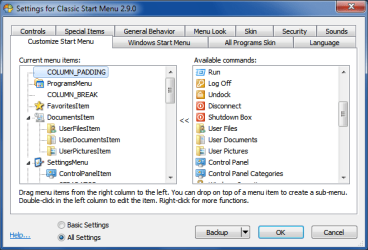
After 3 months of coding, I am finally ready to unveil the latest version of Classic Shell. I just released Classic Shell 2.9.0 on Source Forge. The main new feature is that you can now edit all settings from the GUI. See the attached screenshots. Gone are the ini files that confuse so many people. You can customize your start menu or toolbar by just dragging and dropping pretty pictures. The new menu also comes with a shutdown submenu that you can enable from the settings.

The new version hasn’t been yet well tested, so I need a few brave souls to try it out. If you are up for it, download it from here: https://sourceforge.net/projects/classicshell/files/
Look for the file called ClassicShellSetup_2_9_0.exe. Do not use the main green Download button. It still gives you the old version 2.8.3 (so people don’t accidentally grab the new unproven build by mistake).

The new settings UI is in English by default, but you can download additional translations from the main page Welcome to Classic Shell. Currently only Bulgarian and Russian packs are available for version 2.9.0. If you'd like to contribute a translation for another language, drop me a line.

Please report any problems either in this forum, or on the Source Forge site.

Thanks
Ivo
 

Attachments

  • settings_exp.png
    settings_exp.png
    13 KB · Views: 16
  • settings_sm.png
    settings_sm.png
    18 KB · Views: 23
  • shutdown_menu.png
    shutdown_menu.png
    17.9 KB · Views: 16

My Computer My Computer

Computer Manufacturer/Model Number
Me :) I build all my PCs
OS
Windows 7 Home 64, Vista Ultimate 64
is it possible with this program to change nothing except the status bar, or does have to make old-style start menu and the like?

also, does it restore the old style 'search' itself, which allowed for more narrow search constraints? (I've heard there is a third party search program, but I don't know if there's one to effectively restore the old Windows search ?shell?)
 

My Computer My Computer

Computer type
PC/Desktop
Computer Manufacturer/Model Number
custom
OS
Windows 7 Home Premium 32bit
CPU
AMD Athlon II X2 250 Processor 3.00 GHz
Motherboard
Gigabyte
Memory
2Gb DDR2
Graphics Card(s)
onboard
Sound Card
onboard
Monitor(s) Displays
Viewsonic VA2448m-LED 23.6" LED
Screen Resolution
1920 x 1080
Hard Drives
internal: 1.5 TB Samsung Spinpoint
external: Samsung 2TB USB3.0; 1.5TB Samsung G3 Station
PSU
350w
Case
CoolerMaster
Keyboard
Microsoft Desktop 800
Mouse
Microsoft Desktop 800
Internet Speed
1Mbps
Antivirus
MSE
Browser
Firefox
Other Info
3.4 rating on the "Windows Experience Index"
It's better is cool i liked !!! :p:p:p


PS: HAPPY HELLOWEEN !!! (d)
 

My Computer My Computer

OS
Windows 7 64 Bit
Lykho - if you want nothing but the status bar fixes, uncheck "Classic Start Menu" in the installer. After the installation finishes, go into the Settings and disable any feature you don't want. Besides the status bar, I would recommend you leave on at least "Fix folder scrolling" and "Enable Alt+Enter in the navigation pane".
 

My Computer My Computer

Computer Manufacturer/Model Number
Me :) I build all my PCs
OS
Windows 7 Home 64, Vista Ultimate 64
I would recommend you leave on at least "Fix folder scrolling" and "Enable Alt+Enter in the navigation pane".

what exactly are those? (and why are they important?)
 

My Computer My Computer

Computer type
PC/Desktop
Computer Manufacturer/Model Number
custom
OS
Windows 7 Home Premium 32bit
CPU
AMD Athlon II X2 250 Processor 3.00 GHz
Motherboard
Gigabyte
Memory
2Gb DDR2
Graphics Card(s)
onboard
Sound Card
onboard
Monitor(s) Displays
Viewsonic VA2448m-LED 23.6" LED
Screen Resolution
1920 x 1080
Hard Drives
internal: 1.5 TB Samsung Spinpoint
external: Samsung 2TB USB3.0; 1.5TB Samsung G3 Station
PSU
350w
Case
CoolerMaster
Keyboard
Microsoft Desktop 800
Mouse
Microsoft Desktop 800
Internet Speed
1Mbps
Antivirus
MSE
Browser
Firefox
Other Info
3.4 rating on the "Windows Experience Index"
The folder scrolling bug happens when you expand a folder that is already selected. Here's a 1-year old, 50-page thread on the matter: Bug: Windows Explorer expands folders inappropriately, jumping the folder you expand to the bottom of the navigation pane

The Alt+Enter lets you press Alt+Enter in the folder pane to view the folder's properties.

I'm saying you should leave those enabled because they have no negative effect on any feature of Windows 7. Turning them off also doesn't gain you any performance.

Most other features of Classic Shell are subjective. But these, and the status bar features, are not. Nobody wants their folders to jump around unpredictably. Just like nobody wants their status bar to be broken.
 

My Computer My Computer

Computer Manufacturer/Model Number
Me :) I build all my PCs
OS
Windows 7 Home 64, Vista Ultimate 64

My Computer My Computer

Computer type
PC/Desktop
Computer Manufacturer/Model Number
custom
OS
Windows 7 Home Premium 32bit
CPU
AMD Athlon II X2 250 Processor 3.00 GHz
Motherboard
Gigabyte
Memory
2Gb DDR2
Graphics Card(s)
onboard
Sound Card
onboard
Monitor(s) Displays
Viewsonic VA2448m-LED 23.6" LED
Screen Resolution
1920 x 1080
Hard Drives
internal: 1.5 TB Samsung Spinpoint
external: Samsung 2TB USB3.0; 1.5TB Samsung G3 Station
PSU
350w
Case
CoolerMaster
Keyboard
Microsoft Desktop 800
Mouse
Microsoft Desktop 800
Internet Speed
1Mbps
Antivirus
MSE
Browser
Firefox
Other Info
3.4 rating on the "Windows Experience Index"
Thought i'd give it a try :)

Takes me back to the good ol' days of Windows 95. I like it, although I like the normal Windows 7 style but it's nice, crisp and simple
:thumbsup:
 

My Computer My Computer

Computer Manufacturer/Model Number
Compaq Desktop
OS
Windows 7 Ultimate x64
CPU
AMD Sempron Dual Core
Memory
3GB
Graphics Card(s)
NVIDIA GeForce 6150SE nForce 430
Screen Resolution
1024x768
Hard Drives
150GB Sata
Item Names for Buttons on Classic Explorer Bar

Classic Shell has always been fantastic, and keeps getting better. Thanks. One question, is there a way of getting the Item Names to show on the new version?
 

My Computer My Computer

OS
win 7
What do you mean by "Item Names" and where do you want them to show?
 

My Computer My Computer

Computer Manufacturer/Model Number
Me :) I build all my PCs
OS
Windows 7 Home 64, Vista Ultimate 64
Item Names for Buttons on Classic Explorer Bar

The names like Settings, Cut, Copy, Paste, Delete, Properties, etc.

They are not showing up underneath the icons, nor on the side when I check the box for "Text is on the Side" under Toolbar Settings.
 

My Computer My Computer

OS
win 7
The text for the buttons is not provided by default. You have to enter it yourself. Double-click on each button in the Toolbar Buttons tab and enter something for the Label.
 

My Computer My Computer

Computer Manufacturer/Model Number
Me :) I build all my PCs
OS
Windows 7 Home 64, Vista Ultimate 64
Item Names for Buttons on Classic Explorer Bar

Thanks very much. This may sound silly since there is no reason you have to do all the work for the user, but it might pay to have a default label for the buttons.

Congratulations on all of your efforts to continuously improve an already great program, and to always respond so courteously to everyone's inquiries.
 

My Computer My Computer

OS
win 7
No, that's not possible.

If the label is there it will show in the toolbar. I want the default toolbar to have no text, so it can't have labels by default.

The old version of Classic Shell technically shipped with 2 preset toolbars - one default, and one customizable that you can enable from the ini file. The customizable one had text and the default didn't. The text was just an example for you to understand the format of the ini file. It wasn't supposed to be used as is, particularly because it wasn't localized.

In the new system there is no place for 2 toolbars. It is a tradeoff - I had to sacrifice some of the flexibility that the ini files had for more accessible Settings UI.
 

My Computer My Computer

Computer Manufacturer/Model Number
Me :) I build all my PCs
OS
Windows 7 Home 64, Vista Ultimate 64
Sorry, I don't get to this section of the forums very often, Ivo, so I just noticed the other day you had an update for Classic Shell (2.9.0).

I Love it!

Awesome job on the GUI. I had fun going through the myriad settings and playing around a bit. Very, very stable. I played with the ini files prior but the new GUI, of course, is much more intuitive with most changes occurring immediately.

Thanks, Ivo! Keep up the good work! :D
 

My Computer My Computer

Computer Manufacturer/Model Number
Toshiba L355D
OS
Windows 7 Ultimate x64 SP1
CPU
Core2 Duo
Motherboard
Intel
Memory
4 GB
Graphics Card(s)
GM965 on-board
Sound Card
RealTek on-board
Monitor(s) Displays
19"+17"(laptop)
Screen Resolution
1440x900 (x 2)
Hard Drives
500GB Ext. 200GB Internal
PSU
N/A
Case
N/A
Cooling
N/A
Back
Top