Solved Clean disks to avoid the missing driver error upon install ?

Muffin Top

New member
Member
Local time
3:57 PM
Messages
77
Hi everyone, I'm trying to UEFI-clean-install 7x64 on an Opti 7050 (6th gen proc, supports Win 7). I keep getting the generic missing CD/DVD driver error.

From what I've been reading, this can arise from having a partition on your machine, which the W7 installer will interpret as a removable drive or optical drive. So I "cleaned" the back-up 2T HDD to eliminate that partition. Still getting the error.

There's a pretty comprehensive write-up in git-hub specific to an almost identical machine. It looks like one of his key steps is to set the BIOS to clean all disks, including the C:SSD 1T.


GitHub - PhilipYip1988/windows-7-installation-guide: Downloading a Windows 7 OEM ISO, Creating a UEFI Bootable USB and performing a clean install on a Dell OptiPlex 7040. This tutorial covers installation of Windows 7 OEM and OEM System Locked Preinstallation. Although the guide covers a Dell Device, it can equally be applied to a Lenovo or HP Device. Slipstreaming January 2020 Security Rollup.


His installation guide doesn't say whether I should turn off the USB 3 ports in the BIOS. Some people said doing this helped on other machines, but it's not in the install guide specific to my machine.

I'm reluctant to clean all, but my only other option would be to format that main SSD, producing the same result. I've got recovery resources ready after I blow out the native Win 10 system (including prod activation key), if I'm never able to get Win 7 working on this machine.

No data on the machine yet, but I was hoping for some forum insight before I blow out my pretty Win 10 wallpaper to try to get 7 working.

I tried using unopened retail ultimate 7x64 DVD
I tried using rufus
I tried different usb ports
I tried different usb sticks

Final wrinkle. Eventually I'll want to dual-boot 7/10. Should I format a 4G system partition now? Or should I just try to get the 7 installer working now? Then I could re-try clean installation later if the 7 installer does not give me a large enough system partition.
 

My Computers

System One System Two

  • Computer type
    PC/Desktop
    Computer Manufacturer/Model Number
    Dell Opti 7050
    OS
    10 trying for 7x64
    CPU
    i7 6th gen
    Memory
    32G
    Hard Drives
    1T SSD; 2T HDD
  • Computer type
    PC/Desktop
I'm trying to UEFI-clean-install 7x64 on an Opti 7050 (6th gen proc, supports Win 7). I keep getting the generic missing CD/DVD driver error.
[...]
I was hoping for some forum insight before I blow out my pretty Win 10 wallpaper to try to get 7 working.
[...]
Final wrinkle. Eventually I'll want to dual-boot 7/10. Should I format a 4G system partition now? Or should I just try to get the 7 installer working now? Then I could re-try clean installation later if the 7 installer does not give me a large enough system partition.

My main machine is an Optiplex 7050, triple-booting Win 7/8.1/10. Main difference for me is I see absolutely no purpose at all in using UEFI, so I stick to MBR. MBR also makes it much easier to manage selectively imaging/restoring assorted partitions (I use Macrium Reflect or Terabyte Unlimited's "Image"). FWIW, my wife's machine is a 7060, which has no Legacy boot option like the 7050, and imaging/restoring is less convenient.

You're wise to first try installation on a spare disk and not mess up your main SSD. There's a lot to getting Win7 working properly on the 7050, so tinker first with a spare disk. If all goes well, you can always image/restore from the spare to main disk later, so don't blow away your Win10 until you know you've got a working Win7.

If you're getting hung up on a "a required CD/DVD drive device driver is missing" error, that's from missing USB3 drivers in your boot media. You must install from a USB stick patched with USB3 drivers. (Note: booting to Setup and "browse for drivers" doesn't work, you need to patch the USB3 drivers into the boot media.)

I'll attach a copy of my 2018 "7050 Install Notes". There are a lot of extra drivers you'll need to locate and download before starting the project. (Caveat: Some parts of my notes may seem terse or difficult to understand, but it works for me because I've already been through the process and just need reminders to jog my memory.)
 

Attachments

My Computer

Computer type
PC/Desktop
Computer Manufacturer/Model Number
Dell Optiplex 7050
OS
Windows 7/8.1/10 multiboot
CPU
Intel Core i7-7700
Motherboard
Dell, Intel Q270 chipset
Memory
48GB (2x16GB Crucial DDR4-3200 + 2x8GB Hynix DDR4-2400)
Graphics Card(s)
Intel HD630 + AMD Radeon R7 450 PCIe
Monitor(s) Displays
Asus VC279 (27")
Screen Resolution
1920x1080
Hard Drives
Toshiba M.2 NVMe (256GB),
Samsung 960 Evo (500GB),
WD Red Plus 80EFBX (8TB)
Thanks so much!

Yes, I was hesitant to blow out 10, because who knows if restoring that could be as difficult for me as 7 has been. The GitHub guy who assembled the 7 install guide made it look easy, although I noticed in his BIOS he only had one disk (so hopefully that might fix my error).
 

My Computers

System One System Two

  • Computer type
    PC/Desktop
    Computer Manufacturer/Model Number
    Dell Opti 7050
    OS
    10 trying for 7x64
    CPU
    i7 6th gen
    Memory
    32G
    Hard Drives
    1T SSD; 2T HDD
  • Computer type
    PC/Desktop
I see absolutely no purpose at all in using UEFI, so I stick to MBR.

Caveat: I didn't ask whether you're using NVMe ... the 7050 won't see a NVMe drive as a MBR boot device, so if that's what you want you'll be stuck with UEFI.

In my 7050 I have a 250GB NVMe, a 750GB SSD, and a 8TB HDD. My multiboot manager is on the SSD, so that's where the BIOS points to, and from there the boot manager can load and run Win7 from the NVMe.
 

My Computer

Computer type
PC/Desktop
Computer Manufacturer/Model Number
Dell Optiplex 7050
OS
Windows 7/8.1/10 multiboot
CPU
Intel Core i7-7700
Motherboard
Dell, Intel Q270 chipset
Memory
48GB (2x16GB Crucial DDR4-3200 + 2x8GB Hynix DDR4-2400)
Graphics Card(s)
Intel HD630 + AMD Radeon R7 450 PCIe
Monitor(s) Displays
Asus VC279 (27")
Screen Resolution
1920x1080
Hard Drives
Toshiba M.2 NVMe (256GB),
Samsung 960 Evo (500GB),
WD Red Plus 80EFBX (8TB)
Thanks, NVMe is on my Win 10 disk. Nevertheless I'll try UEFI a couple more times b4 giving up on it.

I've been booting successfully in UEFI, via both Win 7 DVD and rufus stick. My Win 7 installer is getting confused by my hardware.

I imagine my ideal state as being able to dual-boot without going into BIOS to toggle UEFI/Legacy. If I had to pick one operating system, I would use Win 7 all the time. However, compatibility of newer apps with 7 is fading fast, so I don't want to shun 10 if it's easy enough to run both.
 

My Computers

System One System Two

  • Computer type
    PC/Desktop
    Computer Manufacturer/Model Number
    Dell Opti 7050
    OS
    10 trying for 7x64
    CPU
    i7 6th gen
    Memory
    32G
    Hard Drives
    1T SSD; 2T HDD
  • Computer type
    PC/Desktop
Understood. Be aware that to boot Win7 from NVMe you'll need UEFI and don't forget to include the two Microsoft NVMe patches in your boot media.

As for dualbooting two UEFI-installed OSes, perhaps my video, "Creating a Multi-Boot System with Macrium Reflect 7", will help provide some background perspective on the elements involved. This technique allows you to do the initial OS installs as stand-alone, then put them together afterward into a dualboot. Avoids the "you must install Win7 first" nonsense.
 

My Computer

Computer type
PC/Desktop
Computer Manufacturer/Model Number
Dell Optiplex 7050
OS
Windows 7/8.1/10 multiboot
CPU
Intel Core i7-7700
Motherboard
Dell, Intel Q270 chipset
Memory
48GB (2x16GB Crucial DDR4-3200 + 2x8GB Hynix DDR4-2400)
Graphics Card(s)
Intel HD630 + AMD Radeon R7 450 PCIe
Monitor(s) Displays
Asus VC279 (27")
Screen Resolution
1920x1080
Hard Drives
Toshiba M.2 NVMe (256GB),
Samsung 960 Evo (500GB),
WD Red Plus 80EFBX (8TB)
Well, I've verified the Win 7 installer is confused. I unplugged SATA cables for disk 2 (blank HDD) and the CD/DVD player (the NVMe disk 1 in the 7050 looks complicated to a newbie).

The Win 7 installer still returns the required CD/DVD drive device driver is missing.

Next step is to turn off the USB 3 ports in the BIOS. If that doesn't work, then I guess the desperation move is to unplug a memory stick.

If all that doesn't work then am I hoping my shrink-wrapped DVD is defective and that a Dell ISO might work ?

- - - Updated - - -

As for dualbooting two UEFI-installed OSes, perhaps my video, "Creating a Multi-Boot System with Macrium Reflect 7", will help provide some background perspective on the elements involved. This technique allows you to do the initial OS installs as stand-alone, then put them together afterward into a dualboot. Avoids the "you must install Win7 first" nonsense.

Thanks so much!


Well, unplugging the SATA cables and turning off the USB 3 ports didn't clear the hurdle of the missing CD/DVD driver.


In the Dell guide linked above, the only thing he's doing that I haven't done is he cleaned his disk via BIOS. It doesn't seem like that should be the solution . . .

- - - Updated - - -

Understood. Be aware that to boot Win7 from NVMe you'll need UEFI and don't forget to include the two Microsoft NVMe patches in your boot media.

Now I'm beginning to understand what's at stake when I leave the NVMe installed. Reviewing the instructions, it looks feasible for a newbie to remove the NVMe SSD, and then reinstall the HDD, so I guess I should try that next.

That way I'm not deleting anything without fully exploring all other options. If removing most of the hardware doesn't work, then I'm likely to give up and stick with Win 10's annoyances.
 

My Computers

System One System Two

  • Computer type
    PC/Desktop
    Computer Manufacturer/Model Number
    Dell Opti 7050
    OS
    10 trying for 7x64
    CPU
    i7 6th gen
    Memory
    32G
    Hard Drives
    1T SSD; 2T HDD
  • Computer type
    PC/Desktop
The Win 7 installer still returns the required CD/DVD drive device driver is missing.

Did you rebuild your installation media with embedded USB3 drivers? You must do that or you won't get past that error msg. Don't be misled by the "CD/DVD" indication in the error msg, that's a red herring. It says "CD/DVD" but it's the USB3 drivers that are the issue.

Rebuilding the installation media is what's going on with all those "DISM" steps in my installation notes. IIRC, SIW2 has a tool somewhere on these forums that will simplify that process with a GUI instead of from the command line. That's the way to go for those less technically inclined. (I didn't use his GUI because I had already completed the rebuild otherwise, but check with him for more details on his tool.)

To reiterate, you must extract all the files from your iso or installation DVD, locate/download the proper USB3 drivers and Microsoft's NVMe patches, patch them into your extracted file set via DISM or SIW2's tool, and finally sew everything back together into a new iso or DVD or Rufus USB stick. It may seem unnecessarily complex, but you simply cannot avoid rebuilding the installation media.
 

My Computer

Computer type
PC/Desktop
Computer Manufacturer/Model Number
Dell Optiplex 7050
OS
Windows 7/8.1/10 multiboot
CPU
Intel Core i7-7700
Motherboard
Dell, Intel Q270 chipset
Memory
48GB (2x16GB Crucial DDR4-3200 + 2x8GB Hynix DDR4-2400)
Graphics Card(s)
Intel HD630 + AMD Radeon R7 450 PCIe
Monitor(s) Displays
Asus VC279 (27")
Screen Resolution
1920x1080
Hard Drives
Toshiba M.2 NVMe (256GB),
Samsung 960 Evo (500GB),
WD Red Plus 80EFBX (8TB)
Perfect, thanks so much. I'm definitely going to unplug the NVMe, now that I've learned how to do it.

The approach I've taken thus far has been to gradually build up to copying the GitHub guide, so I downloaded the same Dell drivers to my install USB that he did. For the sake of simplification, I turned off the USB 3 ports in BIOS, so only the USB 2 ports are working, and I have Dell's drivers.

Upon further review, I've noticed a couple instances where I didn't follow him exactly. Early on, I was using the DVD player, which he did not have in his BIOS. I've since unplugged it.

I've also noticed in the Guide's BIOS, he removed one of his memory sticks, so I'll also have to do that as well.

If conforming to his BIOS precisely doesn't work, then hopefully the Dell ISO will work. It looks like they may be using the same ISO for Opti 7040 & 7050, based on their checksums being identical.
 

My Computers

System One System Two

  • Computer type
    PC/Desktop
    Computer Manufacturer/Model Number
    Dell Opti 7050
    OS
    10 trying for 7x64
    CPU
    i7 6th gen
    Memory
    32G
    Hard Drives
    1T SSD; 2T HDD
  • Computer type
    PC/Desktop
It doesn't matter whether you use a shrink-wrapped DVD or a Dell ISO. Either way, Microsoft simply did not include the requisite USB3 drivers in the Win7 base media -- hence, the unavoidable requirement to rebuild the installation media to update it.

Unlike HP and others, Dell did not use different Windows ISOs for different models. The same Dell ISO works for all Dell models, including laptops and desktops. That's why there will still be a lot of model-specific drivers (for chipset, audio, video, et al) that need to be installed after you finish installing Windows itself.

One advantage to the Dell media is it is OEM-locked to Dell BIOSes, so regardless of model, it will automatically be activated with a Dell OEM product key. You do not enter any product key during installation and do not have to go through the Windows activation rigamarole. It may be more difficult using a standard retail DVD at this late date because I believe Microsoft's online activation servers have been shut down.
 

My Computer

Computer type
PC/Desktop
Computer Manufacturer/Model Number
Dell Optiplex 7050
OS
Windows 7/8.1/10 multiboot
CPU
Intel Core i7-7700
Motherboard
Dell, Intel Q270 chipset
Memory
48GB (2x16GB Crucial DDR4-3200 + 2x8GB Hynix DDR4-2400)
Graphics Card(s)
Intel HD630 + AMD Radeon R7 450 PCIe
Monitor(s) Displays
Asus VC279 (27")
Screen Resolution
1920x1080
Hard Drives
Toshiba M.2 NVMe (256GB),
Samsung 960 Evo (500GB),
WD Red Plus 80EFBX (8TB)
One advantage to the Dell media is it is OEM-locked to Dell BIOSes, so regardless of model, it will automatically be activated with a Dell OEM product key. You do not enter any product key during installation and do not have to go through the Windows activation rigamarole. It may be more difficult using a standard retail DVD at this late date because I believe Microsoft's online activation servers have been shut down.

Ouch, I did not know that. I had imagined that I had until October, when the update servers are shut down.


Another hassle. The things I go through to stick with the benefits of Win 7.
 

My Computers

System One System Two

  • Computer type
    PC/Desktop
    Computer Manufacturer/Model Number
    Dell Opti 7050
    OS
    10 trying for 7x64
    CPU
    i7 6th gen
    Memory
    32G
    Hard Drives
    1T SSD; 2T HDD
  • Computer type
    PC/Desktop
Ouch, I did not know that. I had imagined that I had until October, when the update servers are shut down.

Don't take my word on that. I've been servicing Dell computers since 1995 so have a lot of experience with Dell media, but it's been quite awhile since I've had to install from retail media and I have not kept up with that issue.

Forum member torchwood is usually the go-to guy on activation issues, so no doubt he would know.
 

My Computer

Computer type
PC/Desktop
Computer Manufacturer/Model Number
Dell Optiplex 7050
OS
Windows 7/8.1/10 multiboot
CPU
Intel Core i7-7700
Motherboard
Dell, Intel Q270 chipset
Memory
48GB (2x16GB Crucial DDR4-3200 + 2x8GB Hynix DDR4-2400)
Graphics Card(s)
Intel HD630 + AMD Radeon R7 450 PCIe
Monitor(s) Displays
Asus VC279 (27")
Screen Resolution
1920x1080
Hard Drives
Toshiba M.2 NVMe (256GB),
Samsung 960 Evo (500GB),
WD Red Plus 80EFBX (8TB)
Ahhhh, I'm in, at last !


Now the fun begins !


Thanks everyone! You may get a kick out of my installation details :


I unplugged the NVMe drive (that was probably my issue), so my SATA HDD is flying solo for the time being. I also removed a memory stick, since that's been an issue for others.


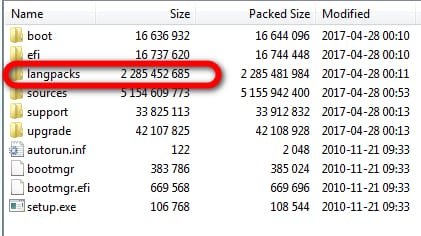
So, to copy the GitHub guide, I downloaded Dell's 2017 ISO (service packs 1 & 2). I used the ROW image, to match the guide. Surprisingly, this image is much larger (7GB) than the ISO burned from my installation CD (4GB).

Here's where it gets funny. Since my USB sticks are jumbled together, and mostly used, I plucked out a dusty old 8GB stick that has less than 7.5GB available. I made the mistake of not deleting the unimportant files on it, so I didn't even have room to add Dell's drivers! No wonder I have so much trouble with computers!

So this 2017 Dell ISO works, even though I'm going commando (without any drivers).


It all makes sense when you follow the GitHub guide. He does the Win 7 install first, prior to installing any drivers or windows updates. Win 7 has rudimentary good enough drivers for video, SATA, and USB 2, so you don't need the manufacturer's drivers to install Win 7, if you have USB 2 ports.

Win 7's weakness is it didn't understand the NVMe, so that had to be unplugged to install Win 7.

- - - Updated - - -

Amazing that installation worked with that flaky old USB. I wonder if the limited space available (less than 8GB) means it's a partially defective stick? Those older files I alluded to above would have been deleted when rufus formatted the stick.
 

My Computers

System One System Two

  • Computer type
    PC/Desktop
    Computer Manufacturer/Model Number
    Dell Opti 7050
    OS
    10 trying for 7x64
    CPU
    i7 6th gen
    Memory
    32G
    Hard Drives
    1T SSD; 2T HDD
  • Computer type
    PC/Desktop
It is big because of the language packs

dell-media1.jpg


these are in the bootable wims and also in the Pro image

Windows6.1-KB2990941-v3-x64.
Windows6.1-KB3087873-v2-x64.

kb2732500-v2
iaStorAC.inf
iusb3hcs.inf
iusb3hub.inf
iusb3xhc.inf

The usb3 drivers and the updates that provide nvme support
 

My Computers

System One System Two

  • Computer type
    PC/Desktop
    OS
    7 X64
    CPU
    i5 8400
    Motherboard
    gigabyte b365m ds3h
    Memory
    2x8gb 3200mhz
    Hard Drives
    various
    PSU
    pure power 11 400w cm
    Case
    Coolermaster
    Cooling
    cryorig m9i
  • Computer type
    PC/Desktop
    OS
    7x64
    CPU
    g5400
    Motherboard
    ga b365m ds3h
    Memory
    8gb ddr4 2400
    PSU
    xfx pro 450w
Ahh, thanks. I could re-do this without the ROW version, and then I would have headroom on the ~8GB flash drive for any extra driver(s).


I spoke too soon about not needing drivers. For some reason this 2017 ISO does not have the motherboard's SATA driver. It seems Dell downloads are only .exe. Is that the reason why the windows 7 installer won't recognize my Dell SATA driver?
 

My Computers

System One System Two

  • Computer type
    PC/Desktop
    Computer Manufacturer/Model Number
    Dell Opti 7050
    OS
    10 trying for 7x64
    CPU
    i7 6th gen
    Memory
    32G
    Hard Drives
    1T SSD; 2T HDD
  • Computer type
    PC/Desktop
Last edited:

My Computers

System One System Two

  • Computer type
    PC/Desktop
    OS
    7 X64
    CPU
    i5 8400
    Motherboard
    gigabyte b365m ds3h
    Memory
    2x8gb 3200mhz
    Hard Drives
    various
    PSU
    pure power 11 400w cm
    Case
    Coolermaster
    Cooling
    cryorig m9i
  • Computer type
    PC/Desktop
    OS
    7x64
    CPU
    g5400
    Motherboard
    ga b365m ds3h
    Memory
    8gb ddr4 2400
    PSU
    xfx pro 450w
Thanks so much. The guy who wrote the GitHub guide didn't get into this at all. It doesn't seem like his 7040 should differ that much from my 7050, so maybe this was his only omission.


I lost some time not following all of his recommendations, because I correctly guessed that I didn't need to copy his use of the BIOS to clean the disks. If I had followed all of his instructions, then I still would have gotten hung up at this point because he didn't explain how to find the HDD driver.


Now that there's light at the end of the tunnel, I don't regret the recent frustrations because there was incidental learning along the way (when I had the time for it).


I went through these experiences a long time ago with my dad on older computers. Amazing how much of those past lessons I retained to understand this current project.

- - - Updated - - -

It looks like fully extracted the newly discovered driver pack is 2.2GB, so I should re-package my ISO drive without the language packs, and then I'll have space for all the drivers.

- - - Updated - - -

Hmmm, not that simple. Tomorrow I get to figure out why the Win 7 installer does not see a signed driver.

- - - Updated - - -

storage
66MG5_A00-00
Intel Rapid Storage Technology Driver and Management Console
A03
15.7.5.1025

:ar: DEL7050storage.zip
you could try going into bios and switch between ahci and whatever the other mode is called - probably raid

It looks like these download results are executables. I think this means I need to go back into my NVMe Win 10 system, re-format the HDD, download the driver pack to the HDD, and run it on the HDD?
 

My Computers

System One System Two

  • Computer type
    PC/Desktop
    Computer Manufacturer/Model Number
    Dell Opti 7050
    OS
    10 trying for 7x64
    CPU
    i7 6th gen
    Memory
    32G
    Hard Drives
    1T SSD; 2T HDD
  • Computer type
    PC/Desktop

My Computers

System One System Two

  • Computer type
    PC/Desktop
    OS
    7 X64
    CPU
    i5 8400
    Motherboard
    gigabyte b365m ds3h
    Memory
    2x8gb 3200mhz
    Hard Drives
    various
    PSU
    pure power 11 400w cm
    Case
    Coolermaster
    Cooling
    cryorig m9i
  • Computer type
    PC/Desktop
    OS
    7x64
    CPU
    g5400
    Motherboard
    ga b365m ds3h
    Memory
    8gb ddr4 2400
    PSU
    xfx pro 450w
Thanks, but this is where I'm getting roadblocked. When I try to extract, it only gives me .exe.


Their readme file says to use one of the following command examples to extract the driver files from the SW package:
c:\SetupRST.exe -a -p c:\<path>


Modeled after the instruction above, from the admin cmd prompt I tried to start setuprst.exe -a -p e:\drivers\storage


It did not then extract to .inf .cat .sys, so I'm not understanding the shorthand used in their readme's instruction above.

- - - Updated - - -

It's craziness: only a couple years ago, the author of the GitHub installation guide encountered the same difficulty when he was a newbie, but he didn't include this step in his GitHub guide.

Re: F6flpy-x64-Non-VMD.zip and F6flpy-x64-VMD.zip Removed - Page 2 - Intel Community

On 9/29/23, it looks like JamesWT_MHT posted the solution. The only problem is that as a newbie I don't understand his style of syntax errors. I typed exactly what he indicates to type, and of course it doesn't work because he's taken stylistic liberties.

- - - Updated - - -

Maybe his syntax is a powershell thing. I typed his command in powershell, and nothing happened, instead of giving me an error. Then I went back to CMD, and typed his command in the style of CMD. Once again, nothing happened, instead of giving me an error.
 

My Computers

System One System Two

  • Computer type
    PC/Desktop
    Computer Manufacturer/Model Number
    Dell Opti 7050
    OS
    10 trying for 7x64
    CPU
    i7 6th gen
    Memory
    32G
    Hard Drives
    1T SSD; 2T HDD
  • Computer type
    PC/Desktop

My Computers

System One System Two

  • Computer type
    PC/Desktop
    OS
    7 X64
    CPU
    i5 8400
    Motherboard
    gigabyte b365m ds3h
    Memory
    2x8gb 3200mhz
    Hard Drives
    various
    PSU
    pure power 11 400w cm
    Case
    Coolermaster
    Cooling
    cryorig m9i
  • Computer type
    PC/Desktop
    OS
    7x64
    CPU
    g5400
    Motherboard
    ga b365m ds3h
    Memory
    8gb ddr4 2400
    PSU
    xfx pro 450w
Back
Top