Clean Install of Win7 doesnt find HD Drivers

Try booting the installer with SATA controller set to AHCI in BIOS.
If you're running one SATA drive, then AHCI is the way to go. It will enable the Native Command Queing which is faster that IDE.

You don't have to go through the trouble of putting the drivers on a DVD installer disk. Just put them on a USB thumb drive and you'll be fine.

I read that too, but I tried that and was unable to get the machine to POST... Am i missing something with ACHI?

I couldnt get anything to work while it was set to ACHI
 

My Computer My Computer

At a glance

windows7 64-bitamdoczintegrated
Computer Manufacturer/Model Number
me
OS
windows7 64-bit
CPU
amd
Motherboard
gigabyte
Memory
ocz
Graphics Card(s)
integrated
Sound Card
integrated
Monitor(s) Displays
acer
Hard Drives
SAMSUNG Spinpoint F1 HD102UJ 1TB
PSU
ocz
Case
cooler master
Cooling
air
Try booting the installer with SATA controller set to AHCI in BIOS.

Slipstream your mobo drivers into the Win7 installer using Vlite.

Here is the basic tutorial, though you will add Drivers tab at beginning to insert drivers, then recompile ISO and burn to DVD: http://www.sevenforums.com/tutorials/32055-bootable-iso-create-installation-files.html

Start by copying the DVD files to your desktop, then load into Vlite, select Drivers and Create ISO tabs, insert mobo drivers (you need to get the IDE?SATA controller driver into installer) then recompile and burn ISO to DVD.

When using vLite, how do i get the drivers from GA-MA78LM-S2H (rev. 1.0) - GIGABYTE - Support&Download - Motherboard - Driver to load. vLite doesnt recognize any of them. Do i need to convert them to another file type?

thanks
 

My Computer My Computer

At a glance

windows7 64-bitamdoczintegrated
Computer Manufacturer/Model Number
me
OS
windows7 64-bit
CPU
amd
Motherboard
gigabyte
Memory
ocz
Graphics Card(s)
integrated
Sound Card
integrated
Monitor(s) Displays
acer
Hard Drives
SAMSUNG Spinpoint F1 HD102UJ 1TB
PSU
ocz
Case
cooler master
Cooling
air
I read that too, but I tried that and was unable to get the machine to POST... Am i missing something with ACHI?

I couldnt get anything to work while it was set to ACHI

Just to clarify, does this mean that you were unable to get to bios at all? Or that the disk didn't show in Bios? OR something else....?

On one of my Mobo's I have both a ACHI and a SATA/RAID choice in bios. I had to set the both to on, hope this helps.
 

My Computer My Computer

At a glance

Windows 7 Ultimate 64 bitIntel(R) Core(TM)2 Quad CPU Q8200 @ 2.33GHz8 GB KingstonNvidia GeForce 9600GT
Computer Manufacturer/Model Number
Custom Hack job
OS
Windows 7 Ultimate 64 bit
CPU
Intel(R) Core(TM)2 Quad CPU Q8200 @ 2.33GHz
Motherboard
GigaByte EP45-UD3
Memory
8 GB Kingston
Graphics Card(s)
Nvidia GeForce 9600GT
Sound Card
Soundblaster Audigy
Monitor(s) Displays
AOC x2 22"
Hard Drives
2 x Samsung 500GB (RAID)
2 x Samsung 2TB
1 x WD Green 2TB
1 x Seagate 1TB
1 x Samsung 500GB
PSU
Thermaltake QFan 750W
Case
CM Scout Gaming
Cooling
Coolermaster V10
Keyboard
Microsoft Wireless Keyboard 1000
Mouse
Microsoft Wireless Optical 2000
Internet Speed
320
Other Info
Winfast PVR2000CP
LG DVD-RAM DVD/RW/DL Super Multi
Linksys WMP300Nx2 Wireless Adapter
Try booting the installer with SATA controller set to AHCI in BIOS.

Slipstream your mobo drivers into the Win7 installer using Vlite.

Here is the basic tutorial, though you will add Drivers tab at beginning to insert drivers, then recompile ISO and burn to DVD: http://www.sevenforums.com/tutorials/32055-bootable-iso-create-installation-files.html

Start by copying the DVD files to your desktop, then load into Vlite, select Drivers and Create ISO tabs, insert mobo drivers (you need to get the IDE?SATA controller driver into installer) then recompile and burn ISO to DVD.

When using vLite, how do i get the drivers from GA-MA78LM-S2H (rev. 1.0) - GIGABYTE - Support&Download - Motherboard - Driver to load. vLite doesnt recognize any of them. Do i need to convert them to another file type?

thanks

Are you slipstreaming the AMD SATA AHCI Driver? I downloaded it to my desktop, extracted, then selected Insert driver in Vlite and it loaded no problem. I first tried Single Driver which worked, then tried Multiple driver folder and it said I already had the only driver.

Seems like you need to get it into your current install, too. Maybe someone will advise how to load it in if AHCI won't set correctly in BIOS.
 
I read that too, but I tried that and was unable to get the machine to POST... Am i missing something with ACHI?

I couldnt get anything to work while it was set to ACHI

Just to clarify, does this mean that you were unable to get to bios at all? Or that the disk didn't show in Bios? OR something else....?

On one of my Mobo's I have both a ACHI and a SATA/RAID choice in bios. I had to set the both to on, hope this helps.

When i tried to boot in ACHI, i could not get to the BIOS or boot to a disk at all. I'm not sure what ACHI is as i have never used it. Either way i could do nothing with it.
 

My Computer My Computer

At a glance

windows7 64-bitamdoczintegrated
Computer Manufacturer/Model Number
me
OS
windows7 64-bit
CPU
amd
Motherboard
gigabyte
Memory
ocz
Graphics Card(s)
integrated
Sound Card
integrated
Monitor(s) Displays
acer
Hard Drives
SAMSUNG Spinpoint F1 HD102UJ 1TB
PSU
ocz
Case
cooler master
Cooling
air
Try booting the installer with SATA controller set to AHCI in BIOS.

Slipstream your mobo drivers into the Win7 installer using Vlite.

Here is the basic tutorial, though you will add Drivers tab at beginning to insert drivers, then recompile ISO and burn to DVD: http://www.sevenforums.com/tutorials/32055-bootable-iso-create-installation-files.html

Start by copying the DVD files to your desktop, then load into Vlite, select Drivers and Create ISO tabs, insert mobo drivers (you need to get the IDE?SATA controller driver into installer) then recompile and burn ISO to DVD.

When using vLite, how do i get the drivers from GA-MA78LM-S2H (rev. 1.0) - GIGABYTE - Support&Download - Motherboard - Driver to load. vLite doesnt recognize any of them. Do i need to convert them to another file type?

thanks

Are you slipstreaming the AMD SATA AHCI Driver? I downloaded it to my desktop, extracted, then selected Insert driver in Vlite and it loaded no problem. I first tried Single Driver which worked, then tried Multiple driver folder and it said I already had the only driver.

Seems like you need to get it into your current install, too. Maybe someone will advise how to load it in if AHCI won't set correctly in BIOS.


I'm not sure what slipstreaming is, but the drivers and BIOS update from the Gigabyte website download as a .exe file that vLite doesnt find... i'm not sure what file type the drivers and BIOS update have to be for Windows7 have to be to be added to the ISO through vLite.

Also, i have been trying with zero luck to get this figured out with the Gigabyte people...just in case anyone was wondering if i was trying to work things out with the MB manufacturer.
 

My Computer My Computer

At a glance

windows7 64-bitamdoczintegrated
Computer Manufacturer/Model Number
me
OS
windows7 64-bit
CPU
amd
Motherboard
gigabyte
Memory
ocz
Graphics Card(s)
integrated
Sound Card
integrated
Monitor(s) Displays
acer
Hard Drives
SAMSUNG Spinpoint F1 HD102UJ 1TB
PSU
ocz
Case
cooler master
Cooling
air
Hi

Go back to TimStitt posts in this thread.

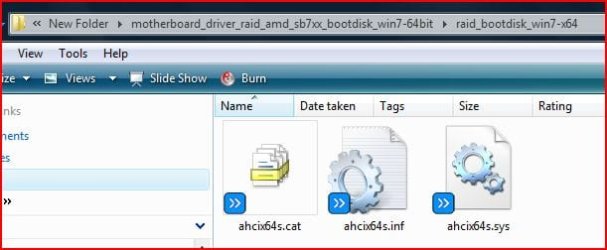
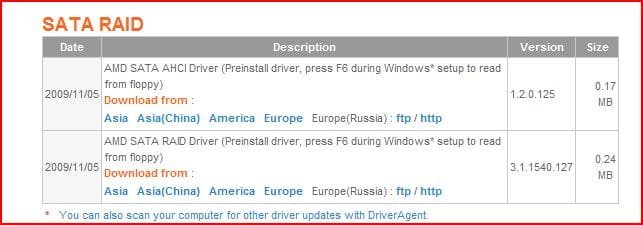
Unzip the download & put the three files on USB stick.

ahcix64s.cat
ahcix64s.inf
ahcix64s.sys
 

Attachments

  • Capture001.JPG
    Capture001.JPG
    31.3 KB · Views: 23
  • Capture002.JPG
    Capture002.JPG
    29.8 KB · Views: 24
Last edited:

My Computer My Computer

At a glance

ME/XP/Vista/Win7
OS
ME/XP/Vista/Win7
thanks theog...i'll give it a try
 

My Computer My Computer

At a glance

windows7 64-bitamdoczintegrated
Computer Manufacturer/Model Number
me
OS
windows7 64-bit
CPU
amd
Motherboard
gigabyte
Memory
ocz
Graphics Card(s)
integrated
Sound Card
integrated
Monitor(s) Displays
acer
Hard Drives
SAMSUNG Spinpoint F1 HD102UJ 1TB
PSU
ocz
Case
cooler master
Cooling
air
Awesome. I've got the ISO built and Windows loads...untill the very end of installation and it gives me an error: "Windows could not configure one or more system components. To install windows, restart the computer and then restart the installation."

WTF! I've come this far. Any thoughts?
 

My Computer My Computer

At a glance

windows7 64-bitamdoczintegrated
Computer Manufacturer/Model Number
me
OS
windows7 64-bit
CPU
amd
Motherboard
gigabyte
Memory
ocz
Graphics Card(s)
integrated
Sound Card
integrated
Monitor(s) Displays
acer
Hard Drives
SAMSUNG Spinpoint F1 HD102UJ 1TB
PSU
ocz
Case
cooler master
Cooling
air
i guess that i will reformat with the Gigabyte utility program (which is useless for anything else IMO) and try again.
 

My Computer My Computer

At a glance

windows7 64-bitamdoczintegrated
Computer Manufacturer/Model Number
me
OS
windows7 64-bit
CPU
amd
Motherboard
gigabyte
Memory
ocz
Graphics Card(s)
integrated
Sound Card
integrated
Monitor(s) Displays
acer
Hard Drives
SAMSUNG Spinpoint F1 HD102UJ 1TB
PSU
ocz
Case
cooler master
Cooling
air
It's strange that the disk is not found in the bios when AHCI is turned on. Please ensure that RAID is also enabled when you try this (no need to configure a Raid array though). Be aware that there is also a prompt on most boards to load the driver prior to the bios loading, this is via F6 on my Gigabyte board.

FYI - about AHCI - Advanced Host Controller Interface - Wikipedia, the free encyclopedia

In regards to your new install, take out any/all cards and unplug all USB / firewall devices etc until the OS is installed.

If it still fails check the setuperr.log for more information.

As a last resort, if you have a copy of vista, you may choose to install vista (no need to put a key in) or XP 64 bit , then upgrade to Win7.
 

My Computer My Computer

At a glance

Windows 7 Ultimate 64 bitIntel(R) Core(TM)2 Quad CPU Q8200 @ 2.33GHz8 GB KingstonNvidia GeForce 9600GT
Computer Manufacturer/Model Number
Custom Hack job
OS
Windows 7 Ultimate 64 bit
CPU
Intel(R) Core(TM)2 Quad CPU Q8200 @ 2.33GHz
Motherboard
GigaByte EP45-UD3
Memory
8 GB Kingston
Graphics Card(s)
Nvidia GeForce 9600GT
Sound Card
Soundblaster Audigy
Monitor(s) Displays
AOC x2 22"
Hard Drives
2 x Samsung 500GB (RAID)
2 x Samsung 2TB
1 x WD Green 2TB
1 x Seagate 1TB
1 x Samsung 500GB
PSU
Thermaltake QFan 750W
Case
CM Scout Gaming
Cooling
Coolermaster V10
Keyboard
Microsoft Wireless Keyboard 1000
Mouse
Microsoft Wireless Optical 2000
Internet Speed
320
Other Info
Winfast PVR2000CP
LG DVD-RAM DVD/RW/DL Super Multi
Linksys WMP300Nx2 Wireless Adapter
Thanks TimStitt!

I did a little reading on ACHI after people mentioned it. I have already tried to install Vista, which did not work either.... I guess that i will continue to beat my head against this Windows wall....

As of this moment i have installed and reinstalled and reinstalled and... still nothing... i may try to take the drive out of the computer and install it in my desktop and install 7 there...thoughts about that?
 

My Computer My Computer

At a glance

windows7 64-bitamdoczintegrated
Computer Manufacturer/Model Number
me
OS
windows7 64-bit
CPU
amd
Motherboard
gigabyte
Memory
ocz
Graphics Card(s)
integrated
Sound Card
integrated
Monitor(s) Displays
acer
Hard Drives
SAMSUNG Spinpoint F1 HD102UJ 1TB
PSU
ocz
Case
cooler master
Cooling
air
http://www.paragon-software.com/free/

If you move HD to another machine to install, do not activate until you return it to target machine. It will attempt to swap out drivers and may succeed with only restarts.

If not, point Paragon Adaptive Restore at the HD.
 
Ok, this is the most recent update....

I loaded windows xp successfully, but was unable to install 7 after the completed and update xp install....

I was able to get Vista 32bit to install, but was unable to do the clean install with windows 7 64bit...

I attempted to install windows 7 on my PC (Asus Maximus Extreme x38, Intel e8400 OC, 4gig Corsair Dominator, 3x750gig Samsung spinpoints, MSI 4890 OC, Creative SB Platinum, D-link wireless N card, Plextor DVD dual layer drive).... So, i know that the media is good...

The only suggestions that i have seen elsewhere on the interweb is to check the installation media....and i have done that...

I also saw that there was a guy on Newegg (where i bought all the parts) who is running the same MB/CPU combo that i am with windows 7 64bit... so, unless he's lying, it can be done.

I am going to call Microsoft in the morning and try to figure this out. If that fails, i guys that i will swallow my pride and go to Micro Center and have them take a look.
 

My Computer My Computer

At a glance

windows7 64-bitamdoczintegrated
Computer Manufacturer/Model Number
me
OS
windows7 64-bit
CPU
amd
Motherboard
gigabyte
Memory
ocz
Graphics Card(s)
integrated
Sound Card
integrated
Monitor(s) Displays
acer
Hard Drives
SAMSUNG Spinpoint F1 HD102UJ 1TB
PSU
ocz
Case
cooler master
Cooling
air
Please let us know the quality of MS Tech Support for Windows 7.

In the past I have gotten more than the value of my product in tech support from them.

Their policy is supposedly that they will work any issue through to completion for a cooperative customer, even elevating to a research team if necessary.

I also would call back several times if not satisfied with the support, until I find an agent who can help me.
 
Well, I just called and was told that because i bought an OEM disk from Newegg.com they could not help me.... The options were to call Newegg (who would tell me that i am on my own), try to exchange my OEM disk for a retail disk, or pay $56 to get support over the phone. I wouldnt mind doing that at this point, even though it would have at that point cost me as much as the retail version... but there is a Micro Center near my house, so i will try them first.

I will update when i get some answer from either one.
 

My Computer My Computer

At a glance

windows7 64-bitamdoczintegrated
Computer Manufacturer/Model Number
me
OS
windows7 64-bit
CPU
amd
Motherboard
gigabyte
Memory
ocz
Graphics Card(s)
integrated
Sound Card
integrated
Monitor(s) Displays
acer
Hard Drives
SAMSUNG Spinpoint F1 HD102UJ 1TB
PSU
ocz
Case
cooler master
Cooling
air
Appalling.

MS, do you know your Tech Support is referring retail customers to the sales outlet for Tech Support?

Did you call back to try another agent? Sometimes they can get lazy. Don't tell them where you bought it. Or was it OEM that caused the refusal?

Why would retail OEM not be supported? The price?

You have come so far, even slipstreaming drivers which is advanced stuff.

You're due a break.
 
Appalling.

MS, do you know your Tech Support is referring retail customers to the sales outlet for Tech Support?

Did you call back to try another agent? Sometimes they can get lazy. Don't tell them where you bought it. Or was it OEM that caused the refusal?

Why would retail OEM not be supported? The price?

You have come so far, even slipstreaming drivers which is advanced stuff.

You're due a break.

@Greg
Agreed on all accounts.
If only Microsoft's customer service was focused-on as much as their product development. Thanotosq deserves better.


@thanotosq - Last lot of ideas.
1. Your XP and Vista installs show that the problem only occurs in Win7 64bit. Not a solution; but did you know that the same key will work in the 32bit windows 7 version of the same flavour. i.e. business, home basic, ultimate etc. This may help if you want to rule out 64bit as an issue. AND - If you have a friend with any flavour of 32bit win7, you can edit the installation media so that it asks you which flavour to install.

2. You said that you found another user with the same hardware, even different RAM or different hardware firmware on the same model device (like a hard drive) could be the cause of your pain here. We can test for this as follows (and you may already have done one or both of these, or they may not be viable options for you):
  • Minim requirements Install: Open the case and remove everything except that pesky hard drive and the absolute minimum required for install. Remove all other drives, add-in cards, extra RAM, USB cables/devices, LAN cables etc. Only leave matching sticks of RAM in.
  • Hardware isolation testing: This process involves swapping out one piece of hardware at a time to see if you can find the problem. I'd start with the hard drive, see if you can beg, borrow or buy another one (preferably the first two as we can't tell for sure that the problem is here). If I had to pick an order for testing id go with Harddrive, RAM, powersupply, mobo)

3. As Greg said - call back and try another agent.
 

My Computer My Computer

At a glance

Windows 7 Ultimate 64 bitIntel(R) Core(TM)2 Quad CPU Q8200 @ 2.33GHz8 GB KingstonNvidia GeForce 9600GT
Computer Manufacturer/Model Number
Custom Hack job
OS
Windows 7 Ultimate 64 bit
CPU
Intel(R) Core(TM)2 Quad CPU Q8200 @ 2.33GHz
Motherboard
GigaByte EP45-UD3
Memory
8 GB Kingston
Graphics Card(s)
Nvidia GeForce 9600GT
Sound Card
Soundblaster Audigy
Monitor(s) Displays
AOC x2 22"
Hard Drives
2 x Samsung 500GB (RAID)
2 x Samsung 2TB
1 x WD Green 2TB
1 x Seagate 1TB
1 x Samsung 500GB
PSU
Thermaltake QFan 750W
Case
CM Scout Gaming
Cooling
Coolermaster V10
Keyboard
Microsoft Wireless Keyboard 1000
Mouse
Microsoft Wireless Optical 2000
Internet Speed
320
Other Info
Winfast PVR2000CP
LG DVD-RAM DVD/RW/DL Super Multi
Linksys WMP300Nx2 Wireless Adapter
3. As Greg said - call back and try another agent.

Ask them to read you the rule which precludes them helping you on retail OEM.

Be very polite which goes a long way with tech support. For one thing, it makes it clear sooner which ones aren't wanting to help so you can politely hang up and call right back.

Then get their agent number and report back.

We have MS outreach people reading these threads.
 
Back
Top