Solved Clean install of Windows 7 x64 on Sony Vaio 71211m VPCEB3F4E

sudosam

New member
Local time
8:00 PM
Messages
2
Hi,

I have got a Sony Vaio 71211m VPCEB3F4E, it came with no hard drive or recovery discs.
So installed a new hard drive and have tried to install windows 7 x64 (also tried Windows 10) by USB and DVD both fail when it comes to actually installing the OS on the hard drive.
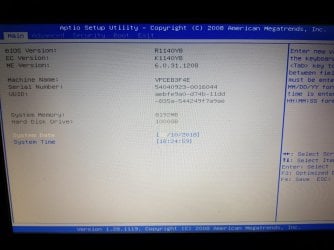
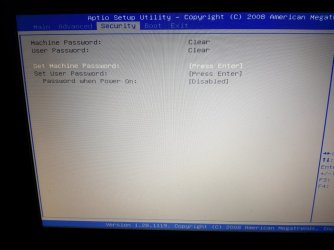
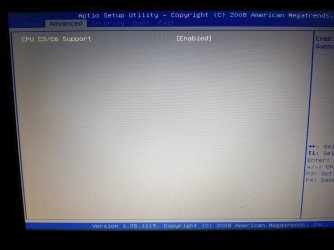
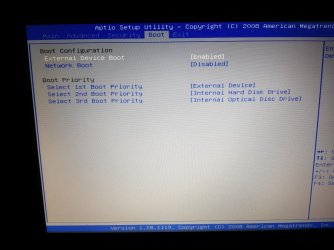
The laptop bios is very restricted and there's not much options, see attached pics

The bios is R1140YB, EC version K1140Y8, ME version 6.0.31.1208

https://www.sony.co.uk/electronics/support/laptop-pc-vpc-series/vpceb3f4e/specifications

any help?
 

Attachments
  • Bios Boot.jpg
    Bios Boot.jpg
    100.6 KB · Views: 1
  • Bios Main.jpg
    Bios Main.jpg
    111.1 KB · Views: 1
  • Bios Security.jpg
    Bios Security.jpg
    89.2 KB · Views: 1
  • Bios Advanced.jpg
    Bios Advanced.jpg
    96.1 KB · Views: 1
  • installation failure.jpg
    installation failure.jpg
    141.2 KB · Views: 1

My Computer My Computer

At a glance

Windows 10 x64
Computer type
PC/Desktop
OS
Windows 10 x64
Browser
Firefox Quantum 58.0.2 (64-bit)
Put "Internal Optical Disk Drive" as the first item in the boot priority, and "External Device" as the second item. This will put your hard drive as the 3rd item. And that's the way it should be, so that you can easily boot from a DVD or an external device if you want to.
 

My Computer My Computer

At a glance

Linux Mint 18.2 xfce 64-bit (VMWare host) / W...Haswell4 GB
Computer type
PC/Desktop
Computer Manufacturer/Model Number
Dell
OS
Linux Mint 18.2 xfce 64-bit (VMWare host) / Windows 8.1 Pro 32-bit (VMWare guest)
CPU
Haswell
Memory
4 GB
Monitor(s) Displays
Acer 23"
Screen Resolution
1920 x 1080
Hard Drives
Two hard drives, 1TB each: One for Linux, one for my data.
Keyboard
IBM Model M
Antivirus
Sophos (Linux), Trend Micro (Windows)
Browser
Firefox, Opera
Other Info
I use Samba to share my data drive with the other computers at my house and with my guest session in VMWare Workstation Player.

My Computer My Computer

At a glance

Linux Mint 18.2 xfce 64-bit (VMWare host) / W...Haswell4 GB
Computer type
PC/Desktop
Computer Manufacturer/Model Number
Dell
OS
Linux Mint 18.2 xfce 64-bit (VMWare host) / Windows 8.1 Pro 32-bit (VMWare guest)
CPU
Haswell
Memory
4 GB
Monitor(s) Displays
Acer 23"
Screen Resolution
1920 x 1080
Hard Drives
Two hard drives, 1TB each: One for Linux, one for my data.
Keyboard
IBM Model M
Antivirus
Sophos (Linux), Trend Micro (Windows)
Browser
Firefox, Opera
Other Info
I use Samba to share my data drive with the other computers at my house and with my guest session in VMWare Workstation Player.
I normally put the HDD / SSD as fist boot option.
To begin the installation I launch the Boot menu and choose DVD or USB flash disk.
If you have a UEFI BIOS, you can install Win 7 64 on a GPT or Legacy disk, depending if you booted the installation disk as UEFI or Legacy. Be sure to delete all partitions then create a new one.
Clean Install Windows 7 - Windows 7 Help Forums
 

My Computers My Computers

  • At a glance

    Windows 7 HP 64i5 6600K - 800MHz to 4200MHz4+4G GSkill DDR4 3000IG - Intel 530
    Computer type
    PC/Desktop
    Computer Manufacturer/Model Number
    custom build
    OS
    Windows 7 HP 64
    CPU
    i5 6600K - 800MHz to 4200MHz
    Motherboard
    GA-Z170-HD3P
    Memory
    4+4G GSkill DDR4 3000
    Graphics Card(s)
    IG - Intel 530
    Monitor(s) Displays
    Samsung 226BW
    Screen Resolution
    1680x1050
    Hard Drives
    (1) -1 SM951 – 128GB M.2 AHCI PCIe SSD drive for Windows 7 and Lubuntu
    (2) -1 WD SATA 3 - 1T for Data
    (3) -1 WD SATA 3 - 1T for backup
    PSU
    Thermaltake 450W TR2 gold
    Keyboard
    Old and good Chicony mechanical keyboard
    Mouse
    Logitech mX performance - 9 buttons (had to disable some)
    Internet Speed
    500Mb/s
    Browser
    Firefox 64
    Other Info
    TinyWall firewall
  • At a glance

    Windows 7 Proi7-4500U 800MHz to 3.0GHz(4+4)G DDR3 1600IG intel 4400 + NVIDIA GeForce GT 745M
    Computer type
    Laptop
    System Manufacturer/Model Number
    Asus Q550LF
    OS
    Windows 7 Pro
    CPU
    i7-4500U 800MHz to 3.0GHz
    Motherboard
    Asus Q550LF
    Memory
    (4+4)G DDR3 1600
    Graphics Card(s)
    IG intel 4400 + NVIDIA GeForce GT 745M
    Sound Card
    Realtek
    Monitor(s) Displays
    LG Display LP156WF4-SPH1
    Screen Resolution
    1920 x 1080
    Hard Drives
    BX500 120G SSD for Windows and programs +
    1T HDD for data
    Internet Speed
    500 Mb/s
    Browser
    Firefox
    Other Info
    TinyWall firewall
Thanks everyone for your help.
Turns out it was a faulty hard drive, I was assured it was fine & it did partition & format OK but when I actually ran surface tests on it = Fail, so fitted new drive and got windows 7 installed no problem.
 

My Computer My Computer

At a glance

Windows 10 x64
Computer type
PC/Desktop
OS
Windows 10 x64
Browser
Firefox Quantum 58.0.2 (64-bit)
Back
Top