Clean Install Windows 7

How to Do a Clean Installation with Windows 7

   Information
This will show you how to do a clean installation with a retail Windows 7. A OEM Windows 7 may have a few different screens than below, but basically the same.

Yes, you can do a clean install from a upgrade Windows 7 version. :)
NOTE: See this tutorial for how: Clean Install with a Upgrade Windows 7 Version

   Note
Do a Clean Installation if:
  • Your computer has no operating system installed, or it’s running a version of Windows prior to Windows Vista with Service Pack 1 (including Windows XP).
  • You do NOT want to preserve your data, programs, or system drivers.
  • You want to delete your current operating system and replace it with Windows 7.
  • You want to create a multiboot system by installing Windows 7 on a separate hard disk partition.
   Tip

  • Sometimes you may have a problem with installing Windows 7 with more than 2 GB of RAM installed on some older motherboards. If you have this problem, then you should install Windows 7 with a maximum of 2GB of RAM installed and add the rest of the RAM after Windows 7 is fully installed. You may need to flash your motherboard BIOS with the latest version to support more RAM like this. (WARNING - DO NOT FLASH THE BIOS if you do not know what you are doing. Please ask for help instead. One mistake can kill your motherboard permanently.)
  • Before doing this clean install, you should download and save all of your device drivers to a USB flash drive, DVD, another HDD, or some other media to have them handy to make setting Windows 7 up easier when finished installing Windows 7. For example, having the network driver available in case you cannot connect to the internet until it's installed.
   Warning
Windows 7 Minimum Hardware Requirements:

NOTE: For more information on this, see: Windows 7 system requirements
  • 1 GHz 32-bit or 64-bit processor
  • 1 GB RAM for 32-bit Windows 7 OR 2 GB RAM for 64-bit Windows 7
  • 16 GB available hard disk space for 32-bit Windows 7 OR 20 GB for 64-bit Windows 7
  • Graphics card or chip that supports DirectX 9 with 128 MB memory (to have Aero theme enabled)
  • DVD-R/W drive, or bootable USB 2.0 port with Windows 7 USB flash drive
  • Internet or phone access to activate Windows 7.


Here's How:1. Boot the computer from your Windows 7 installation DVD/USB.
NOTE: Make sure that the CD/DVD drive is selected first and your HDD second in the boot priority order in your BIOS settings. Usually it is by default.

   Warning
If you want to install Windows 7 using UEFI instead of BIOS, then see this below first.

How to Install Windows 7 Using "Unified Extensible Firmware Interface" (UEFI)

   Note
If you do not have a Windows 7 with SP1 installation DVD/USB, then you can download the latest official Windows 7 with SP1 ISO file at the links below.

:ar: Microsoft Software Recovery

:ar: Microsoft: Windows 7 Direct Download Links

You can use Windows 7 USB-DVD Download Tool to create a bootable DVD or USB flash drive with the ISO to do the clean install with.


2. If using a DVD, then when prompted, press any key to boot from the installation DVD. (See screenshot below)
NOTE: You will only have about 8 seconds to press this key. If you miss it, you will have to restart the computer.Step1.jpg
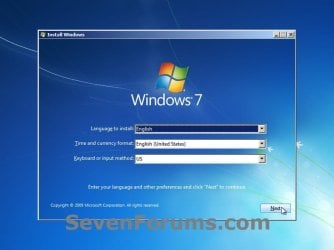
3. Set up your language preferences, and click on the Next button. (See screeshot below).step3.jpg
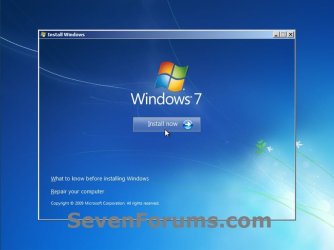
4. Click on the Install Now button to start the installation. (See screenshot below)step4.jpg
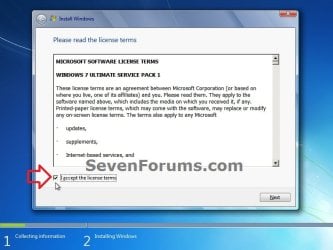
5. Check the I accept the license terms box, and click on Next. (See screenshot below)step5.jpg
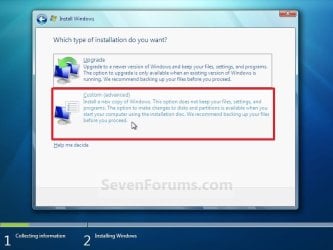
6. Click on the Custom (advanced) option. (See screenshot below)Step6.jpg
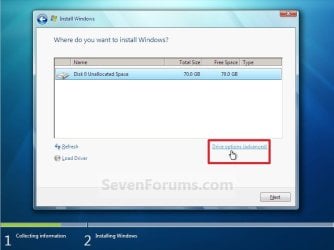
7. Select the hard drive or partition that you want to install Windows 7 on, and click on the Drive Options (advanced) link. (See screenshot below)
NOTE: If the hard drive or partition that you have selected is unallocated, then you can just click on the Next button instead and go to step 9 since it is already empty.
WARNING: You may not have the Drive options (advanced) option unless the installation is done at boot, and not running the installation from within your current OS.Step7.jpg
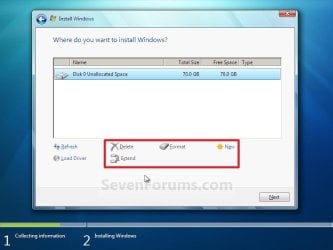
8. Select a hard drive or partition that you want to do a clean install of Windows 7 on, do what Drive options (advanced) you want if any, and click on the Next button when finished. (See screenshot below)
NOTE: If you have your hard drives in a RAID setup, then connect your USB key with the RAID drivers on it, click on Load Driver, select the folder on the USB key that contains the RAID drivers to install them. Afterwards, your RAID drives will be available to select from to install Windows 7 on.

   Tip
Drive options (advanced)
  • If you have more than one partition for a disk # (hard drive) and want to get rid of them to make that disk # one partition drive again, then select a partition with that disk # and click on the Delete option for each partition with the same disk # until there is only one "unallocated space" with that disk # left as in the screenshot below.
  • To shrink an existing partition to create another partition to install Windows 7 on instead, select the partition you want shrink and click on the Extend option. Type in how much in MB (1 GB = 1024 MB) that you want to shrink it by. Now select the new extended partition.
   Note
The 100 MB System Reserved partition is used for the Boot Manager code, BCD (Boot Configuration Database), System Recovery Options (Windows RE), and start up files for BitLocker (if turned on).
  • If you want to have the 100 MB System Reserved partition in addition to the Windows 7 C: partition on a HDD or SSD after installation, then you would need to make sure that all partitions on the drive have been deleted until it is only unallocated space. Next, select the unallocated drive to install Windows 7 on. If there are no partitions on the disk, you will get the 100 MB System Reserved.
  • If you do not want to have the 100 MB System Reserved partition and only the Windows 7 C: partition on a HDD or SSD after installation, then select a formatted partition or drive to install Windows 7 on. If there are any partitions on the disk, you won't get the 100 MB System Reserved.
Step8.jpg
9. The installation of Windows 7 will now begin. (See screenshot below)
NOTE: During the installation process, your screen may flash and computer will restart a few times.Step9.jpg
10. After the final restart, you will see this screen for a moment. (See screenshot below)step10.jpg
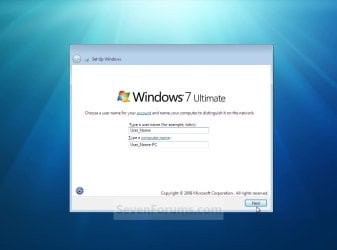
11. Type in any user name that you want for your default administrator account and any computer name, then click on the Next button. (See screenshot below)Step11.jpg
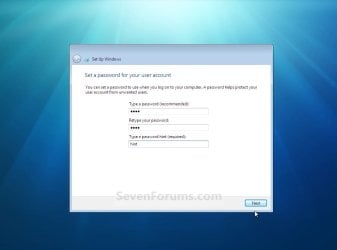
12. Type in a password you want for your default administrator account. Type it in again to confirm it, then type in a hint for your password. Click on the Next button. (See screenshots below)
WARNING: The password will be case sensitive. The hint will be seen by all users on the computer, so do not type your password as the hint.
NOTE: If you do not want your your user account password protected at this time or do not want to have to type in a hint, then leave this blank and click on the Next button. You can create a password later for your user account in the Control Panel User Accounts after installing Windows 7 without having to type in a hint.Step12A.jpg

Step12B.jpg
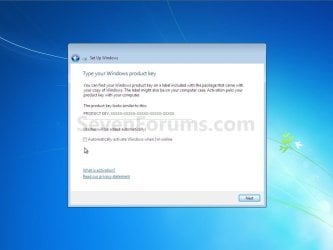
13. Type in your Windows 7 product key number. (See screenshot below step 14)

14. Uncheck the Automatically activate Windows when I'm online box, then click on the Next button. (See screenshot below)
NOTE: You can activate Windows 7 later after you make sure it is running properly. (See step 21 below)
If you chose to automatically activate Windows 7 online when you set up your computer, automatic activation begins trying to activate your copy of Windows three days after you log on for the first time.Step13.jpg
15. Click on Use recommended settings to allow automatic Windows Updates and proper security settings. (See screenshot below)
NOTE: For more information about these recommended settings, click on the Learn more about each option link in this window.Step14.jpg
16. Select your time zone and set your time and date settings, then click on the Next button. (See screenshot below)Step15.jpg
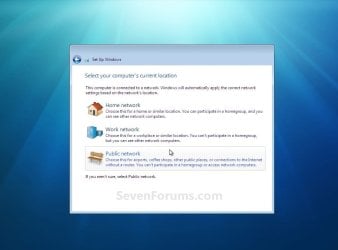
17. Click on your computer's correct network location type location to select it and have the settings for that location automatically applied. (See screenshot below)Step16.jpg
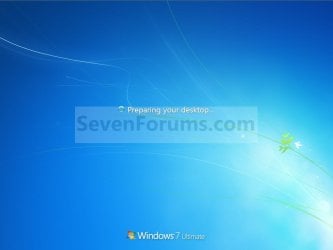
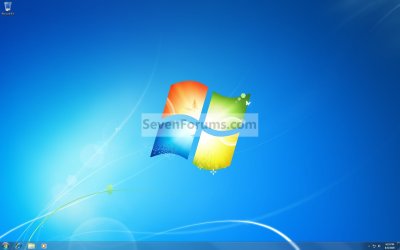
18. Windows 7 will now prepare your desktop to startup. (See screenshots below)Step17.jpg

Desktop.jpg
19. When it's finished and you are at your desktop, you can now remove or disconnect your installation DVD/USB from step 1 above.

20. Install all of your device drivers, then Windows Updates.

21. Refresh your Windows Experience Index (WEI) score.

22. When finished, all you will need to do is to activate Windows 7. (See screenshot below)
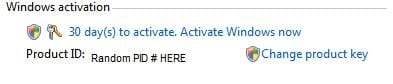
Activate.jpg
   Tip
If you are dual booting with another OS (ex: Vista), then that OS partition may not show up in Computer with a driver letter in Windows 7. You will need to add a drive letter to the OS (ex: Vista) partition in Windows 7 Disk Management for it to show up in Computer with a driver letter.


That's it,
Shawn


Related Tutorials

 
Last edited:
Hello Brink,
I was reading the tutorial on Clean Install Windows 7, and it wasn't clear to me if you could do a clean installation of Win 7 from the upgrade version.

I was wondering if this got clarified. I am intending to use an upgrade version of Win 7 Professional over the top of Vista Ultimate.

Any thoughts if I can still execute the clean install?

Thanks,
Greg


We won't know for sure but there are some hints around.

This is from Microsoft Store: Upgrade purchased DVD procedures

Running Windows Vista?
• If you have Windows Vista, you can purchase Windows 7 Upgrade versions. You can do a clean install (back up your files, clean install, and reinstall your applications) or an in -place upgrade (Windows 7 installs over Windows Vista).
 

My Computer

Computer type
PC/Desktop
Computer Manufacturer/Model Number
76~2.0
OS
Windows 7 Ult x64 - SP1/ Windows 8 Pro x64
CPU
Intel Core i5-3570K 4.6GHz
Motherboard
Gigabyte GA-Z77X UD3H, f18
Memory
8GB (2X4GB) DDR3 1600 Corsair Vengeance CL8 1.5v
Graphics Card(s)
Sapphire HD 7770 Vapor-X OC 1GB DDR5
Sound Card
Onboard VIA VT2021
Monitor(s) Displays
22" LCD Dell
Screen Resolution
1680x1050
Hard Drives
Samsung 840Pro 128GB SSD,
Seagate Barracuda 500GB SATA2 7200rpm 32MB cache, Seagate Barracuda 1TB SATA2 7200rpm 32MB cache,
PSU
Corsair HX650W
Case
Cooler Master Storm Scout
Cooling
Corsair H80 2x12cm Noctua NF P12 , 2x14cm case fans
Keyboard
Logitech Wave
Mouse
CM Sentinel
Internet Speed
Dismal
Antivirus
Avast
Browser
Opera Next
Other Info
Haswell laptop: HP Envy 17t-j, i7-4700MQ, GeForce 740M 2GB DDR3, 17.3" Full HD 1920x1080, 16GB RAM, Samsung 840 Pro 128GB, 1TB Hitachi 7200 HDD,
Desktop: eSATA ports,
External eSATA Seagate 500GB SATA2 7200rpm,
External WD USB 500GB
Hello Greg,

No one is certain yet until we can get our hands on a upgrade verion of Windows 7. It will most likely be like doing a upgrade Vista, or it will ask you to insert you Vista installation disc during the installation of the upgrade Windows 7 to verify that you have a legal copy to upgrade from before continuing.
 
Last edited:

My Computer

Computer type
PC/Desktop
Computer Manufacturer/Model Number
Self built custom
OS
64-bit Windows 11 Pro for Workstations
CPU
Intel i7-8700K OC'd to 5 GHz
Motherboard
ASUS ROG Maximus XI Formula Z390
Memory
64 GB (4x16GB) G.SKILL TridentZ RGB DDR4 3600 MHz
Graphics Card(s)
ASUS ROG-STRIX-GTX1080TI-O11G-GAMING
Sound Card
Integrated
Monitor(s) Displays
2 x Samsung Odyssey G7 27"
Screen Resolution
2560x1440
Hard Drives
1TB Samsung 990 PRO M.2,
4TB Samsung 990 PRO PRO M.2,
TerraMaster F8 SSD Plus NAS
PSU
Seasonic Prime Titanium 850W
Case
Thermaltake Core P3
Cooling
Corsair Hydro H115i
Keyboard
Logitech wireless K800
Mouse
Logitech MX Master 4
Internet Speed
2 Gb/s Download and 100 Mb/s Upload
Antivirus
Malwarebyte Anti-Malware Premium
Browser
Google Chrome
Other Info
Logitech Z625 speaker system,
Logitech BRIO 4K Pro webcam,
HP Color LaserJet Pro MFP M477fdn,
APC SMART-UPS RT 1000 XL - SURT1000XLI,
Galaxy S23 Plus phone
Thanks Brink,
Then I'll find out on Thursday and I'll have my previous DVD on hand if it needs it.

Greg
 

My Computer

Computer Manufacturer/Model Number
Alienware Aurora
OS
Windows 7 Professional (64bit)
CPU
Core i7 Extreme 975 @ 3.33GHz overclocked to 3.6 GHz
Motherboard
Alienware 0H869M
Memory
12 GB DDR3 1333MHz
Graphics Card(s)
NVIDIA GeForce GTX 295 1.8 GB RAM
Sound Card
Creative SB X-Fi Titanium
Monitor(s) Displays
Dell 2407WFP
Screen Resolution
1920 x 1200
Hard Drives
OCZ Vertex 2 100GB SSD - Primary Drive, Western Digital 300GB SATA-II 3GB/X, 10,000 RPM, 16MB Cache - Secondary Drive
PSU
875 Watt
Case
Cosmic Black
Cooling
Alienware High-Performance Liquid Cooling
Keyboard
Logitech
Mouse
Logitech
Internet Speed
60/3MB Service
Other Info
Logitech Z-5500 THX-Certified 505-Watt 5.1 Digital Surround Sound Speaker System
I'm going to have to get a upgrade copy to test with as well. ;)
 

My Computer

Computer type
PC/Desktop
Computer Manufacturer/Model Number
Self built custom
OS
64-bit Windows 11 Pro for Workstations
CPU
Intel i7-8700K OC'd to 5 GHz
Motherboard
ASUS ROG Maximus XI Formula Z390
Memory
64 GB (4x16GB) G.SKILL TridentZ RGB DDR4 3600 MHz
Graphics Card(s)
ASUS ROG-STRIX-GTX1080TI-O11G-GAMING
Sound Card
Integrated
Monitor(s) Displays
2 x Samsung Odyssey G7 27"
Screen Resolution
2560x1440
Hard Drives
1TB Samsung 990 PRO M.2,
4TB Samsung 990 PRO PRO M.2,
TerraMaster F8 SSD Plus NAS
PSU
Seasonic Prime Titanium 850W
Case
Thermaltake Core P3
Cooling
Corsair Hydro H115i
Keyboard
Logitech wireless K800
Mouse
Logitech MX Master 4
Internet Speed
2 Gb/s Download and 100 Mb/s Upload
Antivirus
Malwarebyte Anti-Malware Premium
Browser
Google Chrome
Other Info
Logitech Z625 speaker system,
Logitech BRIO 4K Pro webcam,
HP Color LaserJet Pro MFP M477fdn,
APC SMART-UPS RT 1000 XL - SURT1000XLI,
Galaxy S23 Plus phone
I have a clarificatory question with regard to drivers and installation. I apologise in advance if this is a ridiculous question; I have never, ever installed an operating system before but I am thinking of getting Windows 7 and doing a clean install.

I currently use Windows Vista 32-bit. I plan to install Windows 7 64-bit. I am given to understand that my 32-bit drivers will not work with the new 64-bit OS. Early in the installation guide here it says to back up drivers onto a CD or some other media. If I am planning to go from a current 32-bit OS to 64-bit do I have to do something different at that step, such as find the required drivers online before beginning installation? If so, precisely what drivers do I need to get?
 

My Computer

Computer Manufacturer/Model Number
Custom Built
OS
Windows 7 Professional x64 Service Pack 1
CPU
Intel Core 2 Duo E6750 @2.66GHz
Motherboard
AsusTek Computer Inc. P5N-E SLI
Memory
4096MB OCZ DDR2 800MHz
Graphics Card(s)
NVIDIA GeForce 8800GT
Sound Card
Realtek High Definition Audio
Monitor(s) Displays
Asus 22" Widescreen
Screen Resolution
1650 x 1080
Hard Drives
Western Digital 500GB Internal
Western Digital 500GB External
PSU
750W
Case
Antec 900 Gaming Case
Mouse
Logitech MX518 Optical Gaming Mouse
Hello Frolix, and welcome to Seven Forums.

Correct. You will have to do a clean install when going from 32-bit to 64-bit. 32-bit drivers will not work in a 64-bit OS, so you will need to find and download 64-bit driver versions for all of you devices (ex: graphics card, sound, LAN network, etc....) first to have them ready after installation.

What brand and model number is your computer? I may be able to post back with your computer manufacturer's driver download page.
 

My Computer

Computer type
PC/Desktop
Computer Manufacturer/Model Number
Self built custom
OS
64-bit Windows 11 Pro for Workstations
CPU
Intel i7-8700K OC'd to 5 GHz
Motherboard
ASUS ROG Maximus XI Formula Z390
Memory
64 GB (4x16GB) G.SKILL TridentZ RGB DDR4 3600 MHz
Graphics Card(s)
ASUS ROG-STRIX-GTX1080TI-O11G-GAMING
Sound Card
Integrated
Monitor(s) Displays
2 x Samsung Odyssey G7 27"
Screen Resolution
2560x1440
Hard Drives
1TB Samsung 990 PRO M.2,
4TB Samsung 990 PRO PRO M.2,
TerraMaster F8 SSD Plus NAS
PSU
Seasonic Prime Titanium 850W
Case
Thermaltake Core P3
Cooling
Corsair Hydro H115i
Keyboard
Logitech wireless K800
Mouse
Logitech MX Master 4
Internet Speed
2 Gb/s Download and 100 Mb/s Upload
Antivirus
Malwarebyte Anti-Malware Premium
Browser
Google Chrome
Other Info
Logitech Z625 speaker system,
Logitech BRIO 4K Pro webcam,
HP Color LaserJet Pro MFP M477fdn,
APC SMART-UPS RT 1000 XL - SURT1000XLI,
Galaxy S23 Plus phone
Thanks, Brink, that is very kind of you to offer. However, my pc was custom built so there are lots of different bits and pieces. What would be really helpful though, would be a sort of list of what sort of equipment I will be needing drivers for. You mentioned a few things there. Main board drivers? Video card obviously. What about stuff like hard drives, CD/DVD drive? Will I need to get drivers for all those?

To be honest, and this is probably really dumb thing to say, I am a little puzzled about how the computer gets going at all after the OS installation if it needs all those drivers to operate everything. :o
 

My Computer

Computer Manufacturer/Model Number
Custom Built
OS
Windows 7 Professional x64 Service Pack 1
CPU
Intel Core 2 Duo E6750 @2.66GHz
Motherboard
AsusTek Computer Inc. P5N-E SLI
Memory
4096MB OCZ DDR2 800MHz
Graphics Card(s)
NVIDIA GeForce 8800GT
Sound Card
Realtek High Definition Audio
Monitor(s) Displays
Asus 22" Widescreen
Screen Resolution
1650 x 1080
Hard Drives
Western Digital 500GB Internal
Western Digital 500GB External
PSU
750W
Case
Antec 900 Gaming Case
Mouse
Logitech MX518 Optical Gaming Mouse
Usually generic drivers are installed for the devices during the installation of Windows to be able to use the basic functions of the devices. if a generic driver is not available for the device, then the device will not work of course. It's best to install the latest device driver versions from the manufacturer instead to have all of it's performance and features available though.

It's hard to say without your system specs filled out to know what you have installed or connected to your computer, but these are the usual ones that you will need to install drivers for from their manufacturer's website driver download section (support). You would want drivers for Windows 7, but if none are available, then Vista versions will usually work.
  • graphics card/chip
  • sound card/chip
  • printer
  • webcam
  • motherboard chipset drivers (usually includes your hard drives, CD/DVD drives, southbridge chip)
  • network, LAN, ethernet
  • modem
  • keyboard
  • mouse
  • touchpad
  • etc.........
 

My Computer

Computer type
PC/Desktop
Computer Manufacturer/Model Number
Self built custom
OS
64-bit Windows 11 Pro for Workstations
CPU
Intel i7-8700K OC'd to 5 GHz
Motherboard
ASUS ROG Maximus XI Formula Z390
Memory
64 GB (4x16GB) G.SKILL TridentZ RGB DDR4 3600 MHz
Graphics Card(s)
ASUS ROG-STRIX-GTX1080TI-O11G-GAMING
Sound Card
Integrated
Monitor(s) Displays
2 x Samsung Odyssey G7 27"
Screen Resolution
2560x1440
Hard Drives
1TB Samsung 990 PRO M.2,
4TB Samsung 990 PRO PRO M.2,
TerraMaster F8 SSD Plus NAS
PSU
Seasonic Prime Titanium 850W
Case
Thermaltake Core P3
Cooling
Corsair Hydro H115i
Keyboard
Logitech wireless K800
Mouse
Logitech MX Master 4
Internet Speed
2 Gb/s Download and 100 Mb/s Upload
Antivirus
Malwarebyte Anti-Malware Premium
Browser
Google Chrome
Other Info
Logitech Z625 speaker system,
Logitech BRIO 4K Pro webcam,
HP Color LaserJet Pro MFP M477fdn,
APC SMART-UPS RT 1000 XL - SURT1000XLI,
Galaxy S23 Plus phone
Ah, sorry about that. I have updated my system specs, at least the ones I know. I am not sure about the make and model of the hard drive.

Sound is Realtek and it is on board so would I need to get separate drivers for that or does that all come with the NVIDIA nForce 650i driver package?

With regard to ethernet, my device manager says it is Nvidia nForce 10/100/1000 Ethernet. Will I need separate drivers for that or are they part of the motherboard drivers? The Nvidia site is really unclear.

I have one more question, something that is really worrying me. I used CPU-Z to have a look around at some of the things about my system I have never paid much attention to before and it seems that my BIOS dates from October 2007. Am I likely to encounter any problems there when I install Windows 7? I am kind of... terrified at the prospect of having to update my BIOS as whenever I look into it all I see are horror stories about dead motherboards.
 
Last edited:

My Computer

Computer Manufacturer/Model Number
Custom Built
OS
Windows 7 Professional x64 Service Pack 1
CPU
Intel Core 2 Duo E6750 @2.66GHz
Motherboard
AsusTek Computer Inc. P5N-E SLI
Memory
4096MB OCZ DDR2 800MHz
Graphics Card(s)
NVIDIA GeForce 8800GT
Sound Card
Realtek High Definition Audio
Monitor(s) Displays
Asus 22" Widescreen
Screen Resolution
1650 x 1080
Hard Drives
Western Digital 500GB Internal
Western Digital 500GB External
PSU
750W
Case
Antec 900 Gaming Case
Mouse
Logitech MX518 Optical Gaming Mouse
Yes, you will need separate drivers for each one listed in my post above. ;)

Since you are not familiar with driver installation, I would not recommend trying to update the BIOS since it will kill your motherboard if a mistake was made while updating.
 

My Computer

Computer type
PC/Desktop
Computer Manufacturer/Model Number
Self built custom
OS
64-bit Windows 11 Pro for Workstations
CPU
Intel i7-8700K OC'd to 5 GHz
Motherboard
ASUS ROG Maximus XI Formula Z390
Memory
64 GB (4x16GB) G.SKILL TridentZ RGB DDR4 3600 MHz
Graphics Card(s)
ASUS ROG-STRIX-GTX1080TI-O11G-GAMING
Sound Card
Integrated
Monitor(s) Displays
2 x Samsung Odyssey G7 27"
Screen Resolution
2560x1440
Hard Drives
1TB Samsung 990 PRO M.2,
4TB Samsung 990 PRO PRO M.2,
TerraMaster F8 SSD Plus NAS
PSU
Seasonic Prime Titanium 850W
Case
Thermaltake Core P3
Cooling
Corsair Hydro H115i
Keyboard
Logitech wireless K800
Mouse
Logitech MX Master 4
Internet Speed
2 Gb/s Download and 100 Mb/s Upload
Antivirus
Malwarebyte Anti-Malware Premium
Browser
Google Chrome
Other Info
Logitech Z625 speaker system,
Logitech BRIO 4K Pro webcam,
HP Color LaserJet Pro MFP M477fdn,
APC SMART-UPS RT 1000 XL - SURT1000XLI,
Galaxy S23 Plus phone
Indeed. Don't worry, I know my limits. ;)

I suppose the thing I am worried about is buying Windows 7 then having problems during installation and discovering that I am going to need a BIOS update to get it to work. Because in that case I would be in a bit of a dilemma and would probably end up abandoning the whole thing.
 

My Computer

Computer Manufacturer/Model Number
Custom Built
OS
Windows 7 Professional x64 Service Pack 1
CPU
Intel Core 2 Duo E6750 @2.66GHz
Motherboard
AsusTek Computer Inc. P5N-E SLI
Memory
4096MB OCZ DDR2 800MHz
Graphics Card(s)
NVIDIA GeForce 8800GT
Sound Card
Realtek High Definition Audio
Monitor(s) Displays
Asus 22" Widescreen
Screen Resolution
1650 x 1080
Hard Drives
Western Digital 500GB Internal
Western Digital 500GB External
PSU
750W
Case
Antec 900 Gaming Case
Mouse
Logitech MX518 Optical Gaming Mouse
Frolix,

You shouldn't have a issue with installing the 64-bit Windows 7. If you do, take out one of your RAM sticks to only have 2GB installed, finish installing, then add the other RAM back.
 

My Computer

Computer type
PC/Desktop
Computer Manufacturer/Model Number
Self built custom
OS
64-bit Windows 11 Pro for Workstations
CPU
Intel i7-8700K OC'd to 5 GHz
Motherboard
ASUS ROG Maximus XI Formula Z390
Memory
64 GB (4x16GB) G.SKILL TridentZ RGB DDR4 3600 MHz
Graphics Card(s)
ASUS ROG-STRIX-GTX1080TI-O11G-GAMING
Sound Card
Integrated
Monitor(s) Displays
2 x Samsung Odyssey G7 27"
Screen Resolution
2560x1440
Hard Drives
1TB Samsung 990 PRO M.2,
4TB Samsung 990 PRO PRO M.2,
TerraMaster F8 SSD Plus NAS
PSU
Seasonic Prime Titanium 850W
Case
Thermaltake Core P3
Cooling
Corsair Hydro H115i
Keyboard
Logitech wireless K800
Mouse
Logitech MX Master 4
Internet Speed
2 Gb/s Download and 100 Mb/s Upload
Antivirus
Malwarebyte Anti-Malware Premium
Browser
Google Chrome
Other Info
Logitech Z625 speaker system,
Logitech BRIO 4K Pro webcam,
HP Color LaserJet Pro MFP M477fdn,
APC SMART-UPS RT 1000 XL - SURT1000XLI,
Galaxy S23 Plus phone
That's good to know. Thanks, Brink.

Does anyone know why Windows 7 has a problem with more than 2GB of RAM on installation? That is a kind of annoying issue and one which surely Microsoft should have dealt with prior to launch.
 

My Computer

Computer Manufacturer/Model Number
Custom Built
OS
Windows 7 Professional x64 Service Pack 1
CPU
Intel Core 2 Duo E6750 @2.66GHz
Motherboard
AsusTek Computer Inc. P5N-E SLI
Memory
4096MB OCZ DDR2 800MHz
Graphics Card(s)
NVIDIA GeForce 8800GT
Sound Card
Realtek High Definition Audio
Monitor(s) Displays
Asus 22" Widescreen
Screen Resolution
1650 x 1080
Hard Drives
Western Digital 500GB Internal
Western Digital 500GB External
PSU
750W
Case
Antec 900 Gaming Case
Mouse
Logitech MX518 Optical Gaming Mouse
It's not Windows 7, but instead some older motherboard's BIOS that did not support installing a 64-bit OS with more then 2GB of RAM instead. I do not think you will have this problem though.
 

My Computer

Computer type
PC/Desktop
Computer Manufacturer/Model Number
Self built custom
OS
64-bit Windows 11 Pro for Workstations
CPU
Intel i7-8700K OC'd to 5 GHz
Motherboard
ASUS ROG Maximus XI Formula Z390
Memory
64 GB (4x16GB) G.SKILL TridentZ RGB DDR4 3600 MHz
Graphics Card(s)
ASUS ROG-STRIX-GTX1080TI-O11G-GAMING
Sound Card
Integrated
Monitor(s) Displays
2 x Samsung Odyssey G7 27"
Screen Resolution
2560x1440
Hard Drives
1TB Samsung 990 PRO M.2,
4TB Samsung 990 PRO PRO M.2,
TerraMaster F8 SSD Plus NAS
PSU
Seasonic Prime Titanium 850W
Case
Thermaltake Core P3
Cooling
Corsair Hydro H115i
Keyboard
Logitech wireless K800
Mouse
Logitech MX Master 4
Internet Speed
2 Gb/s Download and 100 Mb/s Upload
Antivirus
Malwarebyte Anti-Malware Premium
Browser
Google Chrome
Other Info
Logitech Z625 speaker system,
Logitech BRIO 4K Pro webcam,
HP Color LaserJet Pro MFP M477fdn,
APC SMART-UPS RT 1000 XL - SURT1000XLI,
Galaxy S23 Plus phone
Ah, that makes things clearer. Thanks again.
 

My Computer

Computer Manufacturer/Model Number
Custom Built
OS
Windows 7 Professional x64 Service Pack 1
CPU
Intel Core 2 Duo E6750 @2.66GHz
Motherboard
AsusTek Computer Inc. P5N-E SLI
Memory
4096MB OCZ DDR2 800MHz
Graphics Card(s)
NVIDIA GeForce 8800GT
Sound Card
Realtek High Definition Audio
Monitor(s) Displays
Asus 22" Widescreen
Screen Resolution
1650 x 1080
Hard Drives
Western Digital 500GB Internal
Western Digital 500GB External
PSU
750W
Case
Antec 900 Gaming Case
Mouse
Logitech MX518 Optical Gaming Mouse
Hi. I've never installed an OS before and am a little nervous about doing a clean install. I went ahead and backed up all my drivers, but once I'm done installing the OS, what do I do with the drivers? Will Windows automatically find them? Do I need to move them to a certain folder? Also, what are the advantages of going from 32-bit to 64-bit? I don't know if I could find all of the 64-bit drivers for everything on my computer and want to know if it would be worth the hassle. Thanks.
 

My Computer

OS
vista 32-bit home premium
Hello Jimmy, and welcome to Seven Forums.

For 32-bit vs 64-bit see this link below for indepth details.

64-bit: More than just the RAM - Vista Forums


You will have to reinstall the drivers just like you would any other program. You will only be able to use 64-bit drivers in a 64-bit Windows though, and only 32-bit drivers in a 32-bit Windows. It's best to have all of your driver installation files downloaded and backed up to have handy after installation in case you cannot connect to the internet until you installed your network drivers, and to make installing them faster and easier.

Hope this helps,
Shawn
 

My Computer

Computer type
PC/Desktop
Computer Manufacturer/Model Number
Self built custom
OS
64-bit Windows 11 Pro for Workstations
CPU
Intel i7-8700K OC'd to 5 GHz
Motherboard
ASUS ROG Maximus XI Formula Z390
Memory
64 GB (4x16GB) G.SKILL TridentZ RGB DDR4 3600 MHz
Graphics Card(s)
ASUS ROG-STRIX-GTX1080TI-O11G-GAMING
Sound Card
Integrated
Monitor(s) Displays
2 x Samsung Odyssey G7 27"
Screen Resolution
2560x1440
Hard Drives
1TB Samsung 990 PRO M.2,
4TB Samsung 990 PRO PRO M.2,
TerraMaster F8 SSD Plus NAS
PSU
Seasonic Prime Titanium 850W
Case
Thermaltake Core P3
Cooling
Corsair Hydro H115i
Keyboard
Logitech wireless K800
Mouse
Logitech MX Master 4
Internet Speed
2 Gb/s Download and 100 Mb/s Upload
Antivirus
Malwarebyte Anti-Malware Premium
Browser
Google Chrome
Other Info
Logitech Z625 speaker system,
Logitech BRIO 4K Pro webcam,
HP Color LaserJet Pro MFP M477fdn,
APC SMART-UPS RT 1000 XL - SURT1000XLI,
Galaxy S23 Plus phone
Further to my earlier query about ethernet and motherboard drivers, I had a conversation with NVIDIA technical support just now and was pleased to hear that all the required drivers for nForce 4 series and above (covering my 650i motherboard and ethernet) are included in-box with Windows 7. :)
 

My Computer

Computer Manufacturer/Model Number
Custom Built
OS
Windows 7 Professional x64 Service Pack 1
CPU
Intel Core 2 Duo E6750 @2.66GHz
Motherboard
AsusTek Computer Inc. P5N-E SLI
Memory
4096MB OCZ DDR2 800MHz
Graphics Card(s)
NVIDIA GeForce 8800GT
Sound Card
Realtek High Definition Audio
Monitor(s) Displays
Asus 22" Widescreen
Screen Resolution
1650 x 1080
Hard Drives
Western Digital 500GB Internal
Western Digital 500GB External
PSU
750W
Case
Antec 900 Gaming Case
Mouse
Logitech MX518 Optical Gaming Mouse
That's good to hear. Be sure to turn on Install updates automatically (step 4) to have Windows Updates automatically update your Windows 7 and drivers for you. :)
 

My Computer

Computer type
PC/Desktop
Computer Manufacturer/Model Number
Self built custom
OS
64-bit Windows 11 Pro for Workstations
CPU
Intel i7-8700K OC'd to 5 GHz
Motherboard
ASUS ROG Maximus XI Formula Z390
Memory
64 GB (4x16GB) G.SKILL TridentZ RGB DDR4 3600 MHz
Graphics Card(s)
ASUS ROG-STRIX-GTX1080TI-O11G-GAMING
Sound Card
Integrated
Monitor(s) Displays
2 x Samsung Odyssey G7 27"
Screen Resolution
2560x1440
Hard Drives
1TB Samsung 990 PRO M.2,
4TB Samsung 990 PRO PRO M.2,
TerraMaster F8 SSD Plus NAS
PSU
Seasonic Prime Titanium 850W
Case
Thermaltake Core P3
Cooling
Corsair Hydro H115i
Keyboard
Logitech wireless K800
Mouse
Logitech MX Master 4
Internet Speed
2 Gb/s Download and 100 Mb/s Upload
Antivirus
Malwarebyte Anti-Malware Premium
Browser
Google Chrome
Other Info
Logitech Z625 speaker system,
Logitech BRIO 4K Pro webcam,
HP Color LaserJet Pro MFP M477fdn,
APC SMART-UPS RT 1000 XL - SURT1000XLI,
Galaxy S23 Plus phone
I have a question about upgrading 32-bit Vista Ultimate to 64-bit 7 Ultimate. I was just told by Microsoft's technical support rep that, to perform a clean installation of 64-bit Ultimate, I have to purchase the full version of Windows 7 Ultimate even though I would upgrade the current OS. Is the answer correct? Whether or not I want to upgrade, to perform a clean installation, the full version of the DVD has to be purchased?
 

My Computer

Computer Manufacturer/Model Number
Dell XPS M1330
OS
32-bit Vista Ultimate
CPU
Core2 T9500
Memory
4 Gb
Graphics Card(s)
nVidia GeForce 8400M GS
Back
Top