Clean Install Windows 7

How to Do a Clean Installation with Windows 7

   Information
This will show you how to do a clean installation with a retail Windows 7. A OEM Windows 7 may have a few different screens than below, but basically the same.

Yes, you can do a clean install from a upgrade Windows 7 version. :)
NOTE: See this tutorial for how: Clean Install with a Upgrade Windows 7 Version

   Note
Do a Clean Installation if:
  • Your computer has no operating system installed, or it’s running a version of Windows prior to Windows Vista with Service Pack 1 (including Windows XP).
  • You do NOT want to preserve your data, programs, or system drivers.
  • You want to delete your current operating system and replace it with Windows 7.
  • You want to create a multiboot system by installing Windows 7 on a separate hard disk partition.
   Tip

  • Sometimes you may have a problem with installing Windows 7 with more than 2 GB of RAM installed on some older motherboards. If you have this problem, then you should install Windows 7 with a maximum of 2GB of RAM installed and add the rest of the RAM after Windows 7 is fully installed. You may need to flash your motherboard BIOS with the latest version to support more RAM like this. (WARNING - DO NOT FLASH THE BIOS if you do not know what you are doing. Please ask for help instead. One mistake can kill your motherboard permanently.)
  • Before doing this clean install, you should download and save all of your device drivers to a USB flash drive, DVD, another HDD, or some other media to have them handy to make setting Windows 7 up easier when finished installing Windows 7. For example, having the network driver available in case you cannot connect to the internet until it's installed.
   Warning
Windows 7 Minimum Hardware Requirements:

NOTE: For more information on this, see: Windows 7 system requirements
  • 1 GHz 32-bit or 64-bit processor
  • 1 GB RAM for 32-bit Windows 7 OR 2 GB RAM for 64-bit Windows 7
  • 16 GB available hard disk space for 32-bit Windows 7 OR 20 GB for 64-bit Windows 7
  • Graphics card or chip that supports DirectX 9 with 128 MB memory (to have Aero theme enabled)
  • DVD-R/W drive, or bootable USB 2.0 port with Windows 7 USB flash drive
  • Internet or phone access to activate Windows 7.


Here's How:1. Boot the computer from your Windows 7 installation DVD/USB.
NOTE: Make sure that the CD/DVD drive is selected first and your HDD second in the boot priority order in your BIOS settings. Usually it is by default.

   Warning
If you want to install Windows 7 using UEFI instead of BIOS, then see this below first.

How to Install Windows 7 Using "Unified Extensible Firmware Interface" (UEFI)

   Note
If you do not have a Windows 7 with SP1 installation DVD/USB, then you can download the latest official Windows 7 with SP1 ISO file at the links below.

:ar: Microsoft Software Recovery

:ar: Microsoft: Windows 7 Direct Download Links

You can use Windows 7 USB-DVD Download Tool to create a bootable DVD or USB flash drive with the ISO to do the clean install with.


2. If using a DVD, then when prompted, press any key to boot from the installation DVD. (See screenshot below)
NOTE: You will only have about 8 seconds to press this key. If you miss it, you will have to restart the computer.Step1.jpg
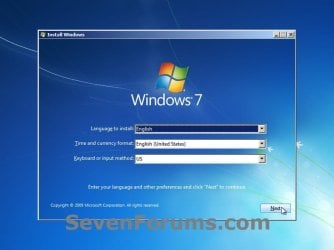
3. Set up your language preferences, and click on the Next button. (See screeshot below).step3.jpg
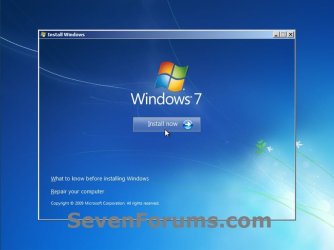
4. Click on the Install Now button to start the installation. (See screenshot below)step4.jpg
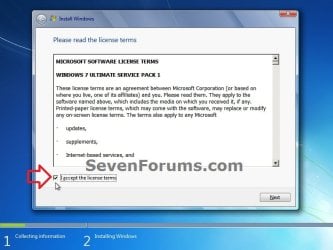
5. Check the I accept the license terms box, and click on Next. (See screenshot below)step5.jpg
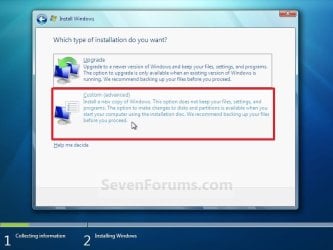
6. Click on the Custom (advanced) option. (See screenshot below)Step6.jpg
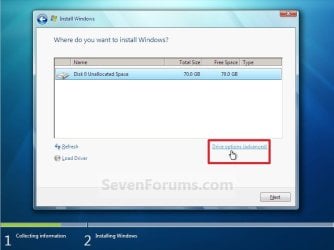
7. Select the hard drive or partition that you want to install Windows 7 on, and click on the Drive Options (advanced) link. (See screenshot below)
NOTE: If the hard drive or partition that you have selected is unallocated, then you can just click on the Next button instead and go to step 9 since it is already empty.
WARNING: You may not have the Drive options (advanced) option unless the installation is done at boot, and not running the installation from within your current OS.Step7.jpg
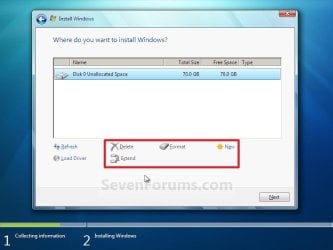
8. Select a hard drive or partition that you want to do a clean install of Windows 7 on, do what Drive options (advanced) you want if any, and click on the Next button when finished. (See screenshot below)
NOTE: If you have your hard drives in a RAID setup, then connect your USB key with the RAID drivers on it, click on Load Driver, select the folder on the USB key that contains the RAID drivers to install them. Afterwards, your RAID drives will be available to select from to install Windows 7 on.

   Tip
Drive options (advanced)
  • If you have more than one partition for a disk # (hard drive) and want to get rid of them to make that disk # one partition drive again, then select a partition with that disk # and click on the Delete option for each partition with the same disk # until there is only one "unallocated space" with that disk # left as in the screenshot below.
  • To shrink an existing partition to create another partition to install Windows 7 on instead, select the partition you want shrink and click on the Extend option. Type in how much in MB (1 GB = 1024 MB) that you want to shrink it by. Now select the new extended partition.
   Note
The 100 MB System Reserved partition is used for the Boot Manager code, BCD (Boot Configuration Database), System Recovery Options (Windows RE), and start up files for BitLocker (if turned on).
  • If you want to have the 100 MB System Reserved partition in addition to the Windows 7 C: partition on a HDD or SSD after installation, then you would need to make sure that all partitions on the drive have been deleted until it is only unallocated space. Next, select the unallocated drive to install Windows 7 on. If there are no partitions on the disk, you will get the 100 MB System Reserved.
  • If you do not want to have the 100 MB System Reserved partition and only the Windows 7 C: partition on a HDD or SSD after installation, then select a formatted partition or drive to install Windows 7 on. If there are any partitions on the disk, you won't get the 100 MB System Reserved.
Step8.jpg
9. The installation of Windows 7 will now begin. (See screenshot below)
NOTE: During the installation process, your screen may flash and computer will restart a few times.Step9.jpg
10. After the final restart, you will see this screen for a moment. (See screenshot below)step10.jpg
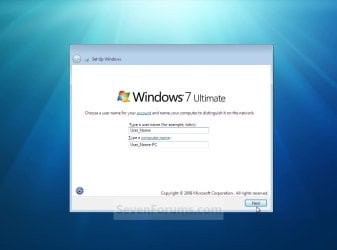
11. Type in any user name that you want for your default administrator account and any computer name, then click on the Next button. (See screenshot below)Step11.jpg
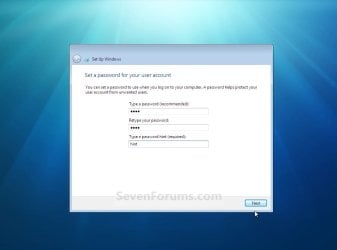
12. Type in a password you want for your default administrator account. Type it in again to confirm it, then type in a hint for your password. Click on the Next button. (See screenshots below)
WARNING: The password will be case sensitive. The hint will be seen by all users on the computer, so do not type your password as the hint.
NOTE: If you do not want your your user account password protected at this time or do not want to have to type in a hint, then leave this blank and click on the Next button. You can create a password later for your user account in the Control Panel User Accounts after installing Windows 7 without having to type in a hint.Step12A.jpg

Step12B.jpg
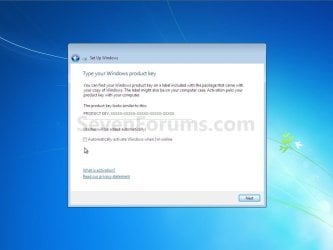
13. Type in your Windows 7 product key number. (See screenshot below step 14)

14. Uncheck the Automatically activate Windows when I'm online box, then click on the Next button. (See screenshot below)
NOTE: You can activate Windows 7 later after you make sure it is running properly. (See step 21 below)
If you chose to automatically activate Windows 7 online when you set up your computer, automatic activation begins trying to activate your copy of Windows three days after you log on for the first time.Step13.jpg
15. Click on Use recommended settings to allow automatic Windows Updates and proper security settings. (See screenshot below)
NOTE: For more information about these recommended settings, click on the Learn more about each option link in this window.Step14.jpg
16. Select your time zone and set your time and date settings, then click on the Next button. (See screenshot below)Step15.jpg
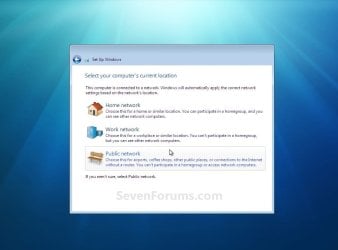
17. Click on your computer's correct network location type location to select it and have the settings for that location automatically applied. (See screenshot below)Step16.jpg
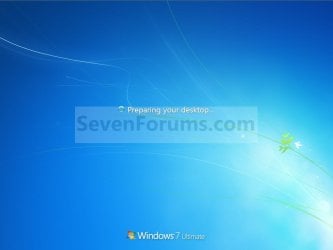
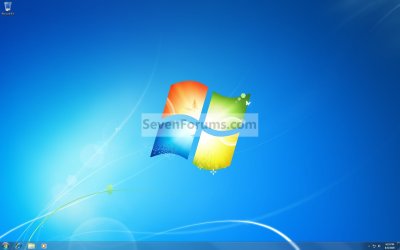
18. Windows 7 will now prepare your desktop to startup. (See screenshots below)Step17.jpg

Desktop.jpg
19. When it's finished and you are at your desktop, you can now remove or disconnect your installation DVD/USB from step 1 above.

20. Install all of your device drivers, then Windows Updates.

21. Refresh your Windows Experience Index (WEI) score.

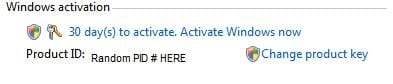
22. When finished, all you will need to do is to activate Windows 7. (See screenshot below)
Activate.jpg
   Tip
If you are dual booting with another OS (ex: Vista), then that OS partition may not show up in Computer with a driver letter in Windows 7. You will need to add a drive letter to the OS (ex: Vista) partition in Windows 7 Disk Management for it to show up in Computer with a driver letter.


That's it,
Shawn


Related Tutorials

 
Last edited:
Hello Fl700815, and welcome to Seven Forums.

When going from a 32-bit to a 64-bit OS, you can only do a clean install. In your case, you could only upgrade if your were going from a 32-bit Vista Ultimate to a 32-bit Windows 7 Ultimate.

In your situatuon, you will be able to use a Upgrade Windows 7 version to do a custom install instead of having to use a full version.. :)
 
Last edited:

My Computer

Computer type
PC/Desktop
Computer Manufacturer/Model Number
Self built custom
OS
64-bit Windows 11 Pro for Workstations
CPU
Intel i7-8700K OC'd to 5 GHz
Motherboard
ASUS ROG Maximus XI Formula Z390
Memory
64 GB (4x16GB) G.SKILL TridentZ RGB DDR4 3600 MHz
Graphics Card(s)
ASUS ROG-STRIX-GTX1080TI-O11G-GAMING
Sound Card
Integrated
Monitor(s) Displays
2 x Samsung Odyssey G7 27"
Screen Resolution
2560x1440
Hard Drives
1TB Samsung 990 PRO M.2,
4TB Samsung 990 PRO PRO M.2,
TerraMaster F8 SSD Plus NAS
PSU
Seasonic Prime Titanium 850W
Case
Thermaltake Core P3
Cooling
Corsair Hydro H115i
Keyboard
Logitech wireless K800
Mouse
Logitech MX Master 4
Internet Speed
2 Gb/s Download and 100 Mb/s Upload
Antivirus
Malwarebyte Anti-Malware Premium
Browser
Google Chrome
Other Info
Logitech Z625 speaker system,
Logitech BRIO 4K Pro webcam,
HP Color LaserJet Pro MFP M477fdn,
APC SMART-UPS RT 1000 XL - SURT1000XLI,
Galaxy S23 Plus phone
That's interesting as I was wondering about that myself. I am eligible for the "upgrade" box at a very low price but I want to do a clean install of 64-bit Windows 7 rather than upgrade to 32-bit Windows 7. From the online literature attached to it it seems I can do a clean installation even with the "upgrade" box by selecting custom installation.

So, I am not sure of the difference between the "upgrade" box and the "full version".
 

My Computer

Computer Manufacturer/Model Number
Custom Built
OS
Windows 7 Professional x64 Service Pack 1
CPU
Intel Core 2 Duo E6750 @2.66GHz
Motherboard
AsusTek Computer Inc. P5N-E SLI
Memory
4096MB OCZ DDR2 800MHz
Graphics Card(s)
NVIDIA GeForce 8800GT
Sound Card
Realtek High Definition Audio
Monitor(s) Displays
Asus 22" Widescreen
Screen Resolution
1650 x 1080
Hard Drives
Western Digital 500GB Internal
Western Digital 500GB External
PSU
750W
Case
Antec 900 Gaming Case
Mouse
Logitech MX518 Optical Gaming Mouse
We should know later today for sure when I get my hands on a upgrade Windows 7 what the exact options will be, but you can compare a clean install from this tutorial VS a custom install. I believe that with a Upgrade Windows 7 version you may be able to do a custom install from the Vista to Windows 7 instead of a upgrade from Vista to Windows 7.

Later today will tell for sure.
 

My Computer

Computer type
PC/Desktop
Computer Manufacturer/Model Number
Self built custom
OS
64-bit Windows 11 Pro for Workstations
CPU
Intel i7-8700K OC'd to 5 GHz
Motherboard
ASUS ROG Maximus XI Formula Z390
Memory
64 GB (4x16GB) G.SKILL TridentZ RGB DDR4 3600 MHz
Graphics Card(s)
ASUS ROG-STRIX-GTX1080TI-O11G-GAMING
Sound Card
Integrated
Monitor(s) Displays
2 x Samsung Odyssey G7 27"
Screen Resolution
2560x1440
Hard Drives
1TB Samsung 990 PRO M.2,
4TB Samsung 990 PRO PRO M.2,
TerraMaster F8 SSD Plus NAS
PSU
Seasonic Prime Titanium 850W
Case
Thermaltake Core P3
Cooling
Corsair Hydro H115i
Keyboard
Logitech wireless K800
Mouse
Logitech MX Master 4
Internet Speed
2 Gb/s Download and 100 Mb/s Upload
Antivirus
Malwarebyte Anti-Malware Premium
Browser
Google Chrome
Other Info
Logitech Z625 speaker system,
Logitech BRIO 4K Pro webcam,
HP Color LaserJet Pro MFP M477fdn,
APC SMART-UPS RT 1000 XL - SURT1000XLI,
Galaxy S23 Plus phone
Thanks Brink. However, that prompts me to ask another (no doubt dumb) question:

Does a custom install clean up and get rid of registry clutter like a clean install does?
 

My Computer

Computer Manufacturer/Model Number
Custom Built
OS
Windows 7 Professional x64 Service Pack 1
CPU
Intel Core 2 Duo E6750 @2.66GHz
Motherboard
AsusTek Computer Inc. P5N-E SLI
Memory
4096MB OCZ DDR2 800MHz
Graphics Card(s)
NVIDIA GeForce 8800GT
Sound Card
Realtek High Definition Audio
Monitor(s) Displays
Asus 22" Widescreen
Screen Resolution
1650 x 1080
Hard Drives
Western Digital 500GB Internal
Western Digital 500GB External
PSU
750W
Case
Antec 900 Gaming Case
Mouse
Logitech MX518 Optical Gaming Mouse

My Computer

Computer type
PC/Desktop
Computer Manufacturer/Model Number
Self built custom
OS
64-bit Windows 11 Pro for Workstations
CPU
Intel i7-8700K OC'd to 5 GHz
Motherboard
ASUS ROG Maximus XI Formula Z390
Memory
64 GB (4x16GB) G.SKILL TridentZ RGB DDR4 3600 MHz
Graphics Card(s)
ASUS ROG-STRIX-GTX1080TI-O11G-GAMING
Sound Card
Integrated
Monitor(s) Displays
2 x Samsung Odyssey G7 27"
Screen Resolution
2560x1440
Hard Drives
1TB Samsung 990 PRO M.2,
4TB Samsung 990 PRO PRO M.2,
TerraMaster F8 SSD Plus NAS
PSU
Seasonic Prime Titanium 850W
Case
Thermaltake Core P3
Cooling
Corsair Hydro H115i
Keyboard
Logitech wireless K800
Mouse
Logitech MX Master 4
Internet Speed
2 Gb/s Download and 100 Mb/s Upload
Antivirus
Malwarebyte Anti-Malware Premium
Browser
Google Chrome
Other Info
Logitech Z625 speaker system,
Logitech BRIO 4K Pro webcam,
HP Color LaserJet Pro MFP M477fdn,
APC SMART-UPS RT 1000 XL - SURT1000XLI,
Galaxy S23 Plus phone
Thanks very much for your patience, Brink. :o
 

My Computer

Computer Manufacturer/Model Number
Custom Built
OS
Windows 7 Professional x64 Service Pack 1
CPU
Intel Core 2 Duo E6750 @2.66GHz
Motherboard
AsusTek Computer Inc. P5N-E SLI
Memory
4096MB OCZ DDR2 800MHz
Graphics Card(s)
NVIDIA GeForce 8800GT
Sound Card
Realtek High Definition Audio
Monitor(s) Displays
Asus 22" Widescreen
Screen Resolution
1650 x 1080
Hard Drives
Western Digital 500GB Internal
Western Digital 500GB External
PSU
750W
Case
Antec 900 Gaming Case
Mouse
Logitech MX518 Optical Gaming Mouse
You're welcome Frolix. It's not a problem at all. :)
 

My Computer

Computer type
PC/Desktop
Computer Manufacturer/Model Number
Self built custom
OS
64-bit Windows 11 Pro for Workstations
CPU
Intel i7-8700K OC'd to 5 GHz
Motherboard
ASUS ROG Maximus XI Formula Z390
Memory
64 GB (4x16GB) G.SKILL TridentZ RGB DDR4 3600 MHz
Graphics Card(s)
ASUS ROG-STRIX-GTX1080TI-O11G-GAMING
Sound Card
Integrated
Monitor(s) Displays
2 x Samsung Odyssey G7 27"
Screen Resolution
2560x1440
Hard Drives
1TB Samsung 990 PRO M.2,
4TB Samsung 990 PRO PRO M.2,
TerraMaster F8 SSD Plus NAS
PSU
Seasonic Prime Titanium 850W
Case
Thermaltake Core P3
Cooling
Corsair Hydro H115i
Keyboard
Logitech wireless K800
Mouse
Logitech MX Master 4
Internet Speed
2 Gb/s Download and 100 Mb/s Upload
Antivirus
Malwarebyte Anti-Malware Premium
Browser
Google Chrome
Other Info
Logitech Z625 speaker system,
Logitech BRIO 4K Pro webcam,
HP Color LaserJet Pro MFP M477fdn,
APC SMART-UPS RT 1000 XL - SURT1000XLI,
Galaxy S23 Plus phone
How does this work with Upgrade disk if it boots?

This tutorial says it works with Upgrade disk but everything else I've read says you can't boot from Upgrade disk since it has to read the activation of the qualifying OS in order to proceed.

Just askin. Would really like to have this settled.
 
Greg,

I can confrm 100% that you can do a clean install with a upgrade Windows 7 version and activate without a problem. I went out this morning and got a copy to test and confirm it. :)

Settled. ;)
 

My Computer

Computer type
PC/Desktop
Computer Manufacturer/Model Number
Self built custom
OS
64-bit Windows 11 Pro for Workstations
CPU
Intel i7-8700K OC'd to 5 GHz
Motherboard
ASUS ROG Maximus XI Formula Z390
Memory
64 GB (4x16GB) G.SKILL TridentZ RGB DDR4 3600 MHz
Graphics Card(s)
ASUS ROG-STRIX-GTX1080TI-O11G-GAMING
Sound Card
Integrated
Monitor(s) Displays
2 x Samsung Odyssey G7 27"
Screen Resolution
2560x1440
Hard Drives
1TB Samsung 990 PRO M.2,
4TB Samsung 990 PRO PRO M.2,
TerraMaster F8 SSD Plus NAS
PSU
Seasonic Prime Titanium 850W
Case
Thermaltake Core P3
Cooling
Corsair Hydro H115i
Keyboard
Logitech wireless K800
Mouse
Logitech MX Master 4
Internet Speed
2 Gb/s Download and 100 Mb/s Upload
Antivirus
Malwarebyte Anti-Malware Premium
Browser
Google Chrome
Other Info
Logitech Z625 speaker system,
Logitech BRIO 4K Pro webcam,
HP Color LaserJet Pro MFP M477fdn,
APC SMART-UPS RT 1000 XL - SURT1000XLI,
Galaxy S23 Plus phone
Short answers work best

Greg,

I can confrm 100% that you can do a clean install with a upgrade Windows 7 version and activate without a problem. I went out this morning and got a copy to test and confirm it. :)

Settled. ;)
Thanks indeed. After reading for over an hour it's always the short answers that are the best and do work. This should be placed on the site as a" FLASH" I don't know if this can be done, it would be helpful.:party::party:
 

My Computer

Computer Manufacturer/Model Number
HP 1212
OS
windows 7 home premium 64
CPU
AMD fx6120
Memory
8gb
Graphics Card(s)
radeon hd 7450
Sound Card
IDT
Monitor(s) Displays
lg
Hard Drives
2 tb
Case
tower
Cooling
?
Keyboard
HP extended
Mouse
MS cordless
Internet Speed
hi
Other Info
NEW 2012 very, very fast. AMD chip still does some strange thinks as expected......
Greg,

I can confrm 100% that you can do a clean install with a upgrade Windows 7 version and activate without a problem. I went out this morning and got a copy to test and confirm it. :)

Settled. ;)

But you did not boot it.....???
 

My Computer

OS
Win 7 32 bit , Win xp Sp3
Greg,

I can confrm 100% that you can do a clean install with a upgrade Windows 7 version and activate without a problem. I went out this morning and got a copy to test and confirm it. :)

Settled. ;)

But you did not boot it.....???

Yep, restarted the computer and booted from the retail Upgrade Windows 7 installation DVD, clean installed, and activated without a problem. :)
 

My Computer

Computer type
PC/Desktop
Computer Manufacturer/Model Number
Self built custom
OS
64-bit Windows 11 Pro for Workstations
CPU
Intel i7-8700K OC'd to 5 GHz
Motherboard
ASUS ROG Maximus XI Formula Z390
Memory
64 GB (4x16GB) G.SKILL TridentZ RGB DDR4 3600 MHz
Graphics Card(s)
ASUS ROG-STRIX-GTX1080TI-O11G-GAMING
Sound Card
Integrated
Monitor(s) Displays
2 x Samsung Odyssey G7 27"
Screen Resolution
2560x1440
Hard Drives
1TB Samsung 990 PRO M.2,
4TB Samsung 990 PRO PRO M.2,
TerraMaster F8 SSD Plus NAS
PSU
Seasonic Prime Titanium 850W
Case
Thermaltake Core P3
Cooling
Corsair Hydro H115i
Keyboard
Logitech wireless K800
Mouse
Logitech MX Master 4
Internet Speed
2 Gb/s Download and 100 Mb/s Upload
Antivirus
Malwarebyte Anti-Malware Premium
Browser
Google Chrome
Other Info
Logitech Z625 speaker system,
Logitech BRIO 4K Pro webcam,
HP Color LaserJet Pro MFP M477fdn,
APC SMART-UPS RT 1000 XL - SURT1000XLI,
Galaxy S23 Plus phone
Greg,

I can confrm 100% that you can do a clean install with a upgrade Windows 7 version and activate without a problem. I went out this morning and got a copy to test and confirm it. :)

Settled. ;)

But you did not boot it.....???

Yep, restarted the computer and booted from the retail Upgrade Windows 7 installation DVD, clean installed, and activated without a problem. :)
Some people still don't believe the Civil is over. Why would anyone think you wouldn't Boot it!!. God has all the answers but I'm not God. :cry::cry:
 

My Computer

Computer Manufacturer/Model Number
HP 1212
OS
windows 7 home premium 64
CPU
AMD fx6120
Memory
8gb
Graphics Card(s)
radeon hd 7450
Sound Card
IDT
Monitor(s) Displays
lg
Hard Drives
2 tb
Case
tower
Cooling
?
Keyboard
HP extended
Mouse
MS cordless
Internet Speed
hi
Other Info
NEW 2012 very, very fast. AMD chip still does some strange thinks as expected......
Thanks Brink!

But just to confirm...did you have a previous version of Windows installed anywhere on your system or did you start with a blank slate? How did you prove you had a previous version?

In Vista you could do a clean install but needed to start from XP first so they could verify the serial. I'm curious how they do it now (if different).

Just want to make sure...I like to change my system a lot and debating full version vs. upgrade. I don't want the hassle of having to install an old Windows version first before it lets me install 7 everytime I change a motherboard.
 

My Computer

OS
Win 7
Thanks Brink!

But just to confirm...did you have a previous version of Windows installed anywhere on your system or did you start with a blank slate? How did you prove you had a previous version?

In Vista you could do a clean install but needed to start from XP first so they could verify the serial. I'm curious how they do it now (if different).

Just want to make sure...I like to change my system a lot and debating full version vs. upgrade. I don't want the hassle of having to install an old Windows version first before it lets me install 7 everytime I change a motherboard.

I have my my current Full retail Windows 7 Ultimate on one drive, but this does not matter since it is not qualified to upgrade from.

I created a new 40GB unallocated partition on a separate physical RAID hard drive, restarted the computer, booted from the Upgrade retail Windows 7 Home Premium, installed, and activated with the included product key number without having to verify or check for any previous qualifying version of Vista.

It's confirmed.:)
 

My Computer

Computer type
PC/Desktop
Computer Manufacturer/Model Number
Self built custom
OS
64-bit Windows 11 Pro for Workstations
CPU
Intel i7-8700K OC'd to 5 GHz
Motherboard
ASUS ROG Maximus XI Formula Z390
Memory
64 GB (4x16GB) G.SKILL TridentZ RGB DDR4 3600 MHz
Graphics Card(s)
ASUS ROG-STRIX-GTX1080TI-O11G-GAMING
Sound Card
Integrated
Monitor(s) Displays
2 x Samsung Odyssey G7 27"
Screen Resolution
2560x1440
Hard Drives
1TB Samsung 990 PRO M.2,
4TB Samsung 990 PRO PRO M.2,
TerraMaster F8 SSD Plus NAS
PSU
Seasonic Prime Titanium 850W
Case
Thermaltake Core P3
Cooling
Corsair Hydro H115i
Keyboard
Logitech wireless K800
Mouse
Logitech MX Master 4
Internet Speed
2 Gb/s Download and 100 Mb/s Upload
Antivirus
Malwarebyte Anti-Malware Premium
Browser
Google Chrome
Other Info
Logitech Z625 speaker system,
Logitech BRIO 4K Pro webcam,
HP Color LaserJet Pro MFP M477fdn,
APC SMART-UPS RT 1000 XL - SURT1000XLI,
Galaxy S23 Plus phone
Perhaps you discovered a loophole. I thought that your hard drive was completely and totally empty...with no other hard drives or anything else installed.
 

My Computer

Computer Manufacturer/Model Number
Self-Built in July 2009
OS
Windows 7 Ultimate x64
CPU
Intel Q9550 2.83Ghz OC'd to 3.40Ghz
Motherboard
Gigabyte GA-EP45-UD3R rev. 1.1, F12 BIOS
Memory
8GB G.Skill PI DDR2-800, 4-4-4-12 timings
Graphics Card(s)
EVGA 1280MB Nvidia GeForce GTX570
Sound Card
Realtek ALC899A 8 channel onboard audio
Monitor(s) Displays
23" Acer x233H
Screen Resolution
1920x1080
Hard Drives
Intel X25-M 80GB Gen 2 SSD
Western Digital 1TB Caviar Black, 32MB cache. WD1001FALS
PSU
Corsair 620HX modular
Case
Antec P182
Cooling
stock
Keyboard
ABS M1 Mechanical
Mouse
Logitech G9 Laser Mouse
Internet Speed
15/2 cable modem
Other Info
Windows and Linux enthusiast. Logitech G35 Headset.
I have my my current Full retail Windows 7 Ultimate on one drive, but this does not matter since it is not qualified to upgrade from.

.:)

Your upgrade install saw your Win 7 Ultimate install.???

I am 98% sure that you can not install upgrade media by booting the disc. You have to install from within Vista or XP.
 

My Computer

OS
Win 7 32 bit , Win xp Sp3
Microsoft isn't very clear but they hint you may only need your install discs

Windows 7 Upgrade Considerations

"Locate the original installation disks for the programs currently on your computer.
Insert the Windows 7 DVD and follow the instructions for a custom installation by selecting the Custom (advanced) installation option."
 

My Computer

OS
Win 7
I have my my current Full retail Windows 7 Ultimate on one drive, but this does not matter since it is not qualified to upgrade from.

.:)

Your upgrade install saw your Win 7 Ultimate install.???

I am 98% sure that you can not install upgrade media by booting the disc. You have to install from within Vista or XP.

Last time. YES YOU CAN CLEAN INSTALL FROM BOOTING FROM THE RETAIL UPGRADE DISC AND ACTIVATE IT. I have done it, and confirmed it over and over. Another member as also confirmed it from a complete blank slate as well. Believe it. It's 100% true and confirmed. The end.........:)
 

My Computer

Computer type
PC/Desktop
Computer Manufacturer/Model Number
Self built custom
OS
64-bit Windows 11 Pro for Workstations
CPU
Intel i7-8700K OC'd to 5 GHz
Motherboard
ASUS ROG Maximus XI Formula Z390
Memory
64 GB (4x16GB) G.SKILL TridentZ RGB DDR4 3600 MHz
Graphics Card(s)
ASUS ROG-STRIX-GTX1080TI-O11G-GAMING
Sound Card
Integrated
Monitor(s) Displays
2 x Samsung Odyssey G7 27"
Screen Resolution
2560x1440
Hard Drives
1TB Samsung 990 PRO M.2,
4TB Samsung 990 PRO PRO M.2,
TerraMaster F8 SSD Plus NAS
PSU
Seasonic Prime Titanium 850W
Case
Thermaltake Core P3
Cooling
Corsair Hydro H115i
Keyboard
Logitech wireless K800
Mouse
Logitech MX Master 4
Internet Speed
2 Gb/s Download and 100 Mb/s Upload
Antivirus
Malwarebyte Anti-Malware Premium
Browser
Google Chrome
Other Info
Logitech Z625 speaker system,
Logitech BRIO 4K Pro webcam,
HP Color LaserJet Pro MFP M477fdn,
APC SMART-UPS RT 1000 XL - SURT1000XLI,
Galaxy S23 Plus phone
Last time. YES YOU CAN CLEAN INSTALL FROM BOOTING FROM THE RETAIL UPGRADE DISC AND ACTIVATE IT. I have done it, and confirmed it over and over. Another member as also confirmed it from a complete blank slate as well. Believe it. It's 100% true and confirmed. The end.........:)

Amen brother.
But one quick question.... How did you find a way to...... Just kidding!
Good job!
Tom
 

My Computer

Computer type
PC/Desktop
Computer Manufacturer/Model Number
Dell: XPS 420 (2), XPS M1330 (several), XPS 14z, Mini 9, Mini 10v
OS
W8 Pro, W7 Ultimate, XP Pro x64, Vista x64, Ubuntu
CPU
Q6600, Q6700, T7500, T7500, N270, N270
Motherboard
Dell
Memory
8GB, 8GB, 4GB, 4GB, 2GB, 2GB
Graphics Card(s)
ATI, nVidia, nVidia, nVidia, Intel, Intel
Monitor(s) Displays
Dell 2408WFP
Hard Drives
A drawer full. OCZ Vertex's in RAID 0. Vertex 3's, Vertex 4, Samsung 830's, Samsung 840's, Intel 330. Don't use dino drives any more except for servers.
Keyboard
Logitech Wave
Internet Speed
29 Mbps DL / .95 Mbps UL
Other Info
New project(2013)...Another low power server. Zotac H67ITX, i3-2100T, Windows Server 2012 Essentials on Samsung SSD.
Previous project...Low power (38-40 watts using Kill-a-Watt) Windows Home Server. Zotac ION (Atom 330, GeForce9400), 4GB RAM, 2x2TB WD Green, IN WIM miniITX Case. Fits on a shelf in laundry closet, practically silent.
Back
Top