
Clean Install with a Upgrade Windows 7 Version

How to Do a Clean Install with an Upgrade Windows 7 Version


   Information
This will show you how to do a Clean Install using a retail Upgrade Windows 7 installation disc.

   Warning
Remember that you need to legally own a valid qualifying previous version of Windows to use a Upgrade Windows 7, and to stop using (or uninstall) the qualifying OS while you have the upgrade installed. Microsoft only made doing a clean install from a upgrade Windows 7 possible to make it more convenient so you do not have to reinstall both the old Windows version (ex: Vista) and upgrade to Windows 7 everytime you needed or wanted to reinstall.

If you do not legally own a valid qualifying previous version of Windows, then you are violating the terms of Microsoft's Windows 7 End User License Agreement and could get your product key number invalidated by Microsoft. Plus, it is considered illegal.

For more about this, please see: Microsoft SMB Community Blog : Regardless of what any hack says, a Windows 7 Upgrade is an Upgrade. What you need to know.


OPTION ONE

A Normal Clean Install


1. Do a clean install at boot without checking the Automatically activate Windows when I'm online box during the installation process.

2. When the installation is finished, then manually activate Windows 7 with your product key number.

3. If your Windows should fail to activate, then pick up at step 2 in OPTION THREE below.


OPTION TWO

Through a Custom Install


   Note
This option will let you do a clean install of Windows 7 without formating the current Windows installation to have your current Windows installation backed up to the Windows.old folder during the installation of your retail upgrade Windows 7. This way you can copy any files back that you want from the C:\Windows.old folder (previous installation) back into your new installation afterwards.

1. Do a custom install at boot or from within your current Windows installation without checking the Automatically activate Windows when I'm online box during the installation process.

2. When the installation is finished, then manually activate Windows 7 with your product key number.

3. Copy any files that you want back from the C:\Windows.old folder into where you want it in you new installation.

4. You can now delete the Windows.old folder using Disk Cleanup to have a clean install now.


OPTION THREE

Clean Install with a Registry Workaround for Error Code 0xc004f061


   Note
If you get a activation error code 0xc004f061 while doing OPTION ONE or OPTION TWO above, then you will need to use this option instead
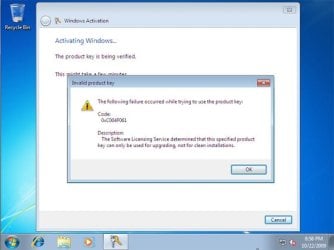
win7_upgrade_media_06.jpg


1. Do a clean install of your upgrade Windows 7 at boot without checking the Automatically activate Windows when I'm online box during the installation process.
NOTE: If you already did this from OPTION ONE above and got a activation error, then skip this step and just proceed to step 2 below instead. There's no need to reinstall again.

2. Click on the Download button below to download the .bat file below, and save it to your desktop.
Activate_Windows_Upgrade_after_Clean_Install.bat


Download


3. Right click on the downloaded .bat file, and click on Run as administrator.

4. If prompted, click/tap on Run and Yes (UAC).
NOTE: If you like, you can stop getting the Run prompt by unblocking the downloaded .bat file.

5. You will now notice a command prompt quickly open and close while applying the changes to your registry.

6. Click/tap on OK. (see screenshot below)
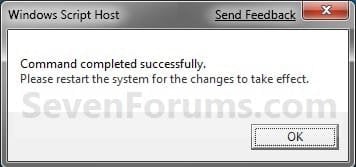
OK.jpg
7. Restart the computer.

8. When the computer is finished restarting, then manually activate Windows 7 with your product key number.


OPTION FOUR

Double Installing Windows 7


   Note
This option is the same that was used to do a clean install of an upgrade copy of Windows 7. It's more work, but if the options above did not work for you, then this should since this is the most reliable option.

1. Do a clean install of your upgrade Windows 7 at boot without checking the Automatically activate Windows when I'm online box during the installation process, and do not activate Windows 7. When finished with the clean install, do not or install any Windows Updates, drivers, or programs yet.

2. When finished with the clean install, start at step 4 at this link to do an in-place "upgrade" install with your upgrade Windows 7 installation disk from within the just now finished clean install of Windows 7.

3. When the in-place upgrade installation is completely finished, then manually activate Windows 7 with your product key number. You can now also install any Windows Updates drivers, and programs you like.
That's it,
Shawn


Attachments

Last edited:
You're most welcome Daniel, and welcome to Seven Forums. :)
 

My Computer

Computer type
PC/Desktop
Computer Manufacturer/Model Number
Self built custom
OS
64-bit Windows 11 Pro for Workstations
CPU
Intel i7-8700K OC'd to 5 GHz
Motherboard
ASUS ROG Maximus XI Formula Z390
Memory
64 GB (4x16GB) G.SKILL TridentZ RGB DDR4 3600 MHz
Graphics Card(s)
ASUS ROG-STRIX-GTX1080TI-O11G-GAMING
Sound Card
Integrated
Monitor(s) Displays
2 x Samsung Odyssey G7 27"
Screen Resolution
2560x1440
Hard Drives
1TB Samsung 990 PRO M.2,
4TB Samsung 990 PRO PRO M.2,
TerraMaster F8 SSD Plus NAS
PSU
Seasonic Prime Titanium 850W
Case
Thermaltake Core P3
Cooling
Corsair Hydro H115i
Keyboard
Logitech wireless K800
Mouse
Logitech MX Master 4
Internet Speed
2 Gb/s Download and 100 Mb/s Upload
Antivirus
Malwarebyte Anti-Malware Premium
Browser
Google Chrome
Other Info
Logitech Z625 speaker system,
Logitech BRIO 4K Pro webcam,
HP Color LaserJet Pro MFP M477fdn,
APC SMART-UPS RT 1000 XL - SURT1000XLI,
Galaxy S23 Plus phone
If I could pass on a donation I would :)

Thanks for the tutorial and download that made my windows reinstall possible. I just upgraded my MB and Processor and for whatever reason Windows wouldn't allow me to do a clean install. Thanks again and a lot. Cheers from the melting great white north.
 

My Computer

Computer type
PC/Desktop
Computer Manufacturer/Model Number
custom build
OS
Windows 7 Hm Prm 64bit
CPU
AMD 8320E
Motherboard
ASRock 970 Fatality
Memory
32 Ggs
Graphics Card(s)
AMD HD 6850
Hard Drives
128 Adata SSD - 128 OCZ SSD - 256 OCZ SSD - 500GB & 1TB Segate 7200 RPM
Antivirus
no
Browser
Opera, Fox & IE
You're most welcome mrthrun, and welcome to Seven Forums. I'm glad it could help. :)
 

My Computer

Computer type
PC/Desktop
Computer Manufacturer/Model Number
Self built custom
OS
64-bit Windows 11 Pro for Workstations
CPU
Intel i7-8700K OC'd to 5 GHz
Motherboard
ASUS ROG Maximus XI Formula Z390
Memory
64 GB (4x16GB) G.SKILL TridentZ RGB DDR4 3600 MHz
Graphics Card(s)
ASUS ROG-STRIX-GTX1080TI-O11G-GAMING
Sound Card
Integrated
Monitor(s) Displays
2 x Samsung Odyssey G7 27"
Screen Resolution
2560x1440
Hard Drives
1TB Samsung 990 PRO M.2,
4TB Samsung 990 PRO PRO M.2,
TerraMaster F8 SSD Plus NAS
PSU
Seasonic Prime Titanium 850W
Case
Thermaltake Core P3
Cooling
Corsair Hydro H115i
Keyboard
Logitech wireless K800
Mouse
Logitech MX Master 4
Internet Speed
2 Gb/s Download and 100 Mb/s Upload
Antivirus
Malwarebyte Anti-Malware Premium
Browser
Google Chrome
Other Info
Logitech Z625 speaker system,
Logitech BRIO 4K Pro webcam,
HP Color LaserJet Pro MFP M477fdn,
APC SMART-UPS RT 1000 XL - SURT1000XLI,
Galaxy S23 Plus phone
If I have Windows 7 Home (FPP) and Ultimate (WAU) licenses, can I perform clean install of Windows 7 Ultimate and use WAU key ? Will it accept it ? Or I must use Home key and then Ultimate key ? How it works please ?

There is more than 50 pages in this thread. So I am sorry if someone else already asked this question. I appreciate any help.
Thanks in advance
 

My Computer

Computer type
PC/Desktop
OS
windows 3.11
Hello John, :)

You will be able to use an option in this tutorial to do a clean install of Windows 7 Ultimate using your WAU key.
 

My Computer

Computer type
PC/Desktop
Computer Manufacturer/Model Number
Self built custom
OS
64-bit Windows 11 Pro for Workstations
CPU
Intel i7-8700K OC'd to 5 GHz
Motherboard
ASUS ROG Maximus XI Formula Z390
Memory
64 GB (4x16GB) G.SKILL TridentZ RGB DDR4 3600 MHz
Graphics Card(s)
ASUS ROG-STRIX-GTX1080TI-O11G-GAMING
Sound Card
Integrated
Monitor(s) Displays
2 x Samsung Odyssey G7 27"
Screen Resolution
2560x1440
Hard Drives
1TB Samsung 990 PRO M.2,
4TB Samsung 990 PRO PRO M.2,
TerraMaster F8 SSD Plus NAS
PSU
Seasonic Prime Titanium 850W
Case
Thermaltake Core P3
Cooling
Corsair Hydro H115i
Keyboard
Logitech wireless K800
Mouse
Logitech MX Master 4
Internet Speed
2 Gb/s Download and 100 Mb/s Upload
Antivirus
Malwarebyte Anti-Malware Premium
Browser
Google Chrome
Other Info
Logitech Z625 speaker system,
Logitech BRIO 4K Pro webcam,
HP Color LaserJet Pro MFP M477fdn,
APC SMART-UPS RT 1000 XL - SURT1000XLI,
Galaxy S23 Plus phone

My Computer

Computer type
PC/Desktop
Computer Manufacturer/Model Number
Custom assembled by me :}
OS
Win-7-Pro64bit 7-H-Prem-64bit
CPU
i7-5930K 2nd i9-9940x both water blocked VRM's too
Motherboard
ASUS SABERTOOTH X99 2nd ASUS x299 Apex
Memory
Trident-z 3200C14 2nd Trident-z 3600C16
Graphics Card(s)
EVGA 1080ti ftw3 2nd Titan Xp both water blocked
Sound Card
Built-in Realtek
Monitor(s) Displays
1-AOC G2460PG 24"G-Sync 144Hz/ 2nd 1-ASUS VG248QE 24" 144Hz
Screen Resolution
1920 x 1080 144Hz
Hard Drives
2-Samsung M.2 Evo & Evo Plus
2-Samsung 850 EVO 500GB SSD's/ 3-2.5 W.D. Black 1tb-&3-1tb/3-3.5 WD Black 1tb hdd's
PSU
EVGA SuperNOVA 1000-P2 2nd 1200-P2
Case
2-Corsair Obsidian Series 450D Black ATX Mid Tower
Cooling
Custom water loops
Keyboard
Logitech G710+/ 2nd Logitech G910
Mouse
2-RedDragon M901 Perdition 16400 dpi Gaming mouse = wired
Internet Speed
Comcast Ping 19ms 89.31mbps download speed 6.12mbps upload
Antivirus
Malwarebytes Pro/ Superantispyware Pro
Browser
FireFox & Pale moon
Other Info
2nd ASUS X299 Apex/Intel i9-9940x with Custom water loop/7H-Prem-x64/Corsair 450D case/Ram Trident-z 3600C16 4x8gb / Samsung970Evo plus 500gb SSD/Dual ssd EZ swap evo/PSU EVGA SuperNova 1200w-P2 80+Platinum/GPU Titan Xp /8-ML-140 on push-pull on 2-280GTX rads
Hi,
With the new iso OddBall offered you
You'd use the upgrade key with it using Option 4 and option 3's bat or reg file before activating windows.
http://www.sevenforums.com/windows-...pgrade-new-installation-disc.html#post3220988

Thank you for your answer. Sorry that I ask like this, but are these options fully legal ? I just don't want to violate any policies or something. I already know that image provided is safe and legal directly from microsoft. But what about that .bat file and registry ?
Thanks
 

My Computer

Computer type
PC/Desktop
OS
windows 3.11
Brink would have to ban himself if it was illegal :D

I used it on a laptop 2 years ago with a win-7 home premium from Vista
It works like a charm and to this day is still shown as activated and genuine ;)
 

My Computer

Computer type
PC/Desktop
Computer Manufacturer/Model Number
Custom assembled by me :}
OS
Win-7-Pro64bit 7-H-Prem-64bit
CPU
i7-5930K 2nd i9-9940x both water blocked VRM's too
Motherboard
ASUS SABERTOOTH X99 2nd ASUS x299 Apex
Memory
Trident-z 3200C14 2nd Trident-z 3600C16
Graphics Card(s)
EVGA 1080ti ftw3 2nd Titan Xp both water blocked
Sound Card
Built-in Realtek
Monitor(s) Displays
1-AOC G2460PG 24"G-Sync 144Hz/ 2nd 1-ASUS VG248QE 24" 144Hz
Screen Resolution
1920 x 1080 144Hz
Hard Drives
2-Samsung M.2 Evo & Evo Plus
2-Samsung 850 EVO 500GB SSD's/ 3-2.5 W.D. Black 1tb-&3-1tb/3-3.5 WD Black 1tb hdd's
PSU
EVGA SuperNOVA 1000-P2 2nd 1200-P2
Case
2-Corsair Obsidian Series 450D Black ATX Mid Tower
Cooling
Custom water loops
Keyboard
Logitech G710+/ 2nd Logitech G910
Mouse
2-RedDragon M901 Perdition 16400 dpi Gaming mouse = wired
Internet Speed
Comcast Ping 19ms 89.31mbps download speed 6.12mbps upload
Antivirus
Malwarebytes Pro/ Superantispyware Pro
Browser
FireFox & Pale moon
Other Info
2nd ASUS X299 Apex/Intel i9-9940x with Custom water loop/7H-Prem-x64/Corsair 450D case/Ram Trident-z 3600C16 4x8gb / Samsung970Evo plus 500gb SSD/Dual ssd EZ swap evo/PSU EVGA SuperNova 1200w-P2 80+Platinum/GPU Titan Xp /8-ML-140 on push-pull on 2-280GTX rads
No worries John. It's perfectly safe and legal. :)
 

My Computer

Computer type
PC/Desktop
Computer Manufacturer/Model Number
Self built custom
OS
64-bit Windows 11 Pro for Workstations
CPU
Intel i7-8700K OC'd to 5 GHz
Motherboard
ASUS ROG Maximus XI Formula Z390
Memory
64 GB (4x16GB) G.SKILL TridentZ RGB DDR4 3600 MHz
Graphics Card(s)
ASUS ROG-STRIX-GTX1080TI-O11G-GAMING
Sound Card
Integrated
Monitor(s) Displays
2 x Samsung Odyssey G7 27"
Screen Resolution
2560x1440
Hard Drives
1TB Samsung 990 PRO M.2,
4TB Samsung 990 PRO PRO M.2,
TerraMaster F8 SSD Plus NAS
PSU
Seasonic Prime Titanium 850W
Case
Thermaltake Core P3
Cooling
Corsair Hydro H115i
Keyboard
Logitech wireless K800
Mouse
Logitech MX Master 4
Internet Speed
2 Gb/s Download and 100 Mb/s Upload
Antivirus
Malwarebyte Anti-Malware Premium
Browser
Google Chrome
Other Info
Logitech Z625 speaker system,
Logitech BRIO 4K Pro webcam,
HP Color LaserJet Pro MFP M477fdn,
APC SMART-UPS RT 1000 XL - SURT1000XLI,
Galaxy S23 Plus phone
Using one of the four install options, could I install on a brand new pc build using the win 7 upgrade disk without having any older windows version/product key available?
 

My Computer

Computer type
PC/Desktop
OS
win7 home premium 64bit
Using one of the four install options, could I install on a brand new pc build using the win 7 upgrade disk without having any older windows version/product key available?

Hello mstrmind5, and welcome to Seven Forums. :)

You would be able to do a clean install with an upgrade copy of Windows 7, but you will of course need a product keep for the same edition to activate with.
 
Last edited:

My Computer

Computer type
PC/Desktop
Computer Manufacturer/Model Number
Self built custom
OS
64-bit Windows 11 Pro for Workstations
CPU
Intel i7-8700K OC'd to 5 GHz
Motherboard
ASUS ROG Maximus XI Formula Z390
Memory
64 GB (4x16GB) G.SKILL TridentZ RGB DDR4 3600 MHz
Graphics Card(s)
ASUS ROG-STRIX-GTX1080TI-O11G-GAMING
Sound Card
Integrated
Monitor(s) Displays
2 x Samsung Odyssey G7 27"
Screen Resolution
2560x1440
Hard Drives
1TB Samsung 990 PRO M.2,
4TB Samsung 990 PRO PRO M.2,
TerraMaster F8 SSD Plus NAS
PSU
Seasonic Prime Titanium 850W
Case
Thermaltake Core P3
Cooling
Corsair Hydro H115i
Keyboard
Logitech wireless K800
Mouse
Logitech MX Master 4
Internet Speed
2 Gb/s Download and 100 Mb/s Upload
Antivirus
Malwarebyte Anti-Malware Premium
Browser
Google Chrome
Other Info
Logitech Z625 speaker system,
Logitech BRIO 4K Pro webcam,
HP Color LaserJet Pro MFP M477fdn,
APC SMART-UPS RT 1000 XL - SURT1000XLI,
Galaxy S23 Plus phone
Hello mstrmind5, and welcome to Seven Forums. :)

You would be able to do a clean install with an upgrade copy of Windows 7, but you will of course need a product keep for the same edition to activate with.

Thank you for the welcome.

So, if I'm reading your reply correctly, all I would need is a product key for the upgrade version of the windows 7? Do windows 7 home prem upgrade family pack editions come with a product key?
 

My Computer

Computer type
PC/Desktop
OS
win7 home premium 64bit
Yes, the family pack comes with a product key that can be activated on up to 3 separate computers at the same time.
 

My Computer

Computer type
PC/Desktop
Computer Manufacturer/Model Number
Self built custom
OS
64-bit Windows 11 Pro for Workstations
CPU
Intel i7-8700K OC'd to 5 GHz
Motherboard
ASUS ROG Maximus XI Formula Z390
Memory
64 GB (4x16GB) G.SKILL TridentZ RGB DDR4 3600 MHz
Graphics Card(s)
ASUS ROG-STRIX-GTX1080TI-O11G-GAMING
Sound Card
Integrated
Monitor(s) Displays
2 x Samsung Odyssey G7 27"
Screen Resolution
2560x1440
Hard Drives
1TB Samsung 990 PRO M.2,
4TB Samsung 990 PRO PRO M.2,
TerraMaster F8 SSD Plus NAS
PSU
Seasonic Prime Titanium 850W
Case
Thermaltake Core P3
Cooling
Corsair Hydro H115i
Keyboard
Logitech wireless K800
Mouse
Logitech MX Master 4
Internet Speed
2 Gb/s Download and 100 Mb/s Upload
Antivirus
Malwarebyte Anti-Malware Premium
Browser
Google Chrome
Other Info
Logitech Z625 speaker system,
Logitech BRIO 4K Pro webcam,
HP Color LaserJet Pro MFP M477fdn,
APC SMART-UPS RT 1000 XL - SURT1000XLI,
Galaxy S23 Plus phone
You're most welcome. :)
 

My Computer

Computer type
PC/Desktop
Computer Manufacturer/Model Number
Self built custom
OS
64-bit Windows 11 Pro for Workstations
CPU
Intel i7-8700K OC'd to 5 GHz
Motherboard
ASUS ROG Maximus XI Formula Z390
Memory
64 GB (4x16GB) G.SKILL TridentZ RGB DDR4 3600 MHz
Graphics Card(s)
ASUS ROG-STRIX-GTX1080TI-O11G-GAMING
Sound Card
Integrated
Monitor(s) Displays
2 x Samsung Odyssey G7 27"
Screen Resolution
2560x1440
Hard Drives
1TB Samsung 990 PRO M.2,
4TB Samsung 990 PRO PRO M.2,
TerraMaster F8 SSD Plus NAS
PSU
Seasonic Prime Titanium 850W
Case
Thermaltake Core P3
Cooling
Corsair Hydro H115i
Keyboard
Logitech wireless K800
Mouse
Logitech MX Master 4
Internet Speed
2 Gb/s Download and 100 Mb/s Upload
Antivirus
Malwarebyte Anti-Malware Premium
Browser
Google Chrome
Other Info
Logitech Z625 speaker system,
Logitech BRIO 4K Pro webcam,
HP Color LaserJet Pro MFP M477fdn,
APC SMART-UPS RT 1000 XL - SURT1000XLI,
Galaxy S23 Plus phone
Clean Install after infections?

My laptop has Windows Pro 7/64 SP1 OS installed.

I recently had some infections, rootkits, that got into my system. My malware scanners picked them up and quarantined them. I deleted those infections and reran several malware scanners thereafter with no traces of infections. Some of those infections and issues are listed in the below thread I started.

http://www.sevenforums.com/windows-...dates-wont-install-error-code-80070005-a.html

I was told that a clean install would be the best thing to do just to be safe. As my system may have been compromised, ie; my online banking account/credit/debit cards and passwords may have been stolen. So it is something to be concerned about.

I'm not sure which way is the best to handle this issue?

I have the original Win 7/32 & 64 bit Upgrade disks and activation number. I'm not sure how many times I can use these disc's to reinstall/clean install/repair any corruption issues on my current OS?

I believe I read somewhere that you can use these discs to install Win 7 on up to 3 computers?

Or if I can use the Win 7/32 bit Pro Upgrade disc to upgrade a neighbors outdated Windows 32 bit OS XP3 laptop?

If I did a clean install on my laptop using the Win 7 discs, I would have to format my current disc before reinstalling Win 7, correct? My HD is a Seagate 750GB SSHD.

Could I follow the "Clean install with a Upgrade Windows 7 Version" tutorial to reinstall my OS?

Any answers appreciated, thanks!
 

My Computer

Computer type
Laptop
Computer Manufacturer/Model Number
HP Windows 10
OS
64 bit OS?
CPU
Intel Core 13 8th Generation
Motherboard
Acer, Inc. Chapala [U2E1]
Memory
4GB DDR2, 2 Crucial memory upgrade sticks
Hard Drives
128GB SSD
Cooling
Ice
Mouse
Laptop finger pad and mouse
Internet Speed
Embarq
Antivirus
MalewareBytes
Browser
Firefox
Hello Vista32toWin7, :)

Unless you purchased a retail Windows 7 Family Pack like below to be able to activate up to 3 computers, you can only use the product key to activate Windows 7 on one computer. It would have to be removed from that computer before you could activate on a different computer.

https://www.amazon.com/Microsoft-Windows-Premium-Upgrade-Version/dp/B002MV2MG0

You can use this tutorial with the upgrade installation disc to clean install Windows 7 on any computer, but each computer will need a different product key to activate with.
 

My Computer

Computer type
PC/Desktop
Computer Manufacturer/Model Number
Self built custom
OS
64-bit Windows 11 Pro for Workstations
CPU
Intel i7-8700K OC'd to 5 GHz
Motherboard
ASUS ROG Maximus XI Formula Z390
Memory
64 GB (4x16GB) G.SKILL TridentZ RGB DDR4 3600 MHz
Graphics Card(s)
ASUS ROG-STRIX-GTX1080TI-O11G-GAMING
Sound Card
Integrated
Monitor(s) Displays
2 x Samsung Odyssey G7 27"
Screen Resolution
2560x1440
Hard Drives
1TB Samsung 990 PRO M.2,
4TB Samsung 990 PRO PRO M.2,
TerraMaster F8 SSD Plus NAS
PSU
Seasonic Prime Titanium 850W
Case
Thermaltake Core P3
Cooling
Corsair Hydro H115i
Keyboard
Logitech wireless K800
Mouse
Logitech MX Master 4
Internet Speed
2 Gb/s Download and 100 Mb/s Upload
Antivirus
Malwarebyte Anti-Malware Premium
Browser
Google Chrome
Other Info
Logitech Z625 speaker system,
Logitech BRIO 4K Pro webcam,
HP Color LaserJet Pro MFP M477fdn,
APC SMART-UPS RT 1000 XL - SURT1000XLI,
Galaxy S23 Plus phone
Thanks, Brink

So if I understand your response, I can only use my 64 bit disc and activation key to reinstall Win 7/64 on my machine, correct?

And I can use the "Clean install with a Upgrade Windows 7 Version" tutorial to reinstall Win 7.

I should format my disk before reinstalling Win 7, correct?


Thanks, Vista-Win7.
 

My Computer

Computer type
Laptop
Computer Manufacturer/Model Number
HP Windows 10
OS
64 bit OS?
CPU
Intel Core 13 8th Generation
Motherboard
Acer, Inc. Chapala [U2E1]
Memory
4GB DDR2, 2 Crucial memory upgrade sticks
Hard Drives
128GB SSD
Cooling
Ice
Mouse
Laptop finger pad and mouse
Internet Speed
Embarq
Antivirus
MalewareBytes
Browser
Firefox
You could use the installation disc to install W7 on any computer, but the key can only be used to activate one computer and not multiple computers.
 

My Computer

Computer type
PC/Desktop
Computer Manufacturer/Model Number
Self built custom
OS
64-bit Windows 11 Pro for Workstations
CPU
Intel i7-8700K OC'd to 5 GHz
Motherboard
ASUS ROG Maximus XI Formula Z390
Memory
64 GB (4x16GB) G.SKILL TridentZ RGB DDR4 3600 MHz
Graphics Card(s)
ASUS ROG-STRIX-GTX1080TI-O11G-GAMING
Sound Card
Integrated
Monitor(s) Displays
2 x Samsung Odyssey G7 27"
Screen Resolution
2560x1440
Hard Drives
1TB Samsung 990 PRO M.2,
4TB Samsung 990 PRO PRO M.2,
TerraMaster F8 SSD Plus NAS
PSU
Seasonic Prime Titanium 850W
Case
Thermaltake Core P3
Cooling
Corsair Hydro H115i
Keyboard
Logitech wireless K800
Mouse
Logitech MX Master 4
Internet Speed
2 Gb/s Download and 100 Mb/s Upload
Antivirus
Malwarebyte Anti-Malware Premium
Browser
Google Chrome
Other Info
Logitech Z625 speaker system,
Logitech BRIO 4K Pro webcam,
HP Color LaserJet Pro MFP M477fdn,
APC SMART-UPS RT 1000 XL - SURT1000XLI,
Galaxy S23 Plus phone
Back
Top