Solved clean windows 7 install on new hd, keeping old drive for storage...

lippi

New member
Local time
12:07 PM
Messages
16
Hi

I had some issues with my existing hd, so bought a new one and installed it as a secondary internal drive. I want to use the new one as the primary drive for windows and applications and keep the old one attached for storage if I need it. I performed a clean install (booting from windows 7 disk) and selected the new hd. I now have 2 installations of windows 7 and the old drive is now called "OS(D:)" and it wont let me format it, so looks as though Ive messed up somewhere. When I try to boot up to new hd it doesn't work either, so Ive no idea whats gone on.

I want to start from scratch and clean install on new hd and format the old drive, so any advise on the best way to do this would be appreciated.

thanks
 

My Computer My Computer

At a glance

Windows 7 Professional 64bit
Computer Manufacturer/Model Number
Dell XPS 420
OS
Windows 7 Professional 64bit
Do the new installation to the new drive again, but first disconnect the old hard drive so Windows CAN'T install anything on it.

I'd guess you installed to the new drive while the old one was still connected. When you do that, Windows may try to put some of the boot files for the new install onto the old drive.

The new drive can't now boot by itself because the boot files for the new install are on the old drive.

Boot up with just the new drive connected. It should be C. If all is well, shut down and reconnect the old drive. When you then restart, the old drive will be shown as D and you can do whatever you want to it--reformat, copy stuff, etc.
 

My Computer My Computer

At a glance

Windows 7 Home Premium SP1, 64-bitIntel Skylake i5-6600K, not overclocked8 GB HyperX DDR4-2666 (2 x 4 GB)none; graphics are integrated on CPU
Computer type
PC/Desktop
Computer Manufacturer/Model Number
Ignatz Special; 4 speed manual gearbox; factory air conditioning; one of one
OS
Windows 7 Home Premium SP1, 64-bit
CPU
Intel Skylake i5-6600K, not overclocked
Motherboard
AsRock Z170M Extreme 4, micro ATX
Memory
8 GB HyperX DDR4-2666 (2 x 4 GB)
Graphics Card(s)
none; graphics are integrated on CPU
Sound Card
onboard: Realtek ALC1150; external: USB Behringer UF0-202
Monitor(s) Displays
Dell S2340M 23 inch IPS
Screen Resolution
1600 x 900
Hard Drives
System: Crucial MX100 series SSD, 128 GB;
Data: Samsung Spinpoint 103SJ, 1 TB;
Backup: WD Caviar Green WD30EZRX-00D8PB0, 3 TB
PSU
Rosewill SilentNight 500 watt fanless, semi-modular
Case
Antec Solo II
Cooling
Noctua NH-U12S; Noctua F12 intake, Noctua S12A exhaust
Keyboard
Microsoft 200 6JH-00001 USB
Mouse
Dell or Microsoft optical wired; USB
Antivirus
Microsoft Security Essentials and Malwarebytes Premium
Browser
Pale Moon
Other Info
All fans PWM; speeds at idle: CPU circa 500 rpm; intake circa 600 rpm; exhaust circa 600 rpm; CPU temps 27 idle and 47 C load in a warm room (27 C/81 F) when running Intel Extreme Tuning Utility stress test.
Thanks for your help. I have done that and windows now boots from the new hard drive.

however when I reconnected the old one, it still wont let me reformat it. Also, the recovery partition E: still seems to be part of the old drive, even thought it wasnt connected during install. Does this mean the fresh install didn't create a recovery partition, so do I need to create one? and is this why it wont format?

Does it matter if I have the new drive in sata port 2 and the old one is still in sata port 0? I changed the boot order in the bios so that 0 is ignored, but it is now still offering me 2 windows installations during bootup
 

My Computer My Computer

At a glance

Windows 7 Professional 64bit
Computer Manufacturer/Model Number
Dell XPS 420
OS
Windows 7 Professional 64bit
however when I reconnected the old one, it still wont let me reformat it. Also, the recovery partition E: still seems to be part of the old drive, even thought it wasnt connected during install. Does this mean the fresh install didn't create a recovery partition, so do I need to create one? and is this why it wont format?

Does it matter if I have the new drive in sata port 2 and the old one is still in sata port 0? I changed the boot order in the bios so that 0 is ignored, but it is now still offering me 2 windows installations during bootup

Somewhat confused: you say it boots from new drive and you say it offers you 2 Windows installations. Do you mean you get a menu and have to choose which install to boot from?

Clean installs will not have a recovery partition. Recovery partitions are placed there by the manufacturer (Dell, HP, etc) and are not part of an ordinary Windows installation, which you now have.

You can't create a recovery partition per se. Your choices to recover would be to either do what you just did (clean install) or use an imaging application such as Macrium Reflect Free Edition. It would enable you to restore your system to the state it was in on the date the image file was created--including whatever applications you had installed and whatever else was on your C partition.

All the recovery partition would ever have done for you is to restore the PC to the way it was when it left the factory--not the way it is today or was last week---unlike an image file.

Not sure offhand why you can't format the old drive. I'd swap cables so that the new installation is on Sata port 0 with the other drive disconnected. If the new drive boots OK on Sata 0, then reconnect the old drive to some other Sata port and see if it can then be formatted.

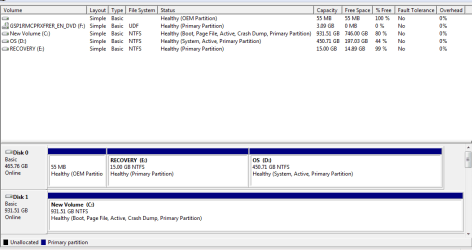
A screen shot of Windows Disk Management would help sort it out.
 

My Computer My Computer

At a glance

Windows 7 Home Premium SP1, 64-bitIntel Skylake i5-6600K, not overclocked8 GB HyperX DDR4-2666 (2 x 4 GB)none; graphics are integrated on CPU
Computer type
PC/Desktop
Computer Manufacturer/Model Number
Ignatz Special; 4 speed manual gearbox; factory air conditioning; one of one
OS
Windows 7 Home Premium SP1, 64-bit
CPU
Intel Skylake i5-6600K, not overclocked
Motherboard
AsRock Z170M Extreme 4, micro ATX
Memory
8 GB HyperX DDR4-2666 (2 x 4 GB)
Graphics Card(s)
none; graphics are integrated on CPU
Sound Card
onboard: Realtek ALC1150; external: USB Behringer UF0-202
Monitor(s) Displays
Dell S2340M 23 inch IPS
Screen Resolution
1600 x 900
Hard Drives
System: Crucial MX100 series SSD, 128 GB;
Data: Samsung Spinpoint 103SJ, 1 TB;
Backup: WD Caviar Green WD30EZRX-00D8PB0, 3 TB
PSU
Rosewill SilentNight 500 watt fanless, semi-modular
Case
Antec Solo II
Cooling
Noctua NH-U12S; Noctua F12 intake, Noctua S12A exhaust
Keyboard
Microsoft 200 6JH-00001 USB
Mouse
Dell or Microsoft optical wired; USB
Antivirus
Microsoft Security Essentials and Malwarebytes Premium
Browser
Pale Moon
Other Info
All fans PWM; speeds at idle: CPU circa 500 rpm; intake circa 600 rpm; exhaust circa 600 rpm; CPU temps 27 idle and 47 C load in a warm room (27 C/81 F) when running Intel Extreme Tuning Utility stress test.
Sorry, I mean it boots fine from the new disk if I unplug the old one (it wasn't before), but with the old one plugged in, it gives a menu to choose which installation to use.

OK I see about recovery partitions, thanks.

So just need to try and sort out the old drive then I think, I have added a screenshot from disk management, disk 0 is old drive, disk 1 is new one.

Will try swapping the sata cables over and see how that goes

thanks again
 

Attachments

  • Capture.PNG
    Capture.PNG
    14.2 KB · Views: 0

My Computer My Computer

At a glance

Windows 7 Professional 64bit
Computer Manufacturer/Model Number
Dell XPS 420
OS
Windows 7 Professional 64bit
update:

Swapped sata cables and with a little tinkering Ive now managed to format the old drive and remove the partition etc, so so all done! thanks for your help.
 

My Computer My Computer

At a glance

Windows 7 Professional 64bit
Computer Manufacturer/Model Number
Dell XPS 420
OS
Windows 7 Professional 64bit
Not sure why the old drive is marked "system" after your clean install with the old drive disconnected. The "system" drive is typically somewhere on the same drive as the C partition and I'm not clear why it isn't since you say the old drive was disconnected during the install.

If your cable swap does not get rid of the menu, I'd do another clean install. This time with the new drive on port 0 from the beginning and with the old drive completely unconnected.
 

My Computer My Computer

At a glance

Windows 7 Home Premium SP1, 64-bitIntel Skylake i5-6600K, not overclocked8 GB HyperX DDR4-2666 (2 x 4 GB)none; graphics are integrated on CPU
Computer type
PC/Desktop
Computer Manufacturer/Model Number
Ignatz Special; 4 speed manual gearbox; factory air conditioning; one of one
OS
Windows 7 Home Premium SP1, 64-bit
CPU
Intel Skylake i5-6600K, not overclocked
Motherboard
AsRock Z170M Extreme 4, micro ATX
Memory
8 GB HyperX DDR4-2666 (2 x 4 GB)
Graphics Card(s)
none; graphics are integrated on CPU
Sound Card
onboard: Realtek ALC1150; external: USB Behringer UF0-202
Monitor(s) Displays
Dell S2340M 23 inch IPS
Screen Resolution
1600 x 900
Hard Drives
System: Crucial MX100 series SSD, 128 GB;
Data: Samsung Spinpoint 103SJ, 1 TB;
Backup: WD Caviar Green WD30EZRX-00D8PB0, 3 TB
PSU
Rosewill SilentNight 500 watt fanless, semi-modular
Case
Antec Solo II
Cooling
Noctua NH-U12S; Noctua F12 intake, Noctua S12A exhaust
Keyboard
Microsoft 200 6JH-00001 USB
Mouse
Dell or Microsoft optical wired; USB
Antivirus
Microsoft Security Essentials and Malwarebytes Premium
Browser
Pale Moon
Other Info
All fans PWM; speeds at idle: CPU circa 500 rpm; intake circa 600 rpm; exhaust circa 600 rpm; CPU temps 27 idle and 47 C load in a warm room (27 C/81 F) when running Intel Extreme Tuning Utility stress test.
update:

Swapped sata cables and with a little tinkering Ive now managed to format the old drive and remove the partition etc, so so all done! thanks for your help.

OK, show me another screen shot of Disk Management.
 

My Computer My Computer

At a glance

Windows 7 Home Premium SP1, 64-bitIntel Skylake i5-6600K, not overclocked8 GB HyperX DDR4-2666 (2 x 4 GB)none; graphics are integrated on CPU
Computer type
PC/Desktop
Computer Manufacturer/Model Number
Ignatz Special; 4 speed manual gearbox; factory air conditioning; one of one
OS
Windows 7 Home Premium SP1, 64-bit
CPU
Intel Skylake i5-6600K, not overclocked
Motherboard
AsRock Z170M Extreme 4, micro ATX
Memory
8 GB HyperX DDR4-2666 (2 x 4 GB)
Graphics Card(s)
none; graphics are integrated on CPU
Sound Card
onboard: Realtek ALC1150; external: USB Behringer UF0-202
Monitor(s) Displays
Dell S2340M 23 inch IPS
Screen Resolution
1600 x 900
Hard Drives
System: Crucial MX100 series SSD, 128 GB;
Data: Samsung Spinpoint 103SJ, 1 TB;
Backup: WD Caviar Green WD30EZRX-00D8PB0, 3 TB
PSU
Rosewill SilentNight 500 watt fanless, semi-modular
Case
Antec Solo II
Cooling
Noctua NH-U12S; Noctua F12 intake, Noctua S12A exhaust
Keyboard
Microsoft 200 6JH-00001 USB
Mouse
Dell or Microsoft optical wired; USB
Antivirus
Microsoft Security Essentials and Malwarebytes Premium
Browser
Pale Moon
Other Info
All fans PWM; speeds at idle: CPU circa 500 rpm; intake circa 600 rpm; exhaust circa 600 rpm; CPU temps 27 idle and 47 C load in a warm room (27 C/81 F) when running Intel Extreme Tuning Utility stress test.
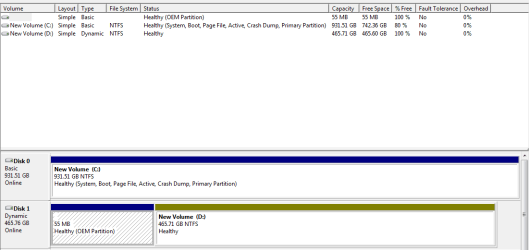
its now like this.

one question, its now showing the old drive as a "dynamic" rather than "basic" drive. What does that mean?
 

Attachments

  • Capture.PNG
    Capture.PNG
    11.2 KB · Views: 0

My Computer My Computer

At a glance

Windows 7 Professional 64bit
Computer Manufacturer/Model Number
Dell XPS 420
OS
Windows 7 Professional 64bit
I have no idea why that suddenly became a dynamic partition.

Dynamic partitions are almost always to be avoided at all costs and they can be difficult to get rid of without losing all data on them.

If you don't care about anything now on that dynamic drive, I'd just go ahead and wipe it clean. It should be "basic" like the other one after you reformat it.

If you DO care about something now on that dynamic drive, you may be in for some work.

Otherwise, reformat it. It should become a "basic" NTFS drive with just one partition, without that OEM partition.
 

My Computer My Computer

At a glance

Windows 7 Home Premium SP1, 64-bitIntel Skylake i5-6600K, not overclocked8 GB HyperX DDR4-2666 (2 x 4 GB)none; graphics are integrated on CPU
Computer type
PC/Desktop
Computer Manufacturer/Model Number
Ignatz Special; 4 speed manual gearbox; factory air conditioning; one of one
OS
Windows 7 Home Premium SP1, 64-bit
CPU
Intel Skylake i5-6600K, not overclocked
Motherboard
AsRock Z170M Extreme 4, micro ATX
Memory
8 GB HyperX DDR4-2666 (2 x 4 GB)
Graphics Card(s)
none; graphics are integrated on CPU
Sound Card
onboard: Realtek ALC1150; external: USB Behringer UF0-202
Monitor(s) Displays
Dell S2340M 23 inch IPS
Screen Resolution
1600 x 900
Hard Drives
System: Crucial MX100 series SSD, 128 GB;
Data: Samsung Spinpoint 103SJ, 1 TB;
Backup: WD Caviar Green WD30EZRX-00D8PB0, 3 TB
PSU
Rosewill SilentNight 500 watt fanless, semi-modular
Case
Antec Solo II
Cooling
Noctua NH-U12S; Noctua F12 intake, Noctua S12A exhaust
Keyboard
Microsoft 200 6JH-00001 USB
Mouse
Dell or Microsoft optical wired; USB
Antivirus
Microsoft Security Essentials and Malwarebytes Premium
Browser
Pale Moon
Other Info
All fans PWM; speeds at idle: CPU circa 500 rpm; intake circa 600 rpm; exhaust circa 600 rpm; CPU temps 27 idle and 47 C load in a warm room (27 C/81 F) when running Intel Extreme Tuning Utility stress test.
ok thanks, its empty anyway so I will reformat and try to get it back to a basic partition.

Thanks again for your help!
 

My Computer My Computer

At a glance

Windows 7 Professional 64bit
Computer Manufacturer/Model Number
Dell XPS 420
OS
Windows 7 Professional 64bit
Show another screen shot when you're done.
 

My Computer My Computer

At a glance

Windows 7 Home Premium SP1, 64-bitIntel Skylake i5-6600K, not overclocked8 GB HyperX DDR4-2666 (2 x 4 GB)none; graphics are integrated on CPU
Computer type
PC/Desktop
Computer Manufacturer/Model Number
Ignatz Special; 4 speed manual gearbox; factory air conditioning; one of one
OS
Windows 7 Home Premium SP1, 64-bit
CPU
Intel Skylake i5-6600K, not overclocked
Motherboard
AsRock Z170M Extreme 4, micro ATX
Memory
8 GB HyperX DDR4-2666 (2 x 4 GB)
Graphics Card(s)
none; graphics are integrated on CPU
Sound Card
onboard: Realtek ALC1150; external: USB Behringer UF0-202
Monitor(s) Displays
Dell S2340M 23 inch IPS
Screen Resolution
1600 x 900
Hard Drives
System: Crucial MX100 series SSD, 128 GB;
Data: Samsung Spinpoint 103SJ, 1 TB;
Backup: WD Caviar Green WD30EZRX-00D8PB0, 3 TB
PSU
Rosewill SilentNight 500 watt fanless, semi-modular
Case
Antec Solo II
Cooling
Noctua NH-U12S; Noctua F12 intake, Noctua S12A exhaust
Keyboard
Microsoft 200 6JH-00001 USB
Mouse
Dell or Microsoft optical wired; USB
Antivirus
Microsoft Security Essentials and Malwarebytes Premium
Browser
Pale Moon
Other Info
All fans PWM; speeds at idle: CPU circa 500 rpm; intake circa 600 rpm; exhaust circa 600 rpm; CPU temps 27 idle and 47 C load in a warm room (27 C/81 F) when running Intel Extreme Tuning Utility stress test.
I reformatted, but its still dynamic. The OEM partition is a Dell thing I believe, which has some things on that probably need keeping (such as software for the quickview panel on the desktop unit etc) or maybe it is not required, im not sure.

So Im not sure how to change the large partition back to a basic volume...
 

My Computer My Computer

At a glance

Windows 7 Professional 64bit
Computer Manufacturer/Model Number
Dell XPS 420
OS
Windows 7 Professional 64bit
I'd try a "clean" or maybe even "clean all" command from a command prompt. Clean first and if that fails, try clean all.

You have to use the diskpart command to do that.

I'd disconnect your boot drive so that the old drive is the only thing connected. That way you can't hurt the good drive cause it's disconnected.

You familiar with diskpart?? You can get at it with your Windows install disc.

The OEM partition is no doubt some Dell stuff, but you gave up on that stuff when you went with a clean install, so it's of no use to you anyway.

If clean all fails or won't run, I'm pretty sure there is a tutorial on this site about how to get rid of dynamic---you may have to use a third party tool like Partition Wizard. As I said, dynamic to be avoided if at all possible.
 

My Computer My Computer

At a glance

Windows 7 Home Premium SP1, 64-bitIntel Skylake i5-6600K, not overclocked8 GB HyperX DDR4-2666 (2 x 4 GB)none; graphics are integrated on CPU
Computer type
PC/Desktop
Computer Manufacturer/Model Number
Ignatz Special; 4 speed manual gearbox; factory air conditioning; one of one
OS
Windows 7 Home Premium SP1, 64-bit
CPU
Intel Skylake i5-6600K, not overclocked
Motherboard
AsRock Z170M Extreme 4, micro ATX
Memory
8 GB HyperX DDR4-2666 (2 x 4 GB)
Graphics Card(s)
none; graphics are integrated on CPU
Sound Card
onboard: Realtek ALC1150; external: USB Behringer UF0-202
Monitor(s) Displays
Dell S2340M 23 inch IPS
Screen Resolution
1600 x 900
Hard Drives
System: Crucial MX100 series SSD, 128 GB;
Data: Samsung Spinpoint 103SJ, 1 TB;
Backup: WD Caviar Green WD30EZRX-00D8PB0, 3 TB
PSU
Rosewill SilentNight 500 watt fanless, semi-modular
Case
Antec Solo II
Cooling
Noctua NH-U12S; Noctua F12 intake, Noctua S12A exhaust
Keyboard
Microsoft 200 6JH-00001 USB
Mouse
Dell or Microsoft optical wired; USB
Antivirus
Microsoft Security Essentials and Malwarebytes Premium
Browser
Pale Moon
Other Info
All fans PWM; speeds at idle: CPU circa 500 rpm; intake circa 600 rpm; exhaust circa 600 rpm; CPU temps 27 idle and 47 C load in a warm room (27 C/81 F) when running Intel Extreme Tuning Utility stress test.
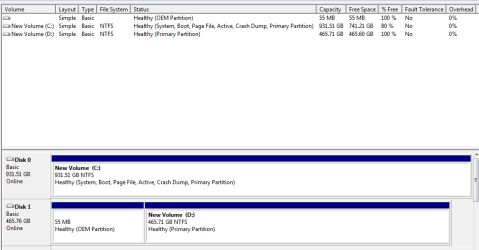
Ok so using diskpart I managed to get it back to a basic drive.

The OEM partition is still there, but not too bothered about that.

Here it is now:
 

Attachments

  • Capture.PNG
    Capture.PNG
    10.7 KB · Views: 0

My Computer My Computer

At a glance

Windows 7 Professional 64bit
Computer Manufacturer/Model Number
Dell XPS 420
OS
Windows 7 Professional 64bit
Suit yourself, but I'd try to get rid of it.

Can you simply delete the OEM partition in Disk Management?

Can you select the OEM partition in Diskpart?

If all of that fails, I'd use Partition Wizard (free app).
 

My Computer My Computer

At a glance

Windows 7 Home Premium SP1, 64-bitIntel Skylake i5-6600K, not overclocked8 GB HyperX DDR4-2666 (2 x 4 GB)none; graphics are integrated on CPU
Computer type
PC/Desktop
Computer Manufacturer/Model Number
Ignatz Special; 4 speed manual gearbox; factory air conditioning; one of one
OS
Windows 7 Home Premium SP1, 64-bit
CPU
Intel Skylake i5-6600K, not overclocked
Motherboard
AsRock Z170M Extreme 4, micro ATX
Memory
8 GB HyperX DDR4-2666 (2 x 4 GB)
Graphics Card(s)
none; graphics are integrated on CPU
Sound Card
onboard: Realtek ALC1150; external: USB Behringer UF0-202
Monitor(s) Displays
Dell S2340M 23 inch IPS
Screen Resolution
1600 x 900
Hard Drives
System: Crucial MX100 series SSD, 128 GB;
Data: Samsung Spinpoint 103SJ, 1 TB;
Backup: WD Caviar Green WD30EZRX-00D8PB0, 3 TB
PSU
Rosewill SilentNight 500 watt fanless, semi-modular
Case
Antec Solo II
Cooling
Noctua NH-U12S; Noctua F12 intake, Noctua S12A exhaust
Keyboard
Microsoft 200 6JH-00001 USB
Mouse
Dell or Microsoft optical wired; USB
Antivirus
Microsoft Security Essentials and Malwarebytes Premium
Browser
Pale Moon
Other Info
All fans PWM; speeds at idle: CPU circa 500 rpm; intake circa 600 rpm; exhaust circa 600 rpm; CPU temps 27 idle and 47 C load in a warm room (27 C/81 F) when running Intel Extreme Tuning Utility stress test.
no the OEM partition is not selectable in diskmgt and cant seem to do anything with it in diskpart either. Ill take a look at partition wizard, thanks.
 

My Computer My Computer

At a glance

Windows 7 Professional 64bit
Computer Manufacturer/Model Number
Dell XPS 420
OS
Windows 7 Professional 64bit
Back
Top