Solved Clearing Remote Assistance History

TheFetch

New member
Local time
4:44 PM
Messages
7
Hello all. I'm looking for a bit of help. I work on a Help Desk and we all use remote assistance a ton! This presents a bit of a problem as the history list keeps expanding. While the history list can be a decent feature, I really don't need to see connections from several days ago. Is there any way to clear this history. Again, this is Remote Assistance, NOT Remote Desktop Connection. Any help would be appreciated.

-TheFetch
 

My Computer My Computer

At a glance

Windows 7
OS
Windows 7
Have you tried deleting the remote assistance logs in your my documents ?
 

My Computer My Computer

At a glance

Windows 7 Home Premium x64 SP1DualCore Intel Core i3-380M 2.53GHz4.00Intel(R) HD Graphics
Computer type
PC/Desktop
Computer Manufacturer/Model Number
ASUSTeK Computer/ ASUS Notebook U52F Series
OS
Windows 7 Home Premium x64 SP1
CPU
DualCore Intel Core i3-380M 2.53GHz
Memory
4.00
Graphics Card(s)
Intel(R) HD Graphics
Monitor(s) Displays
15.6"
Screen Resolution
1360x768
Hard Drives
596 GB, IDE
Internet Speed
2.5MB
Other Info
Wireless LAN adapter: Intel(R) Centrino(R) Advanced-N 6250 AGN
Ethernet adapter: Atheros AR8131 PCI-E Gigabit Ethernet Controller
Thanks for the reply. That doesn't seem to do it.

-TheFetch
 

My Computer My Computer

At a glance

Windows 7
OS
Windows 7
Anybody else ?

-TheFetch
 

My Computer My Computer

At a glance

Windows 7
OS
Windows 7
Welcome to the Seven Forums.

At the risk of sounding dumb: where do you see the history for Remote Assistance (RA)?

Can you provide a screenshot & the steps that you used to get there?
http://www.sevenforums.com/tutorials/9733-screenshots-files-upload-post-seven-forums.html
Block out whatever info you don't want to be public.

I fired up two virtual machines on one host computer and connected between them using RA.
From W7 Professional, I tried:
Invite someone... > Save this invitation as a file
Invite someone... > Use Easy Connect
Help someone... > Use an invitation file
Help someone... > Use Easy Connect
I did not have an e-mail program installed, so I could not test those steps.
I was connecting to W7 Home Premium.

After many connections, I don't see a history, but my guess is that they are stored in the registry - like many other "MRU" lists.
 

My Computer My Computer

At a glance

W7 Pro SP1 64biti78GBIntel HD Graphics
Computer type
Laptop
Computer Manufacturer/Model Number
Employer provided Dell Latitude
OS
W7 Pro SP1 64bit
CPU
i7
Memory
8GB
Graphics Card(s)
Intel HD Graphics
Hard Drives
crappy SSD
Antivirus
Employer mandated Symantec Endpoint Protection
Browser
Pale Moon 64bit, IE11 64bit & Chrome 64bit
Last edited:

My Computer My Computer

At a glance

64-bit Windows 11 Pro for WorkstationsIntel i7-8700K OC'd to 5 GHz64 GB (4x16GB) G.SKILL TridentZ RGB DDR4 3600...ASUS ROG-STRIX-GTX1080TI-O11G-GAMING
Computer type
PC/Desktop
Computer Manufacturer/Model Number
Self built custom
OS
64-bit Windows 11 Pro for Workstations
CPU
Intel i7-8700K OC'd to 5 GHz
Motherboard
ASUS ROG Maximus XI Formula Z390
Memory
64 GB (4x16GB) G.SKILL TridentZ RGB DDR4 3600 MHz
Graphics Card(s)
ASUS ROG-STRIX-GTX1080TI-O11G-GAMING
Sound Card
Integrated
Monitor(s) Displays
2 x Samsung Odyssey G7 27"
Screen Resolution
2560x1440
Hard Drives
1TB Samsung 990 PRO M.2,
4TB Samsung 990 PRO PRO M.2,
TerraMaster F8 SSD Plus NAS
PSU
Seasonic Prime Titanium 850W
Case
Thermaltake Core P3
Cooling
Corsair Hydro H115i
Keyboard
Logitech wireless K800
Mouse
Logitech MX Master 4
Internet Speed
2 Gb/s Download and 100 Mb/s Upload
Antivirus
Malwarebyte Anti-Malware Premium
Browser
Google Chrome
Other Info
Logitech Z625 speaker system,
Logitech BRIO 4K Pro webcam,
HP Color LaserJet Pro MFP M477fdn,
APC SMART-UPS RT 1000 XL - SURT1000XLI,
Galaxy S23 Plus phone
@Brink,
RA, not RDC/RDP.


...Again, this is Remote Assistance, NOT Remote Desktop Connection. Any help would be appreciated....

I never could find any history to be cleared in Remote Assistance on W7.
 

My Computer My Computer

At a glance

W7 Pro SP1 64biti78GBIntel HD Graphics
Computer type
Laptop
Computer Manufacturer/Model Number
Employer provided Dell Latitude
OS
W7 Pro SP1 64bit
CPU
i7
Memory
8GB
Graphics Card(s)
Intel HD Graphics
Hard Drives
crappy SSD
Antivirus
Employer mandated Symantec Endpoint Protection
Browser
Pale Moon 64bit, IE11 64bit & Chrome 64bit
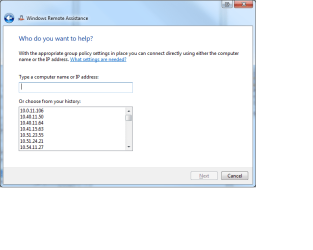
Sorry for taking so long to reply. Here's a screenshot of the window. @Brink; I wish it was that easy. That's for remote desktop. Not remote assistance. Nice try though. :)

-TheFetch
 

Attachments

  • Remote assistance.png
    Remote assistance.png
    17.7 KB · Views: 21

My Computer My Computer

At a glance

Windows 7
OS
Windows 7
Thx for the screenshot.
When you start a session, what steps do you take?
e.g Invite someone... > Use Easy Connect

BTW, what edition of W7 are you using? Enterprise?
 

My Computer My Computer

At a glance

W7 Pro SP1 64biti78GBIntel HD Graphics
Computer type
Laptop
Computer Manufacturer/Model Number
Employer provided Dell Latitude
OS
W7 Pro SP1 64bit
CPU
i7
Memory
8GB
Graphics Card(s)
Intel HD Graphics
Hard Drives
crappy SSD
Antivirus
Employer mandated Symantec Endpoint Protection
Browser
Pale Moon 64bit, IE11 64bit & Chrome 64bit
This is for Windows 7 Enterprise. The shortcut used has a target of "%windir%\system32\msra.exe /offerra"
 

My Computer My Computer

At a glance

Windows 7
OS
Windows 7
It would appear that W7 Enterprise keeps a history and other versions do not. I don't have access to that edition, so I'll have to guess. Have you tried searching the registry for one of those IP addresses?
 

My Computer My Computer

At a glance

W7 Pro SP1 64biti78GBIntel HD Graphics
Computer type
Laptop
Computer Manufacturer/Model Number
Employer provided Dell Latitude
OS
W7 Pro SP1 64bit
CPU
i7
Memory
8GB
Graphics Card(s)
Intel HD Graphics
Hard Drives
crappy SSD
Antivirus
Employer mandated Symantec Endpoint Protection
Browser
Pale Moon 64bit, IE11 64bit & Chrome 64bit
Nada. I can't find any mention of any of those addresses in the registry. Thanks for the suggestion though.

-TheFetch
 

My Computer My Computer

At a glance

Windows 7
OS
Windows 7
You can change your file search options to always search file contents - then unhide everything and start a search for one of the IPs for your entire hard drive --- then go home for the day :-)
 

My Computer My Computer

At a glance

W7 Pro SP1 64biti78GBIntel HD Graphics
Computer type
Laptop
Computer Manufacturer/Model Number
Employer provided Dell Latitude
OS
W7 Pro SP1 64bit
CPU
i7
Memory
8GB
Graphics Card(s)
Intel HD Graphics
Hard Drives
crappy SSD
Antivirus
Employer mandated Symantec Endpoint Protection
Browser
Pale Moon 64bit, IE11 64bit & Chrome 64bit
So, was able to figure it out (actually, I found someone in the office with the same problem). Here's the solution for anyone that ever runs in to it. In C:\Users\(user name)\AppData\Local , there is a file labeled RAExpertHistory.xml . If you open it in notepad and remove everything between <RAINVITATIONCOLL>!***CRAP TO DELETE***!</RAINVITATIONCOLL> (it could be quite long), your'e good to go. Thanks again everybody !
 

My Computer My Computer

At a glance

Windows 7
OS
Windows 7
Glad you found it. Thanks for posting the solution.

For others that stumble across this thread:
That file is created on other editions of W7 (and Vista too) - if you use that switch at start up.
:-)
 

My Computer My Computer

At a glance

W7 Pro SP1 64biti78GBIntel HD Graphics
Computer type
Laptop
Computer Manufacturer/Model Number
Employer provided Dell Latitude
OS
W7 Pro SP1 64bit
CPU
i7
Memory
8GB
Graphics Card(s)
Intel HD Graphics
Hard Drives
crappy SSD
Antivirus
Employer mandated Symantec Endpoint Protection
Browser
Pale Moon 64bit, IE11 64bit & Chrome 64bit
Found the xml file responsible

It is called RAExpertHistory.xml it is under C:\Users\username\AppData\Local. Clearing the file clears the history.
 

My Computer My Computer

At a glance

Windows 7 Enterprise x64i58GB
Computer type
PC/Desktop
Computer Manufacturer/Model Number
HP
OS
Windows 7 Enterprise x64
CPU
i5
Memory
8GB
Antivirus
Microsoft SEP
Back
Top