ClearType Text Tuner

How to Open and Use ClearType Text Tuner in Windows 7 and Windows 8


   Information
ClearType font technology makes the text on your screen almost as sharp and clear as text that is printed on paper.

This will show you how to turn on or off the ClearType Text Tuner and how to use it to help make the text on your screen sharp and clear to make it easier to read. ClearType is turned on by default in Windows 7 and Windows 8.

   Note
To get the full benefit of ClearType, you'll need a high-quality, flat-panel monitor, such as LCD or plasma. Even on a CRT monitor, you might get some improvement in readability with ClearType.


Here's How:
1. Press the Windows + R keys to open the Run dialog, type cttune.exe, and press Enter.
NOTE: The ClearType Text Tuner exe file is located at C:\Windows\System32\cttune.exe.

2. Do step 3 or 4 below for what you would like to do.

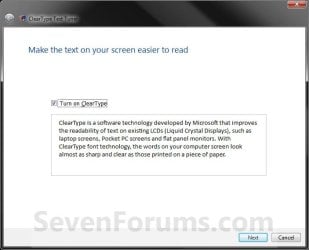
3. To Turn On ClearType A) Check the Turn on ClearType box, click/tap on Next, and go to step 5 below. (See screenshot below step 4)
4. To Turn Off ClearType A) Uncheck the Turn on ClearType box, click on Next, go to step 5 below, and click on Next until finished at step 11. (See screenshot below)
Step1.jpg
5. If you have multiple monitors, select to tune one or all of them, and click/tap on Next. (See screenshot below) Step2.jpg
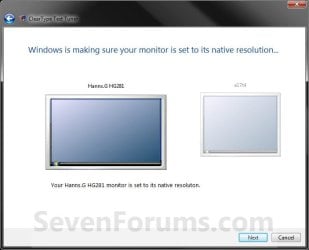
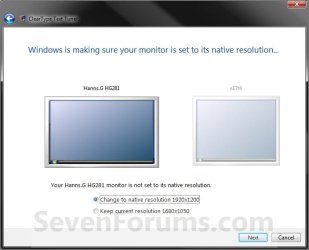
6. If your monitor native screen resolution is not correct, then correct it and click/tap on Next. (See left screenshot below)
NOTE: If the native resolution is correct, then just click on Next. (See right screenshot below) Step3B.jpg
Step3.jpg

7. Click on the text that looks best to you, and click/tap on Next. (See screenshot below) Step4.jpg
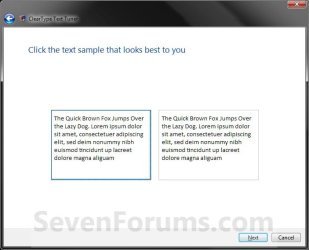
8. Click on the text that looks best to you, and click/tap on Next. (See screenshot below) Step5.jpg
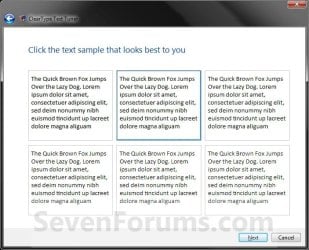
9. Click on the text that looks best to you, and click/tap on Next. (See screenshot below) Step6.jpg
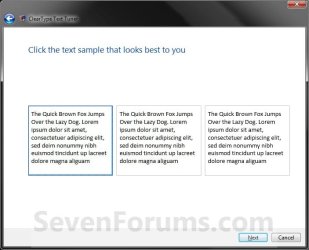
10. Click on the text that looks best to you, and click/tap on Next. (See screenshot below) Step7.jpg
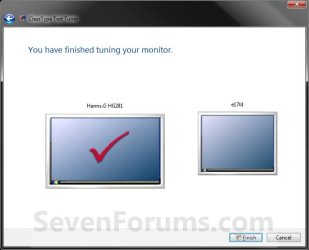
11. Click/tap on Finish. (See screenshot below)
NOTE: If you selected to tune all monitors (step 5), then you will click on Next instead and repeat steps 6 to 11 again for the next monitor. Step8.jpg
That's it,
Shawn


Last edited:
Even after turning off ClearType, it still shows up

I followed your instructions, and ClearType seems to be disabled for the most part, but it keeps showing up on certain headers or menus. Why is this?
 

My Computer

OS
Multiple; XP, Vista, and Win 7, for different computers.
Hello Jenn, and welcome to Seven Forums.

What headers and menus does it still appear to be turned on with? I'll see if I can see the same on my system. :)

Shawn
 

My Computer

Computer type
PC/Desktop
Computer Manufacturer/Model Number
Self built custom
OS
64-bit Windows 11 Pro for Workstations
CPU
Intel i7-8700K OC'd to 5 GHz
Motherboard
ASUS ROG Maximus XI Formula Z390
Memory
64 GB (4x16GB) G.SKILL TridentZ RGB DDR4 3600 MHz
Graphics Card(s)
ASUS ROG-STRIX-GTX1080TI-O11G-GAMING
Sound Card
Integrated
Monitor(s) Displays
2 x Samsung Odyssey G7 27"
Screen Resolution
2560x1440
Hard Drives
1TB Samsung 990 PRO M.2,
4TB Samsung 990 PRO PRO M.2,
TerraMaster F8 SSD Plus NAS
PSU
Seasonic Prime Titanium 850W
Case
Thermaltake Core P3
Cooling
Corsair Hydro H115i
Keyboard
Logitech wireless K800
Mouse
Logitech MX Master 4
Internet Speed
2 Gb/s Download and 100 Mb/s Upload
Antivirus
Malwarebyte Anti-Malware Premium
Browser
Google Chrome
Other Info
Logitech Z625 speaker system,
Logitech BRIO 4K Pro webcam,
HP Color LaserJet Pro MFP M477fdn,
APC SMART-UPS RT 1000 XL - SURT1000XLI,
Galaxy S23 Plus phone
I can confirm this behaviour. it seems the cleartype option for menus (like "file" and "edit") and some other stuff is inverted. whenever you turn off cleartype it will get turned on for those but turned off for everything else. and verse visa.

but it is not for every menu.
you can see it for firefox menus and toolbar buttons.
you can also see it for IE tab titles.

just look at those while switching cleartype on and off multiple times.

cheers.
 

My Computer

OS
windows 7
Hi CloneWarrior,

I checked the areas you mentioned. In IE8, the tab titles do have ClearType turned off for them to, but it is very subtle there. You really have to look to notice it. Everything else was real obvious when ClearType was turned off though.

ON:
On.jpg

OFF:
Off.jpg
 

My Computer

Computer type
PC/Desktop
Computer Manufacturer/Model Number
Self built custom
OS
64-bit Windows 11 Pro for Workstations
CPU
Intel i7-8700K OC'd to 5 GHz
Motherboard
ASUS ROG Maximus XI Formula Z390
Memory
64 GB (4x16GB) G.SKILL TridentZ RGB DDR4 3600 MHz
Graphics Card(s)
ASUS ROG-STRIX-GTX1080TI-O11G-GAMING
Sound Card
Integrated
Monitor(s) Displays
2 x Samsung Odyssey G7 27"
Screen Resolution
2560x1440
Hard Drives
1TB Samsung 990 PRO M.2,
4TB Samsung 990 PRO PRO M.2,
TerraMaster F8 SSD Plus NAS
PSU
Seasonic Prime Titanium 850W
Case
Thermaltake Core P3
Cooling
Corsair Hydro H115i
Keyboard
Logitech wireless K800
Mouse
Logitech MX Master 4
Internet Speed
2 Gb/s Download and 100 Mb/s Upload
Antivirus
Malwarebyte Anti-Malware Premium
Browser
Google Chrome
Other Info
Logitech Z625 speaker system,
Logitech BRIO 4K Pro webcam,
HP Color LaserJet Pro MFP M477fdn,
APC SMART-UPS RT 1000 XL - SURT1000XLI,
Galaxy S23 Plus phone
Here is how it looks on my machine with firefox:

ON:


OFF:


Here are the direct links. you see the difference better, when you download them and switch between them in an image-viewer or have them in different browser-tabs:
ON: http://img10.imageshack.us/img10/796/cleartypeon.png
OFF: http://img10.imageshack.us/img10/4945/cleartypeoff.png

You see, that the menu and the addressbar is exactly turned around. with cleartype on the letters look like cleartype is off. firefox is not the only example. i have the same results with other menus, for example the popup-menu that appears, when i right-click on the desktop.

for me it is distracting. might be, because cleartype isn't configured correctly, but anyway, this shouldn't happen. off still means off ;)

so there seems to be something wrong somewhere.

thanks and cheers!
 

My Computer

OS
windows 7
I'm sorry CloneWarrior, but the ON image looks sharper and clearer to me than the OFF one in all areas of the image. What type of monitor are you using?

If LCD, then you might turn ClearType back on and see if adjusting the settings in ClearType Tuner may help any.
 

My Computer

Computer type
PC/Desktop
Computer Manufacturer/Model Number
Self built custom
OS
64-bit Windows 11 Pro for Workstations
CPU
Intel i7-8700K OC'd to 5 GHz
Motherboard
ASUS ROG Maximus XI Formula Z390
Memory
64 GB (4x16GB) G.SKILL TridentZ RGB DDR4 3600 MHz
Graphics Card(s)
ASUS ROG-STRIX-GTX1080TI-O11G-GAMING
Sound Card
Integrated
Monitor(s) Displays
2 x Samsung Odyssey G7 27"
Screen Resolution
2560x1440
Hard Drives
1TB Samsung 990 PRO M.2,
4TB Samsung 990 PRO PRO M.2,
TerraMaster F8 SSD Plus NAS
PSU
Seasonic Prime Titanium 850W
Case
Thermaltake Core P3
Cooling
Corsair Hydro H115i
Keyboard
Logitech wireless K800
Mouse
Logitech MX Master 4
Internet Speed
2 Gb/s Download and 100 Mb/s Upload
Antivirus
Malwarebyte Anti-Malware Premium
Browser
Google Chrome
Other Info
Logitech Z625 speaker system,
Logitech BRIO 4K Pro webcam,
HP Color LaserJet Pro MFP M477fdn,
APC SMART-UPS RT 1000 XL - SURT1000XLI,
Galaxy S23 Plus phone
you can also see it in another way: if you look at the menu in the off-image (so on for menus), you see that the shortkeys (strg+n, etc.) are not aligned.

anyway, these are images. they should look the same on every monitor. except colours of course. maybe i get distracted easier then you, because of being a perfectionist. ;)
but you could test it yourself. change your cleartype settings in a way, that they DON'T look good. then turn cleartype on and off multiple times to see that different GUI-items seem to invert the settings.

anyway. my goal is not to make it look good on my machine, but to report the initial problem, namely cleartype not being turned on or off completely. there is probably just a boolean-bug somewhere in the code, that inverts the settings. just a quick guess ;)

thanks
 

My Computer

OS
windows 7
CloneWarrior,

My guess is that it may be some glitch between the video drivers and settings somewhere for you. :confused:
 

My Computer

Computer type
PC/Desktop
Computer Manufacturer/Model Number
Self built custom
OS
64-bit Windows 11 Pro for Workstations
CPU
Intel i7-8700K OC'd to 5 GHz
Motherboard
ASUS ROG Maximus XI Formula Z390
Memory
64 GB (4x16GB) G.SKILL TridentZ RGB DDR4 3600 MHz
Graphics Card(s)
ASUS ROG-STRIX-GTX1080TI-O11G-GAMING
Sound Card
Integrated
Monitor(s) Displays
2 x Samsung Odyssey G7 27"
Screen Resolution
2560x1440
Hard Drives
1TB Samsung 990 PRO M.2,
4TB Samsung 990 PRO PRO M.2,
TerraMaster F8 SSD Plus NAS
PSU
Seasonic Prime Titanium 850W
Case
Thermaltake Core P3
Cooling
Corsair Hydro H115i
Keyboard
Logitech wireless K800
Mouse
Logitech MX Master 4
Internet Speed
2 Gb/s Download and 100 Mb/s Upload
Antivirus
Malwarebyte Anti-Malware Premium
Browser
Google Chrome
Other Info
Logitech Z625 speaker system,
Logitech BRIO 4K Pro webcam,
HP Color LaserJet Pro MFP M477fdn,
APC SMART-UPS RT 1000 XL - SURT1000XLI,
Galaxy S23 Plus phone
I want to turn cleartype fully off, right now i have 2d performance issues. cleartype is still on in my taskbar.
 

My Computer

Computer type
PC/Desktop
Computer Manufacturer/Model Number
home built
OS
windows 8.1 Pro x64
CPU
intel i5 4670k @ 4.3ghz
Motherboard
asus z87-plus
Memory
16 gig ram ddr3 @ 1600 corsair vengeance
Graphics Card(s)
evga 970 GTX 4 GIG FTW ACX 2.0
Sound Card
asus xonar D2X
Monitor(s) Displays
benq gw2765ht
Screen Resolution
2560x1440
Hard Drives
Samsung 850 pro SSD 512gig - boot device wooosh
WD black cavalier 640gig WD6401AALS
Seagate 500gig ST3500630AS
WD 2TB Green WDC20EARS
2 x WD Red 3TB WD30EFRX
Samsung 750gig HD753LG - on asmedia controller
PSU
coolermaster silent pro 600watt modular
Case
fractal define R4
Cooling
artic freezer i30, 3 case fans
Keyboard
microsoft business ps2 keyboard
Mouse
microsoft optical black mouse
Internet Speed
80/20 FTTC SkyBB
Antivirus
Nod32 AV v8, HitmanProAlert, SRP, System Hardening
Browser
Chrome x64
Other Info
Intel controller is in AHCI mode currently using IaSTOR 12.8.0.1016 drivers
Hello Chrysalis,

After you uncheck the box to turn off ClearType, see if restarting the computer afterwards may help.
 

My Computer

Computer type
PC/Desktop
Computer Manufacturer/Model Number
Self built custom
OS
64-bit Windows 11 Pro for Workstations
CPU
Intel i7-8700K OC'd to 5 GHz
Motherboard
ASUS ROG Maximus XI Formula Z390
Memory
64 GB (4x16GB) G.SKILL TridentZ RGB DDR4 3600 MHz
Graphics Card(s)
ASUS ROG-STRIX-GTX1080TI-O11G-GAMING
Sound Card
Integrated
Monitor(s) Displays
2 x Samsung Odyssey G7 27"
Screen Resolution
2560x1440
Hard Drives
1TB Samsung 990 PRO M.2,
4TB Samsung 990 PRO PRO M.2,
TerraMaster F8 SSD Plus NAS
PSU
Seasonic Prime Titanium 850W
Case
Thermaltake Core P3
Cooling
Corsair Hydro H115i
Keyboard
Logitech wireless K800
Mouse
Logitech MX Master 4
Internet Speed
2 Gb/s Download and 100 Mb/s Upload
Antivirus
Malwarebyte Anti-Malware Premium
Browser
Google Chrome
Other Info
Logitech Z625 speaker system,
Logitech BRIO 4K Pro webcam,
HP Color LaserJet Pro MFP M477fdn,
APC SMART-UPS RT 1000 XL - SURT1000XLI,
Galaxy S23 Plus phone
makes no difference but after changing the font type in the advanced appearance options I have removed nearly all cleartype, also set cleartype gamma to 0 in the registry.
 

My Computer

Computer type
PC/Desktop
Computer Manufacturer/Model Number
home built
OS
windows 8.1 Pro x64
CPU
intel i5 4670k @ 4.3ghz
Motherboard
asus z87-plus
Memory
16 gig ram ddr3 @ 1600 corsair vengeance
Graphics Card(s)
evga 970 GTX 4 GIG FTW ACX 2.0
Sound Card
asus xonar D2X
Monitor(s) Displays
benq gw2765ht
Screen Resolution
2560x1440
Hard Drives
Samsung 850 pro SSD 512gig - boot device wooosh
WD black cavalier 640gig WD6401AALS
Seagate 500gig ST3500630AS
WD 2TB Green WDC20EARS
2 x WD Red 3TB WD30EFRX
Samsung 750gig HD753LG - on asmedia controller
PSU
coolermaster silent pro 600watt modular
Case
fractal define R4
Cooling
artic freezer i30, 3 case fans
Keyboard
microsoft business ps2 keyboard
Mouse
microsoft optical black mouse
Internet Speed
80/20 FTTC SkyBB
Antivirus
Nod32 AV v8, HitmanProAlert, SRP, System Hardening
Browser
Chrome x64
Other Info
Intel controller is in AHCI mode currently using IaSTOR 12.8.0.1016 drivers
Chrysalis,

I'm happy to hear that you got it sorted. Thank you for posting back your results. :)
 

My Computer

Computer type
PC/Desktop
Computer Manufacturer/Model Number
Self built custom
OS
64-bit Windows 11 Pro for Workstations
CPU
Intel i7-8700K OC'd to 5 GHz
Motherboard
ASUS ROG Maximus XI Formula Z390
Memory
64 GB (4x16GB) G.SKILL TridentZ RGB DDR4 3600 MHz
Graphics Card(s)
ASUS ROG-STRIX-GTX1080TI-O11G-GAMING
Sound Card
Integrated
Monitor(s) Displays
2 x Samsung Odyssey G7 27"
Screen Resolution
2560x1440
Hard Drives
1TB Samsung 990 PRO M.2,
4TB Samsung 990 PRO PRO M.2,
TerraMaster F8 SSD Plus NAS
PSU
Seasonic Prime Titanium 850W
Case
Thermaltake Core P3
Cooling
Corsair Hydro H115i
Keyboard
Logitech wireless K800
Mouse
Logitech MX Master 4
Internet Speed
2 Gb/s Download and 100 Mb/s Upload
Antivirus
Malwarebyte Anti-Malware Premium
Browser
Google Chrome
Other Info
Logitech Z625 speaker system,
Logitech BRIO 4K Pro webcam,
HP Color LaserJet Pro MFP M477fdn,
APC SMART-UPS RT 1000 XL - SURT1000XLI,
Galaxy S23 Plus phone
yep, I will eventually probably at least turn some cleartype back on, this is been done on this machine whilst I investigate 2d performance issues on this machine.
 

My Computer

Computer type
PC/Desktop
Computer Manufacturer/Model Number
home built
OS
windows 8.1 Pro x64
CPU
intel i5 4670k @ 4.3ghz
Motherboard
asus z87-plus
Memory
16 gig ram ddr3 @ 1600 corsair vengeance
Graphics Card(s)
evga 970 GTX 4 GIG FTW ACX 2.0
Sound Card
asus xonar D2X
Monitor(s) Displays
benq gw2765ht
Screen Resolution
2560x1440
Hard Drives
Samsung 850 pro SSD 512gig - boot device wooosh
WD black cavalier 640gig WD6401AALS
Seagate 500gig ST3500630AS
WD 2TB Green WDC20EARS
2 x WD Red 3TB WD30EFRX
Samsung 750gig HD753LG - on asmedia controller
PSU
coolermaster silent pro 600watt modular
Case
fractal define R4
Cooling
artic freezer i30, 3 case fans
Keyboard
microsoft business ps2 keyboard
Mouse
microsoft optical black mouse
Internet Speed
80/20 FTTC SkyBB
Antivirus
Nod32 AV v8, HitmanProAlert, SRP, System Hardening
Browser
Chrome x64
Other Info
Intel controller is in AHCI mode currently using IaSTOR 12.8.0.1016 drivers
I need smooth edges but NO cleartype. I use ClearType Switch to disable it but I still get blurry text on windows' titles and some other controls. How do I turn it off completely?
See attachment below.
 

Attachments

  • 1.PNG
    1.PNG
    6.1 KB · Views: 760

My Computer

Computer Manufacturer/Model Number
Asus
OS
Win7 Ultimate 32b
CPU
Intel Core i5
Memory
4 Gb
Graphics Card(s)
Integrated
Hello Xap,

I'm afraid that's what ClearType is for. That's what your going to get without it. You might see if changing the default font in Windows using OPTION THREE in the tutorial below to one that looks better may help.

http://www.sevenforums.com/tutorials/1175-fonts-change.html

Hope this helps. :)
 

My Computer

Computer type
PC/Desktop
Computer Manufacturer/Model Number
Self built custom
OS
64-bit Windows 11 Pro for Workstations
CPU
Intel i7-8700K OC'd to 5 GHz
Motherboard
ASUS ROG Maximus XI Formula Z390
Memory
64 GB (4x16GB) G.SKILL TridentZ RGB DDR4 3600 MHz
Graphics Card(s)
ASUS ROG-STRIX-GTX1080TI-O11G-GAMING
Sound Card
Integrated
Monitor(s) Displays
2 x Samsung Odyssey G7 27"
Screen Resolution
2560x1440
Hard Drives
1TB Samsung 990 PRO M.2,
4TB Samsung 990 PRO PRO M.2,
TerraMaster F8 SSD Plus NAS
PSU
Seasonic Prime Titanium 850W
Case
Thermaltake Core P3
Cooling
Corsair Hydro H115i
Keyboard
Logitech wireless K800
Mouse
Logitech MX Master 4
Internet Speed
2 Gb/s Download and 100 Mb/s Upload
Antivirus
Malwarebyte Anti-Malware Premium
Browser
Google Chrome
Other Info
Logitech Z625 speaker system,
Logitech BRIO 4K Pro webcam,
HP Color LaserJet Pro MFP M477fdn,
APC SMART-UPS RT 1000 XL - SURT1000XLI,
Galaxy S23 Plus phone
I'm afraid that's what ClearType is for.
No, it is not. There is separate option for edge smoothing that works without cleartype.
I've already changed all my fonts to Tahoma (as you can see on menu @ the screenshot) but I still get cleartype on some controls.

UPDATE: Ok, I've fixed almost all my fonts to Tahoma with no cleartype by modifying aero.msstyles. But windows' caption are still blurry because of cleartype. It seems like Windows totally ignores CAPTIONFONT:FONT parameter in *.msstyles.
 

My Computer

Computer Manufacturer/Model Number
Asus
OS
Win7 Ultimate 32b
CPU
Intel Core i5
Memory
4 Gb
Graphics Card(s)
Integrated
Back
Top