
How to Add Additional Clocks in Windows 7 and Windows 8
Information
Windows 7 and Windows 8 can display up to three clocks: one for the local time and two for the times in other time zones. After you set up additional clocks, you can view them by clicking on or pointing to the taskbar clock.
EXAMPLE: Additional Clocks in Windows
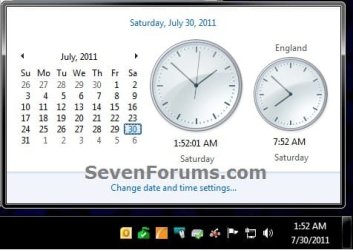

Here's How: 1. Do step 2, 3, or 4 below for how you would like to open Additional Clocks.
2. Click/tap on Time on the taskbar, click/tap on Change date and time settings, and go to step 5 below. (see screenshot below)
3. Right click on Time on the taskbar, click/tap Adjust Date/Time, and go to step 5 below.
4. Open the Control Panel (icons view), click/tap on the Date and Time icon, and go to step 5 below.
5. Click/tap on the Additional Clocks tab. (see screenshot below step 9)
6. Check Show this clock to add a clock. (see screenshot below step 9)
NOTE: You can add one or both additional clocks.
7. Click/tap on the Select time zone drop down arrow, and select a time zone from the list you want for this clock. (see screenshot below step 9)
8. Enter a display name for this clock. (see screenshot below step 9)
NOTE: You can type up to 15 characters.
9. When finished, click/tap on OK. (see screenshot below)

That's it,
Shawn
Related Tutorials
- How to Create an "Additional Clocks" Shortcut in Windows 7 and Vista
- How to Change the Date and Time in Windows 7 and Windows 8
- How to Create a "Date and Time" Shortcut in Windows 7 and Vista
- How to Change the Time Zone in Windows 7
- How to Change the Time Zone in Windows 8
- How to Change the Date Format in Windows 7
- How to Change the Date and Time in Windows 8 and Windows 8.1
- How to Show Day and Month Names in the Windows 7 Taskbar System Tray Date
- How to Change the Time Format in Windows 7 and Windows 8
Last edited:


