Clocking advice?

Valsako

New member
Member
Local time
1:34 PM
Messages
48
I've been dealing with a lot of lag issues with games (Assassin's Creed II, Crysis 2, etc), even though my hardware is perfectly capable of running these games. So I've decided it must be something to do with the clocking, but I'm unsure what exactly would be safe levels, and what what wouldn't, and I don't want to fry the computer. So, I'm asking for advice from those more knowledgeable on this subject than I am.

My specs are already in my profile, but for convenience, I'll list them here as well:

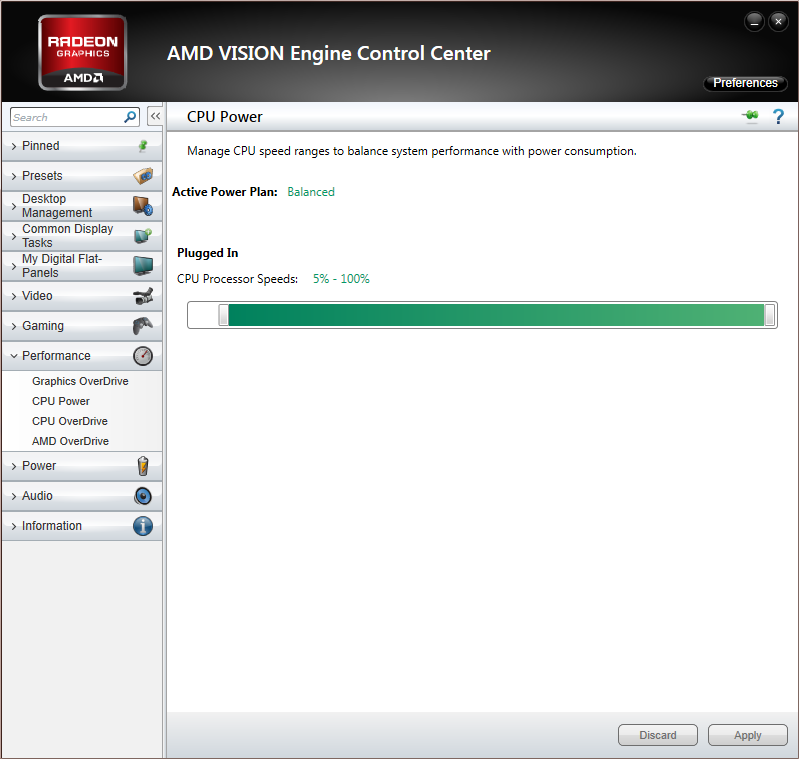
CPU: AMD FX 8350 8-core processor overclocked @ 4.52 GHz

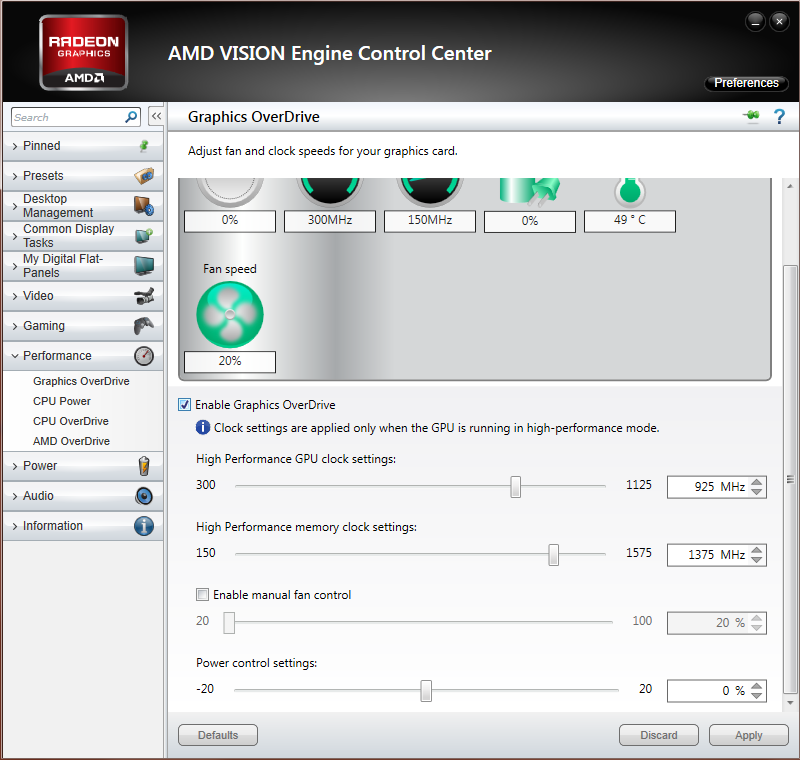
GPU: AMD 7970 3 GB graphics card overclocked at 925 MHz GPU clock, 1,375 MHz Memory clock.

PSU: Corsair 850 Watt.

Is there anything I should change, or maybe increase voltage? I've read before that it can improve the performance significantly, but it's risky.

For reference (if it provides any useful info at all):

These were taken from the AMD Engine Control Center.
proces10.png


gpu_cl10.png
 
Last edited:

My Computer

Computer type
PC/Desktop
Computer Manufacturer/Model Number
iBuyPower
OS
Windows 7 Home Premium 64 bit
CPU
AMD FX 8350 @ 4.52 GHz
Motherboard
Gigabyte GA-970A-UD3 -- AMD 970
Memory
16 GB DDR3 Corsair Vengeance
Graphics Card(s)
AMD Radeon HD 7970 3 GB
Sound Card
3D Premium Surround Sound Onboard
Screen Resolution
1920x1080
Hard Drives
Dual 1 TB Drives - RAID-0 High Performance
PSU
850 Watt - Corsair CMPSU-850AX
Case
NZXT Source 210 Gaming Case Blue
Cooling
Liquid CPU Cooling System [AMD]
Internet Speed
300 KBps download speed.
Antivirus
Microsoft Security Essentials
Browser
Firefox 20.0.1
I would make sure you're running the latest graphic's drivers and leave your OC alone. It isn't responsible for any lag, it will be other resources being used or a driver issue or just the way the system is interacting with that game, IMHO. Is your OC tested stable?
 

My Computer

Computer type
PC/Desktop
Computer Manufacturer/Model Number
A blend of brains, brawn and dumb luck.
OS
Windows 7 Ultimate 64
CPU
i7 3770k OC'd 4.6 @ 1.17v, also FX 8120 & i5 miniITX
Motherboard
MSI P67A-GD80 b3
Memory
32 gb G.Skill Sniper DDR3 10-12-12-31 @ 2133
Graphics Card(s)
XFX Radeon 7870 2GB DDR5
Sound Card
Sound Blaster Z Series Card
Monitor(s) Displays
(2) LG LED 23" 1920 x 1080 2ms Monitors via mini d-port
Screen Resolution
1680 X 1050 p
Hard Drives
Samsung 256 gb 830 SSD sata III
(1) 1 tb WD Black
(2) 1 tb Hitachi deskmates/sata II
(2) 1 tb WD green/sata II
(2) 3 tb Seagate Barracuda
(1) 120 gb OCZ Vertex SS
(1) Drobo 5N w/5 Seagate 3tb
PSU
EVGA modular 1000G2 80% gold rating & APC 1200 RS
Case
CoolerMaster Storm Styker
Cooling
7 case fans 140mm & 120mm, NZXT Kraken X60
Keyboard
(2) Logitech Illuminated Keyboards (1) usb (1) wireless
Mouse
Logitech G700 & T-BC21 - nano nx for the laptop
Internet Speed
Basic 120mbps down
Antivirus
Trend Micro Titanium Max Security & Malwarebytes Premium
Browser
Chrome and IE 10
Other Info
5 Noctua case fans + 3 Noctua in p/p on NZXT cooler
Integrated hot swap drive bays for 2.5" Drives
(2) Lite-on dvd/cd/Blu Ray optical 22X
Integrated fan controller and led on/off
HP Officejet Pro 8630 all-n-one
Hot-swappable 3.5" hard drive bay
Netgear Nighthawk router
Asus USB 3 & sata 6 PCIe card
Vantec IDE to sata adptr./Ultra sata adptr
Lenovo L420 i5 lappy with m sata
Drobo 5N advanced NAS
I would make sure you're running the latest graphic's drivers and leave your OC alone. It isn't responsible for any lag, it will be other resources being used or a driver issue or just the way the system is interacting with that game, IMHO. Is your OC tested stable?

:ditto: It's not likely that the CPU has anything to do with lag.
 

My Computer

Computer type
PC/Desktop
Computer Manufacturer/Model Number
Custom Built
OS
Windows 7 Professional 64bit SP1
CPU
Intel Core i5-3570K @ 4.5GHz
Motherboard
Asus Sabertooth Z77
Memory
Corsair Vengeance 16GB (4x4) @1866MHz CL 9-9-9-24 1T
Graphics Card(s)
EVGA GTX 750 Ti FTW
Sound Card
Onboard Audio
Monitor(s) Displays
Dell S2309W
Screen Resolution
1920x1080
Hard Drives
Samsung 830 128GB SSD - OS
(4) Seagate 5TB HDD
(1) Seagate 2TB HDD
PSU
Seasonic X750 80+ Gold Full Modular
Case
Antec Eleven Hundred Super Mid Tower
Cooling
Intel Liquid Cooler
Keyboard
Max Nighthawk X8 Mechanical keyboard
Mouse
Mionix Naos 7000
Internet Speed
50 Mbps Down / 10 Mbps Up
Antivirus
Microsoft Security Essentials/Malwarebytes Anti-Malware
Browser
Chrome/Firefox
Other Info
Klipsch ProMedia 2.1's
Asus RT-N66R Wireless Router
I may get arguments for saying this -- but really, there aren't any hard and fast "safe" overclocking levels. I did overclocking for YEARS, back when it was a lot of work involving making detail changes in BIOS setting screens and there weren't any cool GUI tools like you have today.

It was worth it back then because you could get serious (as in 50% or more!) speed improvement. And, if you went too high, the PC would simply crash, you would restore BIOS defaults, and start again.

It looks like you're doing considerable overclocking of your GPU, so nothing comes immediately to mind that would explain the lag in the gaming.

What could be the case is that you've got background tasks running that are consuming resources. But, that's just a guess.

Again, I know this "dates" me, but back in the "old days", we would manually shut off all but critical processes to get serious speed improvement. It might be work you're running Task Manager to see what's using resources and shutting down services you don't need.
 

My Computer

Computer type
PC/Desktop
Computer Manufacturer/Model Number
Custom
OS
Win7 Pro 32-bit, Win8 Pro 32-bit
CPU
AMD Phenom II X6 1090T
Motherboard
Gigabyte
Memory
4GB ddr3 1300
Graphics Card(s)
AMD HD 4290 onboard
Sound Card
Builtin Realtek HD Audio
Monitor(s) Displays
Samsung 24" widescreen, LG 23" widescreen
Screen Resolution
1920x1200/1920x1080
Hard Drives
Kingston 256GB SSD
Keyboard
Logitech Illuminated Keyboard
Mouse
Logitech M705 wireless mouse
Antivirus
Norton Av 2013
Browser
IE v10
I would make sure you're running the latest graphic's drivers and leave your OC alone. It isn't responsible for any lag, it will be other resources being used or a driver issue or just the way the system is interacting with that game, IMHO. Is your OC tested stable?

Drivers are up to date and installed properly, perhaps it could just be a resource drain. And yes, the OC is stable.

I would make sure you're running the latest graphic's drivers and leave your OC alone. It isn't responsible for any lag, it will be other resources being used or a driver issue or just the way the system is interacting with that game, IMHO. Is your OC tested stable?

:ditto: It's not likely that the CPU has anything to do with lag.

I had thought it might be the CPU due to the fact that this lag isn't persistent, it just randomly hits on and off. I had considered that maybe the CPU was draining too much power by being set in the BIOS at 4.52 GHz when the regular setting is 4.2 GHz. It was the only reasonable guess after dealing with lag when my hardware far exceeds the requirements for the game's recommended settings, plus the fact that the games I'm running are not that old, so there's no reason for my card to already be too advanced to run them properly.

I may get arguments for saying this -- but really, there aren't any hard and fast "safe" overclocking levels. I did overclocking for YEARS, back when it was a lot of work involving making detail changes in BIOS setting screens and there weren't any cool GUI tools like you have today.

It was worth it back then because you could get serious (as in 50% or more!) speed improvement. And, if you went too high, the PC would simply crash, you would restore BIOS defaults, and start again.

It looks like you're doing considerable overclocking of your GPU, so nothing comes immediately to mind that would explain the lag in the gaming.

What could be the case is that you've got background tasks running that are consuming resources. But, that's just a guess.

Again, I know this "dates" me, but back in the "old days", we would manually shut off all but critical processes to get serious speed improvement. It might be work you're running Task Manager to see what's using resources and shutting down services you don't need.

I figured there wasn't anything guaranteed, but I was more or less just wondering if there would be a general 'safe' level that would not have so many FPS drops at random moments.

Yeah, now if you go too high it fries your hardware from what I've read.

It's not persistent lag, probably should have noted that, it's these random drops that occur quite often. It's not so annoying when it's in a part of the game where you're just sort of walking around, but when it occurs in a part where you're supposed to react quickly and accurately, it's a much bigger annoyance.

Could be.

I've used PCs for awhile (since 1998), I've just never gotten into overclocking until just a few months ago, so it's just something I'm not entirely familiar with. But I will try what you suggested.
 

My Computer

Computer type
PC/Desktop
Computer Manufacturer/Model Number
iBuyPower
OS
Windows 7 Home Premium 64 bit
CPU
AMD FX 8350 @ 4.52 GHz
Motherboard
Gigabyte GA-970A-UD3 -- AMD 970
Memory
16 GB DDR3 Corsair Vengeance
Graphics Card(s)
AMD Radeon HD 7970 3 GB
Sound Card
3D Premium Surround Sound Onboard
Screen Resolution
1920x1080
Hard Drives
Dual 1 TB Drives - RAID-0 High Performance
PSU
850 Watt - Corsair CMPSU-850AX
Case
NZXT Source 210 Gaming Case Blue
Cooling
Liquid CPU Cooling System [AMD]
Internet Speed
300 KBps download speed.
Antivirus
Microsoft Security Essentials
Browser
Firefox 20.0.1
If the over clock was done in bios and tested fine then your good to go. I would look to background resources and other conflicts like running two AV's together and things like that. With the spec's of this rig I doubt it's the hardware but maybe placing all back to stock default bios setting is a smart idea. Write down where you got to with all settings or save in bios and then go back to default and run you games to see if you perceive a difference.
 

My Computer

Computer type
PC/Desktop
Computer Manufacturer/Model Number
A blend of brains, brawn and dumb luck.
OS
Windows 7 Ultimate 64
CPU
i7 3770k OC'd 4.6 @ 1.17v, also FX 8120 & i5 miniITX
Motherboard
MSI P67A-GD80 b3
Memory
32 gb G.Skill Sniper DDR3 10-12-12-31 @ 2133
Graphics Card(s)
XFX Radeon 7870 2GB DDR5
Sound Card
Sound Blaster Z Series Card
Monitor(s) Displays
(2) LG LED 23" 1920 x 1080 2ms Monitors via mini d-port
Screen Resolution
1680 X 1050 p
Hard Drives
Samsung 256 gb 830 SSD sata III
(1) 1 tb WD Black
(2) 1 tb Hitachi deskmates/sata II
(2) 1 tb WD green/sata II
(2) 3 tb Seagate Barracuda
(1) 120 gb OCZ Vertex SS
(1) Drobo 5N w/5 Seagate 3tb
PSU
EVGA modular 1000G2 80% gold rating & APC 1200 RS
Case
CoolerMaster Storm Styker
Cooling
7 case fans 140mm & 120mm, NZXT Kraken X60
Keyboard
(2) Logitech Illuminated Keyboards (1) usb (1) wireless
Mouse
Logitech G700 & T-BC21 - nano nx for the laptop
Internet Speed
Basic 120mbps down
Antivirus
Trend Micro Titanium Max Security & Malwarebytes Premium
Browser
Chrome and IE 10
Other Info
5 Noctua case fans + 3 Noctua in p/p on NZXT cooler
Integrated hot swap drive bays for 2.5" Drives
(2) Lite-on dvd/cd/Blu Ray optical 22X
Integrated fan controller and led on/off
HP Officejet Pro 8630 all-n-one
Hot-swappable 3.5" hard drive bay
Netgear Nighthawk router
Asus USB 3 & sata 6 PCIe card
Vantec IDE to sata adptr./Ultra sata adptr
Lenovo L420 i5 lappy with m sata
Drobo 5N advanced NAS
I would make sure you're running the latest graphic's drivers and leave your OC alone. It isn't responsible for any lag, it will be other resources being used or a driver issue or just the way the system is interacting with that game, IMHO. Is your OC tested stable?


Yup Drop the overclock and go to AMD Catalyst

I have the same set up I had micro stutter in the very beginning with 2x 7970's after a few drivers kicked in it was fixed ,if you are using the drivers that came on the disc then there is the issue those drivers sucked

Try putting on V-sync to see if it controls the dips and stuttering if not then update the drivers you have a Corsair 850w i'm assuming AX850 more than enough to power it
 

My Computer

Computer type
PC/Desktop
Computer Manufacturer/Model Number
CoreI7-6700K MrFingerIII Special Builds
OS
Windows 10 Home Premium 64bit sp1
CPU
Intel I7-6700K @ 4.6 Ghz 1.344 volts everyday OC
Motherboard
Asrock Fatality K6 Z170 Socket 1151
Memory
32GB G-Skill TridentZ 3200mhz 16-18-18-38 DDR4
Graphics Card(s)
Sli Gigabyte Windforce GTX 980 G1
Sound Card
AC97 Creative Rage Tactic 3D Headphones Bluetooth
Monitor(s) Displays
27" Asus ROG Swift PG278Q G-Sync 48" Vizio Smart HD TV
Screen Resolution
2560x1440p 27"- 48" Currently Gaming at 2560x1440p Res 2K
Hard Drives
250GB Samsung Evo840SSD Seagate baracuda 500 GB WD Mybook 500Gb 1TB Seagate Barracuda
PSU
HX1050w Corsair Silver 80plus certified crosfire/sli
Case
Enthod Pro Full Tower
Cooling
Corsair H110i GT 280 mm High Performance WaterBlock
Keyboard
Logitech wireless keyboard
Mouse
Logitech wireless mouse
Internet Speed
Cox Cable 100+ mb
Antivirus
WebRoot Spysweeper with Antivirus
Browser
IE-10, Chrome, Opera
Other Info
My Other Rig is a AMD FX8320E @4.6Ghz 16GB Ballistic Sport Ram
Mobo Asrock Fatality 990FX 120GB OCZ SSD 1TB Seagate Barracuda Corsair H75 Cooling PSU Corsair CX750
GPU GTX Gigabyte 970G1
Back
Top