Solved Cloned an SSD; new one works, but original doesn't

cpmusic

New member
Member
Local time
3:10 AM
Messages
43
Location
Southern California
I've got a problem I'd like to solve. I don't have to solve it for reasons that are clear below, but I'd really like to know what happened. Call it an exercise for exercise's sake. I've searched the forum but can't find any threads on this issue.

Recently I cloned my existing SSD to a new SSD to give the Windows 10 free upgrade a try without risking my original configuration. I'm running W7 Pro 64-bit SP1, and I cloned the drive with the Acronis software that came with the new SSD.

The new SSD booted up to W7 without a hitch. The upgrade to W10 didn't work (I tried 3 times) but the SSD was returned to W7 without alteration, so the only thing I lost was time.

But here's the thing: the original SSD will no longer boot up. There's no message about a missing system disk, just a black screen with a blinking cursor at top left. And when I look in the BIOS with that SSD connected, the Windows Boot Manager that used to appear in the boot options is missing.

Some searching and testing revealed that the BOOTMGR was installed on my D drive, but the D drive had been connected and running all along. Moreover, when I re-connected the new SSD, it worked as it should.

It would appear that BOOTMGR location has something to do with the original SSD not booting, but I can't see how unless the cloning software altered the original SSD, and that doesn't make sense. I tried using the Repair function from the W7 installation disk, but it gave me a message about the version being wrong, which I'm guessing occurred because my PC has SP1. I have a Rescue Disk I made with Windows, but it won't boot (I expect I'm missing a step there).

For what it's worth, the original SSD is a Crucial M4 256 gb which is a little over three years old but has not given me a second's trouble until now. The new SSD is a Crucial MX200 250 gb.

Once again, the new SSD works, so I don't have to solve this puzzle, but I want to. Any thoughts or suggestions would be appreciated.

BTW, I expect that the BOOTMGR location was the reason the Windows 10 upgrade didn't work. I had no idea that Windows installation would load it on a second drive when present, and I'll be darned if I know why, but that seems to be common. I've since fixed it with EasyBCD, thanks to a post on this forum.
 

My Computer My Computer

At a glance

Windows 7 Pro 64-bitIntel Core i5-3570KCorsair 2x4gbIntel HD Graphics 4000, on motherboard, 1gb
Computer type
PC/Desktop
Computer Manufacturer/Model Number
Generic (BIY)
OS
Windows 7 Pro 64-bit
CPU
Intel Core i5-3570K
Motherboard
Gigabyte GA-Z77-DS3H
Memory
Corsair 2x4gb
Graphics Card(s)
Intel HD Graphics 4000, on motherboard, 1gb
Sound Card
Realtek Audio on motherboard
Monitor(s) Displays
HP Pavillion 22bw
Screen Resolution
1920x1080
Hard Drives
Crucial MX200, Toshiba 3tb spinning (data) drive
Case
Corsair something-or-other
Cooling
CPU fan, 2 x case fans
Keyboard
Microsoft wired keyboard
Mouse
Logitech wireless
Antivirus
Avast free
Browser
IE11, Chrome
Hello and welcome cpmusic and for starters well done on doing what I do when either trying a new OS (like you I tired 10:()

Now I am assuming that using the Acronis has somehow not cloned the new drive in a manner that leaves the original drive ok. I use Macrium to be honest and never had a problem.

But that doesn't solve your query. I am also assuming you want a clean 7 on the new drive?? and the old drive cleaned up for use??

What I would do to be honest is to clean all the new drive and clean install the 7 again providing you save the data from it before you clean all because the cloned drive I put 10 on and then tried to get back to 7 never worked well at all and I ended up doing what I have suggested you do;)
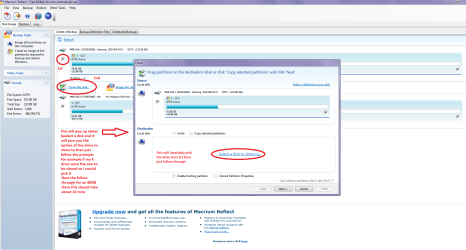
Now this is the program I find best for cloning (as above) Macrium Reflect Free it is a very useful tool for imaging too see this http://www.sevenforums.com/tutorials/73828-imaging-free-macrium.html
To clone see my pic if unsure please ask
 

Attachments

  • CLONE.PNG
    CLONE.PNG
    78.4 KB · Views: 1

My Computer My Computer

At a glance

Desk1 7 Home Prem / Desk2 10 Pro / Main lap A...Desk1 i5 3750K / Laptop i7 GTX 860M / Desk2 i...Desk1 8GB (1866) / Desk2 16GB (1333) / Laptop...Desk 1& 2NVidia GTX 650 & Laptops on board Intel
Computer type
PC/Desktop
Computer Manufacturer/Model Number
Own build (new) Desk1 / Asus ROG Win 7 / Desk2 1st build
OS
Desk1 7 Home Prem / Desk2 10 Pro / Main lap Asus ROG 10 Pro 2 laptop Toshiba 7 Pro Asus P2520 7 & 10
CPU
Desk1 i5 3750K / Laptop i7 GTX 860M / Desk2 i5 2500
Motherboard
Desk1 Asus P877-V / Desk2 Gigabyte H67 UD3H / Laptop ?
Memory
Desk1 8GB (1866) / Desk2 16GB (1333) / Laptop 8Gb DDR3
Graphics Card(s)
Desk 1& 2NVidia GTX 650 & Laptops on board Intel
Sound Card
Desk 1 & 2 -XONAR DG Realtek High Def audio Laptop
Monitor(s) Displays
Desk 1 Benq HD 2450 / Desk2 Philips 24" / Laptop 17.5"
Screen Resolution
1920x1080 D1 & D2 & Laptop 1
Hard Drives
Desk1 Samsung 120GB 830 SSD
Asus ROG 256GB 850 Pro SSD
Desk2 Samsung 840 256 SSD
Toshiba 120GB EVO
PSU
Desk 1 Corsair HX 1050/ Laptop ? / Desk 2 Corsair HX 650
Case
Desk 1 Cooler HAF XM ? Toshiba laptop / Desk2 Coolermaster
Cooling
Fans on all Desk1 -2 Desk2 - all Coolermasters 5 Laptop ?
Keyboard
Desk 1 MS Sidewinder X6 Desk 2 MS Sidewinder X 4
Mouse
Desk 1&2 - Gigabyte MS 900 gamer - laptop - Logitec wireless
Internet Speed
ADSL2+
Other Info
One other Desktop (tester) and spare Toshba laptop both with SSD's
Running Kaspersky 2016 ISS on all machines config'd identically
Logitec audio stereo systems on each machine (x3)
Canon MG5250MFC
Router/modem TP-Link running WPA2SK
I likewise tried to clone my HD to an SSD, using Clonezilla, and the only problem was that it wasn't bootable although it was supposed to be an exact copy of the entire disk (both being the same size). The content was all there, but it just wasn't bootable. I tried again with Macrium (free), and at the tail end of the operation there were some error messages, and when I tried to open Explorer, nothing was working: the original HD installation had gotten trashed and now the original drive was only partially bootable (Windows would quasi-start but then went to a pastel stasis field). Fortunately, the SSD was now bootable. After swapping the order of the drives, MMC tells me that the HD had a signature collision so the HD was offline. Your problem sounds similar to my problem.
 

My Computer My Computer

At a glance

Win7-64 pro; XP
Computer type
PC/Desktop
Computer Manufacturer/Model Number
Dell (Precision, Dimension), Vaio, IBM Thinkpad
OS
Win7-64 pro; XP
Yep I agree only I think the 10 OS has a lot of remnants hence my clean all with DISKPART. That stopped the nonsense real quick.

Maybe an idea to disconnect the spinner until the problem is sorted and say use a new one for data. The data on the wonky spinner can be got at using this if you want to it is free and works good when I do fixes on older machine's with almost to dead drives;)

BOOTABLE UBUNTU

Make a bootable Ubuntu disk http://www.ubuntu.com/download

Set the BIOS to boot from the optical when themachine boots it will show you a screen with TRY or INSTALL >select TRY not INSTALL

When it is finished - it takes very little time youwill get a screen like in the pic .

Open the drive you want > User and dig downuntil you get to the data / settings you may be able to copy / paste thematerial you want to an external source or other installed drive doing this.

I am not sure if it will but I have recovered tonsof data etc using this method both on "dead" or just plain drivesthat you cannot get data from using Windows.

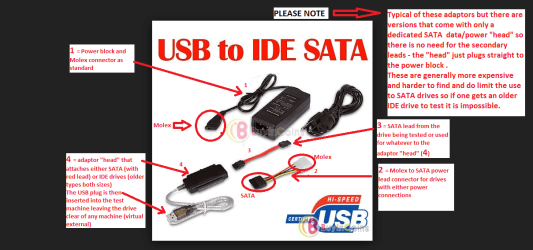
You can do this by just disconnecting the SATA data cable from the spinner drive and boot then reattach it or use a USB to SATA adaptor see pics
 

Attachments

  • UBUNTU SCREEN X2.PNG
    UBUNTU SCREEN X2.PNG
    272.7 KB · Views: 2
  • ADAPTOR _ USB_SATA.PNG
    ADAPTOR _ USB_SATA.PNG
    85.5 KB · Views: 1

My Computer My Computer

At a glance

Desk1 7 Home Prem / Desk2 10 Pro / Main lap A...Desk1 i5 3750K / Laptop i7 GTX 860M / Desk2 i...Desk1 8GB (1866) / Desk2 16GB (1333) / Laptop...Desk 1& 2NVidia GTX 650 & Laptops on board Intel
Computer type
PC/Desktop
Computer Manufacturer/Model Number
Own build (new) Desk1 / Asus ROG Win 7 / Desk2 1st build
OS
Desk1 7 Home Prem / Desk2 10 Pro / Main lap Asus ROG 10 Pro 2 laptop Toshiba 7 Pro Asus P2520 7 & 10
CPU
Desk1 i5 3750K / Laptop i7 GTX 860M / Desk2 i5 2500
Motherboard
Desk1 Asus P877-V / Desk2 Gigabyte H67 UD3H / Laptop ?
Memory
Desk1 8GB (1866) / Desk2 16GB (1333) / Laptop 8Gb DDR3
Graphics Card(s)
Desk 1& 2NVidia GTX 650 & Laptops on board Intel
Sound Card
Desk 1 & 2 -XONAR DG Realtek High Def audio Laptop
Monitor(s) Displays
Desk 1 Benq HD 2450 / Desk2 Philips 24" / Laptop 17.5"
Screen Resolution
1920x1080 D1 & D2 & Laptop 1
Hard Drives
Desk1 Samsung 120GB 830 SSD
Asus ROG 256GB 850 Pro SSD
Desk2 Samsung 840 256 SSD
Toshiba 120GB EVO
PSU
Desk 1 Corsair HX 1050/ Laptop ? / Desk 2 Corsair HX 650
Case
Desk 1 Cooler HAF XM ? Toshiba laptop / Desk2 Coolermaster
Cooling
Fans on all Desk1 -2 Desk2 - all Coolermasters 5 Laptop ?
Keyboard
Desk 1 MS Sidewinder X6 Desk 2 MS Sidewinder X 4
Mouse
Desk 1&2 - Gigabyte MS 900 gamer - laptop - Logitec wireless
Internet Speed
ADSL2+
Other Info
One other Desktop (tester) and spare Toshba laptop both with SSD's
Running Kaspersky 2016 ISS on all machines config'd identically
Logitec audio stereo systems on each machine (x3)
Canon MG5250MFC
Router/modem TP-Link running WPA2SK
ICIT2LOL and DavidOdden, thank you for your responses. I've never been fond of upgrading Windows from an existing installation, but Microsoft won't allow a clean install to get a free upgrade 7 or 8 to 10 from the online image unless you upgrade an existing installation first. That's just stupid, since the forced upgrade is so buggy and the image could be written to require your 7 or 8 product code, but it seems to be par for the course with Microsoft these days. Witness the "bad penny" KB3035583 update and the 10-style data-mining updates to 7 and 8.

But I digress.

As it happens, my attempted upgrade to 10 on the new SSD returned the drive to 7 without any obvious glitches. That was a bit of a shock, but a pleasant one. I'm still wondering how the cloning process altered the source drive, but from David's post, it seems that my experience isn't unique. I may do a clean installation of 7 when my mind clears a bit, but I'll buy a new SSD so I don't "fix what ain't broke," and I'll use the old SSD to hold an image of the current one--assuming, of course, that the imaging process doesn't corrupt the SSD that works. I'm taking nothing for granted.

(I'm still wondering why my 7 installation DVD is telling me that the disk on which it was used has a different version of 7, and why the System Repair Disk I made in Windows won't boot at all. But I'll search the forum and, if needed, start separate threads.)
 

My Computer My Computer

At a glance

Windows 7 Pro 64-bitIntel Core i5-3570KCorsair 2x4gbIntel HD Graphics 4000, on motherboard, 1gb
Computer type
PC/Desktop
Computer Manufacturer/Model Number
Generic (BIY)
OS
Windows 7 Pro 64-bit
CPU
Intel Core i5-3570K
Motherboard
Gigabyte GA-Z77-DS3H
Memory
Corsair 2x4gb
Graphics Card(s)
Intel HD Graphics 4000, on motherboard, 1gb
Sound Card
Realtek Audio on motherboard
Monitor(s) Displays
HP Pavillion 22bw
Screen Resolution
1920x1080
Hard Drives
Crucial MX200, Toshiba 3tb spinning (data) drive
Case
Corsair something-or-other
Cooling
CPU fan, 2 x case fans
Keyboard
Microsoft wired keyboard
Mouse
Logitech wireless
Antivirus
Avast free
Browser
IE11, Chrome
Sorry mate I got a bit out of kilter there I thought it was your original post - night duty does that to you ;)

Now when you are doing the install yes do look out for that KB there are ways of dealing with it like hiding etc and if by chance or bad luck it gets loaded you can block the install. (I even deleted the GWX reg entry from my machines but please don't try unless it is there and only if you are confident in messing in there.)

There are tutorials in the forum to avoid the 10 OS installing and on the sister 10 forum Windows 10 Forums - Windows 10 Forums just sign up if you want to I did simply to get my problems fixed and it doesn't cost you anything. Here is one I used Windows Update Automatic Updates - Enable or Disable in Windows 10 - Windows 10 Forums

I think your idea of a clean install is the only way to go to be certain and if you haven't got any install media if you know someone with a Windows 7 DVD you can install from it if you have a code for the version you already have installed on your machine see this http://www.sevenforums.com/tutorials/219487-clean-reinstall-factory-oem-windows-7-a.html > Point 1 section especially about the ei.cfg removal tool

When you are finished and don't mind doing a little tidying up and lose a but of "bling" like transparency this is an excellent tutorial to get the machine really up to scratch - it is my bible for computing
http://www.sevenforums.com/tutorials/11728-optimize-windows-7-a.html
 

My Computer My Computer

At a glance

Desk1 7 Home Prem / Desk2 10 Pro / Main lap A...Desk1 i5 3750K / Laptop i7 GTX 860M / Desk2 i...Desk1 8GB (1866) / Desk2 16GB (1333) / Laptop...Desk 1& 2NVidia GTX 650 & Laptops on board Intel
Computer type
PC/Desktop
Computer Manufacturer/Model Number
Own build (new) Desk1 / Asus ROG Win 7 / Desk2 1st build
OS
Desk1 7 Home Prem / Desk2 10 Pro / Main lap Asus ROG 10 Pro 2 laptop Toshiba 7 Pro Asus P2520 7 & 10
CPU
Desk1 i5 3750K / Laptop i7 GTX 860M / Desk2 i5 2500
Motherboard
Desk1 Asus P877-V / Desk2 Gigabyte H67 UD3H / Laptop ?
Memory
Desk1 8GB (1866) / Desk2 16GB (1333) / Laptop 8Gb DDR3
Graphics Card(s)
Desk 1& 2NVidia GTX 650 & Laptops on board Intel
Sound Card
Desk 1 & 2 -XONAR DG Realtek High Def audio Laptop
Monitor(s) Displays
Desk 1 Benq HD 2450 / Desk2 Philips 24" / Laptop 17.5"
Screen Resolution
1920x1080 D1 & D2 & Laptop 1
Hard Drives
Desk1 Samsung 120GB 830 SSD
Asus ROG 256GB 850 Pro SSD
Desk2 Samsung 840 256 SSD
Toshiba 120GB EVO
PSU
Desk 1 Corsair HX 1050/ Laptop ? / Desk 2 Corsair HX 650
Case
Desk 1 Cooler HAF XM ? Toshiba laptop / Desk2 Coolermaster
Cooling
Fans on all Desk1 -2 Desk2 - all Coolermasters 5 Laptop ?
Keyboard
Desk 1 MS Sidewinder X6 Desk 2 MS Sidewinder X 4
Mouse
Desk 1&2 - Gigabyte MS 900 gamer - laptop - Logitec wireless
Internet Speed
ADSL2+
Other Info
One other Desktop (tester) and spare Toshba laptop both with SSD's
Running Kaspersky 2016 ISS on all machines config'd identically
Logitec audio stereo systems on each machine (x3)
Canon MG5250MFC
Router/modem TP-Link running WPA2SK
Yep I agree only I think the 10 OS has a lot of remnants hence my clean all with DISKPART. That stopped the nonsense real quick.

Maybe an idea to disconnect the spinner until the problem is sorted and say use a new one for data. The data on the wonky spinner can be got at using this if you want to it is free and works good when I do fixes on older machine's with almost to dead drives;)

This is why the clean install makes sense, but for now 7 is working well, and my spinner is working well, too. I don't know whether the BOOTMGR fix I used moves BOOTMGR to the C drive or simply copies it, so it may be worthwhile to move just the data to a backup drive.

(I've been backing up my spinner with the hard disk copy function in Paragon Hard Disk Manager and using ROBOCOPY for incremental backups, but of course that will copy everything, including BOOTMGR, if it's there. And FWIW, I keep two spinner backups. I'm sure that's overkill, but I have a lot of data files.)
 

My Computer My Computer

At a glance

Windows 7 Pro 64-bitIntel Core i5-3570KCorsair 2x4gbIntel HD Graphics 4000, on motherboard, 1gb
Computer type
PC/Desktop
Computer Manufacturer/Model Number
Generic (BIY)
OS
Windows 7 Pro 64-bit
CPU
Intel Core i5-3570K
Motherboard
Gigabyte GA-Z77-DS3H
Memory
Corsair 2x4gb
Graphics Card(s)
Intel HD Graphics 4000, on motherboard, 1gb
Sound Card
Realtek Audio on motherboard
Monitor(s) Displays
HP Pavillion 22bw
Screen Resolution
1920x1080
Hard Drives
Crucial MX200, Toshiba 3tb spinning (data) drive
Case
Corsair something-or-other
Cooling
CPU fan, 2 x case fans
Keyboard
Microsoft wired keyboard
Mouse
Logitech wireless
Antivirus
Avast free
Browser
IE11, Chrome
Ok glad it is getting there and you always have that Ubuntu thing to fall back on - I will PM you.

If you want to image this is just about the bees knees http://www.sevenforums.com/tutorials/73828-imaging-free-macrium.html indispensable tool and free;) I do a weekly scheduled image on my machines when I get to using them all as I live in two different locales. It does an excellent clone too.
 

My Computer My Computer

At a glance

Desk1 7 Home Prem / Desk2 10 Pro / Main lap A...Desk1 i5 3750K / Laptop i7 GTX 860M / Desk2 i...Desk1 8GB (1866) / Desk2 16GB (1333) / Laptop...Desk 1& 2NVidia GTX 650 & Laptops on board Intel
Computer type
PC/Desktop
Computer Manufacturer/Model Number
Own build (new) Desk1 / Asus ROG Win 7 / Desk2 1st build
OS
Desk1 7 Home Prem / Desk2 10 Pro / Main lap Asus ROG 10 Pro 2 laptop Toshiba 7 Pro Asus P2520 7 & 10
CPU
Desk1 i5 3750K / Laptop i7 GTX 860M / Desk2 i5 2500
Motherboard
Desk1 Asus P877-V / Desk2 Gigabyte H67 UD3H / Laptop ?
Memory
Desk1 8GB (1866) / Desk2 16GB (1333) / Laptop 8Gb DDR3
Graphics Card(s)
Desk 1& 2NVidia GTX 650 & Laptops on board Intel
Sound Card
Desk 1 & 2 -XONAR DG Realtek High Def audio Laptop
Monitor(s) Displays
Desk 1 Benq HD 2450 / Desk2 Philips 24" / Laptop 17.5"
Screen Resolution
1920x1080 D1 & D2 & Laptop 1
Hard Drives
Desk1 Samsung 120GB 830 SSD
Asus ROG 256GB 850 Pro SSD
Desk2 Samsung 840 256 SSD
Toshiba 120GB EVO
PSU
Desk 1 Corsair HX 1050/ Laptop ? / Desk 2 Corsair HX 650
Case
Desk 1 Cooler HAF XM ? Toshiba laptop / Desk2 Coolermaster
Cooling
Fans on all Desk1 -2 Desk2 - all Coolermasters 5 Laptop ?
Keyboard
Desk 1 MS Sidewinder X6 Desk 2 MS Sidewinder X 4
Mouse
Desk 1&2 - Gigabyte MS 900 gamer - laptop - Logitec wireless
Internet Speed
ADSL2+
Other Info
One other Desktop (tester) and spare Toshba laptop both with SSD's
Running Kaspersky 2016 ISS on all machines config'd identically
Logitec audio stereo systems on each machine (x3)
Canon MG5250MFC
Router/modem TP-Link running WPA2SK
Success! It's not quite the way I expected, but that's okay.

Some searching on this forum led me to the EasyRE recovery disk website. I watched the video and was impressed, so I sprang for the price of a download. I figured it would be worth it if it works, since my wife and I have four Windows 7 computers between us.

I disconnected my newer SSD (C drive) and D drive, connected the old SSD, and tried to boot. No dice; it said the system disk was missing. So I rebooted with the EasyRE disk. It took a while to load (not surprising with a CD) but when it finished loading, I ran Automated Repair. The software it did its thing and after about five minutes it reported that the problems were solved, including rebuilding the boot manager.

I removed the CD and rebooted. The Windows logo appeared briefly and then CHKDSK started. I let it run, and about ten minutes later the computer booted up to 7 as if nothing had happened. I rebooted again to check the BIOS, and Windows Boot Manager is no longer an option in the boot order. Now the first item is UEFI: Crucial M4, followed by the optical drive and the M4 drive itself.

Since I only cloned the drive a couple of days ago and have all my data on a separate drive, I have very little to catch up on, and I can use the newer SSD for a clean 7 install when I feel up to it. I still don't know why or how the cloning procedure altered the source drive, but I don't care anymore.

My thanks to the folks who responded. Although my answer lay in that recovery disk, I don't know whether I'd have kept looking without some encouragement.
 

My Computer My Computer

At a glance

Windows 7 Pro 64-bitIntel Core i5-3570KCorsair 2x4gbIntel HD Graphics 4000, on motherboard, 1gb
Computer type
PC/Desktop
Computer Manufacturer/Model Number
Generic (BIY)
OS
Windows 7 Pro 64-bit
CPU
Intel Core i5-3570K
Motherboard
Gigabyte GA-Z77-DS3H
Memory
Corsair 2x4gb
Graphics Card(s)
Intel HD Graphics 4000, on motherboard, 1gb
Sound Card
Realtek Audio on motherboard
Monitor(s) Displays
HP Pavillion 22bw
Screen Resolution
1920x1080
Hard Drives
Crucial MX200, Toshiba 3tb spinning (data) drive
Case
Corsair something-or-other
Cooling
CPU fan, 2 x case fans
Keyboard
Microsoft wired keyboard
Mouse
Logitech wireless
Antivirus
Avast free
Browser
IE11, Chrome

My Computer My Computer

At a glance

Multi-Boot W7_Pro_x64 W8.1_Pro_x64 W10_Pro_x6...AMD Athlon II x4 6206GB GSkill DDR2 800AMD 4670 GPU + AMD 4200 IGP
Computer type
PC/Desktop
Computer Manufacturer/Model Number
home built
OS
Multi-Boot W7_Pro_x64 W8.1_Pro_x64 W10_Pro_x64 +Linux_VMs +Chromium_VM
CPU
AMD Athlon II x4 620
Motherboard
Gigabyte GA-MA785G-UD3H
Memory
6GB GSkill DDR2 800
Graphics Card(s)
AMD 4670 GPU + AMD 4200 IGP
Sound Card
on board Realtek ALC889A
Monitor(s) Displays
RCA 40" LCD TV, Insignia 32" LCD TV, HP 15" LCD monitor
Screen Resolution
1680 x 1050
Hard Drives
OCZ Vertex 3 120GB,
Samsung F3 1TB (3),
Several others - WD, Seagate, Hitachi, ...
PSU
Corsair 500 W
Case
Rosewill mid tower
Cooling
CM 90mm rifle
Keyboard
Gyration wireless, Logitech wireless, Dell USB wired
Mouse
Gyration wireless, Logitech wireless, V7 USB wired
Internet Speed
Spectrum - 100Mbps D / 10Mbps U
Antivirus
Avast, MBAM3, EMET, WinPatrol
Browser
Pale Moon, Firefox, IE
Other Info
2 multi-boot PC's
Mainly HTPC/Office/Gen purpose (no gaming).
Trendnet USB KVM.
LG DVD burner/Blue Ray Player.
Tray system for removable SATA backup drives.

Not currently OCd, under-volted.
I use Hybrid sleep, rarely re-boot or shutdown.

Hauppauge HD-PVR, Avermedia PCIe TV Tuner, Hauppauge PCI TV Tuner.
I've never been fond of upgrading Windows from an existing installation, but Microsoft won't allow a clean install to get a free upgrade 7 or 8 to 10 from the online image unless you upgrade an existing installation first.

It is possible to clean install Win 10 without doing the upgrade install first.
Here is a tutorial by Brink explaining how:
Clean Install Windows 10 Directly without having to Upgrade First - Windows 10 Forums

Cool! Thank you!
 

My Computer My Computer

At a glance

Windows 7 Pro 64-bitIntel Core i5-3570KCorsair 2x4gbIntel HD Graphics 4000, on motherboard, 1gb
Computer type
PC/Desktop
Computer Manufacturer/Model Number
Generic (BIY)
OS
Windows 7 Pro 64-bit
CPU
Intel Core i5-3570K
Motherboard
Gigabyte GA-Z77-DS3H
Memory
Corsair 2x4gb
Graphics Card(s)
Intel HD Graphics 4000, on motherboard, 1gb
Sound Card
Realtek Audio on motherboard
Monitor(s) Displays
HP Pavillion 22bw
Screen Resolution
1920x1080
Hard Drives
Crucial MX200, Toshiba 3tb spinning (data) drive
Case
Corsair something-or-other
Cooling
CPU fan, 2 x case fans
Keyboard
Microsoft wired keyboard
Mouse
Logitech wireless
Antivirus
Avast free
Browser
IE11, Chrome
You're welcome !
 

My Computer My Computer

At a glance

Multi-Boot W7_Pro_x64 W8.1_Pro_x64 W10_Pro_x6...AMD Athlon II x4 6206GB GSkill DDR2 800AMD 4670 GPU + AMD 4200 IGP
Computer type
PC/Desktop
Computer Manufacturer/Model Number
home built
OS
Multi-Boot W7_Pro_x64 W8.1_Pro_x64 W10_Pro_x64 +Linux_VMs +Chromium_VM
CPU
AMD Athlon II x4 620
Motherboard
Gigabyte GA-MA785G-UD3H
Memory
6GB GSkill DDR2 800
Graphics Card(s)
AMD 4670 GPU + AMD 4200 IGP
Sound Card
on board Realtek ALC889A
Monitor(s) Displays
RCA 40" LCD TV, Insignia 32" LCD TV, HP 15" LCD monitor
Screen Resolution
1680 x 1050
Hard Drives
OCZ Vertex 3 120GB,
Samsung F3 1TB (3),
Several others - WD, Seagate, Hitachi, ...
PSU
Corsair 500 W
Case
Rosewill mid tower
Cooling
CM 90mm rifle
Keyboard
Gyration wireless, Logitech wireless, Dell USB wired
Mouse
Gyration wireless, Logitech wireless, V7 USB wired
Internet Speed
Spectrum - 100Mbps D / 10Mbps U
Antivirus
Avast, MBAM3, EMET, WinPatrol
Browser
Pale Moon, Firefox, IE
Other Info
2 multi-boot PC's
Mainly HTPC/Office/Gen purpose (no gaming).
Trendnet USB KVM.
LG DVD burner/Blue Ray Player.
Tray system for removable SATA backup drives.

Not currently OCd, under-volted.
I use Hybrid sleep, rarely re-boot or shutdown.

Hauppauge HD-PVR, Avermedia PCIe TV Tuner, Hauppauge PCI TV Tuner.
Yep that would be the way to go Chris on a dedicated SSD and then it only a matter of wiping it or simply disconnecting it when you want.

Having said that with all the nonsense and shenanigans with 10 and having tried it I will not be doing anything until support for 7 runs out. :cool:
 

My Computer My Computer

At a glance

Desk1 7 Home Prem / Desk2 10 Pro / Main lap A...Desk1 i5 3750K / Laptop i7 GTX 860M / Desk2 i...Desk1 8GB (1866) / Desk2 16GB (1333) / Laptop...Desk 1& 2NVidia GTX 650 & Laptops on board Intel
Computer type
PC/Desktop
Computer Manufacturer/Model Number
Own build (new) Desk1 / Asus ROG Win 7 / Desk2 1st build
OS
Desk1 7 Home Prem / Desk2 10 Pro / Main lap Asus ROG 10 Pro 2 laptop Toshiba 7 Pro Asus P2520 7 & 10
CPU
Desk1 i5 3750K / Laptop i7 GTX 860M / Desk2 i5 2500
Motherboard
Desk1 Asus P877-V / Desk2 Gigabyte H67 UD3H / Laptop ?
Memory
Desk1 8GB (1866) / Desk2 16GB (1333) / Laptop 8Gb DDR3
Graphics Card(s)
Desk 1& 2NVidia GTX 650 & Laptops on board Intel
Sound Card
Desk 1 & 2 -XONAR DG Realtek High Def audio Laptop
Monitor(s) Displays
Desk 1 Benq HD 2450 / Desk2 Philips 24" / Laptop 17.5"
Screen Resolution
1920x1080 D1 & D2 & Laptop 1
Hard Drives
Desk1 Samsung 120GB 830 SSD
Asus ROG 256GB 850 Pro SSD
Desk2 Samsung 840 256 SSD
Toshiba 120GB EVO
PSU
Desk 1 Corsair HX 1050/ Laptop ? / Desk 2 Corsair HX 650
Case
Desk 1 Cooler HAF XM ? Toshiba laptop / Desk2 Coolermaster
Cooling
Fans on all Desk1 -2 Desk2 - all Coolermasters 5 Laptop ?
Keyboard
Desk 1 MS Sidewinder X6 Desk 2 MS Sidewinder X 4
Mouse
Desk 1&2 - Gigabyte MS 900 gamer - laptop - Logitec wireless
Internet Speed
ADSL2+
Other Info
One other Desktop (tester) and spare Toshba laptop both with SSD's
Running Kaspersky 2016 ISS on all machines config'd identically
Logitec audio stereo systems on each machine (x3)
Canon MG5250MFC
Router/modem TP-Link running WPA2SK
I create a System Image Backup (Macrium) of my OS partition before doing any major changes such as this.
That way i can restore that image and be back to where i was before the change.
I trust that approach more than relying on the MS built-in "Restore Previous OS" feature.
I've used System Image Backups (Macrium, Acronis, Ghost) for many years, and they work reliably for me.

I think MS is suppose to change how the free W10 upgrade offer works in the next major release.
You will be able to use a valid W7 or W8.1 license to do a clean install, making the upgrade simpler.
You would have to keep on eye on Windows 10 Forums posts, or ask there for more info.
 

My Computer My Computer

At a glance

Multi-Boot W7_Pro_x64 W8.1_Pro_x64 W10_Pro_x6...AMD Athlon II x4 6206GB GSkill DDR2 800AMD 4670 GPU + AMD 4200 IGP
Computer type
PC/Desktop
Computer Manufacturer/Model Number
home built
OS
Multi-Boot W7_Pro_x64 W8.1_Pro_x64 W10_Pro_x64 +Linux_VMs +Chromium_VM
CPU
AMD Athlon II x4 620
Motherboard
Gigabyte GA-MA785G-UD3H
Memory
6GB GSkill DDR2 800
Graphics Card(s)
AMD 4670 GPU + AMD 4200 IGP
Sound Card
on board Realtek ALC889A
Monitor(s) Displays
RCA 40" LCD TV, Insignia 32" LCD TV, HP 15" LCD monitor
Screen Resolution
1680 x 1050
Hard Drives
OCZ Vertex 3 120GB,
Samsung F3 1TB (3),
Several others - WD, Seagate, Hitachi, ...
PSU
Corsair 500 W
Case
Rosewill mid tower
Cooling
CM 90mm rifle
Keyboard
Gyration wireless, Logitech wireless, Dell USB wired
Mouse
Gyration wireless, Logitech wireless, V7 USB wired
Internet Speed
Spectrum - 100Mbps D / 10Mbps U
Antivirus
Avast, MBAM3, EMET, WinPatrol
Browser
Pale Moon, Firefox, IE
Other Info
2 multi-boot PC's
Mainly HTPC/Office/Gen purpose (no gaming).
Trendnet USB KVM.
LG DVD burner/Blue Ray Player.
Tray system for removable SATA backup drives.

Not currently OCd, under-volted.
I use Hybrid sleep, rarely re-boot or shutdown.

Hauppauge HD-PVR, Avermedia PCIe TV Tuner, Hauppauge PCI TV Tuner.
I create a System Image Backup (Macrium) of my OS partition before doing any major changes such as this.
That way i can restore that image and be back to where i was before the change.
I trust that approach more than relying on the MS built-in "Restore Previous OS" feature.

My first go-round was on an HP Stream (inexpensive, little data of consequence) and when the upgrade failed, it crashed the drive. I had to order an imaged USB drive from HP to get it working again.
 

My Computer My Computer

At a glance

Windows 7 Pro 64-bitIntel Core i5-3570KCorsair 2x4gbIntel HD Graphics 4000, on motherboard, 1gb
Computer type
PC/Desktop
Computer Manufacturer/Model Number
Generic (BIY)
OS
Windows 7 Pro 64-bit
CPU
Intel Core i5-3570K
Motherboard
Gigabyte GA-Z77-DS3H
Memory
Corsair 2x4gb
Graphics Card(s)
Intel HD Graphics 4000, on motherboard, 1gb
Sound Card
Realtek Audio on motherboard
Monitor(s) Displays
HP Pavillion 22bw
Screen Resolution
1920x1080
Hard Drives
Crucial MX200, Toshiba 3tb spinning (data) drive
Case
Corsair something-or-other
Cooling
CPU fan, 2 x case fans
Keyboard
Microsoft wired keyboard
Mouse
Logitech wireless
Antivirus
Avast free
Browser
IE11, Chrome
Yes that is an option David but ti still worries me re that privacy and other change to functions issues. Until they get that sorted I shall not be using it.:zip:
 

My Computer My Computer

At a glance

Desk1 7 Home Prem / Desk2 10 Pro / Main lap A...Desk1 i5 3750K / Laptop i7 GTX 860M / Desk2 i...Desk1 8GB (1866) / Desk2 16GB (1333) / Laptop...Desk 1& 2NVidia GTX 650 & Laptops on board Intel
Computer type
PC/Desktop
Computer Manufacturer/Model Number
Own build (new) Desk1 / Asus ROG Win 7 / Desk2 1st build
OS
Desk1 7 Home Prem / Desk2 10 Pro / Main lap Asus ROG 10 Pro 2 laptop Toshiba 7 Pro Asus P2520 7 & 10
CPU
Desk1 i5 3750K / Laptop i7 GTX 860M / Desk2 i5 2500
Motherboard
Desk1 Asus P877-V / Desk2 Gigabyte H67 UD3H / Laptop ?
Memory
Desk1 8GB (1866) / Desk2 16GB (1333) / Laptop 8Gb DDR3
Graphics Card(s)
Desk 1& 2NVidia GTX 650 & Laptops on board Intel
Sound Card
Desk 1 & 2 -XONAR DG Realtek High Def audio Laptop
Monitor(s) Displays
Desk 1 Benq HD 2450 / Desk2 Philips 24" / Laptop 17.5"
Screen Resolution
1920x1080 D1 & D2 & Laptop 1
Hard Drives
Desk1 Samsung 120GB 830 SSD
Asus ROG 256GB 850 Pro SSD
Desk2 Samsung 840 256 SSD
Toshiba 120GB EVO
PSU
Desk 1 Corsair HX 1050/ Laptop ? / Desk 2 Corsair HX 650
Case
Desk 1 Cooler HAF XM ? Toshiba laptop / Desk2 Coolermaster
Cooling
Fans on all Desk1 -2 Desk2 - all Coolermasters 5 Laptop ?
Keyboard
Desk 1 MS Sidewinder X6 Desk 2 MS Sidewinder X 4
Mouse
Desk 1&2 - Gigabyte MS 900 gamer - laptop - Logitec wireless
Internet Speed
ADSL2+
Other Info
One other Desktop (tester) and spare Toshba laptop both with SSD's
Running Kaspersky 2016 ISS on all machines config'd identically
Logitec audio stereo systems on each machine (x3)
Canon MG5250MFC
Router/modem TP-Link running WPA2SK
I create a System Image Backup (Macrium) of my OS partition before doing any major changes such as this.
That way i can restore that image and be back to where i was before the change.
I trust that approach more than relying on the MS built-in "Restore Previous OS" feature.

My first go-round was on an HP Stream (inexpensive, little data of consequence) and when the upgrade failed, it crashed the drive. I had to order an imaged USB drive from HP to get it working again.

I don't understand how you could get an imaged USB drive from HP that would include everything you had before the update.
Did what they give you include and restore all your previously installed programs, and configuration changes ?
I believe they could only give you some media that would restore the PC to "Factory Defaults".
 

My Computer My Computer

At a glance

Multi-Boot W7_Pro_x64 W8.1_Pro_x64 W10_Pro_x6...AMD Athlon II x4 6206GB GSkill DDR2 800AMD 4670 GPU + AMD 4200 IGP
Computer type
PC/Desktop
Computer Manufacturer/Model Number
home built
OS
Multi-Boot W7_Pro_x64 W8.1_Pro_x64 W10_Pro_x64 +Linux_VMs +Chromium_VM
CPU
AMD Athlon II x4 620
Motherboard
Gigabyte GA-MA785G-UD3H
Memory
6GB GSkill DDR2 800
Graphics Card(s)
AMD 4670 GPU + AMD 4200 IGP
Sound Card
on board Realtek ALC889A
Monitor(s) Displays
RCA 40" LCD TV, Insignia 32" LCD TV, HP 15" LCD monitor
Screen Resolution
1680 x 1050
Hard Drives
OCZ Vertex 3 120GB,
Samsung F3 1TB (3),
Several others - WD, Seagate, Hitachi, ...
PSU
Corsair 500 W
Case
Rosewill mid tower
Cooling
CM 90mm rifle
Keyboard
Gyration wireless, Logitech wireless, Dell USB wired
Mouse
Gyration wireless, Logitech wireless, V7 USB wired
Internet Speed
Spectrum - 100Mbps D / 10Mbps U
Antivirus
Avast, MBAM3, EMET, WinPatrol
Browser
Pale Moon, Firefox, IE
Other Info
2 multi-boot PC's
Mainly HTPC/Office/Gen purpose (no gaming).
Trendnet USB KVM.
LG DVD burner/Blue Ray Player.
Tray system for removable SATA backup drives.

Not currently OCd, under-volted.
I use Hybrid sleep, rarely re-boot or shutdown.

Hauppauge HD-PVR, Avermedia PCIe TV Tuner, Hauppauge PCI TV Tuner.
I don't understand how you could get an imaged USB drive from HP that would include everything you had before the update.
I didn't, and I apologize if I implied otherwise. The reason I felt safe using that PC is that it had nothing of consequence that I hadn't copied from my desktop, and personal settings were mild. I bought the PC out of curiosity and waited too long to return it, so we've kept it around for casual use. As you noted, the USB drive restored it to factory specs.
 

My Computer My Computer

At a glance

Windows 7 Pro 64-bitIntel Core i5-3570KCorsair 2x4gbIntel HD Graphics 4000, on motherboard, 1gb
Computer type
PC/Desktop
Computer Manufacturer/Model Number
Generic (BIY)
OS
Windows 7 Pro 64-bit
CPU
Intel Core i5-3570K
Motherboard
Gigabyte GA-Z77-DS3H
Memory
Corsair 2x4gb
Graphics Card(s)
Intel HD Graphics 4000, on motherboard, 1gb
Sound Card
Realtek Audio on motherboard
Monitor(s) Displays
HP Pavillion 22bw
Screen Resolution
1920x1080
Hard Drives
Crucial MX200, Toshiba 3tb spinning (data) drive
Case
Corsair something-or-other
Cooling
CPU fan, 2 x case fans
Keyboard
Microsoft wired keyboard
Mouse
Logitech wireless
Antivirus
Avast free
Browser
IE11, Chrome
No problem, and i understand.
I just wasn't sure i understood correctly, and you answered that.
:)
 

My Computer My Computer

At a glance

Multi-Boot W7_Pro_x64 W8.1_Pro_x64 W10_Pro_x6...AMD Athlon II x4 6206GB GSkill DDR2 800AMD 4670 GPU + AMD 4200 IGP
Computer type
PC/Desktop
Computer Manufacturer/Model Number
home built
OS
Multi-Boot W7_Pro_x64 W8.1_Pro_x64 W10_Pro_x64 +Linux_VMs +Chromium_VM
CPU
AMD Athlon II x4 620
Motherboard
Gigabyte GA-MA785G-UD3H
Memory
6GB GSkill DDR2 800
Graphics Card(s)
AMD 4670 GPU + AMD 4200 IGP
Sound Card
on board Realtek ALC889A
Monitor(s) Displays
RCA 40" LCD TV, Insignia 32" LCD TV, HP 15" LCD monitor
Screen Resolution
1680 x 1050
Hard Drives
OCZ Vertex 3 120GB,
Samsung F3 1TB (3),
Several others - WD, Seagate, Hitachi, ...
PSU
Corsair 500 W
Case
Rosewill mid tower
Cooling
CM 90mm rifle
Keyboard
Gyration wireless, Logitech wireless, Dell USB wired
Mouse
Gyration wireless, Logitech wireless, V7 USB wired
Internet Speed
Spectrum - 100Mbps D / 10Mbps U
Antivirus
Avast, MBAM3, EMET, WinPatrol
Browser
Pale Moon, Firefox, IE
Other Info
2 multi-boot PC's
Mainly HTPC/Office/Gen purpose (no gaming).
Trendnet USB KVM.
LG DVD burner/Blue Ray Player.
Tray system for removable SATA backup drives.

Not currently OCd, under-volted.
I use Hybrid sleep, rarely re-boot or shutdown.

Hauppauge HD-PVR, Avermedia PCIe TV Tuner, Hauppauge PCI TV Tuner.
Yes that is an option David but ti still worries me re that privacy and other change to functions issues. Until they get that sorted I shall not be using it.:zip:

Hi John,

I understand your (and others) concerns, and can't disagree with them.

I don't know what W10 will evolve into going forward, i don't know if anyone does.

Right now MS is offering a free upgrade to W10 for a qualified W7 and W8.x PC/OS/License.
If a person uses the free upgrade offer now, the valid/activated W10 license is stored on a "MS W10 activation server" .
So, you should be able to get the free update now, restore the W7 or W8.x OS and keep using what you have now, as long as you want.

Then if a year or 2 or 5 from now you decide you want W10, you should be able to install/use W10 with the license (free) that is stored on the MS activation server.
Or, you could purchase a new W10 license, or use some other OS such as Linux.

From everything I've read, that's my understanding.

:) :geek:
 

My Computer My Computer

At a glance

Multi-Boot W7_Pro_x64 W8.1_Pro_x64 W10_Pro_x6...AMD Athlon II x4 6206GB GSkill DDR2 800AMD 4670 GPU + AMD 4200 IGP
Computer type
PC/Desktop
Computer Manufacturer/Model Number
home built
OS
Multi-Boot W7_Pro_x64 W8.1_Pro_x64 W10_Pro_x64 +Linux_VMs +Chromium_VM
CPU
AMD Athlon II x4 620
Motherboard
Gigabyte GA-MA785G-UD3H
Memory
6GB GSkill DDR2 800
Graphics Card(s)
AMD 4670 GPU + AMD 4200 IGP
Sound Card
on board Realtek ALC889A
Monitor(s) Displays
RCA 40" LCD TV, Insignia 32" LCD TV, HP 15" LCD monitor
Screen Resolution
1680 x 1050
Hard Drives
OCZ Vertex 3 120GB,
Samsung F3 1TB (3),
Several others - WD, Seagate, Hitachi, ...
PSU
Corsair 500 W
Case
Rosewill mid tower
Cooling
CM 90mm rifle
Keyboard
Gyration wireless, Logitech wireless, Dell USB wired
Mouse
Gyration wireless, Logitech wireless, V7 USB wired
Internet Speed
Spectrum - 100Mbps D / 10Mbps U
Antivirus
Avast, MBAM3, EMET, WinPatrol
Browser
Pale Moon, Firefox, IE
Other Info
2 multi-boot PC's
Mainly HTPC/Office/Gen purpose (no gaming).
Trendnet USB KVM.
LG DVD burner/Blue Ray Player.
Tray system for removable SATA backup drives.

Not currently OCd, under-volted.
I use Hybrid sleep, rarely re-boot or shutdown.

Hauppauge HD-PVR, Avermedia PCIe TV Tuner, Hauppauge PCI TV Tuner.
Back
Top